Text to Speech for Websites: Boost Accessibility in 2026

Sidharth Nayyar
Text to speech for websites has moved into the mainstream. The global Text-to-Speech market was valued at USD 4.0 billion in 2024 and is projected to reach USD 7.6 billion by 2029, while demand is being driven by accessibility needs for 285 million visually impaired people worldwide. Consequently, website TTS is no longer a nice extra. It's part of accessibility, compliance, and day-to-day UX, and modern AI-driven options, including accessibility widgets, make rollout much faster than it used to be.
Teams often start this conversation as if they're choosing a voice feature. In practice, they're choosing how people will access content, how much engineering effort they'll carry, and how well the site works with the assistive technology users already depend on.
That distinction matters. A play button alone doesn't equal accessibility. The implementation has to work with screen readers, semantic structure, keyboard navigation, and the way people browse. When teams get that right, text to speech for websites helps with usability, lowers legal exposure, and creates more paths into core pages that matter for conversion.
What Is Website Text to Speech and Why It Matters Now
Website text to speech converts on-page written content into spoken audio. On a simple level, that means a visitor can listen to an article, product description, form guidance, or help content instead of reading it line by line.
The demand behind that capability is no longer niche. The global Text-to-Speech market was valued at USD 4.0 billion in 2024 and is projected to grow to USD 7.6 billion by 2029, at a 13.7% CAGR, driven by the need for accessibility features for 285 million people worldwide who are visually impaired, according to MarketsandMarkets research on the text-to-speech market.
What website TTS actually does
On a website, TTS usually appears in one of three forms:
- Built-in browser reading features that users activate themselves
- An embedded website control that reads selected content aloud
- A custom implementation tied to a speech API or accessibility layer
Each can be valid. The right choice depends on your content, technical resources, and compliance goals.
What matters most is the outcome. People need to find content, understand it, and move through the site without friction. That includes visitors with low vision, users with dyslexia or other reading-related disabilities, non-native speakers, and people who prefer listening while working or traveling.
Better accessibility often comes from removing reading friction, not from adding more interface.
Why teams are prioritizing it now
Three forces are pushing text to speech for websites up the roadmap.
First, accessibility expectations are rising. Second, legal scrutiny is more practical than theoretical. Third, teams have better tooling than they had a few years ago, so implementing reading support doesn't always require a full custom build.
For a broader view of reading support patterns beyond TTS, WebAbility.io on reading accessibility is a useful reference point.
From an E-E-A-T perspective, this is where experience and expertise matter. The teams that get strong results don't treat TTS as a decorative add-on. They treat it as one part of a reading-access strategy that supports real users, aligns with standards, and fits the site's content model.
The Business Case for Website Text to Speech
Accessibility teams rarely need to be convinced that reading support matters. Stakeholders usually need a clearer answer to a different question. Why prioritize it now instead of later?
Compliance, risk, and implementation quality
The legal side starts with implementation details, not with marketing claims. According to Iubenda's guidance on text-to-speech assistive technology, WCAG and European Accessibility Act compliance requires TTS-friendly sites to use semantic HTML such as headings, paragraphs, and landmarks, plus proper aria-labels so TTS engines can parse content accurately. It also means avoiding auto-playing audio that interferes with screen readers.
That has a direct operational implication. If a team adds a reader tool on top of weak markup, the feature may look complete in a demo and still fail in real use. Legal risk usually shows up in that gap between “present” and “usable.”
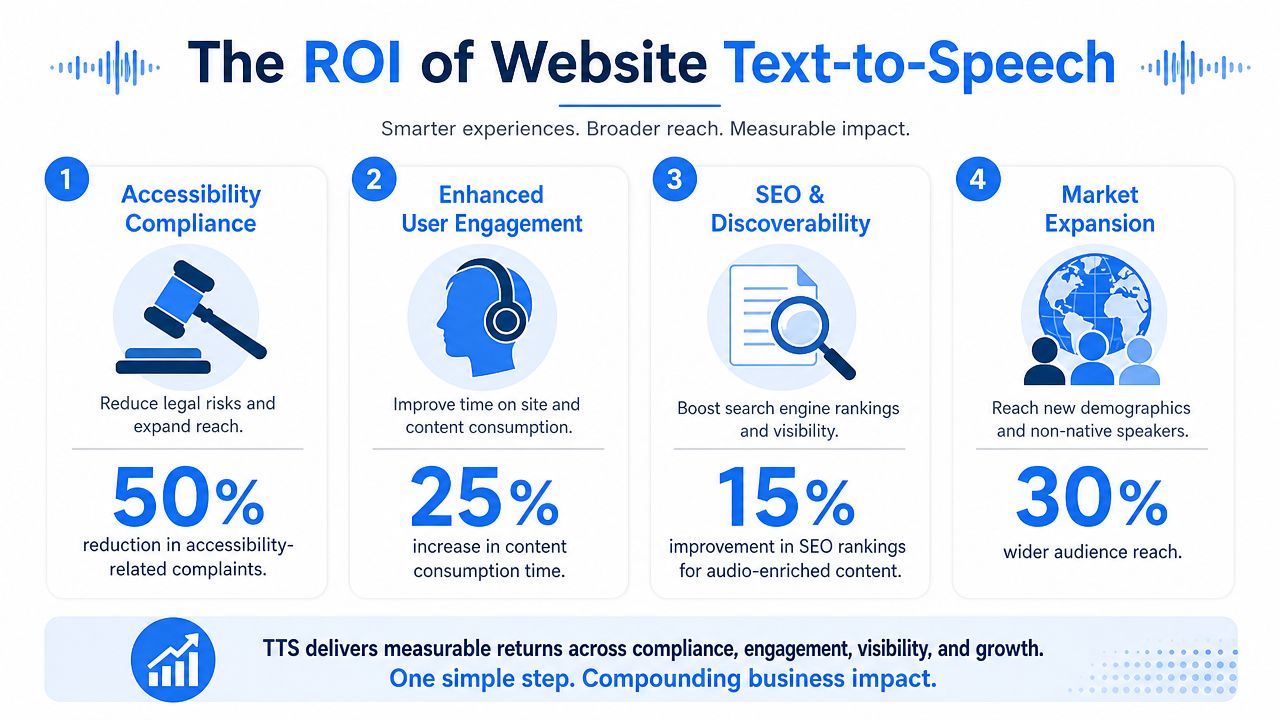
A practical business case for TTS usually rests on four outcomes:
- Lower remediation pressure: Reading support works better when markup, labels, and controls are built properly from the start.
- Cleaner user journeys: People can consume content in the format that suits them, which often helps key pages perform better.
- Stronger market reach: Accessibility opens the door to more users, including the disability market opportunity discussed in this guide to web accessibility business value.
- Better content utility: Long-form pages, support articles, policy pages, and educational materials become easier to consume.
Accessibility can support CRO
Teams frequently miss an easy win. TTS isn't only for blog posts. It can support conversion on high-intent pages where clarity matters: pricing explanations, onboarding steps, service detail pages, FAQs, application flows, and checkout guidance.
A good implementation also creates opportunities for stronger internal linking. If your article pages offer a smooth listen experience, you can route users toward high-value destinations such as service pages, demo requests, contact flows, or compliance resources without forcing them to stop and reread dense text. Audio-friendly content often rewards concise headings, better summaries, and clearer link context. Those are all good for usability and CRO.
Practical rule: If a page matters for conversion, assume some visitors would rather listen than read.
Managed accessibility tooling can help here because it lets teams move faster while still covering multiple assistive needs in one layer. That's often the right fit when the goal is broad support, faster deployment, and easier governance across many pages or sites.
How Modern AI Voice Technology Works
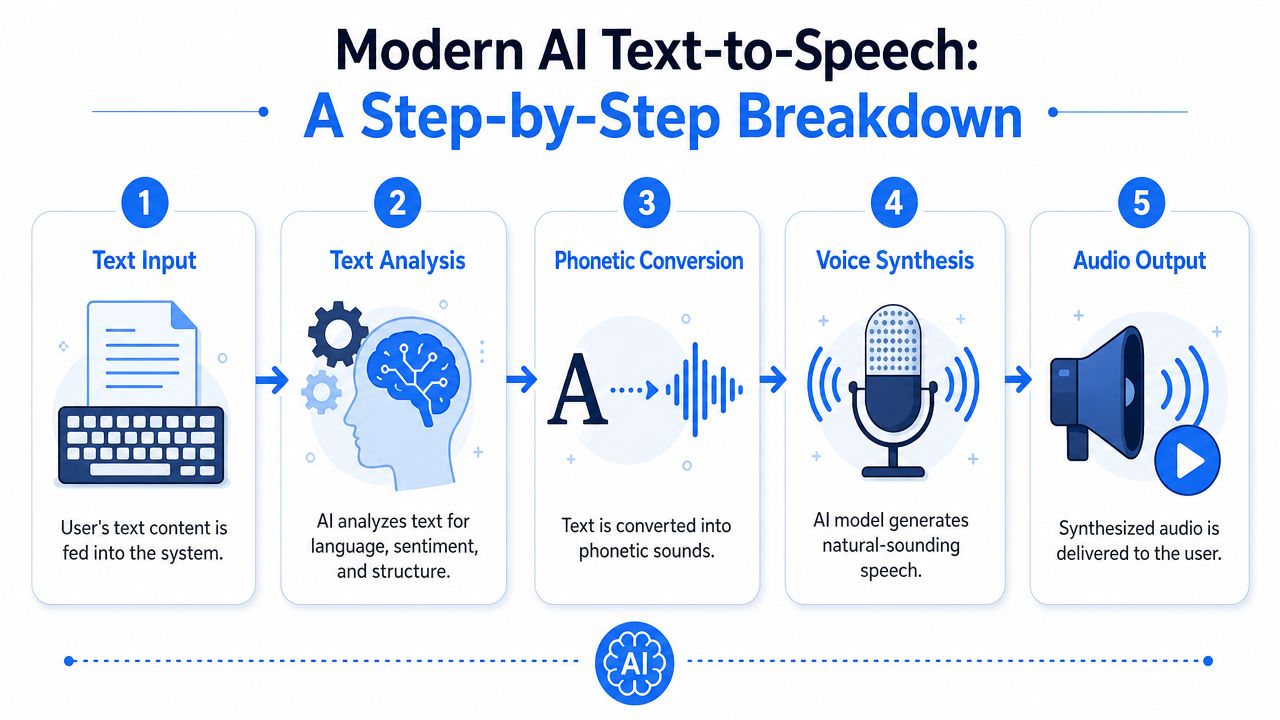
Older website voices sounded mechanical because they followed rigid pronunciation rules. Modern systems sound more natural because they model speech in stages, closer to how a trained reader interprets text before speaking.
A simple way to think about it is a voice actor reading a script. The actor doesn't just pronounce words. They interpret grammar, pause at the right place, shift tone, and shape emphasis. Neural TTS tries to do the same process computationally.
The four-stage pipeline
According to Respeecher's explanation of modern TTS systems, modern neural text-to-speech works through a four-stage pipeline:
Text input
The system receives the content to be spoken.
Linguistic analysis
It parses grammar, sentence structure, and phonetics so it knows what the text means and how words should sound.
Prosody generation In this process, rhythm, pitch, pauses, and intonation are shaped.
Waveform synthesis
A deep learning model generates the final speech audio.
That's why current AI voices can sound far more expressive than older rule-based systems.
For teams exploring how synthetic speech is created in production environments, this overview on how to create high-quality AI voices is useful context.
What developers should care about
The voice model is only part of the story. On websites, quality also depends on controls and performance. You need sane defaults for rate and pitch, predictable behavior on mobile, and careful handling of dynamic content so the spoken output matches what the user sees.
This is also where accessibility and AI overlap in a very practical way. AI can improve naturalness, but it doesn't replace structural accessibility. AI solutions for web accessibility are most effective when they sit on top of clean semantic markup and well-defined interaction patterns.
A short overview helps if you want to see TTS concepts in a more visual format.
Comparing TTS Implementation Approaches
Organizations typically choose between three paths: relying on native browser capabilities, deploying a managed accessibility layer with TTS included, or building a custom implementation with a speech API. None is universally right. The best option depends on who owns accessibility internally, how much customization is required, and how quickly the team needs coverage.
Where native browser TTS fits
Browser-native reading tools are valuable because they're familiar to many users and often integrate well with existing assistive technology workflows. They also reduce the need to teach users a new interface.
The trade-off is control. You don't control how every browser exposes the feature, how it handles dynamic regions, or whether your content structure is parsed cleanly. If the page markup is weak, native tools reveal that weakness quickly.
Where managed solutions fit
A managed accessibility platform or widget can be the right choice when a team needs broad assistive support, fast rollout, centralized oversight, and less engineering lift. This approach is often a strong fit for agencies, multi-site organizations, and teams that need to standardize accessibility features across many templates.
For example, WebAbility.io includes text-to-speech as part of a broader accessibility layer alongside keyboard navigation, contrast controls, translation, and monitoring. That makes sense in environments where TTS is one requirement among many, not a standalone project.
Where custom API builds fit
Custom builds make sense when product teams need fine-grained control over voice selection, playback behavior, content targeting, or integrations with proprietary interfaces. They're common in apps with specialized workflows, gated content, learning platforms, or complex multi-language experiences.
The cost isn't only budget. It's ownership. Someone has to handle maintenance, testing, privacy review, regression risk, and compatibility as the site evolves.
Comparison of TTS Implementation Methods
| Approach | Implementation Speed | Maintenance | Compliance Scope | Cost |
|---|---|---|---|---|
| Native browser capabilities | Fast for users who already rely on them. No site-side feature build required. | Low on the site feature side, but content structure still needs ongoing accessibility maintenance. | Good for users of supported native tools, but limited site-level control over experience. | Often low direct cost. |
| Managed accessibility widget or platform | Fast to deploy across many pages and easier to standardize. | Lower than custom for most teams because updates and feature support are centralized. | Broad, especially when combined with governance, scanning, and assistive controls. | Subscription-based. Often predictable operational cost. |
| Custom TTS API integration | Slower because design, engineering, QA, and governance all sit with the team. | Highest. Voice logic, UI behavior, testing, and privacy controls need active ownership. | Can be very strong if built well, but scope depends on implementation quality. | Variable. Can scale from moderate to high depending on complexity. |
Choose the approach your team can support six months from now, not just the one you can launch next week.
For many organizations, the decision isn't either-or. A sensible pattern is to preserve compatibility with native tools, add managed assistive support for immediate coverage, and reserve custom development for the few journeys that need specialized behavior.
Technical and UX Best Practices for TTS
The biggest mistake I see is treating TTS as a self-contained widget. Users don't experience it that way. They experience a page, a reading flow, a keyboard path, and their preferred assistive toolset. If those pieces don't work together, the feature feels unreliable.
According to Veroniiiica's analysis of low-vision TTS usage, 78% of users with low vision rely on system-level tools rather than click-to-activate widgets, and many embedded implementations fail because they lack proper aria-labels and focus management. That interoperability gap is also drawing more attention in DOJ rulings.
Build for interoperability first
If your embedded TTS control can't coexist with native screen readers and browser reading tools, it's not solving the core problem.
Use these implementation rules:
- Start with semantic HTML: Headings, paragraphs, lists, buttons, forms, and landmarks must describe the page correctly.
- Name controls clearly: Buttons need accurate labels, and state changes should be exposed to assistive tech.
- Manage focus intentionally: Opening a player, changing speed, or starting playback shouldn't trap keyboard users or hide context.
- Avoid autoplay: Audio should start because the user asked for it.
- Test dynamic content: Modals, accordions, tabs, and injected content often break reading order unless they're coded carefully.
If your team is refining announcements and state changes in interactive components, this web accessibility compliance term is especially relevant.
Design the player so people will use it
A compliant TTS feature can still be awkward. UX quality matters.
Good TTS controls usually include:
- Playback flexibility: Let people pause, resume, restart, and adjust speed without hunting through the page.
- Voice choice where useful: Not every page needs many voices, but clarity and comfort matter.
- Visible reading context: Text highlighting or active sentence indication helps users track spoken content.
- Non-intrusive placement: The player should be easy to find without covering important content or competing with navigation.
- Consistent behavior across templates: Blog posts, product pages, and support articles should not all behave differently.
If the player interrupts the page, users abandon it. If it supports the page, users keep reading, listening, and moving forward.
This is also where CRO and accessibility can reinforce each other. The easier it is to consume a page, the easier it is to move a visitor to the next meaningful action. Use descriptive in-content links, place them near logical pauses, and make key destination pages understandable in both visual and audio form.
Your TTS Integration and Vendor Evaluation Checklist
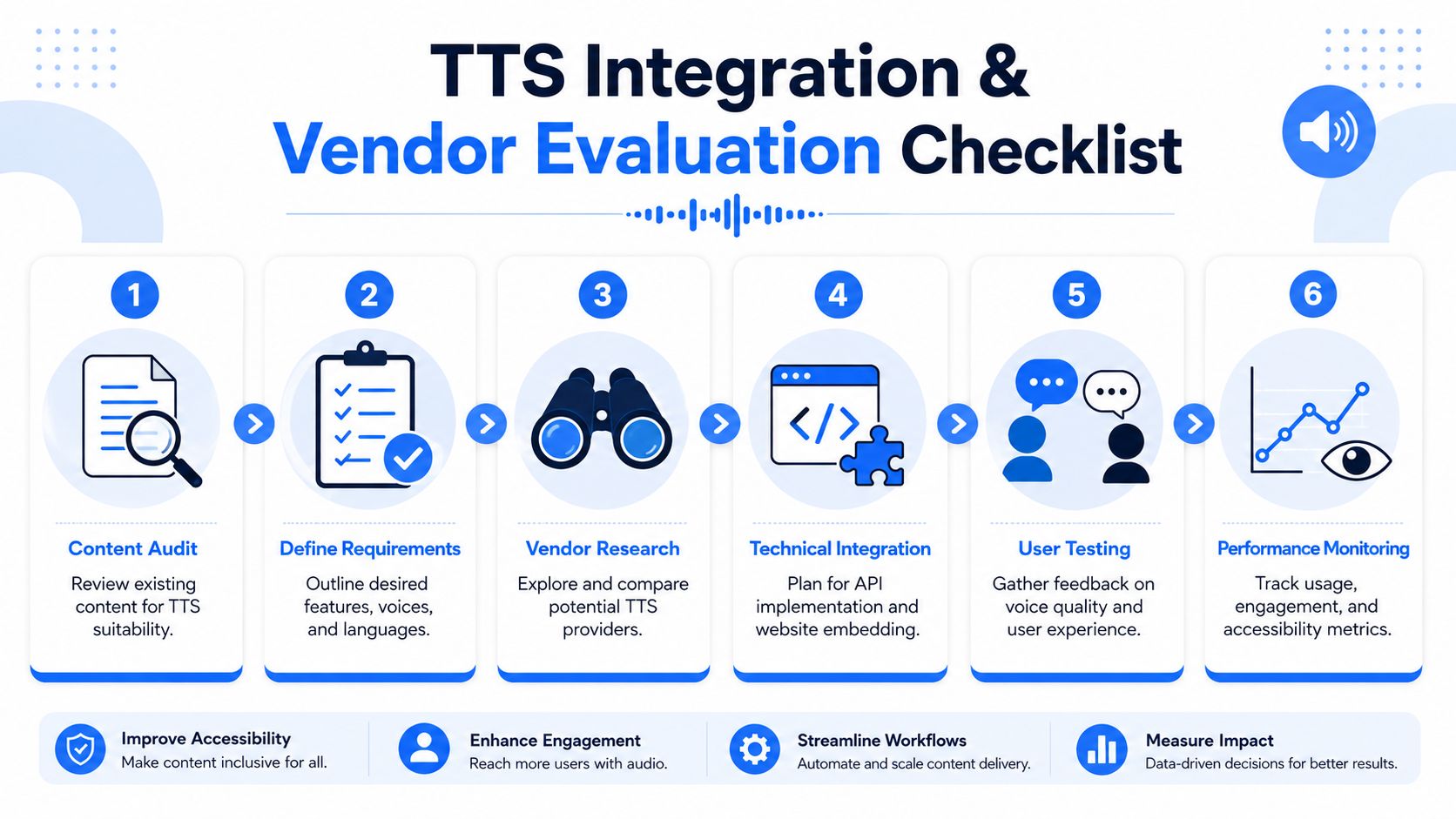
Teams usually overfocus on the voice and underfocus on rollout discipline. A clean launch starts with content structure, ownership, and testing criteria.
Integration checklist
Audit the pages that matter most
Start with revenue pages, high-traffic resources, support content, forms, and legally important pages. If a page is confusing to read visually, audio won't fix that. Rewrite where needed.
Define the reading model
Decide whether users should hear the full page, selected regions, article-only content, or transactional instructions. This keeps playback useful instead of noisy.
Confirm accessibility prerequisites
Check semantic headings, labels, landmarks, keyboard paths, and dynamic components. TTS quality depends on these basics.
Review privacy and legal requirements
If text is sent to an external service, involve legal or compliance teams early. Sensitive content changes the vendor shortlist immediately.
Test with real assistive workflows
Don't stop at browser QA. Test with keyboard-only navigation, screen readers, native browser reading tools, and mobile devices.
Monitor after release
Watch where users engage, where playback breaks, and which templates create friction. TTS needs maintenance just like any other site feature.
Vendor evaluation criteria
A strong vendor review is less about brand recognition and more about fit.
Ask these questions:
- Voice quality and control: Does the output sound natural enough for your content type, and can users adjust playback in a meaningful way?
- Language support: Does the service match your actual site languages, regional variants, and pronunciation needs?
- Accessibility compatibility: Does it work with native assistive tech rather than competing with it?
- Privacy posture: How is user text processed, stored, and protected?
- Support model: Will your team get implementation help, troubleshooting guidance, and documentation that's usable by developers?
- Pricing clarity: Can procurement understand the cost model without chasing hidden constraints?
A practical first step is to establish a baseline before selecting anything. Running a scanner and reviewing the reading structure of high-priority pages will usually show whether your TTS problem is mainly technical, editorial, or both.
Frequently Asked Questions About Website TTS
Can I use a free TTS tool on my website?
Sometimes, but free is where legal and privacy review often gets skipped.
According to this discussion summarizing common free TTS risks, 92% of free TTS APIs send user text to external servers, which can create potential HIPAA and GDPR issues. The same source notes that 80% of free TTS services lack explicit licenses for commercial use, which creates copyright risk for revenue-generating websites.
If your content includes personal data, health information, internal documents, or customer submissions, free tools usually require much closer review than teams expect.
Will text to speech slow down my website?
It can, depending on how it's implemented. The common pressure points are script weight, playback controls, API calls, and how the feature behaves on mobile devices.
A good implementation keeps the player lightweight, avoids blocking core page rendering, and tests performance on resource-constrained devices. For many sites, the answer isn't avoiding TTS. It's choosing an approach with predictable performance behavior.
How do I measure the ROI of website TTS?
Start with outcomes that already matter to the business. Look at engagement with priority pages, completion of forms or applications, content consumption on long pages, support deflection, and qualitative accessibility feedback.
The strongest ROI stories usually come from a combination of effects: fewer barriers for users, smoother journeys into important pages, broader content usability, and lower compliance risk.
Is a widget enough for compliance?
A managed widget can be a useful and efficient part of an accessibility program, especially for fast deployment and broad assistive support. But the ultimate standard is whether the site works well with native assistive technologies and whether the underlying content and code are accessible.
That's why the most effective approach is usually layered. Keep the structure accessible, support native tools, and use managed functionality to expand access and speed implementation.
If you're evaluating text to speech for websites and want a practical baseline first, WebAbility.io is worth reviewing. It combines accessibility tooling, monitoring, and reading support in one platform, which can help teams assess current gaps, improve key user journeys, and move toward stronger ADA and WCAG alignment without turning TTS into a standalone engineering project.
Quick Questions
Tap to ask AI about this article