WebAIM's 2026 Screen Reader Survey: What to Fix on Your Website and PDFs

Sidharth Nayyar

Every few years, WebAIM asks screen reader users what works on the web and what gets in their way. The 2026 survey heard from 1,780 people. It is a useful view of how screen reader users move through the web and where they get stuck. WebAIM notes that its respondents may not represent every screen reader user.
We audit and fix websites every day. So we read the results with one question: what should a site owner change this week? Here are the answers, in the order we would do them.
1. Fix your headings first
67.8% of respondents say headings are the first thing they use to find information on a long page. No other method comes close.
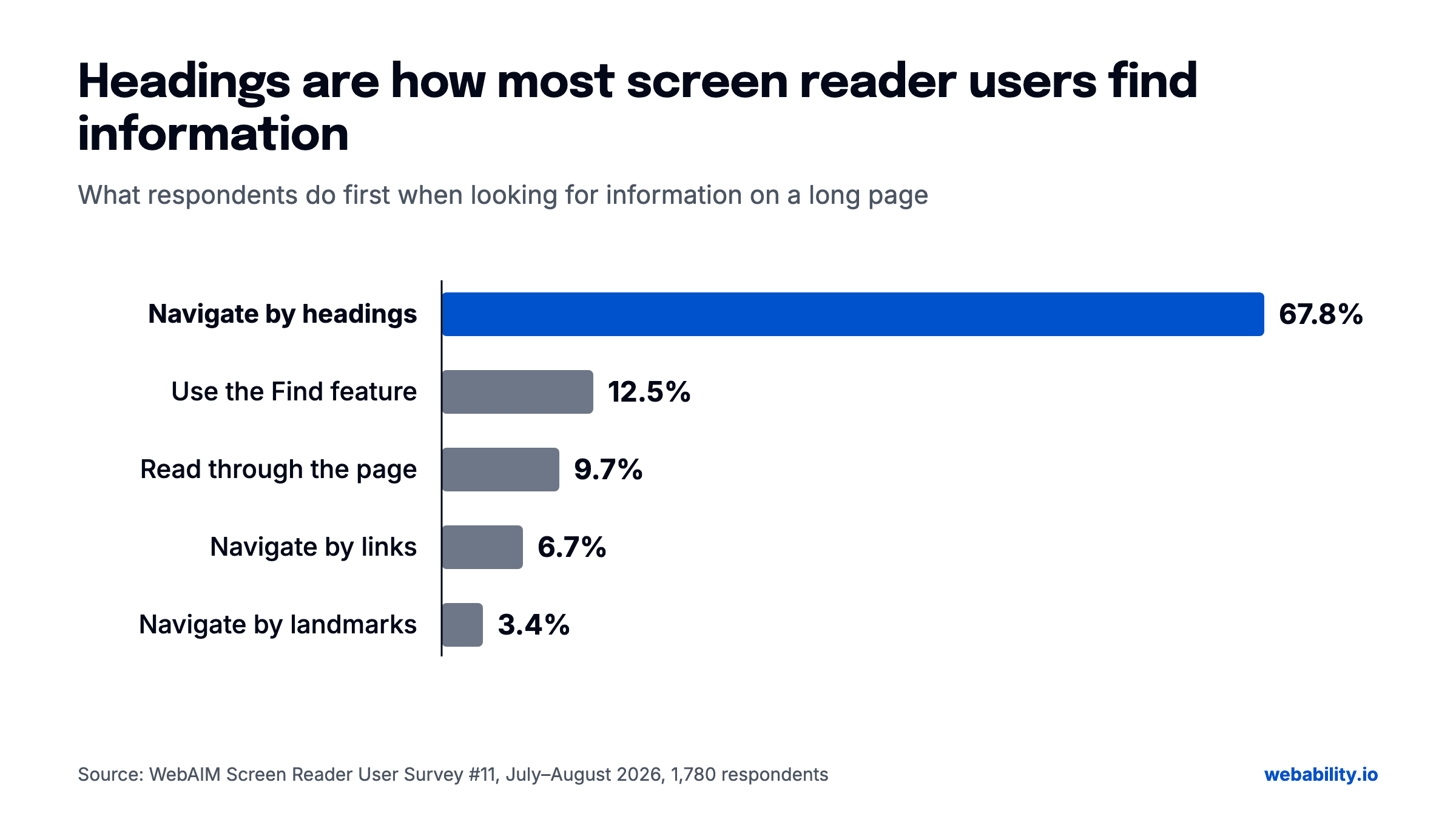 Source: WebAIM Screen Reader User Survey #11 (2026).
Headings work like a table of contents. When they are missing, or when big bold text only looks like a heading, that table of contents is gone.
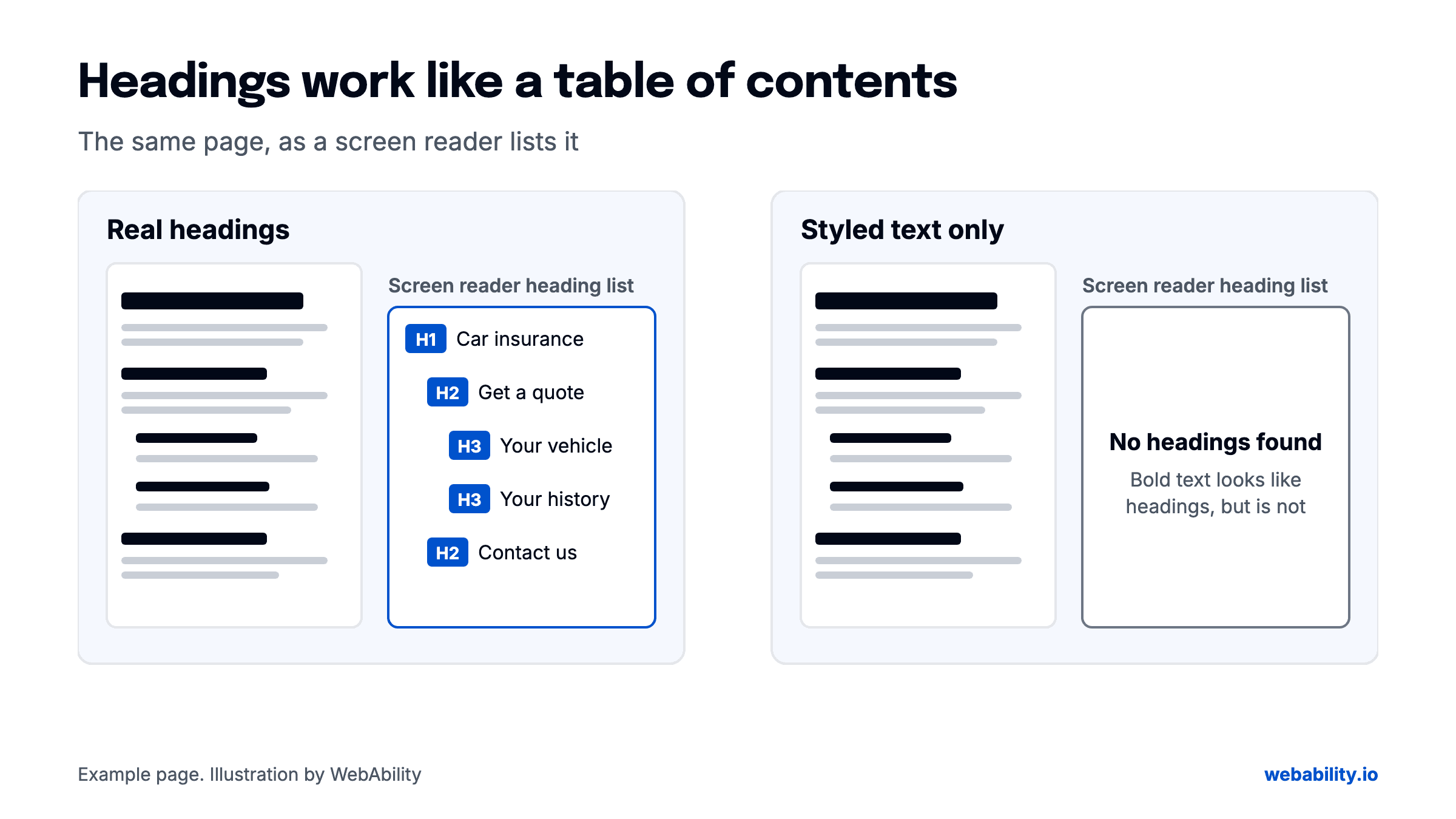 The same page with real headings and with styled text only.
What to do:
- Give every page one main heading that says what the page is.
- Give every section its own heading.
- Keep the levels in order. A sub-section sits one level under its section.
- Add a "skip to main content" link at the top, and check that it lands in the right place.
This is a template fix. Fix the page template once and every page built on it improves. In our 2026 scans, the check for a way to skip repeated content failed on 65.2% of sites. Fixing it once in the template is a fast first win.
2. Take PDFs seriously
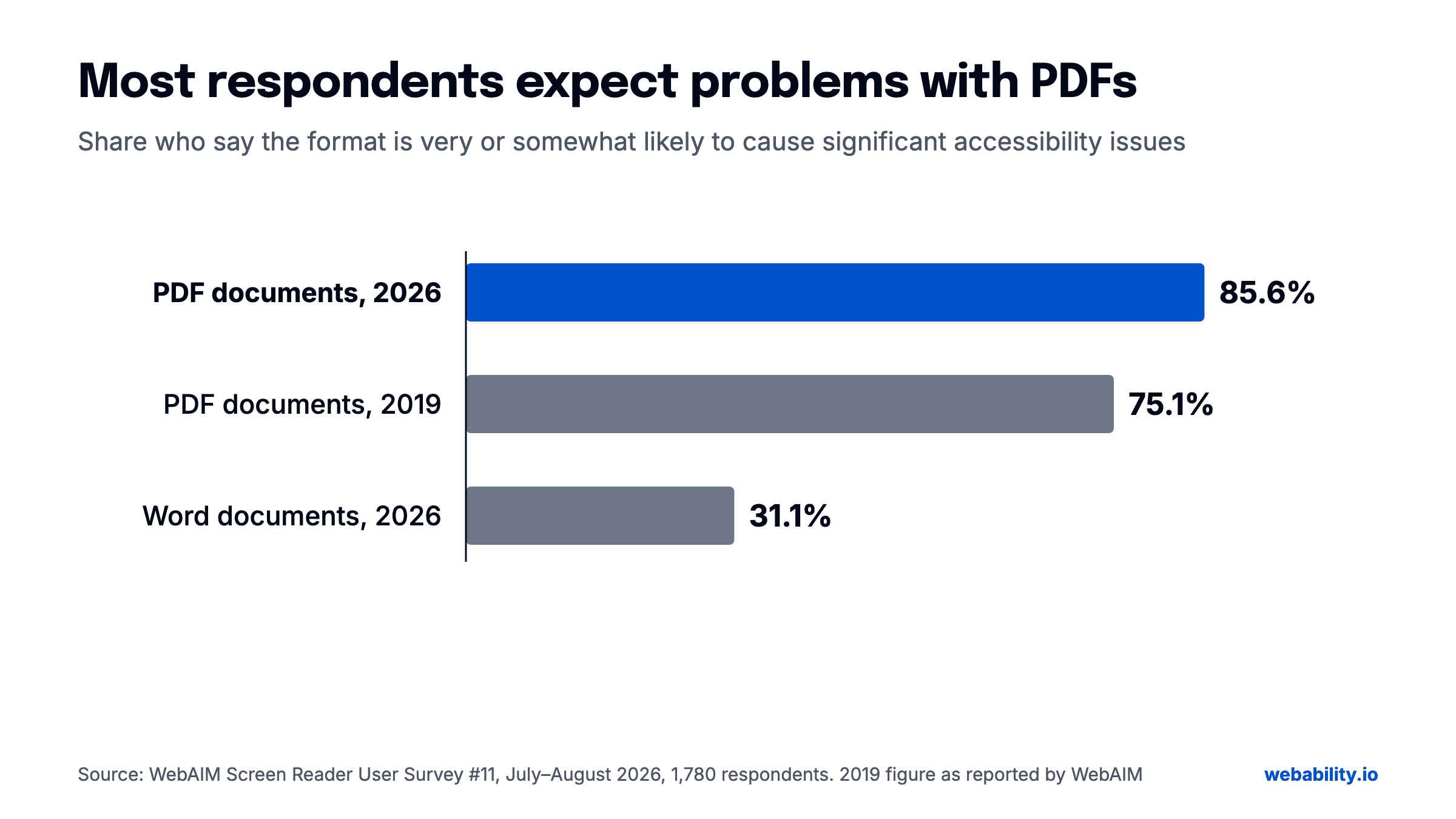
85.6% of respondents say a PDF is likely to cause them accessibility problems. In 2019 it was 75.1%. For Word documents, the figure is 31.1%.
 Source: WebAIM Screen Reader User Survey #11 (2026).
Tags give a PDF its structure: headings, reading order, and labels on form fields. Without them, a screen reader may still read the text, but it cannot tell a heading from a paragraph, and form fields can be hard or impossible to fill in.
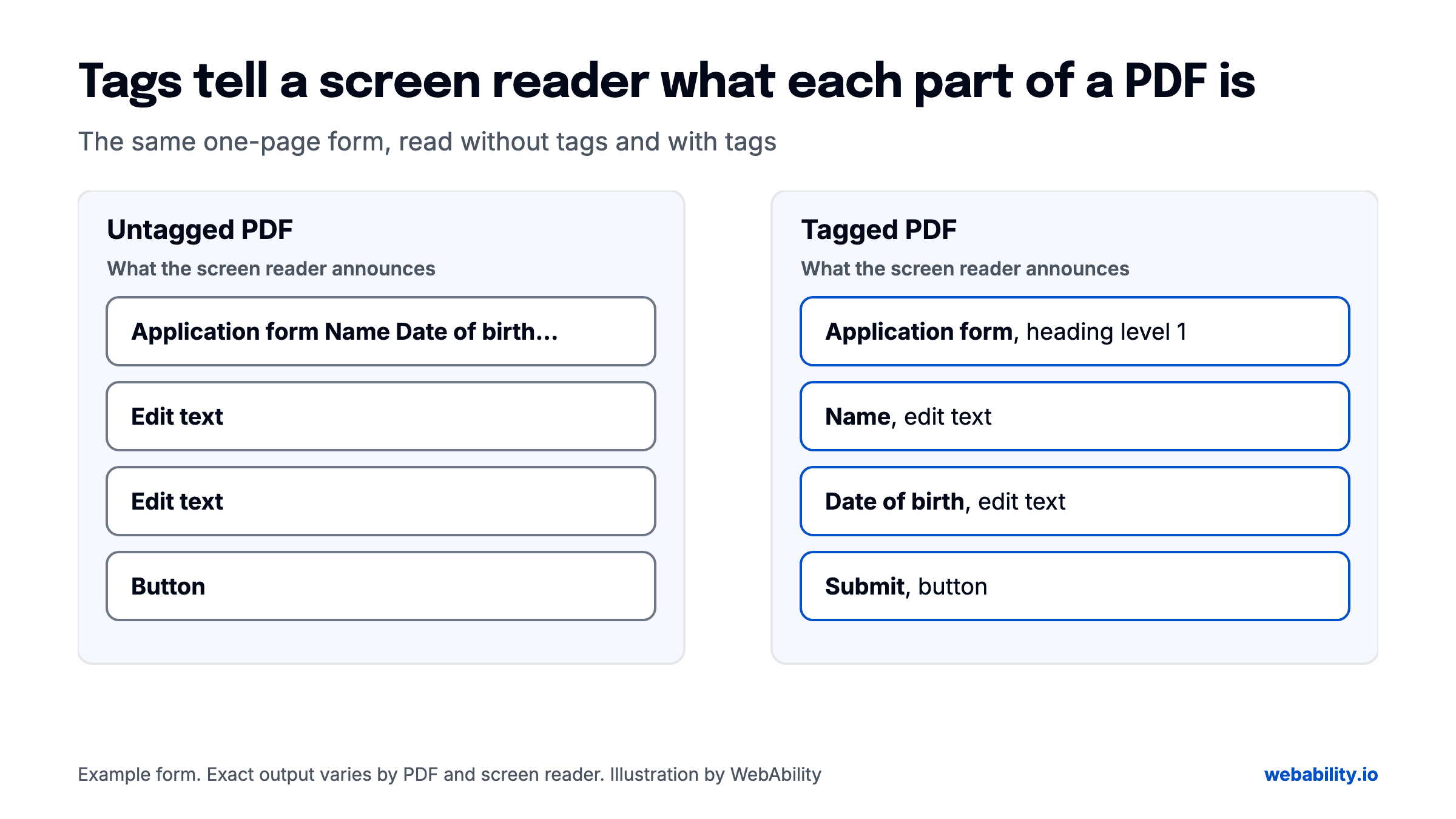 The same form, read without tags and with tags. Exact output varies by PDF and screen reader.
What to do:
- Stop publishing new PDFs for content that can be a web page. Forms, policies, and FAQs usually can.
- List the PDFs that must stay. Tag them, starting with the ones people download most.
- Check that every form field in a PDF has a label.
Many organizations keep publishing reports, statements, and forms as PDFs after their website is fixed. Start with the documents people need to finish a task, such as forms and applications.
We remediate PDFs as well as websites. Upload a PDF and you get an accessible web view of it, a conformance report for each document, and, for standard PDFs, a tagged PDF/UA file you can publish in its place. See how PDF remediation works.
3. Name every button and link
A button with only an icon, or a link that says "click here", does not tell a screen reader user what it does. In our 2026 scans, the check that controls expose a name and role failed on 66.3% of sites.
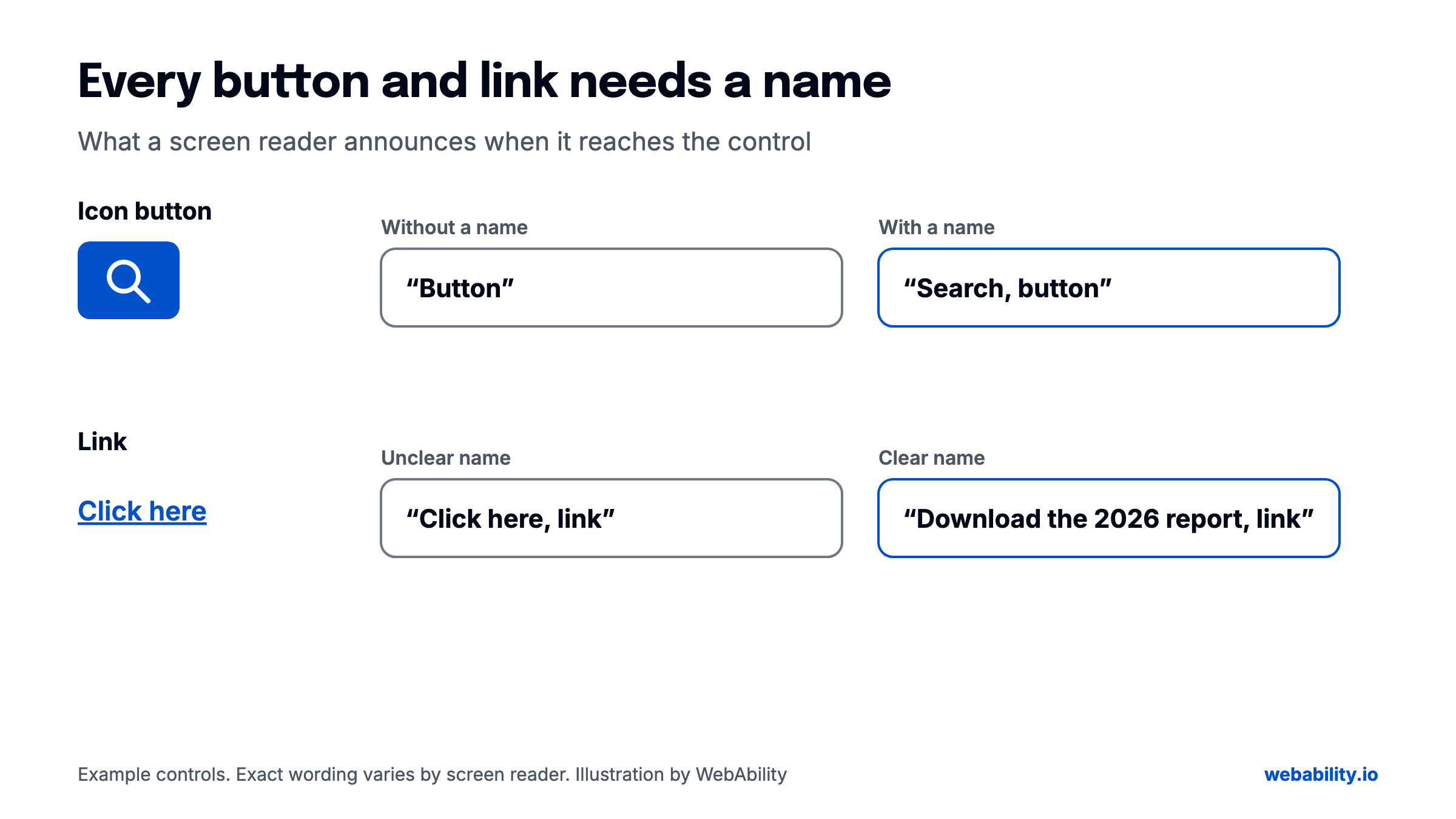 Exact wording varies by screen reader.
What to do:
- Give every button and link a short, plain name that says what it does: "Add to cart", "Download the 2026 report".
- For icon-only buttons, add a text label that a screen reader can read.
- For custom menus, tabs, and pop-ups, check that a screen reader announces what each one is and whether it is open.
4. The fix is on the site owner's side
83.9% of respondents say better websites would do more for accessibility than better screen readers. That has been the majority answer in every WebAIM survey since 2009.
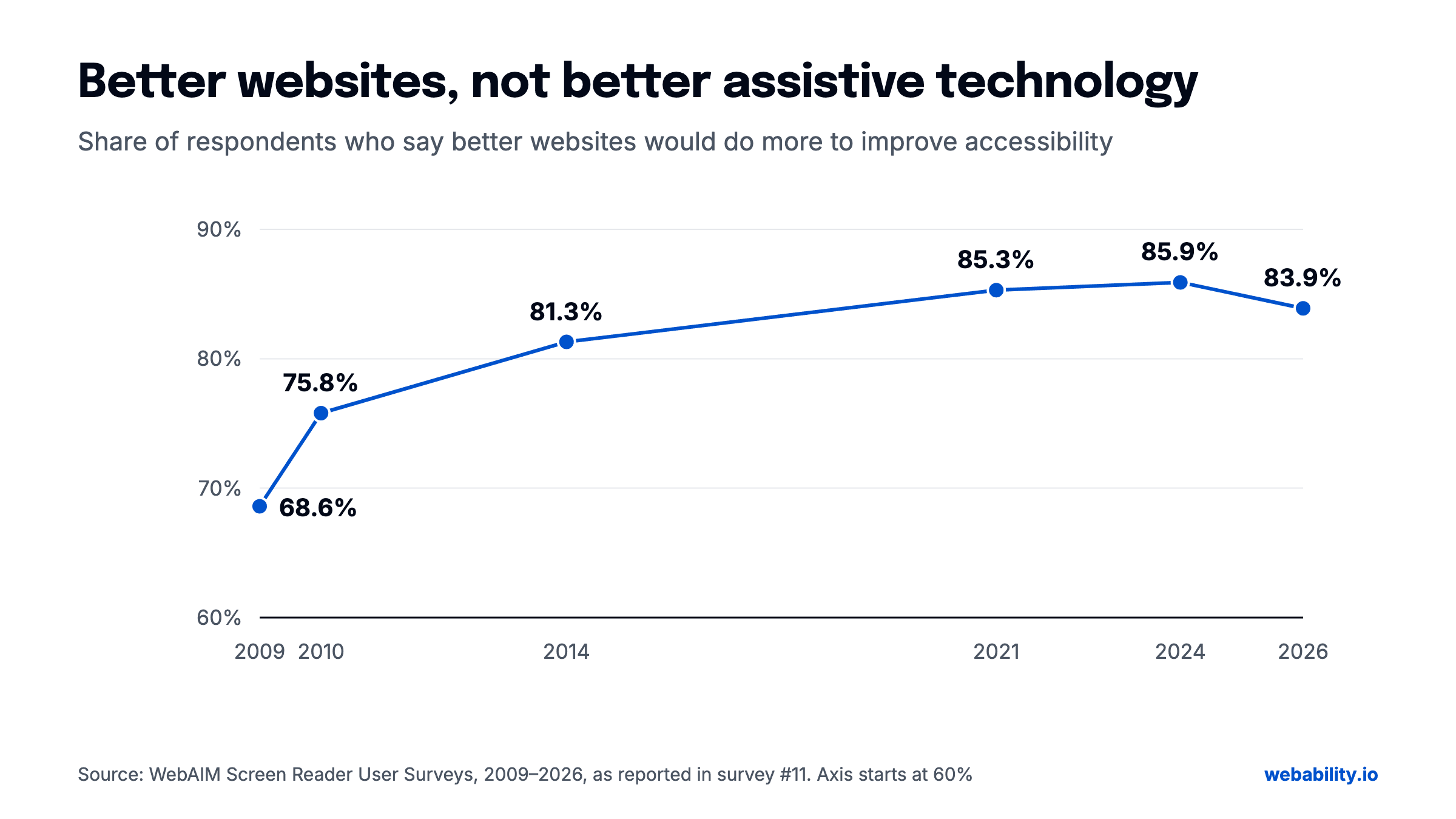 Source: WebAIM Screen Reader User Surveys, 2009 to 2026.
Most of that work sits with site owners, and with the agencies and vendors who build for them.
How to start
- Run a free scan to find the repeatable issues on your live pages: headings, names, contrast, alt text.
- Fix the page templates first, because one fix carries to every page.
- List your PDFs and remediate the most-downloaded ones first.
- Book a human audit for what a scan cannot judge: whether the reading order makes sense, whether alt text says something useful, and whether a screen reader user can finish the task.
Automation fixes the repeatable issues on the live page. A human audit covers the rest. Neither alone is compliance. We do both, for your website and your PDFs.
Sources
- WebAIM, Screen Reader User Survey #11 (July–August 2026, 1,780 responses): https://webaim.org/projects/screenreadersurvey11/
- WebAbility, State of Web Accessibility 2026: https://www.webability.io/reports/state-of-web-accessibility-2026
Quick Questions
Tap to ask AI about this article