A customer opens your site with a screen reader, ready to compare products or complete a form. The layout may be polished, but if the page language is missing or wrong, the first thing they hear is mispronounced content, the wrong voice rules, or speech that sounds unreliable. That problem starts in one small place in your HTML: the lang attribute.
For developers, lang can look like housekeeping. In practice, it controls how assistive technology interprets text, how browsers process language, and how search engines classify the page. A missing or incorrect value can reduce comprehension for screen reader users, weaken multilingual SEO signals, and add friction at the exact moment you want a visitor to trust the experience and convert.
The simplest way to frame it is this: lang is the page's language setting, much like choosing the correct region and keyboard before typing. If that setting is wrong, everything built on top of it becomes less reliable. That is why teams working on building accessible websites should treat lang as part of user experience, not just markup hygiene.
This matters across markets as well. If your organization serves international users, legal expectations and implementation details can vary by region, and this guide to WCAG for Australian businesses is a useful reference point for teams shipping accessible experiences in that market.
Your Site's First Impression on Screen Reader Technology
A shopper opens your homepage with a screen reader to compare plans or finish a signup. Within seconds, the page starts speaking in the wrong pronunciation pattern. Product names sound unfamiliar. A city name is misread. A headline that was meant to feel polished now sounds careless. Before the user evaluates your offer, they are already evaluating whether your site feels dependable.
That reaction has business consequences. People judge quality fast, and screen reader users do it through audio output instead of visual design. If the spoken experience feels off, trust drops early. Lower trust means more hesitation, more abandoned forms, and less confidence in the brand behind the page.
For developers, this is a useful reset. The first impression is not your CSS. It is the version of your page that assistive technology can interpret and present clearly.
lang sits near the start of that experience. It tells the browser and assistive tools which language rules to apply before the user reaches your main content. A wrong setting works like sending a call center script to the wrong language queue. The words are still there, but the delivery creates confusion and extra effort.
For teams working across regions, that small HTML detail also connects to policy and market expectations. If your clients operate internationally, this guide to WCAG for Australian businesses gives useful context for teams translating accessibility requirements into development work.
What this sounds like in practice
A missing or incorrect lang attribute rarely causes a dramatic crash. It causes friction at the exact moment you want clarity.
- Mispronounced content: Brand names, people’s names, place names, and headings may be spoken with the wrong pronunciation rules.
- More mental effort: Users have to stop, reinterpret what they heard, and confirm whether the page says what they think it says.
- Lower confidence: If the page sounds unreliable, the company can sound unreliable too.
That last point is easy to underestimate. Teams often treat lang as markup hygiene, but users experience it as part of product quality. Search engines also use language signals to classify content, so the same implementation choice can affect discoverability as well as accessibility. Good language metadata helps people find the right page and understand it once they arrive.
If your team is already working on building accessible websites, add lang to the short list of checks that happen on every template, every localized page, and every QA pass. It is one of the smallest code decisions with the clearest effect on user experience and conversion.
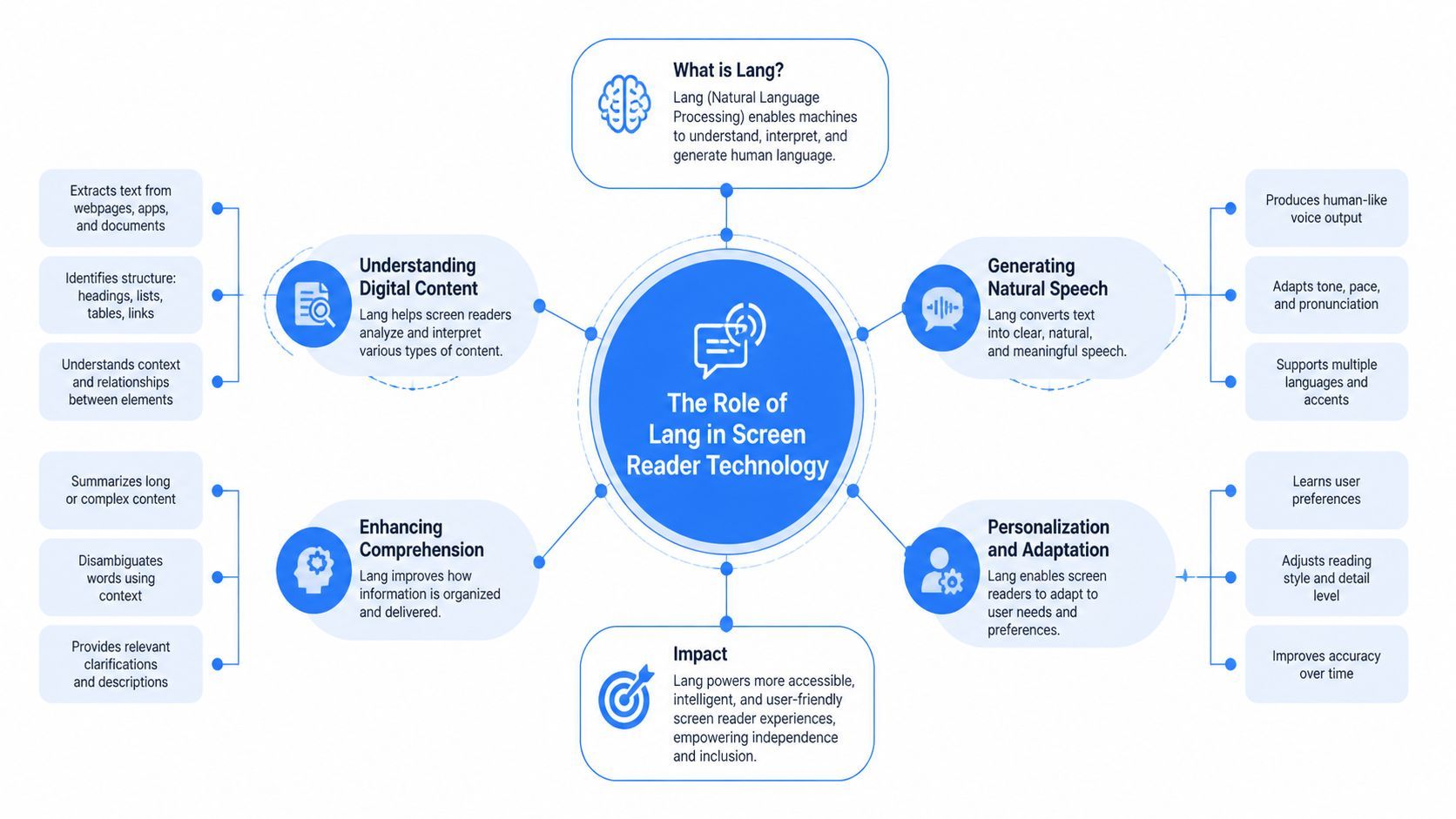
The Role of Lang in Screen Reader Technology
Think of lang as the linguistic director for a page. The screen reader's speech engine can only read well if the browser and operating system tell it which pronunciation rules to use. Without that signal, the software can still try to read the content, but the output may sound distorted, clumsy, or flat-out confusing.
In technical terms, screen readers use an off-screen model and hook into operating system accessibility APIs to interpret content. A missing or incorrect lang attribute can cause that model to misinterpret the page’s language, leading to garbled announcements that violate WCAG 2.2 Success Criterion 4.1.2, as explained in this NVDA developer discussion.
What lang actually does
At the page level, the browser reads something like this:
<html lang="en"> That short attribute tells assistive tech, translation tools, browsers, and search engines that the page is in English. If the page is in Canadian French, your signal should be more precise. If a phrase switches to Spanish inside an English page, that switch should be declared too.
Mid-level developers often get confused. They assume screen reader technology "knows" what language the text is in because the words are obvious to a human reader. It doesn't work that way. Assistive technology doesn't infer language the way people do. It follows what the code exposes.
Why multilingual sites get harder fast
On multilingual sites, one bad default can spread across hundreds of pages. The homepage may be set correctly, while templates, embedded widgets, blog posts, or campaign landing pages drift out of sync.
If your team is planning multilingual architecture, it's worth seeing how other developers approach content and language switching. You can read Cleffex's take on multilingual websites for a broader implementation perspective.
When the language signal is wrong, users don't hear "content." They hear decoding work.
For developers who want the broader technical backdrop before testing, these comprehensive screen reader insights help connect page semantics, software behavior, and user expectations.
Beyond Compliance The Business Case for the Lang Attribute
A customer opens a product page with a screen reader, taps into the pricing details, and hears the copy pronounced in the wrong language. Brand names sound distorted. A short French phrase in an English page is read with English speech rules. The content is technically present, but the experience feels careless at the exact moment trust should be increasing.
That is why lang matters to the business, not just to an audit report. It affects how clearly people understand your offer, how confidently they complete key tasks, and how accurately search engines classify your pages.
Why this affects user experience and conversion
Conversion starts with comprehension. If a user has to mentally correct mispronounced text, they spend attention decoding the interface instead of evaluating the product, filling out a form, or finishing checkout.
The effect is similar to a sales rep speaking clearly for most of a call, then switching to the wrong pronunciation for product names, locations, and pricing terms. The information is still there. Confidence drops anyway.
For teams responsible for CRO, that shows up in practical places:
- Landing pages feel more trustworthy: Correct speech output makes headlines, offers, and calls to action easier to understand on first pass.
- Forms create less friction: Labels, help text, and error messages are easier to follow when pronunciation matches the content language.
- Localized pages feel intentionally built: Regional language variants support the feeling that the page was prepared for that audience, not pasted together.
This is also where accessibility work connects directly to front-end quality. If your markup already uses clear structure, labels, and headings, lang becomes part of the same discipline. WebAbility.io's semantic HTML guide is a useful reference because language metadata and semantic structure support the same outcome. Clear interpretation by both assistive technology and machines.
Why this also supports SEO
Search engines use several signals to determine language and audience. The lang attribute is not the only one, but it is a clean, low-cost signal that supports your broader language targeting setup.
For developers, the lesson is practical. Good accessibility metadata often overlaps with good search metadata. If a page is meant for English speakers in the UK or French speakers in Canada, your code should say so plainly. That improves the chance of the right page appearing for the right audience, and it reduces ambiguity across templates, campaign pages, and localized content.
The larger business case
Accessibility decisions often get framed as risk reduction. That framing is incomplete. A correct lang attribute can improve user confidence, reduce friction in high-intent flows, and support discoverability in multilingual search.
It also helps you serve a large customer base that includes people with disabilities, as noted earlier in the article. You do not need one engineering path for accessibility and another for growth. In this case, they point in the same direction. Better language signaling improves the experience, supports search visibility, and protects conversion opportunity.
How to Correctly Implement the Lang Attribute
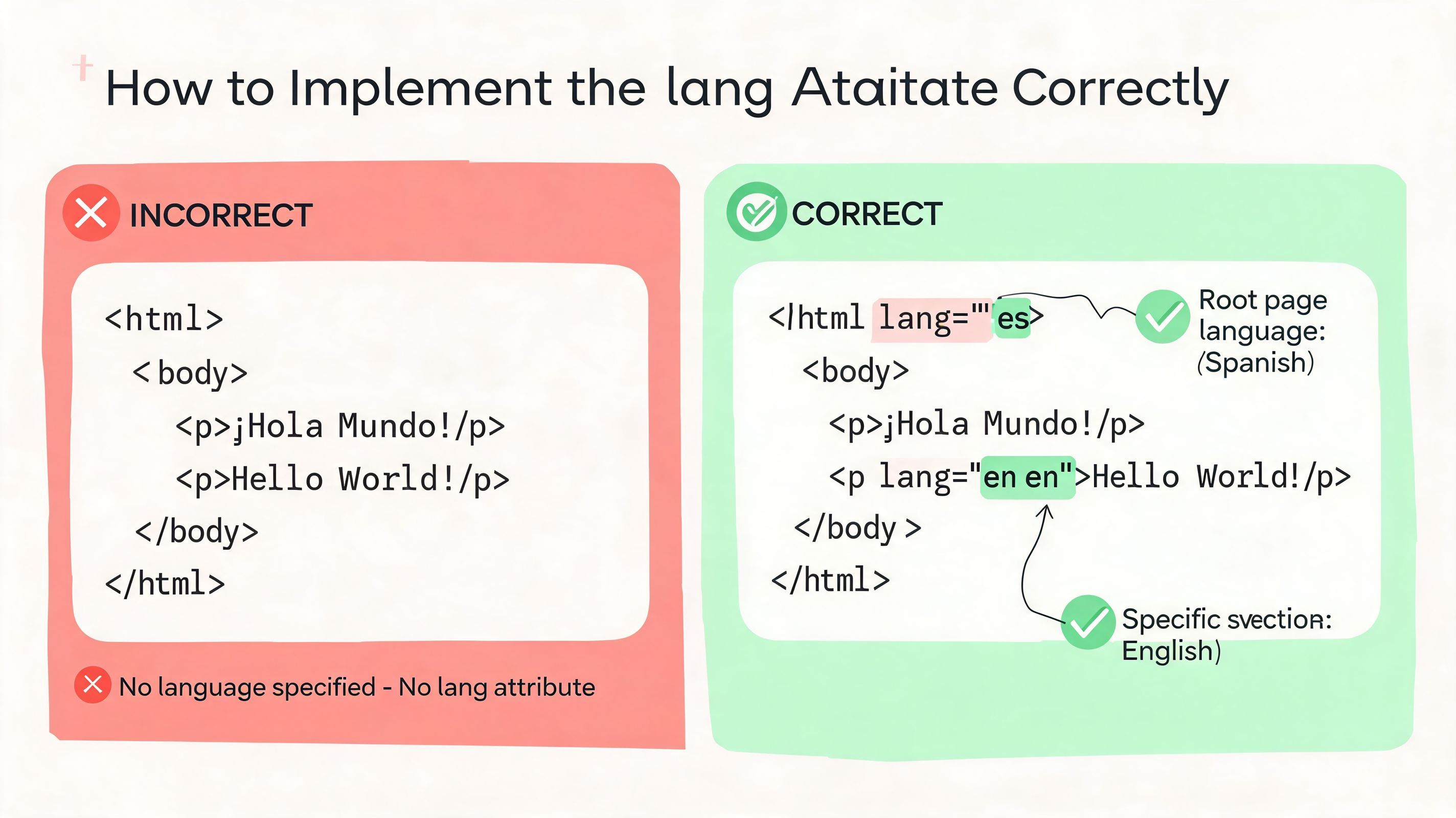
Most implementation mistakes happen because teams either set lang once and forget it, or they never handle language changes inside the content itself. The fix is straightforward if you bake it into templates, components, and content governance.
Efficient screen reader navigation depends on structure, but language definition makes that structure understandable. When language changes aren't declared, users can become as disoriented as they do on pages with poor landmarks, as discussed in MIT CSAIL’s work on richer screen reader experiences.
Start with the document language
For a standard English page, set the language on the root element:
<!doctype html> <html lang="en"> <head> <meta charset="utf-8"> <title>Example Page</title> </head> <body> ... </body> </html> If your entire page is in a regional variant, use a more specific code.
| Situation | Recommended pattern |
|---|---|
| General English page | lang="en" |
| American English | lang="en-US" |
| British English | lang="en-GB" |
| Canadian French | lang="fr-CA" |
| Spanish page | lang="es" |
Use standard BCP 47 language tags. Don't invent your own labels.
Declare language changes inside content
A lot of pages aren't monolingual. Product pages include testimonials, legal text, brand slogans, or quoted phrases in another language. That's where inline lang matters.
<p>Our brand promise is <span lang="fr">service sans compromis</span>.</p> For a larger section:
<section lang="es"> <h2>Atención al cliente</h2> <p>Estamos aquí para ayudarle.</p> </section> This tells screen reader technology to switch pronunciation rules for that phrase or block only, not the whole page.
Small language switches matter most when they appear in high-value content like headings, CTAs, form instructions, and names.
Pair lang with direction when needed
Some languages also need text direction declared correctly. If you're working with Arabic or Hebrew, use dir alongside lang.
<p lang="ar" dir="rtl">مرحبا بكم في موقعنا</p> That combination helps both reading order and pronunciation. One without the other leaves part of the user experience broken.
Put this into your development workflow
A reliable team process usually includes:
- Template defaults: Set
langin the base layout so every page inherits a valid value. - CMS rules: Give editors a way to define page language and mark embedded foreign-language content.
- Component review: Check modals, banners, and injected content, not just static page templates.
- Manual testing: Listen to key pages with screen readers after release.
If your team is cleaning up semantics at the same time, WebAbility.io's semantic HTML guide is a useful companion because language and structure work together.
Common Lang Attribute Mistakes to Avoid
Most lang failures aren't exotic. They're ordinary production mistakes that survive because nobody hears the page the way a screen reader user does.
Low vision users are often left out of this conversation, even though they also rely on speech to reduce strain. Only 33.3% of low vision employees use tools like JAWS, and many rely on a combination of magnification and speech, which means a misconfigured lang attribute can create real auditory fatigue, as described in Be My Eyes’ discussion of screen reader gaps for low vision users.
Four mistakes that show up constantly
No
langattribute at allThe browser and screen reader are forced to guess. Sometimes the guess is passable. Sometimes it's not. Add a valid
langvalue to the root<html>element on every page.Using invalid values
Teams sometimes write
lang="english"orlang="ENGLISH". Use standard language tags such asen,en-US, orfr-CA.Setting the page language but ignoring inline changes
A page can be mostly English and still contain another language in navigation labels, legal copy, testimonials, or product names. Mark those switches with a
langattribute on the exact element where the language changes.Declaring one language while publishing another
This happens when templates are cloned across locales or when translated content is dropped into a page without updating metadata. Always compare the declared language to the actual content.
Why these mistakes linger
lang problems often slip past visual QA because the page looks fine. The bug is in how the experience sounds.
Here's a simple audit lens your team can use:
| Check | What to look for | Fix |
|---|---|---|
| Root language | Missing or generic placeholder | Set <html lang="..."> correctly |
| Inline switches | Foreign words or quotes | Add lang to spans or sections |
| CMS output | Locale mismatch after publishing | Sync template and content settings |
| Reusable components | Injected banners or widgets | Verify rendered markup, not just source templates |
A page can be visually perfect and still be exhausting to listen to.
If you're reviewing broader patterns at the same time, this list of common accessibility errors helps teams catch adjacent issues that often travel with language errors.
Auditing and Automating Lang Attribute Checks
A five-page brochure site can survive a manual review. A multilingual ecommerce store, university site, or SaaS platform cannot. Once content is published through templates, CMS fields, localization pipelines, and third-party widgets, lang stops being a one-time markup choice and becomes a quality control problem.
That matters because language metadata affects more than screen reader pronunciation. It influences how clearly users understand your content, how search engines classify localized pages, and how much friction people feel on high-value journeys like product discovery, checkout, and support. A missing or wrong lang attribute can degrade all three.
What manual auditing still catches best
Manual review is still the fastest way to answer one question: does the page sound right to a real user?
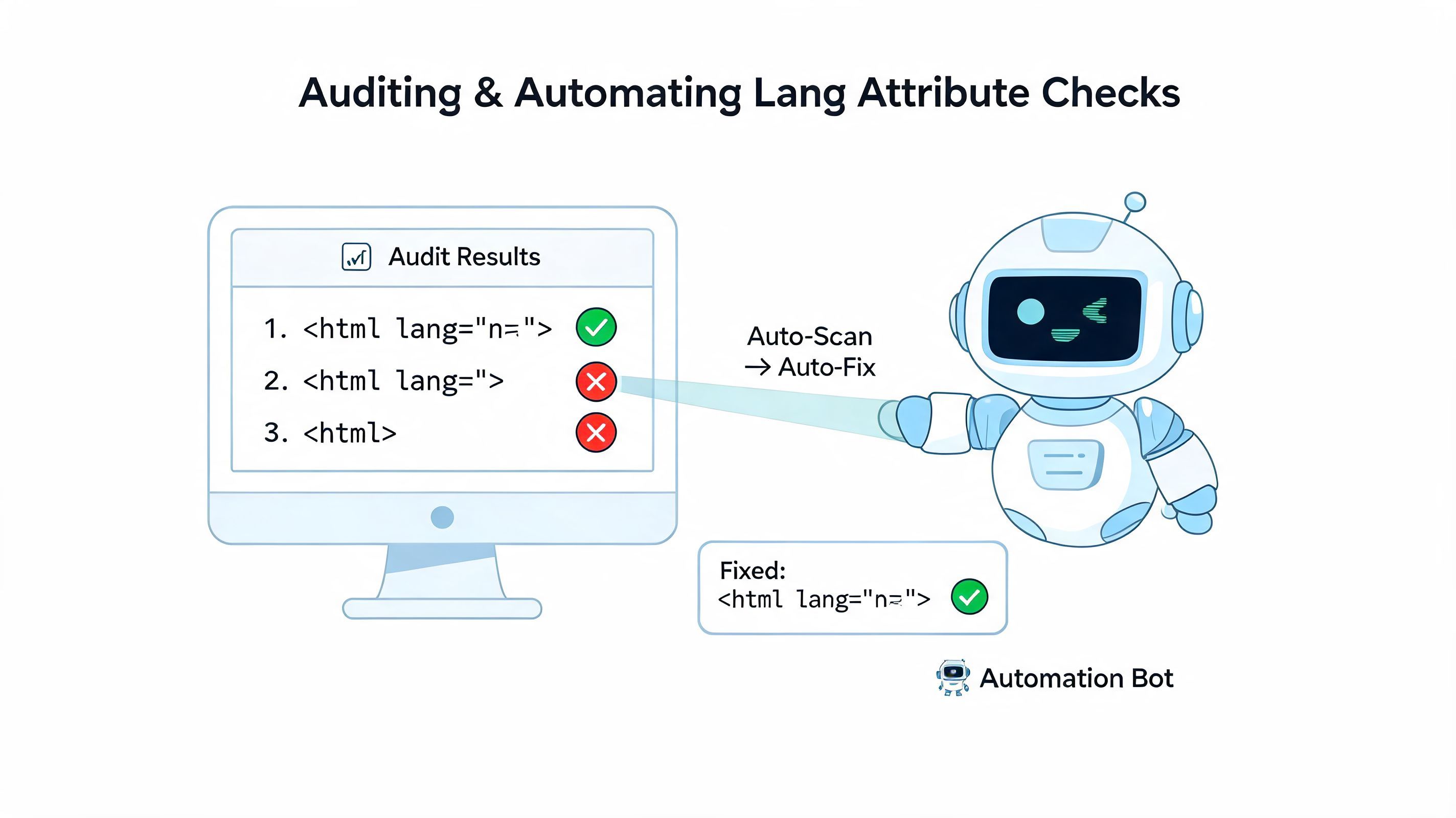
A scanner can confirm that <html lang="fr-CA"> exists. It cannot tell you whether a screen reader shifts voices at the wrong moment, whether a translated button label is pronounced awkwardly, or whether a pricing page mixes English and Spanish in a way that breaks comprehension. That is why manual testing belongs on key revenue and service flows.
Focus human review on places where confusion costs the business something:
- Rendered markup checks: Inspect the live
<html>element, not only the template, and verify the finallangvalue. - Screen reader spot tests: Listen to headings, form labels, buttons, error messages, and any mixed-language content after release.
- Localized content QA: Compare the declared language with the published content on translated pages and regional variants.
- Critical user journeys: Test homepages, category pages, product pages, checkout, account areas, and help content first.
Listening builds judgment. Developers who hear a page mispronounced once usually stop treating lang as a compliance detail and start treating it as part of product quality.
What automation should do for your team
Automation is coverage. It works like a spell-checker for your language metadata. It will not tell you whether the sentence is persuasive, but it will catch the missing or invalid marker that causes the sentence to be read in the wrong voice.
For larger sites, automated checks should look for:
- missing
langattributes on the root element - invalid language codes
- template regressions across page types
- locale mismatches between page metadata and page content
- newly published pages that bypassed QA
If your team already runs recurring accessibility scans, add language checks to the same workflow. The goal is simple: catch regressions during normal release cycles instead of discovering them through support tickets, abandonment, or formal audits later.
A practical operating model
The teams that handle this well usually assign responsibility at three different layers.
Engineering sets the default
Base templates, app shells, and rendering logic should always output a valid root
langbased on the page locale.Content and localization teams verify exceptions
Inline language changes, imported copy, and regional variations need review in the rendered page, not just in source files.
QA and platform owners monitor drift
Scheduled scans catch pages that were cloned, patched, or republished with incorrect language metadata.
This division of labor is what turns lang from a one-off fix into a stable process.
If your organization is also reviewing storefront accessibility more broadly, these inclusive design standards for online shops complement language auditing well because they connect technical decisions to customer trust and conversion.
The strongest workflow uses automation to find likely defects and manual testing to confirm the listening experience.
That balance gives teams a repeatable way to protect accessibility, search visibility, and user confidence as the site grows.
Conclusion Building a More Accessible Digital Future
A visitor lands on a product page, starts a screen reader, and hears the content spoken in the wrong voice and pronunciation pattern. That failure starts with one small missing signal in the code, but the effect reaches much further. It changes how trustworthy your site feels in the first few seconds, which can shape whether someone keeps listening, keeps reading, and keeps buying.
That is the takeaway. The lang attribute influences accessibility, search understanding, and conversion because it helps every system interpret your content correctly. For development teams, that makes it part of product quality, not a last-minute compliance task.
For commerce teams, this is also a useful test of maturity. If your templates, CMS rules, localization workflows, and QA checks can keep language metadata accurate, you are building a site that communicates clearly across assistive tech, search engines, and regional audiences. If they cannot, the gaps usually show up elsewhere too.
If you're reviewing storefront accessibility more broadly, these inclusive design standards for online shops offer a useful companion perspective.
Set a simple challenge for your next release. Pick five key pages, run them with a screen reader, switch locales if your site supports them, and listen for whether the experience matches the page language every time. That habit turns lang from a forgotten attribute into a reliable part of how your business earns trust.
If you want a practical way to monitor language issues, screen reader compatibility, and broader accessibility requirements across your site, WebAbility.io can support that workflow as part of a single scanning and remediation process.