A common accessibility failure pattern looks like this: the team runs a scanner, fixes the obvious errors, ships the release, and assumes the site is covered. Then a customer can't complete checkout with a keyboard, a screen reader announces the wrong thing in a modal, or legal sends over a demand letter and asks what the testing process is.
TL;DR
- Manual vs automated testing isn't an either/or decision for accessibility. You need both.
- Automated testing is the right tool for repeatable checks, regression coverage, and fast feedback in development.
- Manual testing is where teams validate keyboard behavior, screen-reader flows, focus order, usable forms, and real task completion.
- A widely cited benchmark from Virtuoso QA shows a regression suite that would take 11.6 days manually can run in 1.43 hours with 100 parallel automated executions, about a 64x speed improvement. The same source says mature automation programs often automate 60% to 80% of test execution, while leaving manual work for exploratory and discovery testing (Virtuoso QA benchmark on automated vs manual testing).
- Choosing between an overlay widget, automated scanning, and a manual audit? See our accessibility widget vs audit vs automated decision guide to pick the right approach for your site.
- For accessibility teams, the most useful question is often what not to automate.
- The strongest programs treat accessibility testing as an ongoing workflow tied to releases, remediation, verification, and reporting.
The Right Accessibility Strategy Is Both Manual and Automated
If your team is evaluating manual vs automated testing because risk suddenly feels real, you're not alone. Many organizations only realize their process is incomplete when a launch goes sideways, a procurement review asks for evidence, or counsel wants to know whether accessibility has been verified beyond a scan report.
The answer usually isn't “do more automation” or “hire more people to test manually.” It's a hybrid accessibility practice that gives engineering speed without giving compliance and user experience false confidence.
Automation is excellent at catching recurring code-level problems early. It helps teams scan templates, components, and production pages at scale. That matters because modern sites change constantly, and repeated checks are exactly where software should carry the load.
Manual testing does different work. It tells you whether a user can tab through a menu without getting trapped, whether a dialog announces itself properly, whether link text makes sense in context, and whether a checkout flow is understandable with a screen reader. Those aren't edge concerns. They're core product quality concerns.
Working rule: If a check can be defined clearly and repeated often, automate it. If the question depends on meaning, context, behavior, or user judgment, test it manually.
Accessibility leaders should frame this as operational design, not philosophy. The goal isn't to prove one method is superior. The goal is to build a testing system that catches common failures fast, reserves expert attention for higher-risk scenarios, and produces evidence your team can use.
That approach also supports conversion work. The easier your forms, navigation, product pages, and support flows are to use with keyboards and assistive technology, the fewer users abandon tasks because the interface breaks under real conditions.
Defining Manual and Automated Accessibility Testing
Manual accessibility testing means a person evaluates a site or application directly, using the same interaction patterns many disabled users rely on. That includes keyboard-only navigation, screen readers, zoom, focus tracking, form interaction, error recovery, and task completion across real user journeys.
Automated accessibility testing means software scans code, DOM output, or rendered pages to detect violations that can be checked programmatically. Typical examples include missing form labels, image alt attribute issues, some color contrast failures, duplicate IDs, and structural markup problems.
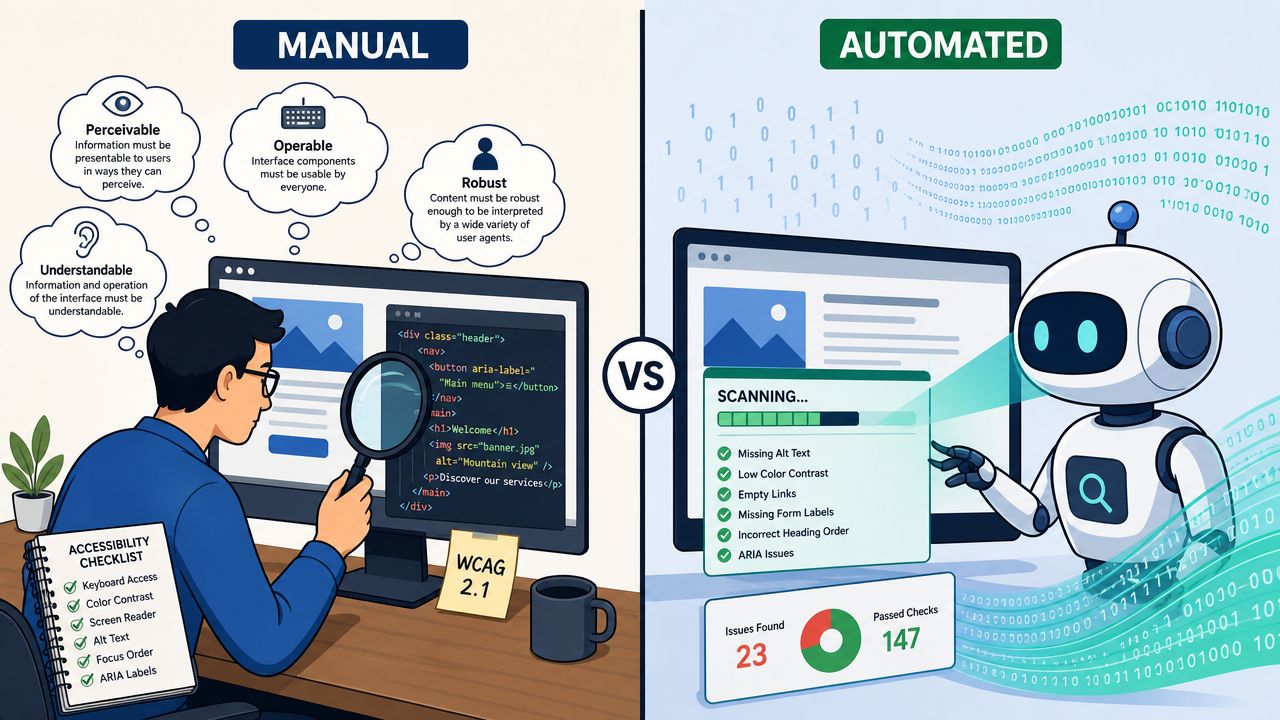
What manual testing actually looks like
Manual testing isn't just clicking around and “seeing if it feels okay.” Good teams use repeatable checks:
- Keyboard review to verify focus visibility, logical tab order, escape behavior, and absence of traps
- Screen-reader review to confirm page landmarks, names, roles, states, announcements, and form feedback
- Task-based testing for flows like sign-in, account creation, filtering, cart, checkout, and support requests
- Usability review to assess whether content and controls are understandable, not merely technically present
A useful way to explain it to stakeholders is this: automated testing is like a spell checker, while manual testing is the editor. The first catches many obvious mistakes quickly. The second decides whether the message works.
Historically, that division of labor has been stable across QA. TestRail notes that automation is more reliable for repetitive tests and more scalable for large test volumes, while manual testing is more effective when human intuition is needed (TestRail's comparison of manual and automated testing).
What automated testing actually does well
Automation shines when the team needs consistency and frequency. It can run on pull requests, on scheduled crawls, during component testing, and after deployment. That makes it especially useful for design systems and high-change environments.
For accessibility work, automated checks are strongest when you use them to enforce standards early:
- In components before bad patterns spread
- In CI so regressions are flagged before release
- In production monitoring so changes from CMS edits or third-party scripts don't slip by unnoticed
If your team wants a deeper operational checklist for this human side of the work, start with mastering manual accessibility testing.
A Detailed Comparison of Testing Approaches
Accessibility teams should compare testing methods by one standard. Which method finds meaningful barriers early enough to fix them before they affect users, releases, or compliance review?
Manual vs. Automated Accessibility Testing At a Glance
| Criterion | Automated Testing | Manual Testing |
|---|---|---|
| Scope & Coverage | Detects many rule-based issues across many pages quickly | Finds behavior, context, and workflow issues tools can't judge well |
| Accuracy | Consistent for predefined checks, but results still need review and triage | Strong for nuanced evaluation, but quality depends on tester skill and method |
| Speed & Efficiency | Fast for regression, repeat runs, and large-scale scanning | Slower across large sites, especially if the team tests every page instead of key user flows |
| Cost Implications | Requires setup, maintenance, and integration into delivery workflows | Uses specialist time directly, so teams need clear priorities and test scope |
| Human Insight & Nuance | Limited to what can be encoded and measured | Required for usability, comprehension, and assistive technology behavior |
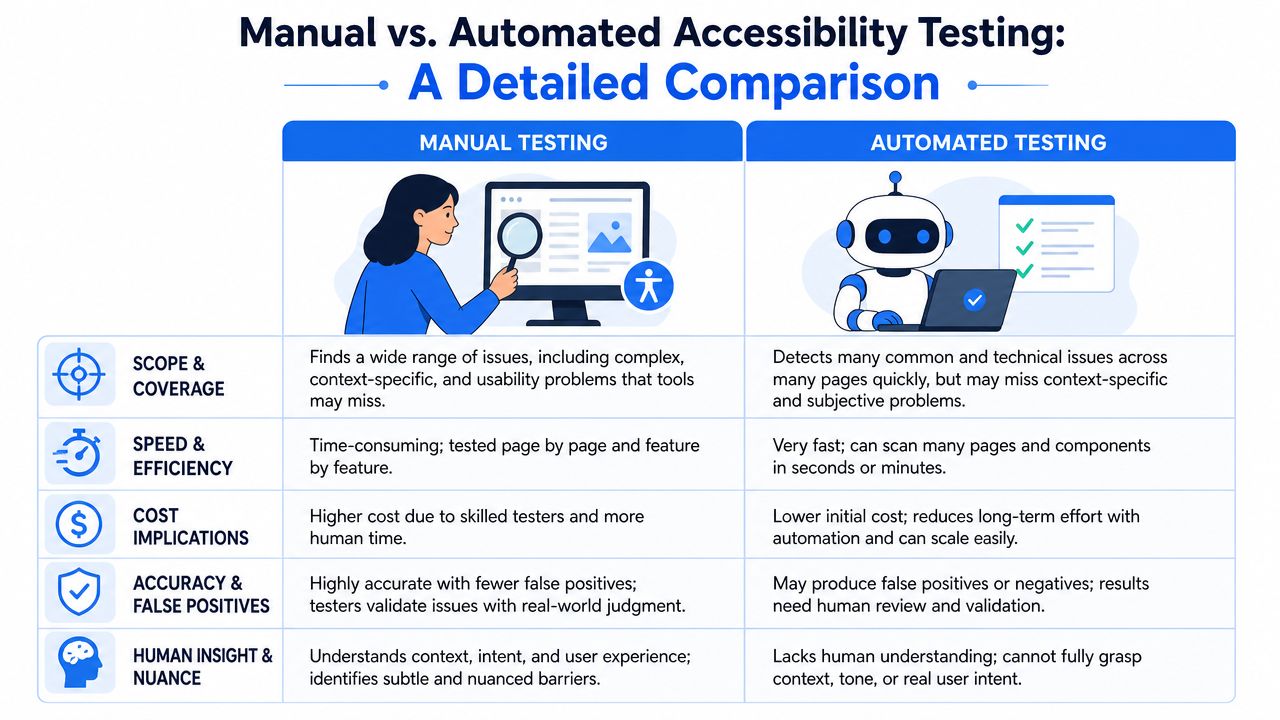
Speed helps, but only if the team uses it well
Automation is faster for repeated checks. That matters in accessibility because the same failures tend to reappear in shared components, page templates, and content updates.
A scanner can review a large set of pages in minutes. A manual reviewer cannot. The trade-off is that automated output still needs interpretation, especially when the report mixes true defects, warnings, and issues with limited user impact. Teams that treat scan volume as proof of coverage usually end up with a long backlog and weak prioritization. Teams that use automation to catch repeatable defects early get much better return.
For implementation patterns, tooling choices, and CI use cases, see this guide to automated accessibility.
Coverage and confidence are different
Automation gives breadth. Manual testing gives decision quality.
A crawler may flag missing form labels across hundreds of pages, which is useful and actionable. It cannot tell you whether the checkout flow makes sense with a screen reader, whether an error message appears at the right moment, or whether a custom date picker creates confusion even though it passes several technical checks.
That distinction matters for WCAG and ADA work. Compliance risk rarely comes from one isolated code issue. It comes from broken tasks: logging in, requesting a quote, completing a purchase, submitting a claim, or managing an account without sight, mouse input, or full dexterity.
A low-error scan can still sit on top of a frustrating or unusable experience.
Accuracy depends on what is being tested
Automated testing is reliable when the expected outcome is objective and machine-detectable. Missing labels, empty links, duplicate IDs, low color contrast in many cases, and some heading or landmark errors fit that category. These checks belong in development workflows because they are predictable and repeat often.
Manual testing is stronger when context affects the answer. Alternative text is a good example. A tool can confirm that an alt attribute exists. A human reviewer has to judge whether the text communicates the purpose of the image on that page. The same is true for focus placement, reading order, error recovery, and the behavior of custom components under keyboard and screen-reader use.
In practice, the highest-value manual work usually sits in the places where design intent, engineering choices, and user expectations meet.
Cost is driven by timing and scope
Testing cost is not just a tooling question. It is a workflow question.
If a team waits until the end of a release to do manual accessibility review, defects are more expensive to diagnose, assign, retest, and explain to stakeholders. If the team runs automated checks during development and reserves manual review for high-risk journeys, the effort is smaller and the findings are easier to act on.
This is the trade-off I see most often. Automation reduces the cost of repetition. Manual testing reduces the cost of false confidence. Strong accessibility programs use both on purpose, not by habit.
Understanding the Gaps in Automated Coverage
The most important conversation in accessibility testing is often not what to automate, but what not to automate.
That matters because automated tools can detect only a subset of WCAG issues and still require human review for keyboard behavior, screen-reader flows, and real-world usability. Neutral industry coverage often acknowledges that limit, but rarely turns it into a practical prioritization model for engineering and compliance teams (GetXray's discussion of manual testing vs automation testing).
Where automation stops being enough
In accessibility work, some of the highest-risk failures are interaction failures. Those include:
- Keyboard traps where users can enter a component but can't exit predictably
- Focus order problems where tabbing jumps around in a way that breaks comprehension
- Weak alternative text that is present syntactically but useless in context
- Screen-reader flow issues where headings, landmarks, error messages, and control names don't form a usable experience
- Custom components that look polished visually but expose poor semantics or confusing state changes
These aren't fringe cases. They show up in menus, filters, carousels, modals, checkout forms, chat tools, account dashboards, and embedded third-party widgets.
A practical way to prioritize manual review
Teams get stuck when they try to manually test everything with the same intensity. That's not realistic. Use risk instead.
Start with flows that affect revenue, legal exposure, or service access:
- Critical transactions such as login, checkout, booking, payment, and account recovery
- High-traffic templates including homepage, product pages, category pages, article pages, and contact forms
- Complex interactions like drawers, filters, date pickers, modals, and multi-step forms
- Compliance-sensitive content such as public service information, admissions, employment, healthcare, or financial tasks
Risk filter: If a user can't complete the task with a keyboard and screen reader, the page needs manual review regardless of scan score.
Automation should still run across the full estate. It gives you signal, trend data, and a fast way to catch recurring issues. For a deeper operational starting point, use this guide to automated accessibility. Just don't treat the tool output as the final answer.
How to Build a Hybrid Accessibility Workflow
The strongest accessibility programs treat testing as part of delivery, not as a checkpoint tacked on at the end. Recent industry coverage increasingly describes testing as a continuous loop where automation depends on manual exploration to create reliable test design and find blind spots. The same coverage stresses that automation is only as good as the knowledge encoded into it, and that test value depends on system understanding and risk identification (Qt Group on the manual testing and automated testing paradox).
A workable workflow should feel boring in the best way. It runs often, creates clear responsibilities, and prevents the same classes of issues from returning.
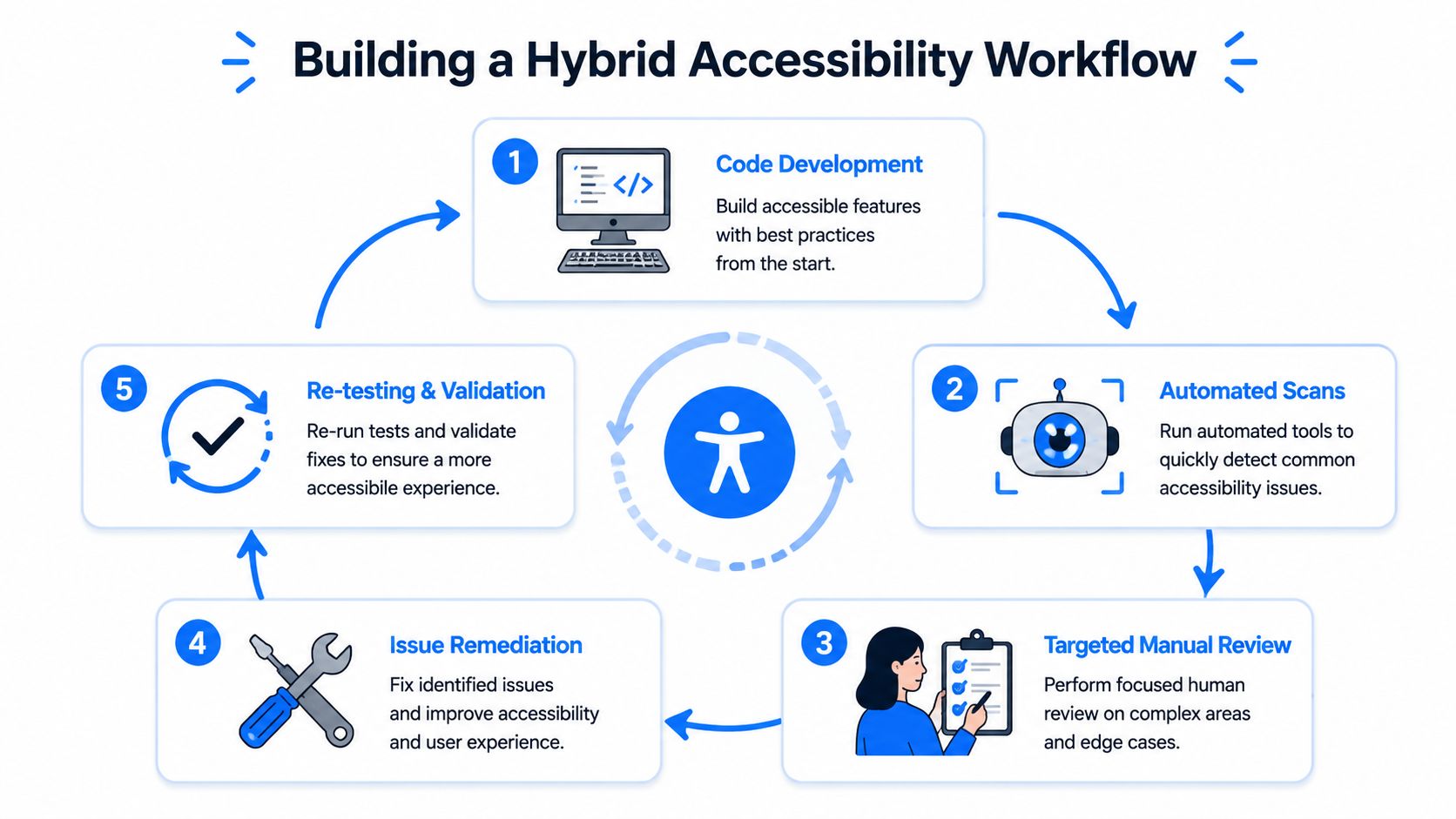
Put automated checks where code changes happen
The first layer belongs close to development:
- Component checks against buttons, forms, dialogs, menus, accordions, and tables
- Pull request checks for obvious regressions before merge
- Scheduled scans for templates and production pages that change through CMS or marketing updates
Teams catch recurring failures cheaply. If a component library keeps emitting the same issue, fix the component and stop paying for the same defect every sprint.
Add targeted manual review before release
Manual review should be selective and deliberate, not random. Pick the workflows most likely to create business and user harm if they fail.
A good release gate includes tasks like:
- Logging in with keyboard only
- Completing a form with proper error identification and recovery
- Moving through menus, dialogs, and filters with a screen reader
- Verifying focus visibility and reading order after dynamic updates
That's also where assistive technology testing matters most. The question isn't whether every page gets a full audit before release. The question is whether your most important journeys are tested the way real users experience them.
This video gives a useful visual frame for that ongoing process.
Create a loop, not a handoff
A hybrid workflow breaks down when teams separate “automation people” from “manual people” too rigidly. Developers should understand basic keyboard and focus checks. Accessibility specialists should influence what gets automated. QA should feed recurring failure patterns back into components and acceptance criteria.
One practical tooling approach is to combine continuous scanning, reporting, and expert review in the same operating model. For example, review of web accessibility software can help teams compare options, and platforms such as WebAbility.io combine automated scanning, dashboard monitoring, reporting workflows, and expert support in one system.
Measuring Success with the Right KPIs
Accessibility teams often track the wrong metric. A single compliance score or scan summary can be useful, but it doesn't tell leadership whether the experience is getting easier to use or whether the testing process is catching the right problems early enough.
What matters is trend, responsiveness, and defect mix.
KPIs that help teams make decisions
Track measures that support prioritization and remediation:
- New issue introduction rate so you can see whether releases are creating repeat accessibility failures
- Time to remediation for serious barriers in critical user flows
- Manual audit findings by pattern so you know which components or templates keep causing trouble
- Reopen rate on accessibility defects that were marked fixed but failed validation
- User-reported issue themes to capture friction that internal testing may not surface
A dashboard matters because teams need one place to see change over time. Engineering managers want to know whether the process is reducing repeat defects. Compliance leaders want documentation. Product teams want to know which fixes affect the most important journeys.
What not to measure in isolation
Don't overvalue raw issue counts. A site can have many minor findings and still support key tasks, or it can have relatively few flagged issues while blocking users in a core flow. The severity and context of the issue matter more than the headline number.
If reporting doesn't distinguish between code hygiene and task failure, it won't help you prioritize.
Another weak metric is “pages scanned” without follow-through. Coverage sounds good in a status update, but if no one validates the risky journeys manually, the number doesn't say much about actual accessibility performance.
For a more mature reporting model, use WebAbility.io's accessibility success guide.
Your Action Plan for Integrating Accessibility Testing
Start with the process you can sustain. Teams get into trouble when they design an accessibility program that sounds extensive but never becomes part of release operations.
Use this sequence instead:
Establish a baseline
Run an automated scan on core templates and top-priority pages. Fix the obvious structural issues first so manual reviewers aren't wasting time on defects a scanner could have caught immediately.
Choose your critical journeys
Pick the flows that affect revenue, service access, onboarding, and support. If you're an ecommerce team, that usually means navigation, product discovery, cart, checkout, and account access. If you're in higher education, healthcare, or public sector, focus on the pages where users must complete essential tasks.
Add lightweight manual checks to development
Train developers and QA to test with keyboard only, inspect focus movement, verify visible focus, and review basic form behavior. These checks won't replace expert testing, but they prevent many obvious regressions.
Build recurring validation into release work
Don't wait for an annual audit. Add automated scans continuously and schedule manual review for the most important workflows before release windows close.
Bring in expert review for deeper issues
Complex interfaces, design systems, and high-risk workflows need specialist evaluation. That's where teams usually uncover the problems that automated tools and informal spot checks miss.
The key shift is simple. Treat manual vs automated testing as a division of labor, not a debate. Automation gives you reach. Manual testing gives you judgment. Accessibility needs both.
If your team needs a practical way to combine automated scanning, ongoing monitoring, reporting, and expert accessibility support, WebAbility.io is worth evaluating as part of that workflow.