TL;DR: Think of automated accessibility testing as a spell-checker for your code. It uses software to quickly scan your website or app, catching common, widespread errors like missing image descriptions or flawed heading structures. It's your first line of defense, building a solid foundation of inclusivity right into your development process.
Understanding Automated Accessibility Testing
Automated accessibility testing is essentially a high-speed quality check for your digital product's code. Instead of a person painstakingly clicking through every page, specialized software sweeps through your entire site or application in minutes. It's programmed to hunt for clear-cut violations of established standards, like the Web Content Accessibility Guidelines (WCAG).
This process is all about breadth. Its strength lies in catching the low-hanging fruit—those black-and-white, programmatic errors that don’t require human judgment to identify. For a busy development team, this is huge. It means they can spot and squash a huge chunk of potential problems early and often.
The Role of Automation in a Testing Strategy
It's important to remember that automated tools aren't a silver bullet; they're the foundational layer of a much bigger strategy. They do their best work when combined with manual testing and feedback from real users. Automation handles the high-volume, repetitive checks, which frees up your human experts to tackle the tricky, nuanced issues that demand real-world context.
This blended approach is the heart of effective accessibility testing.
Automated testing helps teams move away from a reactive "we'll fix it later" mentality. Instead, it fosters a proactive culture where inclusivity is built in from the very beginning, making accessibility a natural part of the development cycle.
The need for these solutions is undeniable. The global accessibility testing market is already valued at approximately USD 1 billion and continues to grow as more companies get serious about digital inclusion. Research from accessibility leader Deque highlights the coverage of automated testing, showing just how essential these tools have become.
Comparing Accessibility Testing Methods
To really understand where automation fits, it helps to see how it stacks up against other methods. Each one plays a unique and critical role.
| Testing Method | Best For | Key Strengths | Core Limitations |
|---|---|---|---|
| Automated Testing | Finding widespread, programmatic issues quickly. | Speed, scalability, consistency, and early detection in workflows. | Cannot evaluate context, user experience, or complex interactions. |
| Manual Testing | Evaluating nuanced issues and user journeys. | Human judgment, context awareness, and in-depth component analysis. | Time-consuming, less scalable, and can be resource-intensive. |
| Assistive Technology User Testing | Gaining real-world feedback from people with disabilities. | Authentic insights, identifies practical barriers, validates solutions. | Requires coordination, can be costly, and covers a smaller scope. |
Ultimately, a truly robust accessibility plan doesn't choose one method—it intelligently combines all three. Automation casts a wide net to catch common bugs, manual testing dives deep into complex areas, and user testing ensures the final product actually works for the people it's meant to serve.
Why Automation Is a Game-Changer for Digital Inclusivity
Imagine the fire sprinkler system in a modern office building. It's not waiting for someone to smell smoke and pull an alarm. It's on duty 24/7, automatically detecting the most common signs of a fire and responding instantly. This system offers a baseline of safety for everyone inside, without needing a person to manually check every corner of the building.
Automated accessibility testing works just like that for your website or app.
It’s your first line of defense—a tireless scanner that constantly checks your code for common, known barriers. By flagging issues like missing image alt text or jumbled heading structures, automation helps you build a fundamentally safer and more welcoming digital space for everyone, particularly users with disabilities.
From Afterthought to Foundational Habit
One of the biggest wins with automated accessibility testing is how it helps teams become proactive. For too long, accessibility has been treated as a final-step compliance check—something you fix after a user complains or a lawsuit lands.
Automation flips that script. By plugging these tests directly into the development cycle, you’re encouraging a "shift-left" mindset. This just means you're finding and fixing problems much earlier, often as the code is being written, instead of waiting for a frantic, last-minute audit.
This isn't just a feel-good practice; it's smart business. The accessibility testing market in North America was valued at USD 434 million and is on a steep growth curve. That number tells a story: the industry now sees accessible design as a non-negotiable part of building quality software. You can find more details on the accessibility testing market growth on straitsresearch.com.
When accessibility checks are just another part of the daily workflow, they stop feeling like a chore. They become an integral part of building excellent, human-centered products right from the start.
The Power of Being Consistent at Scale
Manual testing is vital, but let's be realistic. On a website with thousands of pages and constantly changing components, checking every single element by hand is simply not sustainable. This is where automation truly shines. It applies the exact same set of rules across your entire project, every single time a test runs.
This consistency pays off in a couple of major ways:
Cost-Effective Growth: Automated tools can rip through a massive codebase in minutes, doing what might take a human tester days or weeks. This makes it incredibly efficient to maintain accessibility as your project scales.
Rock-Solid Standards: It ensures that every new feature or update meets the same accessibility benchmark, preventing old bugs from creeping back in and keeping the user experience reliable.
In the end, automation does more than just catch bugs. It gives your team the power to build better, more inclusive products for more people. To see how this fits into the bigger picture, it's worth brushing up on the essential website design best practices for accessibility.
Choosing the Right Automated Accessibility Tools
Picking the right automated accessibility tool isn't about finding one silver bullet. It's more about building the right toolkit for the job. The sheer number of options can feel overwhelming, but they generally fall into a few key categories, each built for a different point in the development lifecycle.
Think of it like a carpenter's workshop. You've got different tools for different tasks—a measuring tape for quick checks, a power saw for heavy-duty cuts, and a level for ensuring everything is perfectly aligned. The tool a developer needs for a quick spot-check on a new button is worlds away from what a QA engineer needs to validate an entire user flow.
For a side-by-side comparison, see our roundup of the best accessibility testing tools across free and paid options.
Tools for Immediate Developer Feedback
The fastest and most immediate feedback comes from browser extensions. These nifty tools live right in your browser's toolbar, ready to scan a page with a single click. A developer can code a new feature, run a quick check with an extension like Axe DevTools, and instantly spot issues like a missing ARIA label or a color contrast problem.
This kind of instant gratification is a game-changer. It catches simple mistakes the moment they're made, weaving accessibility into the fabric of daily coding instead of leaving it as a separate, time-consuming chore down the road.
Integrating Checks into Your Build Process
To take things up a notch, you can use Command-Line Interface (CLI) tools. These integrate directly into your team's development pipeline. A DevOps engineer can set up a CLI tool to run a full accessibility scan every single time a developer pushes new code.
This acts as an automated gatekeeper. If the scan finds critical accessibility errors, the build fails, and the problematic code is blocked from ever reaching your live website.
It’s a powerful way to enforce standards and treat accessibility bugs with the same seriousness as any other critical software defect.
Platforms for Comprehensive Oversight
For the big-picture view, you need a comprehensive accessibility platform. These are designed for tracking accessibility health across your entire digital portfolio. They provide the dashboards and historical data that project managers and executives need to monitor progress, spot trends, and ensure company-wide compliance.
These platforms often wrap automated scanning, manual testing guidance, and detailed reporting into a single, centralized system. They become the command center for your organization's entire accessibility program. If you're ready to explore specific options, our guide on the top automated accessibility testing tools breaks down the best solutions in each of these categories.
Integrating Automation into Your Development Workflow
For automated accessibility testing to really make a difference, it can't be an afterthought or a one-time audit. It needs to be woven directly into the fabric of your development lifecycle. We call this a "shift-left" approach, which is just a practical way of saying we need to catch and fix accessibility issues as early as humanly possible—ideally, the moment a developer writes the code.
When you catch issues early, you prevent simple mistakes from snowballing into complex, expensive problems down the road. By making accessibility a part of every step, it becomes a natural quality check, just like you’d run tests for performance or security. The real goal here is to make inclusive design an ingrained habit for the entire team, not a chore.
Starting in the Developer's Environment
The best place to start is right where the code is born: the developer's Integrated Development Environment (IDE). By using IDE linters and extensions, developers can get real-time feedback on accessibility as they type. An extension might instantly flag a missing alt attribute on an image tag or an incorrectly used ARIA role, letting the developer fix it on the spot before the code is even saved.
The next line of defense is using pre-commit hooks. Think of these as automated gatekeepers that run a quick check just before new code is added to the shared repository. If an automated accessibility scan finds a critical issue, the commit is blocked, stopping inaccessible code from ever contaminating the main codebase.
By embedding checks at these early stages, you create a powerful feedback loop. Developers learn accessibility best practices on the fly, and the overall quality of the code improves from the ground up, reducing remediation costs down the line.
This diagram shows how different automated tools fit into this workflow, moving from the developer's local machine all the way to broader platform monitoring.
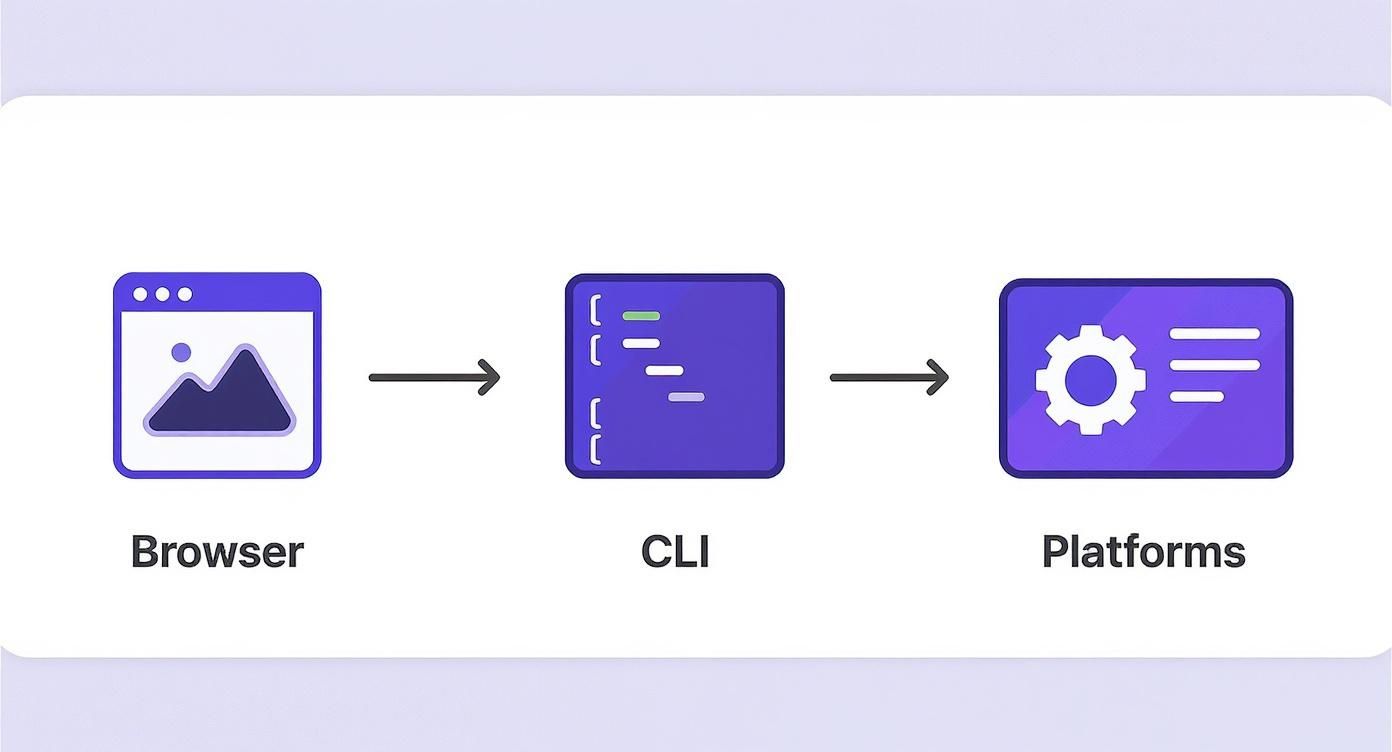
This flow shows a natural progression from local tools like browser extensions to automated pipeline checks with CLI tools, and finally to comprehensive monitoring with dedicated platforms.
Automating Checks in CI/CD Pipelines
The final and most crucial piece of the puzzle is the Continuous Integration/Continuous Deployment (CI/CD) pipeline. This is the automated assembly line that builds, tests, and deploys your application. Adding an accessibility testing step here creates an unbreakable quality gate.
You can configure your CI/CD pipeline to do some pretty powerful things:
Run Automated Scans: Automatically kick off a full accessibility scan on every new build or pull request.
Set Failure Thresholds: Define clear rules, like having zero critical WCAG violations, that a build must pass to move forward.
Fail the Build: If a scan detects issues that cross your threshold, the build automatically fails. This stops inaccessible code dead in its tracks.
Generate Reports: Create detailed reports that pinpoint the exact issues, making it easy for developers to find and fix them quickly.
When you integrate accessibility into a visual workflow, it becomes a standard, non-negotiable part of your delivery process. It’s the ultimate guarantee that no new feature goes live without meeting your accessibility standards.
Making Automated Testing Actually Work for You
Getting the most out of automated testing isn't just about flipping a switch. You need a game plan. The goal is to set up your tools to find what really matters (like issues related to WCAG 2.1 AA), create a system for fixing the biggest problems first, and slot those fixes right into your team's existing workflow. And never forget: automation is a powerful assistant to manual testing, not a replacement for it.
Just installing an automated accessibility tool is a great start, but its real power is only unlocked when you use it strategically. Without a clear process, teams can easily get buried in a mountain of alerts. This leads to "alert fatigue," where developers start ignoring the critical bugs right along with the minor ones. A smart strategy makes sure every bug report is a problem you can actually solve.
The very first thing you should do is configure your testing tools to match your organization’s accessibility goals. For most teams, that means zeroing in on the rules that correspond directly to the Web Content Accessibility Guidelines (WCAG) 2.1 Level AA. This one simple tweak cuts through the noise and lets your team focus on the standards that are most important for your users and for meeting legal requirements.
Figuring Out What to Fix First
Once the scans are running, the real work begins: deciding what to tackle first. It’s a simple fact that not all accessibility bugs carry the same weight. A missing alt tag on a purely decorative icon is a much smaller problem than a "Buy Now" button that a keyboard user can't click.
You need a clear system for sorting and prioritizing these issues, and it should live inside the project management tools you already use, like Jira or Asana. Critical accessibility defects should be treated with the same level of urgency as any other show-stopping bug.
Here’s a straightforward model you can adapt:
Critical: Problems that completely block someone from finishing a key task.
High: Issues creating major roadblocks, though a workaround might exist.
Medium: Annoyances that cause frustration but don't completely derail the user.
Low: Minor things that are good to fix eventually but have very little impact on the user experience.
Using a framework like this turns an overwhelming list of findings into an organized backlog that your development team can work through, one sprint at a time.
The most effective accessibility programs don't just find problems—they create a clear, repeatable process for fixing them. Integrating accessibility bug tracking into your standard workflow makes it a shared responsibility, not a niche task.
Knowing When You Need a Human Touch
Finally, it’s absolutely critical to remember that automation is a partner, not a cure-all. Automated tools are incredible at catching a huge volume of code-based issues with amazing speed, but they have zero understanding of context, usability, or what the experience actually feels like for a real person.
A tool can tell you an image has alt text, but it can't tell you if that text is genuinely helpful. It can check for keyboard focus, but it can't tell you if the navigation order makes any sense. That's where you need real people. To truly know if your site works, you have to conduct a screen reader test and involve experts who can provide that human perspective. A mature accessibility strategy uses automation for wide-ranging coverage, which frees up your human testers to provide the critical depth that machines can't.
The Future of Automated Accessibility
We're standing at a really interesting inflection point for automated accessibility testing. For years, our tools have been fantastic at catching the low-hanging fruit—the clear-cut, by-the-book errors. But now, thanks to big strides in AI and machine learning, we're seeing the emergence of tools that can grasp context, which has always been the domain of human testers.
This is a game-changer. Think about a tool that can look at an image and not just flag a missing alt tag, but actually determine if the image is purely decorative and should be ignored by a screen reader. That kind of nuanced judgment is what’s coming, and it’s set to dramatically improve the quality of feedback we get from automation.
The Rise of Context-Aware Testing
The most immediate win here is the massive cutdown on false positives. When an AI-powered tool understands what an element is for in the grand scheme of the UI, its reports become far more accurate and genuinely helpful. This means development teams can stop wasting time chasing ghosts and start fixing real problems that impact users.
The future of automated accessibility lies in its ability to augment human expertise, not just replace repetitive tasks. These smarter systems will act as a more capable partner, handling nuanced checks and freeing up experts to solve the most complex usability challenges.
As this technology matures, automated testing is only going to become more essential for building truly inclusive products. These innovations bring a new level of efficiency and scale to the table, making it far easier for any organization to bake accessibility into its DNA from the start.
At the end of the day, these tools are evolving beyond simple code checkers. They represent a fundamental leap in our ability to create experiences that work for everyone, cementing automated testing as a cornerstone of responsible, modern development. This is how we build a more accessible future, faster.
A Few Common Questions
Diving into automated accessibility testing usually brings up a few questions. Getting a handle on these is the first step toward building a strategy that actually makes a difference for your users and your product. Let's tackle some of the most common ones.
Can Automated Testing Alone Make My Site 100% WCAG Compliant?
In a word: no. This is probably the most important thing to understand right from the start. Automated tools are incredibly powerful, but they typically only flag about 30-50% of all potential accessibility problems.
They’re brilliant at finding clear-cut, code-level mistakes. Think missing alt text on an image, a heading structure that’s out of order, or ARIA roles that aren't implemented correctly. The machine can see those rules and check if they’re being followed.
But what about the things that require human understanding? An automated scanner can’t tell you if the content flows in a logical order, if your link text is clear and descriptive, or if the alt text you wrote for an image is actually a helpful description. That’s where you need manual reviews and real user feedback to fill in the gaps.
Think of it like this: automation can check if a building has a ramp. That's a simple yes or no. But only a human can tell you if that ramp is at a usable angle, isn't blocked by a plant, and actually leads to the front door. Both checks are vital.
How Can I Get My Development Team to Actually Use These Tools?
The secret is to make it part of their world, not another task piled on top. Find tools that plug right into the software and systems they already use every day. An extension in their code editor that gives instant feedback or a check that runs automatically in the CI/CD pipeline feels like a natural part of the process.
It also helps to frame it as a way to build better, more solid code—not just a box-ticking exercise for compliance. Show them how an automated fix caught a bug that would have been a headache later on. When developers start to see automated accessibility testing as a tool that makes their job easier and the product better, it just becomes part of how they work.
What's the Biggest Mistake People Make When Getting Started?
By far, the most common pitfall is treating accessibility testing as a last-minute audit. Running a single scan right before you launch is like checking the blueprints after the house has been built. It's too late, and any fixes will be slow and expensive.
The real magic happens when you "shift left"—integrating these checks as early as possible in the development process. When you catch and fix accessibility issues while the code is still being written, the solutions are faster, cheaper, and much easier to handle. It stops being a scramble to the finish line and starts being a sustainable habit of building things the right way from the ground up.
Ready to build accessibility into your workflow? WebAbility.io provides an end-to-end platform with automated scanning, real-time monitoring, and expert guidance to help you achieve and maintain compliance while delivering a superior user experience.