Your website is probably doing two jobs right now. It's bringing in customers, and it's unintentionally turning some away.
That usually becomes obvious when a customer struggles with a form, can't read low-contrast text, can't use your menu with a keyboard, or sends you a message asking whether your site is ADA compliant. Most small business owners don't ignore accessibility on purpose. They just inherit an old site, add plugins over time, and assume the theme took care of it.
It didn't.
The good news is that ADA website compliance for small business doesn't have to mean a massive rebuild, a legal panic, or a giant consulting bill. The practical path is simpler. Use tools to speed up the obvious fixes and improve the user experience immediately. Then apply manual review where it matters most, especially on pages tied to leads, sales, and customer service.
Your Quick Guide to ADA Compliance
If you're short on time, here's the direct version. Accessible websites convert better, serve more customers, and put you in a stronger position if your site is ever questioned. Treat accessibility as both customer experience and risk management. For hands-on help sized to a small business, see WebAbility's ADA compliance services.
Start with this roadmap:
Know the baseline: For most practical purposes, target WCAG 2.1 or 2.2 Level AA. If you need a plain-English primer first, review web accessibility standards explained.
Run a quick check: Test your homepage, contact page, product or service pages, and checkout or booking flow. Use automation as a starting point, then manually test the parts customers use.
Prioritize business-critical fixes: Repair barriers on high-value journeys first. Think navigation, forms, product pages, carts, logins, and contact pages.
Use smart tools to move faster: Accessibility widgets and platforms can provide immediate user controls and help surface common issues while you work through deeper remediation.
Build an ongoing process: Accessibility isn't one task you cross off. It's part of publishing, design, QA, and website maintenance.
If your design foundation needs work too, this practical guide to accessible web design is a useful companion to the compliance side.
Why ADA Compliance Is a Growth Strategy
A lot of small business owners first think about accessibility after receiving a vague email, a complaint, or a legal-sounding message. That's the wrong frame.
Yes, there's risk. In 2022, 3,225 website accessibility lawsuits were filed in U.S. federal court, a 12% increase from the prior year, according to the U.S. Chamber's overview of ADA website accessibility compliance. But if you stop at fear, you miss the bigger opportunity.
Better usability usually means better business
An accessible site is usually a cleaner site. It has clearer headings, more obvious buttons, stronger contrast, better form labels, and less confusing navigation. That helps people using assistive technology, and it also helps tired shoppers on mobile, older visitors, distracted users, and anyone trying to complete a task quickly.
That's why I don't treat accessibility as a legal bolt-on. I treat it as conversion rate optimization with standards.
Practical rule: If a visitor can't find, read, understand, or complete a key action, you don't just have an accessibility issue. You have a sales issue.
Accessibility also improves internal linking discipline. When you make headings clearer and link text more descriptive, you help users move toward your most important pages. That includes service pages, collections, booking flows, FAQs, and contact pages. Good accessibility pushes you to organize your site around user intent, which is exactly what strong CRO work does.
Trust is part of compliance
Small businesses win on trust. Your customers want confidence that they can browse, contact you, buy from you, and come back without friction. Accessibility supports that in a very direct way.
A site that works with keyboard navigation, readable contrast, labeled forms, and sensible structure feels more professional. It signals care. It reduces abandonment caused by frustration. And it gives your team a better framework for future updates.
If you're already working through broader WCAG compliance strategies, don't separate that effort from growth. Put your top-converting journeys at the center of it.
The right mindset
Don't ask, “How do I avoid trouble?”
Ask, “How do I make my site easier for more people to use?”
That question leads to better design decisions, stronger content structure, and fewer expensive surprises later.
How to Conduct a 5-Minute Accessibility Check
You don't need a full technical audit to spot obvious problems. You need five minutes, your own website, and a willingness to click around like a customer who doesn't use a mouse.
Here's a simple visual checklist to anchor the process:
Check keyboard use first
Put your mouse aside.
Press the Tab key and move through your homepage, menu, buttons, forms, and footer links. You should be able to see where focus is, move in a logical order, open menus, and activate buttons and links.
If you get stuck, lose focus, or can't reach something important, that's not a minor technical issue. It's a barrier.
Review the obvious content issues
Look at the pages that matter most and ask:
Images: Do meaningful images have alt text that describes the image or function?
Headings: Do your page headings follow a logical order, or did someone style random text to look like headings?
Forms: Does every field have a visible label, or are you relying on placeholder text inside the field?
Contrast: Is every line of text easy to read against its background?
Mobile use: Does the page stay usable on a phone, without cramped text or broken layouts?
A quick automated scan can help surface machine-detectable issues. You can start with a website accessibility checker to get a first-pass view.
Don't confuse scanning with testing
Automation is useful, but it isn't enough by itself. A layered audit process is the defensible approach. Automated tools typically surface only about 30 to 40% of accessibility problems, which is why manual checks for keyboard operability, focus order, and form labels are essential, as noted in this guide to ADA website compliance workflows.
If your site passes a scan but fails a basic keyboard test, your customers still hit the barrier.
The five-minute test I recommend
Homepage tab test: Can you move through navigation and primary calls to action?
Menu test: Can you open and use the main navigation without a mouse?
Form test: Can you complete your contact, lead, or checkout form with clear labels?
Readability test: Is the text readable without squinting or zooming?
Page structure test: Do headings, buttons, and links make sense out of context?
This won't prove compliance. It will tell you whether your site likely has meaningful friction. For most small businesses, it does. For hands-on help sized to a small business, see WebAbility's ADA compliance services.
Building Your Action Plan From Audit to Remediation
Once you spot issues, don't dump them into one giant to-do list. That's how accessibility work stalls.
Sort problems by business impact first. Fix the barriers that block revenue, lead capture, and customer support before you worry about lower-impact cosmetic improvements.
Use WCAG AA as your practical baseline
The most common benchmark for ADA-related web accessibility is WCAG 2.1 Level AA. Key technical requirements include a minimum 4.5:1 contrast ratio for normal text, no content flashing more than three times per second, and forms with clear, programmatically associated labels, as outlined in the ADA Title III primer.
That gives you a clear standard. But your work plan shouldn't be organized around guidelines alone. It should be organized around customer journeys.
Prioritize by user journey
Start with the pages and functions that matter most:
Revenue pages: Product pages, service pages, pricing pages, category pages
Conversion flows: Cart, checkout, quote request, booking, lead forms
Trust pages: Contact, about, policies, FAQs, support
Account access: Login, password reset, account dashboard
If these areas fail, your site fails where it counts.
My advice: Fix what blocks action before you fix what merely looks imperfect.
A formal website accessibility audit helps turn this into a documented remediation plan, especially if multiple people or agencies touch the site.
Prioritized Remediation Checklist
| Priority Level | Issue Type & Examples | Business Impact |
|---|---|---|
| Priority 1 | Broken keyboard navigation, inaccessible menus, unlabeled checkout or contact forms, buttons that can't be activated properly | Blocks sales, leads, bookings, and support requests |
| Priority 2 | Low text contrast, poor heading structure, vague link text, missing alt text on important images | Creates major friction and undermines usability and trust |
| Priority 3 | Decorative image cleanup, minor content structure inconsistencies, lower-traffic page improvements | Improves polish and consistency but doesn't usually block core actions |
What to fix first on a typical small business site
Fix the homepage and top-entry pages
Your homepage sets the pattern for navigation, readability, and first impressions. If it's confusing, users won't reach deeper pages.
Fix forms before blog archives
A contact form with poor labels matters more than a minor issue buried in an old article. Put another way, repair pages that generate action before pages that attract visits.
Fix templates, not just pages
If your problem lives in a theme component, card layout, navigation menu, modal, or form template, repair it once at the system level. That's how you make progress efficiently.
For broader site modernization, this 2026 web design guide for SMEs is useful because it connects design decisions with business outcomes, which is exactly how accessibility work should be prioritized.
Accelerating Compliance With Accessibility Tools
Small businesses often think they have two choices. Hand-code everything from scratch, or pay for a heavyweight audit and remediation project.
That's not how smart teams handle this anymore.
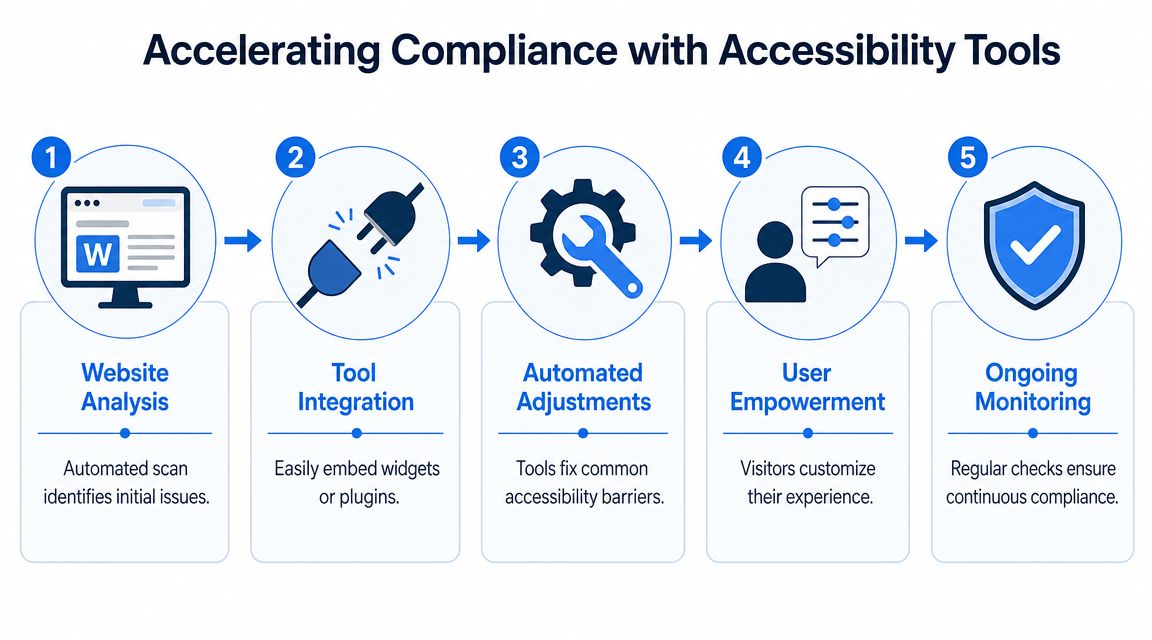
The practical path is hybrid. Use accessibility tools to accelerate progress, improve the experience immediately, and support users with flexible controls. Then apply manual remediation to the pages and components that carry the most business value.
This visual captures that workflow well:
What tools should do for you
Good accessibility tooling should help in two ways.
First, it should give visitors practical controls. That includes options like contrast adjustment, text scaling, keyboard support, reading support, and other usability settings that help people tailor the experience.
Second, it should help your team identify recurring issues, monitor changes, and keep accessibility visible after launch.
That's why I recommend tools as accelerators, not as a replacement for judgment.
Use tools for speed, then remediate with purpose
One of the most common questions is whether to retrofit manually or rely on automated widgets. The most effective strategy is risk-based prioritization: use automation and user-facing tools to quickly address common issues and provide immediate user options, while manually remediating the highest-impact customer journeys first, such as home, product, checkout, and login flows, as discussed in this small business accessibility guidance.
That approach is practical because small businesses need progress now, not a perfect end state six months from now.
Here's the sequence I recommend:
Start with a scan: Identify recurring errors and obvious problem patterns.
Deploy user-facing controls: Give visitors immediate options that improve readability and navigation.
Repair high-impact code and content issues: Focus on templates, forms, menus, and transactional flows.
Retest after changes: Every redesign, plugin update, and content push can introduce new barriers.
A platform such as WebAbility.io fits into this model by combining an accessibility widget, automated scanning, monitoring, reporting, and remediation support in one workflow. That makes sense for teams that want both user controls and operational visibility without stitching together multiple products.
For a quick walkthrough of how these solutions fit into the broader process, this video gives a useful overview:
How this helps CRO, not just compliance
Accessibility tools can also improve conversion performance when used well.
A visitor who needs larger text, better contrast, fewer visual distractions, or simpler keyboard access is more likely to stay engaged if those options are available immediately. That's not just accommodation. It's friction reduction.
Better user control often means fewer drop-offs on the pages where people decide whether to buy, book, or contact you.
The mistake is treating accessibility tooling as separate from the rest of your user experience stack. It belongs in the same conversation as form optimization, mobile UX, page clarity, and navigation quality.
Maintaining Accessibility Long-Term Monitoring and Governance
Accessibility falls apart when nobody owns it after the first round of fixes.
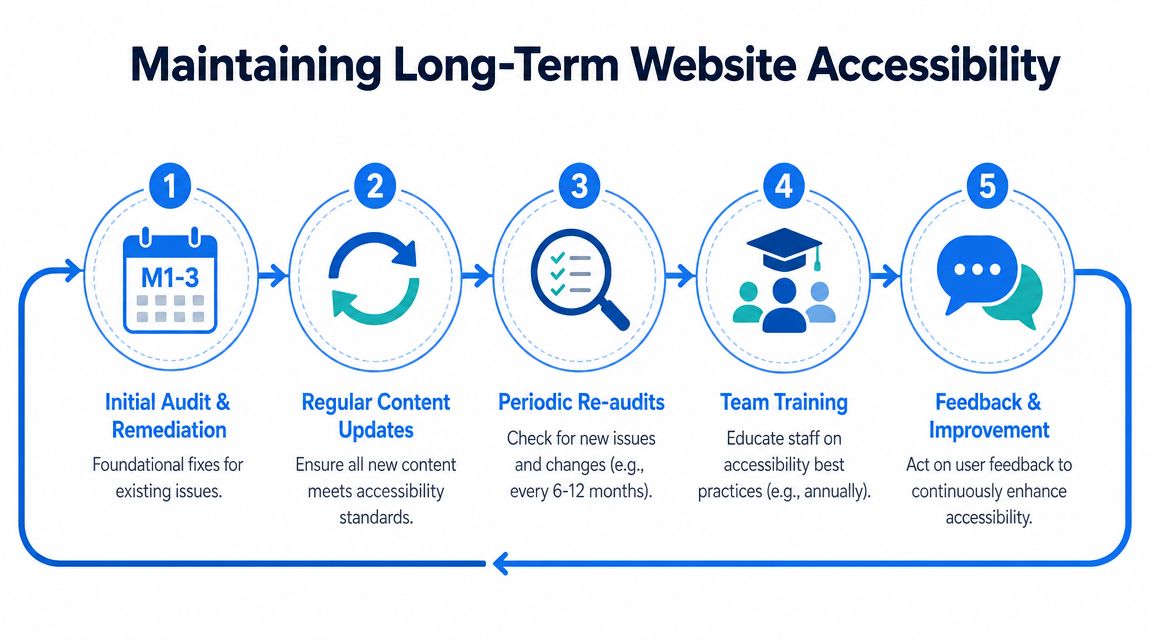
That's why the right question isn't “How do we become compliant?” It's “How do we keep the site usable as it changes?” New products get added, blog posts go live, staff upload PDFs, plugins update, and landing pages multiply. Without a routine, barriers come back.
This long-term view matters because compliance is increasingly viewed as a process, not a project. With the DOJ reinforcing WCAG 2.1 AA as the baseline for public entities, private businesses are expected to maintain accessibility over time and validate changes through periodic testing, not just one cleanup effort, as noted in the NFIB discussion of ADA website accessibility and lawsuits.
Build accessibility into normal operations
You don't need a giant governance framework. You need a repeatable checklist that fits your publishing and update process.
Before content goes live: Check headings, link text, alt text, and form labeling.
Before design changes ship: Test keyboard flow, focus states, contrast, and mobile readability.
After plugin or theme updates: Recheck menus, popups, carts, and account flows.
When users report issues: Log them, fix them, and keep a record.
Keep an audit trail
If your business ever needs to show good-faith effort, documentation matters. Keep records of scans, remediation tasks, content guidelines, and issue reports. Dashboards, historical reporting, and assigned ownership assist.
Even a simple internal process works:
| Task | Owner |
|---|---|
| Monthly scan review | Marketing or web lead |
| New page QA | Content editor |
| Form and conversion flow checks | Developer or agency |
| Accessibility issue inbox review | Customer support or operations |
Train the people who publish
A lot of accessibility problems are content problems, not coding problems. Staff add images without alt text. They paste headings in the wrong order. They upload unreadable PDFs. They create vague links like “click here.”
Accessibility holds up better when the people touching the site every week know the basic rules.
That's the sustainable model. Not panic-driven cleanup. Routine review, documented fixes, and accountability.
Common Questions on Small Business ADA Compliance
Do I need an accessibility statement
Yes. If you serve the public online, you should publish one. It shows that you take accessibility seriously, tells users how to report issues, and gives your team a visible standard to maintain.
Are widgets and tools enough on their own
They're useful, and for many small businesses they're part of the fastest practical path forward. But you still need to address high-impact issues in your core customer journeys. Use tools for immediate support and acceleration, then back them up with manual fixes where customers convert.
Do PDFs and other public documents count
Yes. If customers rely on a document to understand your services, pricing, policies, applications, or instructions, that content should be accessible too.
What standard should I target
For practical purposes, target WCAG 2.1 Level AA as your working baseline. The DOJ's 2024 final rule for Title II public entities solidified WCAG 2.1 Level AA as the technical standard, and while that rule doesn't directly govern private small businesses, it strongly influences the benchmark courts and regulators look to, as explained in the DOJ small entity compliance guide.
If you want a practical hybrid path instead of a vague checklist, WebAbility.io can help you move faster with accessibility tooling, monitoring, audits, and remediation support. That lets you improve usability now, prioritize the pages that drive revenue, and build a process your team can maintain.