ADA Website Demand Letter? What to Do (and How to Avoid a Lawsuit) 2026

Sidharth Nayyar

You probably opened the letter after a meeting, or between client calls, and felt that immediate pressure to do something fast. The deadline looks serious, the language is dense, and the sender has already named your website pages, so the question is no longer whether this is real, it's what to do this week without making the situation worse.
Treat an ADA website demand letter as a verifiable defect list first, then a legal response. That order matters because these letters usually point to specific URLs, specific WCAG failures, and a response deadline. This means your most impactful step is to confirm what's broken before you say anything broad. It also keeps you from overreacting, either by paying too quickly or by ignoring a notice that clearly needs action.
The smartest teams use triage, remediation, and documentation together. They fix the concrete barriers, preserve evidence, and build a response that shows control. That's how you protect CRO, strengthen internal linking to important pages, and reduce repeat exposure without turning the whole thing into a panic project.
What to do if you receive an ADA website demand letter
- Do not ignore it, and do not rush to pay. Confirm it is real: the sender, the specifics, and whether a plaintiff or law firm is named.
- Scan your site to see the actual accessibility issues it is likely citing. Run a free scan.
- Consult an attorney before responding. Do not admit liability in writing.
- Start remediation on the real issues: automate what is safe, and send the rest to expert manual review.
- Document everything: the scan, the fixes, an accessibility statement, and your ongoing plan.
Find out what the letter is really about.Scan your site free against 50+ WCAG 2.2 checks, no signup, and see the exact issues a plaintiff would cite. See what these lawsuits cost, or send the complex fixes to our expert audit.
What an ADA Website Demand Letter Actually Is
An ADA website demand letter is a pre-litigation notice, not a court ruling. It usually cites ADA Title III, points to WCAG 2.1 Level AA, and sets a response deadline while naming the exact URLs and defects the sender claims to have found. That structure tells you what the other side believes is broken, what standard they are using, and how quickly they want movement.
The bigger issue is exposure. According to Seyfarth Shaw's ADA Title III tracker, plaintiffs filed 3,117 website-accessibility lawsuits in U.S. federal court in 2025, up 27 percent from 2,452 in 2024 (Seyfarth, 2026). Demand letters, which never reach court, are more common still, with accessibility industry estimates running into the tens of thousands each year (accessibility.com). That gap shows why a letter often matters more than a filed case. The pressure usually starts before court, and the first response should be a defect check, not a reaction to the tone of the notice. For a wider view of ADA web accessibility risks, look at how often the same page-level failures appear across demand letters.
Practical rule: do not treat the letter as proof that your site is doomed. Treat it as an opening claim that still needs verification.
The four moving parts you need to track
Every useful response starts with four questions.
- What law did they cite? Usually ADA Title III.
- What standard did they invoke? Usually WCAG 2.1 Level AA.
- What pages did they name? Specific URLs matter more than broad accusations.
- What timeline did they set? Deadlines shape your response plan.
That framework keeps the letter from feeling vague. It also helps you separate legal pressure from technical evidence.
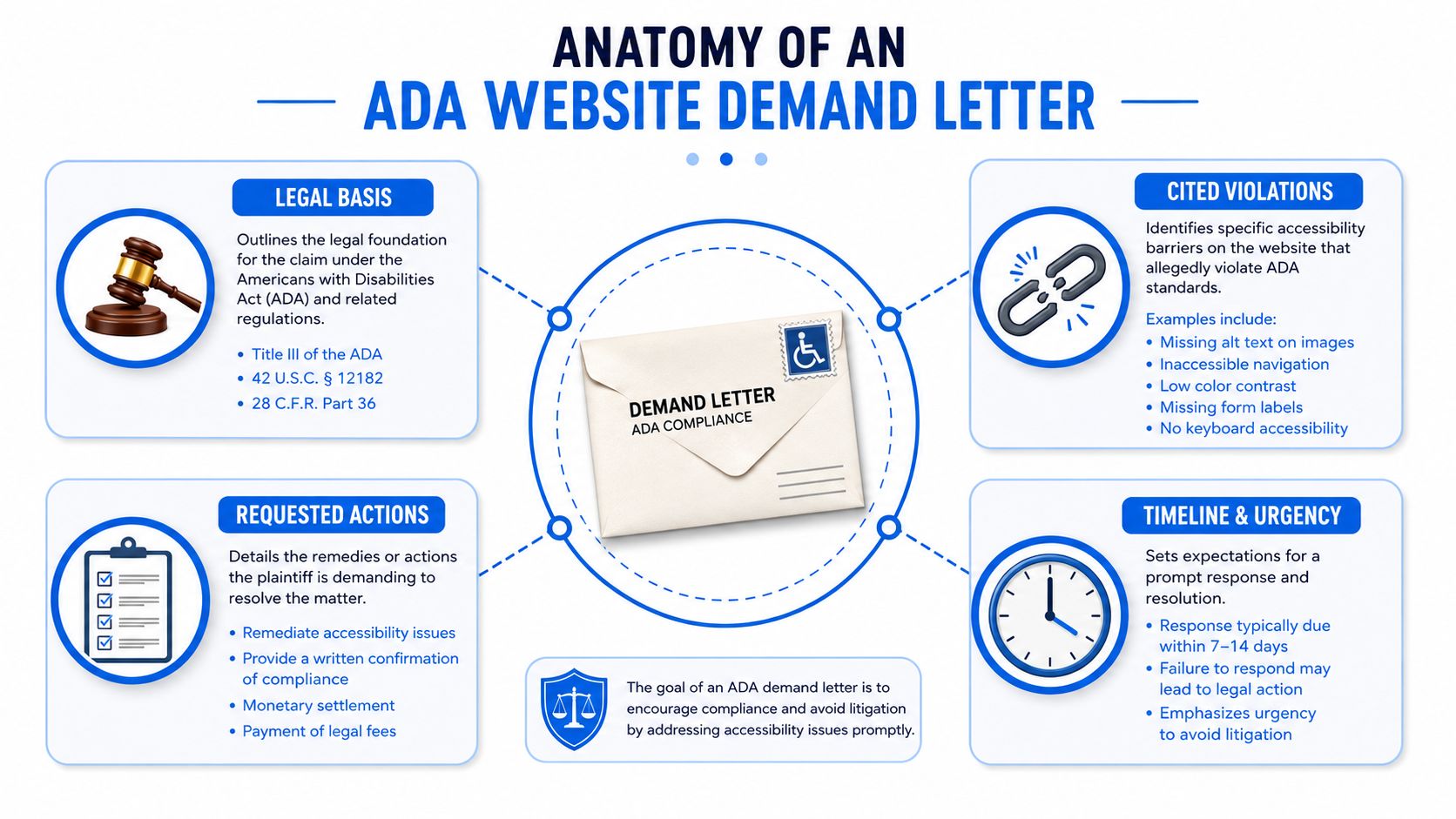
Anatomy of a Typical Demand Letter
A real demand letter rarely says only, “your site is inaccessible.” It usually reads like a file built for strategic advantage, with a sender identity, legal basis, alleged violations, and a settlement ask. That structure matters because the sender is trying to move you from uncertainty to payment before you've validated the claim.
What usually shows up on the page
The strongest letters are the ones that name specific URLs, identify specific WCAG criteria, and include reproducible evidence. Annotated examples show that some letters even tie allegations to a measured contrast ratio such as 3.2:1 on a specific element, which turns the issue into something your team can test directly on the page (annotated demand-letter analysis). That's a very different thing from a blanket complaint about a site being “not accessible.”
The most useful triage signal is the defect type, not the tone. The issues that show up most often in demand letters are non-text content or alt text, contrast ratio, keyboard accessibility, labels or instructions, and page titles, with reported shares of 88%, 76%, 61%, 58%, and 42% respectively (dataset summary). Those are the first things you should verify on the cited pages, because they're the highest-yield remediation targets.
Most letters are strongest when they point to a page, a rule, and evidence. They're weakest when they only describe a general feeling of inaccessibility.
How to read the settlement pressure
Don't miss the remedy section. Demand letters often ask for remediation, monitoring, policy changes, and payment, and defense sources say pre-litigation settlement demands commonly land in the $5,000–$25,000 range (demand-letter response guide). That doesn't mean you should negotiate based on fear. It means you should know the sender is usually aiming to resolve quickly before the legal spend grows.
Here's the line you need to keep in mind. A letter is a pre-litigation settlement offer, not proof that a full lawsuit is inevitable. Some plaintiff firms now file directly without sending one first, so the right response is not panic, it's verification and control.
For a structured way to compare the letter against your own documentation, WCAG 2.2 ACR best practices are a solid reference point for organizing conformance evidence.
| WCAG Success Criterion | Approx. Share of Letters | Typical User Impact |
|---|---|---|
| Non-text content, alt text | 88% | Images and icons may not be announced properly |
| Contrast ratio | 76% | Text can be hard to read |
| Keyboard accessibility | 61% | Users may get stuck or blocked |
| Labels or instructions | 58% | Forms can become confusing or unusable |
| Page titles | 42% | Pages are harder to identify and navigate |
First 72 Hours After You Receive the Letter
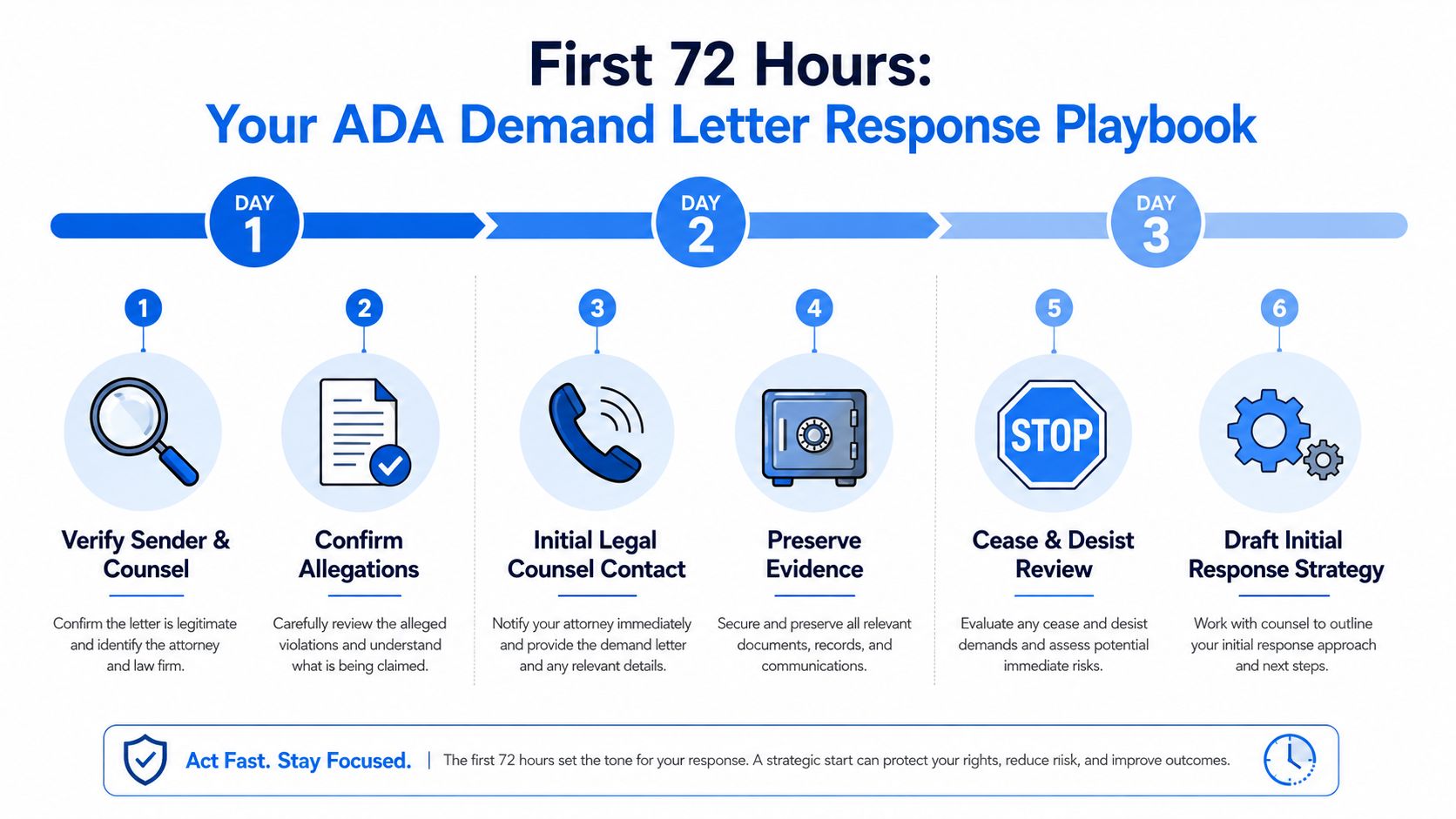
The first three days are about control, not perfection. You need a single owner, preserved evidence, and a clear chain of review so nobody starts rewriting pages before you know what the allegations are. If you move too fast on fixes without a baseline, you'll make it harder to prove what changed and when.
Day 1, verify and preserve
Start by confirming the sender, the law firm, and the URLs named in the letter. Then save the entire message set, including attachments, headers, and any screenshots or exhibits. Your team should also preserve the current state of the cited pages so there's a known baseline before remediation starts.
Do not scatter the response across half the company. Put one person in charge of collecting technical facts, one person in charge of legal routing, and one person in charge of documentation. That keeps the timeline clean and stops multiple teams from making conflicting edits.
A good immediate move is to run a quick baseline check on the cited pages with a free accessibility checker, then compare those results with what the letter claims. If the page isn't the same as the one described, that difference matters.
Day 2, bring in counsel and lock the evidence
By the second day, loop in legal counsel who handles ADA Title III matters. Don't wait until the deadline is almost gone. Even when the letter looks overbroad, you still need a response plan that won't create admissions you can't walk back.
Keep server logs, deployment notes, ticket history, and current screenshots together. If the cited pages are live commerce or lead-generation pages, freeze them in your records so your team can prove whether a defect was already present or whether a fix landed later.
Day 3, set the response direction
By the third day, you should know three things, what looks valid, what needs manual testing, and what can be fixed quickly. That's the point where you decide whether the first reply is a short acknowledgment, a remediation update, or a counsel-led negotiation posture.
Silence is usually the wrong move. Acknowledge the letter on time, preserve your position, and keep the technical facts tight.
For teams that need outside support, how accessibility remediation works is worth reviewing when you're deciding whether to handle remediation in-house or with specialist help.
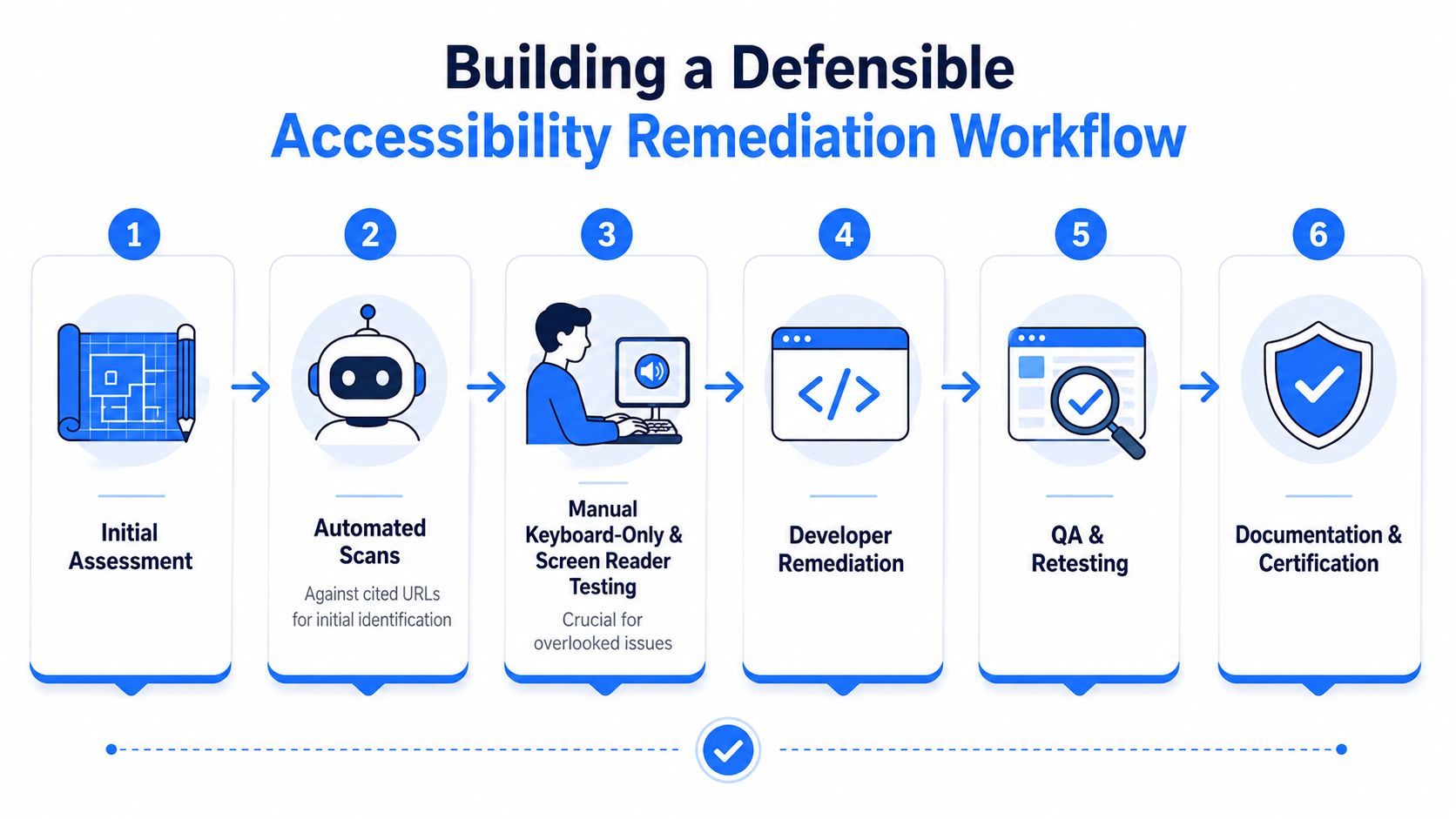
Building a Remediation Workflow That Holds Up
A defensible remediation plan starts with the pages named in the letter, not the whole site. That is the part teams miss most often. They spread effort across unrelated templates, then waste time fixing pages nobody cited while the alleged defects stay live. Start with the defect list, prove what is real, then expand only if the same problem appears across other URLs.
Scan, test, fix, document
Run automated scans on the cited URLs first. Use them to surface obvious issues like missing alt text, contrast failures, and unlabeled controls. That gives you a fast triage layer, not a complete answer.
Manual keyboard-only testing and screen reader testing should follow on the exact pages named in the letter. That is where you catch keyboard traps, focus problems, broken form flows, confusing announcements, and other barriers that users hit during real tasks. If the sender leaned on scanner output alone, your own testing should go deeper and stay tied to the same pages and states.
Here is the order I recommend:
- Initial assessment. Confirm the alleged pages and the business-critical flows.
- Automated scans. Run them against the cited URLs for quick issue identification.
- Manual testing. Test keyboard navigation and a screen reader path.
- Developer remediation. Fix the issues with the highest user impact first.
- QA and retesting. Verify the fix on the same page and state.
- Documentation and certification. Save the evidence package for counsel.
If you cannot prove the fix, you do not really have the fix in a legal sense.
Prioritize the defects that matter most
Start with the failure types that show up again and again, alt text, contrast, keyboard access, labels, and page titles. Those are the issues most often named in demand letters, and they are usually the fastest to verify and correct. Fixing the cited barriers on the impacted pages can also improve CRO on product, signup, and checkout flows because you remove friction where users convert. Strengthen internal links to high-intent pages at the same time so accessibility and discoverability improve together.
For teams that want a practical implementation reference, the Webtwizz WCAG implementation guide gives developers concrete patterns to follow instead of abstract advice.
Keep the evidence pack tight
Your documentation should include audit logs, screenshots, remediation tickets, and short conformance notes written in plain language. If a page changed, record the before and after state. If a defect could not be reproduced, say so and keep the test method visible.
Treat documentation as part of the remediation work, not an afterthought. A clean record helps counsel assess risk, shows what was tested, and makes it harder for a later notice to reset the same dispute. Teams that need outside help can review how accessibility remediation works before deciding whether to handle the fixes in-house or with specialist support.
Why Automated Scans Alone Are Not Enough
Automated scanning is useful, but it isn't a defense by itself. It's best at finding programmatic problems like missing alt text and contrast failures, and it's fast enough to support triage. It's not enough to prove user access, and it's not enough to rebut a demand letter that points to actual interaction barriers.
What scanners catch and what they miss
A scanner can flag obvious defects quickly, but it can't tell you whether a custom menu traps keyboard focus, whether a modal announces itself correctly, or whether a checkout flow breaks after an error state. Those are the barriers that often carry the most legal and user weight. A tool can tell you something looks wrong, but it can't always tell you whether a disabled user can complete the task.
The same applies to documents and media. PDFs, captions, screen reader announcements, and dynamic interactions require manual review because the user experience depends on context. If the letter relies mainly on automated findings, that doesn't mean the claim is meaningless. It means your own testing should be deeper than the sender's evidence.
Why a widget is not the whole answer
An accessibility widget can support users with controls like contrast adjustment, text scaling, and keyboard navigation assistance, but it doesn't replace source-level remediation. That distinction matters because the defects cited in demand letters usually live in the underlying code, labels, focus order, and structure. You can't wish those away with an overlay.
This is also why the most convincing internal workflow combines scanners, manual testing, and ongoing fixes. Automated output gives you breadth. Manual testing gives you proof.
| Testing Method | Strength | Limitation |
|---|---|---|
| Automated scan | Fast issue detection across many pages | Misses many interaction and context problems |
| Manual keyboard test | Reveals real navigation barriers | Takes longer and needs trained testers |
| Screen reader test | Shows what users actually hear | Requires more skill and discipline |
Use scanners to find the likely defects, then use human testing to confirm what's real.
The practical rule is simple. If the letter lists a defect that affects task completion, like form submission or checkout, manual validation comes first. If the letter is full of generic scanner-style issues, your position improves when your own tests show the pages are cleaner than the complaint suggests.
Drafting Your Response and Negotiation Strategy
Your response should be short, factual, and disciplined. Don't write a speech. Don't argue every point in the first draft. A good response acknowledges the letter, confirms review, and says you're validating and addressing the alleged barriers.
What to say
Use a structure like this.
- Acknowledge receipt. Confirm you got the letter and are reviewing it.
- Verify the facts. State that you're checking the named URLs and allegations.
- Commit to remediation. Say you're evaluating and addressing barriers tied to the cited standards.
- Keep settlement language narrow. Don't volunteer more than counsel approves.
- Avoid liability admissions. Don't say your site “violated” the law unless counsel has already made that call.
A strong response can sound like this in substance, “We've received your notice, we're reviewing the cited pages and technical allegations, and we're taking steps to verify and address any confirmed barriers.” That keeps the door open without surrendering your position.
How to negotiate without oversharing
Engage counsel early if the letter is detailed, if it names multiple pages, or if the alleged barriers affect revenue-critical flows. If the defects are confirmed and fixable quickly, a remediation-forward response can make more sense than a fight over every sentence. If the sender is asking for payment before you've validated the claims, push the discussion back toward evidence and scope.
Avoid these traps.
- Don't over-admit. Say what you verified, not what you assume.
- Don't overpromise dates. Give timelines only when your team can meet them.
- Don't oversell a partial fix. A half-finished remediation plan isn't a compliance strategy.
- Don't ignore the deadline. Late responses weaken your posture, even when the claim is shaky.
The best negotiation posture is calm and documented. Fix what's real, dispute what isn't, and keep the response aligned with the evidence.
Using WebAbility.io to Reduce Risk and Document Compliance
A continuous platform makes more sense than a one-off scramble after a letter arrives. WebAbility.io fits that model because it combines 24/7 automated scanning, compliance scoring, historical trend reporting, audit trails, and executive summaries that help teams show what changed and when. It also gives you AI alt text generation, color contrast checks, keyboard navigation profiles, and integrated bug reporting, which all support the same evidence trail you need if a second notice shows up.
That matters because recurring risk isn't solved by one cleanup cycle. The faster your team can monitor, verify, and document, the easier it is to keep the site aligned with WCAG 2.2 AA and related standards over time. If you want a practical governance resource alongside that tooling, preventing digital accessibility lawsuits is a useful perspective on how continuous monitoring reduces surprise exposure.
WebAbility.io also supports multi-site and multi-team workflows, so legal, development, and content teams aren't guessing about ownership. That's the operational difference between fixing a letter and building a defensible compliance process.
If you're dealing with an ADA website demand letter right now, start with the cited pages, document what's real, and build your response around evidence, not panic. WebAbility.io gives teams the scanning, reporting, and remediation workflow they need to manage that process cleanly, Scan your site free to turn the letter into a controlled remediation plan instead of a fire drill, then book an expert audit for the issues that need a human.
Frequently Asked Questions
Is an ADA website demand letter legally binding?
A demand letter is not a court order, but it is often the first step before a lawsuit. Ignoring it does not make it go away and can weaken your position if a suit follows.
Can I ignore it?
No. Even if the letter looks like a template, treat it as a real legal threat. Verify it, then respond through counsel.
How long do I have to respond?
Letters often set a short window, commonly 2 to 4 weeks. Confirm the stated deadline and ask your attorney before agreeing to anything.
How much does it cost to settle versus to fix?
Settlements commonly run from a few thousand dollars into the tens of thousands, plus legal fees. Fixing the underlying issues is often cheaper and also protects against repeat claims. See typical settlement amounts.
Will fixing my website make the demand go away?
Remediation does not automatically end a claim, but documented, good-faith fixes strengthen your response and reduce the odds of a costly outcome.
Are these letters ever a scam?
Some are opportunistic, but most reference real accessibility defects. Verify the sender and the cited pages rather than assuming it is fake.
Quick Questions
Tap to ask AI about this article