Your Guide to Choosing a WCAG Accessibility Checker in 2026

Sidharth Nayyar
Sidharth Nayyar
Ready to make your website accessible? Engage with our team or start a free trial today.
Tap to ask AI about this article
TL;DR: A WCAG accessibility checker is your first, most essential step for building a more inclusive and higher-converting website. By automating the detection of common errors like missing alt text or low-contrast colors, these tools provide immediate, actionable feedback to improve user experience and reduce legal risk. For truly comprehensive compliance and an exceptional user journey, pair these automated scans with expert-led manual audits. This hybrid approach ensures your site is not just technically compliant but genuinely usable for everyone, unlocking a wider audience and driving business growth.
Think of a WCAG accessibility checker as your website's first line of defense. It's an automated tool that scans your site for compliance problems, much like a spell-checker sifts through a document for typos. Based on my extensive experience in digital compliance, it's the single fastest way to spot accessibility issues that create a poor user experience and open the door to legal risks.
The best strategy I've found is to pair these automated tools with expert-led audits for a more complete, nuanced analysis. This demonstrates a deep commitment to inclusivity and excellence, which builds user trust and loyalty.
Diving into web accessibility can feel overwhelming at first, but the goal is straightforward: make your website work for everyone. A WCAG accessibility checker is where you start. It acts as a diagnostic tool, automatically flagging common mistakes like missing image alt text, low-contrast color schemes, or broken links that frustrate users and hurt your SEO.
This isn't just about checking boxes to avoid a lawsuit; it’s about elevating your site’s quality and connecting with a much larger audience. Time and again, I've seen more accessible websites achieve better conversion rates simply because they offer a smoother, more intuitive experience for all visitors, not just those with disabilities.
My biggest takeaway after years in this field? When you invest in accessibility, you're really investing in a better user experience. That's a proven driver of business growth and customer loyalty. The top-performing companies don't see compliance as a cost—they see it as a revenue opportunity.
In practice, the most effective accessibility plan is a hybrid one. You start with automated tools for broad, continuous monitoring and bring in human experts to handle the complex issues that technology alone can't catch.
This two-pronged approach ensures you catch everything from simple code fixes to tricky navigational flaws. If you want to build a solid foundation of what these tools are looking for, I'd recommend starting with a guide to WCAG standards.
Ultimately, you need a solution that fits your organization's specific needs and resources. For a more detailed breakdown of the technical rules, our guide on WCAG success criteria is a great next step. Following this path will lead to real compliance and a better website for every single person who visits it.
Think of an automated WCAG accessibility checker as your secret weapon. It’s the first thing I recommend to any team serious about accessibility because it works around the clock, catching the low-hanging fruit that trips up users and creates unnecessary legal risks.
I’ve seen it time and again: fixing seemingly minor issues like missing image alt text, low-contrast fonts, or empty links has a massive impact. These small adjustments don't just check a box; they genuinely improve the user experience, leading to lower bounce rates and better engagement. It’s the foundational first step to building a site that works for everyone.
Let’s be realistic. If you're managing a handful of client sites, let alone a massive enterprise-level web property, manually checking every page for accessibility is impossible. It just doesn't scale. Automation is what gives you the power to manage accessibility effectively without burning out your team on tedious, repetitive work.
A good automated WCAG accessibility checker can rip through thousands of pages in just a few minutes, giving your developers immediate, concrete feedback. In a world of continuous deployment, where new code ships daily, that kind of speed is a game-changer.
The sheer number of accessibility errors out there is staggering. When researchers scanned the homepages of the top one million websites, they found that an incredible 94.8% had at least one detectable WCAG failure. What's more, just six common error types accounted for 96.4% of all issues found—all things an automated tool catches instantly. You can discover more insights about web accessibility on beaccessible.com.
Using an automated tool fundamentally changes how you approach accessibility. You move from putting out fires to preventing them in the first place. Instead of waiting for a user to complain or, worse, for a demand letter to arrive, you can spot and fix problems the moment they’re introduced.
This constant monitoring gives you a real-time pulse on your site’s accessibility health. It allows you to track progress over time and prove you’re taking your responsibilities seriously. The main wins here are:
This systematic approach is the bedrock of any solid accessibility program. It handles the grunt work, freeing up your accessibility specialists to tackle the more nuanced, complex problems that truly require human expertise. To get the most out of these tools, our guide on automated accessibility testing tools offers a deeper dive.
Ultimately, integrating a powerful WCAG accessibility checker isn't just about compliance—it’s about building a fundamentally better digital experience that serves every single user.
Picking the right accessibility checker isn't a one-size-fits-all decision. The best tool for you really depends on your goals, your team's workflow, and just how deep you need to go. Think of it less like buying a single product and more like building a toolkit for different jobs.
This simple decision tree lays it out pretty clearly: using an automated checker is the foundation for a proactive, low-risk strategy. Building a digital presence without one means missing a key opportunity for quality assurance and market expansion.
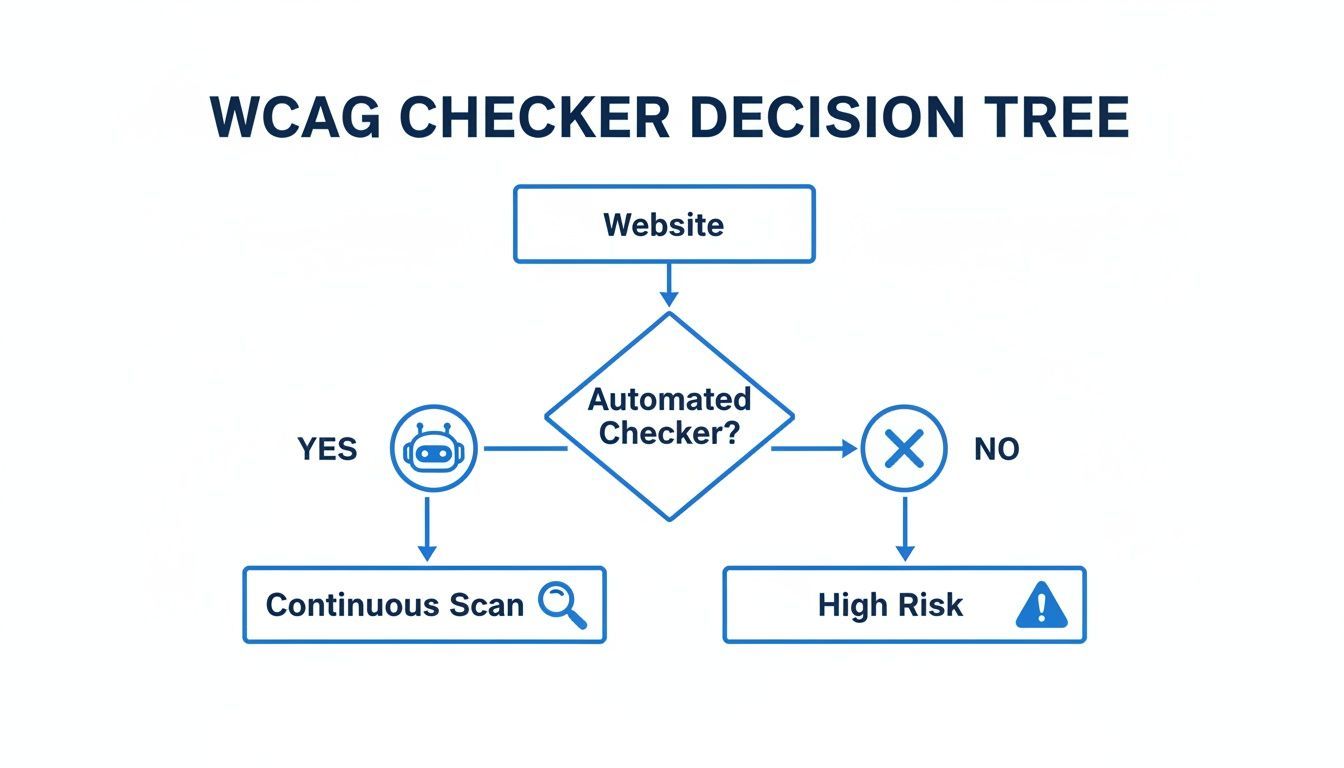
As you can see, a WCAG accessibility checker is your first line of defense. But "checker" can mean a few different things, so let's break down the main types of tools you'll encounter.
For quick, on-the-fly tests, nothing beats a good browser extension. These are lightweight tools you add directly to Chrome or Firefox, letting you scan any page you're on with a single click.
I always tell designers and content managers to keep one of these handy. They're perfect for catching obvious issues—like missing alt text or glaring color contrast errors—before a design ever makes it to development.
When it’s time to get serious and assess your entire website, you'll want to graduate to a standalone scanner. These are more robust web-based services where you plug in your site's URL, and the tool gets to work, crawling every page it can find.
This is what you use for a comprehensive quarterly audit or after a major redesign. The reports you get are far more detailed, often pointing to the exact line of code that needs fixing and prioritizing issues by severity. A dedicated WCAG compliance checker is perfect for this, providing the deep insights you need to build a solid remediation plan.
A standalone scanner’s real power is in giving you a complete, high-level snapshot of your site's accessibility health. It helps you grasp the full scope of the work ahead and create a data-driven strategy to tackle it.
For any business that views accessibility as an ongoing commitment—not a one-off project—an integrated platform is the ultimate solution. These platforms don't just scan; they plug directly into your development lifecycle and governance workflows, providing continuous 24/7 monitoring to flag new issues instantly.
This approach is non-negotiable for dynamic sites where content and code are constantly changing.
What you get with an integrated platform:
This model shifts accessibility from a reactive, fire-fighting exercise to a proactive, manageable process. For any growing business or enterprise, it’s the most effective way to manage legal risk and, more importantly, build a better experience for everyone.
Choosing the right checker often comes down to balancing scope, resources, and technical needs. This table breaks down the three main types to help you decide which approach—or combination of approaches—is the best fit for your team.
| Checker Type | Ideal For | Key Strengths | Limitations |
|---|---|---|---|
| Browser Extension | Individual developers, designers, content editors | Fast, free, on-demand checks within the browser | Page-by-page only; lacks site-wide reporting |
| Standalone Scanner | Quarterly/annual audits, post-redesign analysis | Comprehensive site-wide crawls, detailed reports, issue prioritization | A snapshot in time; doesn't catch new issues as they arise |
| Integrated Platform | Teams serious about long-term compliance | Continuous monitoring, developer workflow integration, trend reporting | Higher investment; requires team-wide adoption |
Ultimately, many mature organizations use a hybrid approach: browser extensions for daily checks, standalone scanners for periodic deep dives, and an integrated platform as the central nervous system for their entire accessibility program.
The single most effective way to build accessible websites is to catch problems before they ever go live. This "shift left" approach means integrating a WCAG accessibility checker right into your development process, turning what's often an afterthought into a foundational part of your workflow.
Think about it: finding and fixing an accessibility bug in a local development environment is quick and cheap. Finding that same bug after launch? That’s a fire drill involving project managers, QA, and developers, costing immense time and money. A proactive approach isn't just about compliance; it's smart business.
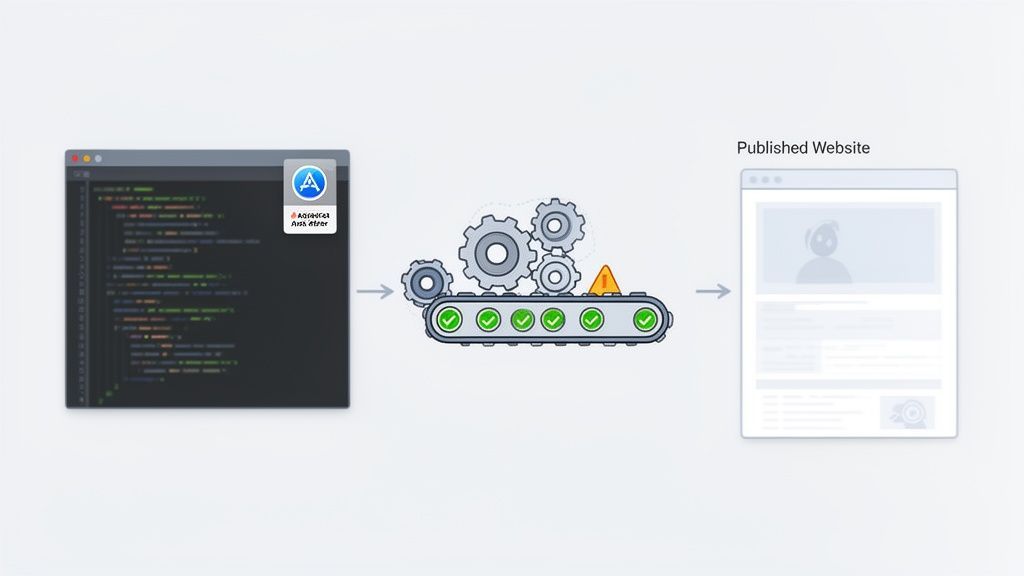
Truly accessible products are built, not bolted on. When you embed accessibility checks into your daily work, you empower developers to build inclusively from the start. This saves countless hours of remediation and ensures every new feature ships with accessibility built-in.
The goal is to make accessibility checks as routine as your unit tests. Imagine a developer getting an instant warning in their code editor about a missing form label. Or a CI/CD pipeline automatically blocking a deployment because it found critical accessibility errors.
This transforms accessibility from a stressful, last-minute audit into a predictable part of your daily operations.
The most mature development teams I've worked with treat accessibility errors just like any other bug. There’s no special treatment; a critical accessibility failure is a showstopper that must be fixed before the code ships. This discipline is what separates the best from the rest.
By building these automated checks directly into your tools, you create a powerful feedback loop. Developers get immediate, context-specific guidance, helping them learn and improve with every line of code they write.
While automated tools are fantastic for catching common issues, they aren't a silver bullet. The reality is, even the best WCAG accessibility checker can only reliably flag about 30% of all potential violations. Issues with dynamic content, ARIA live regions, and complex user flows often slip through the cracks.
This is where a blended strategy becomes crucial. Relying only on automation is a recipe for post-release fixes that can cost up to 10x more to resolve. Recent market analysis backs this up, showing the need for a multi-faceted approach to testing.
Think of your automated tools as the first line of defense. They handle the high-volume, code-based issues, which frees up your accessibility specialists to focus on what humans do best:
When you combine a WCAG accessibility checker with human expertise, you get a robust system that catches both the simple mistakes and the complex user experience flaws. It’s how you gain real confidence that you’re building a product for everyone.
I’ve seen countless teams start with an automated WCAG accessibility checker, which is a fantastic first step. These tools are invaluable for catching a ton of low-hanging fruit. To achieve true accessibility—the kind that creates a genuinely inclusive experience and meets full compliance—integrating human expertise is the next logical move.
This is where managed accessibility services come in. They bridge the gap between what a machine can scan and what a person actually experiences, blending technology's speed with the irreplaceable insight of a human expert. A managed accessibility program is how you elevate your strategy from good to great.
Automated tools are great at what they do: flagging code-level errors at an incredible scale. But they can’t tell you if your checkout process is seamless for someone using a screen reader, or if that slick custom widget you built is truly usable with just a keyboard. They simply lack the context to understand the human side of the equation.
Pairing those automated scans with expert-led audits gives you the complete picture. It's the difference between a tool spotting a syntax error and an expert confirming a user can actually complete a purchase.
Think of it like this: an automated scan is like your car’s dashboard warning light. It tells you there’s a problem, but it takes an experienced mechanic to drive the car, listen to the engine, and diagnose how it really feels on the road.
A human-led audit is that test drive for your website. An expert can evaluate the nuanced parts of your user experience that software just can't grasp, such as:
An automated WCAG accessibility checker was never designed to answer these qualitative, experience-based questions.
The push for accessibility isn't just about good practice; it's a massive market reality. The global digital accessibility market is projected to hit USD 1,417.47 million by 2025, pushed by regulations like the European Accessibility Act. Yet, 95.9% of top websites still fail WCAG 2.2, with an average of 51 errors per page. The business case is just as compelling: accessible e-commerce has been shown to reduce cart abandonment by as much as 66%.
A truly effective accessibility strategy combines the strengths of both worlds. You use automation for its speed and scale to catch the technical issues, and you bring in human experts to handle the critical nuances of usability and real-world interaction.
This hybrid approach creates a system of checks and balances. Technology handles the volume, and people handle the verdict. It gives you confidence that you're not just checking a compliance box but building a better, more inclusive product for everyone.
This investment pays off. You build deeper trust with your users, open your brand to a wider audience, and ultimately drive better business outcomes. It’s a shift from a reactive, compliance-focused mindset to one centered on excellence.
If your team is ready to see what a complete solution can do for your website, exploring a managed accessibility program is the most logical and effective next step to ensure your digital front door is open to all.
When it comes to web accessibility, I hear the same questions pop up time and again. Let's clear the air and tackle some of the most common ones about using a WCAG accessibility checker so you can move forward with confidence.
Honestly, accessibility scanning shouldn't be a one-time event. Think of it as an ongoing health check for your website. From my experience, the most effective approach is to have an automated tool scanning your site 24/7. This way, you get immediate alerts when new content or a code update introduces a problem, stopping small issues from snowballing.
But automated tools are only part of the story. I always recommend pairing continuous monitoring with deeper, manual audits. Plan on doing these quarterly or, at the very least, after any major site redesign.
An easy way to remember it is this: automated scans are your daily check-up, while manual audits are your comprehensive annual physical. You really do need both to manage risk and keep your site in top shape.
This is a huge misconception. The short answer is no, a tool alone cannot guarantee 100% compliance. An automated WCAG accessibility checker is incredibly powerful for catching code-based errors—it can typically flag around 30-40% of all potential issues.
But that leaves a huge gap. Full compliance is only achievable through a combination of automated scanning and manual testing performed by experts. A tool can't understand context or evaluate the real-world user experience for someone relying on a screen reader. A human expert can.
It’s helpful to understand the different roles these tools play in a comprehensive accessibility strategy.
A WCAG accessibility checker is a diagnostic tool. It’s built for your team—developers, designers, and content managers—to find and report accessibility barriers in your site’s code so you can fix them permanently.
An accessibility widget is a user-facing tool. It’s an overlay that can provide visitors with options to adjust their own experience, like increasing font sizes or changing color contrast.
A checker helps you build an accessible foundation directly into your website's code, while a widget offers user-controlled adjustments on the front-end. The most robust strategies focus on using checkers to achieve core compliance, ensuring the site is accessible from the ground up for everyone.
Ready to see how continuous monitoring and guided remediation can change the game for your team? WebAbility.io combines 24/7 automated scanning with powerful tools to help you build and maintain a truly accessible website. You can start a free trial and see for yourself at https://www.webability.io.