An effective accessibility program starts by choosing a specific target for WCAG success criteria. WCAG 2.0 had 61 success criteria, WCAG 2.1 raised that to 78, and WCAG 2.2 added 9 more for a total of 87, which is why your policy needs to name an exact version and level rather than just saying “we follow WCAG.”
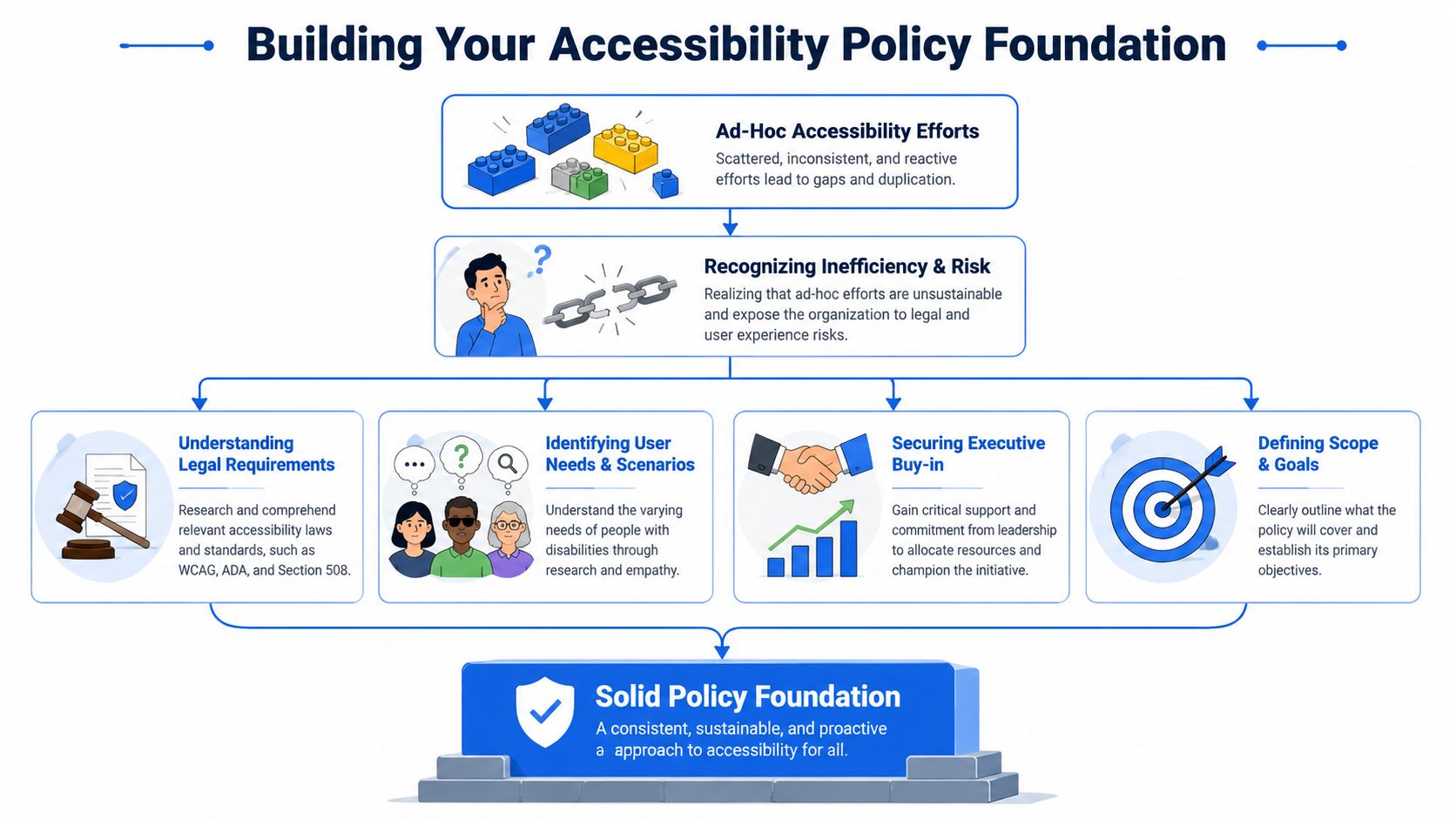
If you're reading this, there's a good chance your organization already cares about accessibility but is still handling it informally. A designer flags contrast issues when they notice them. A developer fixes keyboard problems when QA catches them. Someone in legal asks for an accessibility statement. Then a redesign ships, and nobody can say with confidence whether the site still meets the standard.
That's the moment to stop treating accessibility as a series of isolated fixes and start treating it as a managed business process.
A durable program begins with a formal policy, not with code. First define the standard you're targeting, such as WCAG 2.2 Level AA. Then get buy-in from legal, design, engineering, content, procurement, and leadership. Draft a policy people can use. After that, build the operating model around it: ownership, tooling, review gates, training, audits, and ongoing monitoring.
Laying the Foundation for Your Accessibility Policy
A common pattern looks like this. A redesign is close to launch, QA finds keyboard traps in a checkout flow, marketing has already approved the release date, and legal asks whether the site meets WCAG. Nobody can answer with confidence because the organization never turned accessibility into a defined operating requirement.
That is the foundational starting point for policy work. The policy is not only a statement of intent. It sets the measurable standard for how teams design, build, test, buy, and maintain digital products over time.
Set a conformance target that people can apply
A policy needs a precise target. If it says only that the organization aims to be accessible, each team will interpret that differently. Design may focus on color contrast. Engineering may focus on keyboard support. Procurement may ask vendors for a VPAT without checking whether the product fits your standard.
For many organizations, the clearest starting point is:
Version: WCAG 2.2
Level: AA
Scope: Public website, customer portals, authenticated flows, and new digital experiences
That target gives teams something they can use in tickets, acceptance criteria, release reviews, and vendor requirements. If your stakeholders still need baseline context before choosing a version and level, this guide can help them understand WCAG guidelines.
Practical rule: If the policy does not name a WCAG version and conformance level, teams will create their own definitions of done.
Assign ownership across the people who affect accessibility
Accessibility breaks down when one team writes the policy and everyone else is expected to absorb it later. I usually advise clients to set ownership before they draft the document, because unresolved ownership shows up later as delayed fixes, weak exception handling, and disputes over release signoff.
A workable owner group often includes:
Executive sponsor: Sets expectations, approves priorities, and resolves delivery conflicts.
Program owner: Maintains the policy, tracks exceptions, coordinates audits, and keeps evidence organized.
Design lead: Applies WCAG success criteria to components, patterns, and interaction states.
Engineering lead: Turns requirements into implementation standards, test cases, and release gates.
Content owner: Manages headings, link purpose, form copy, document publishing, and editorial workflow.
Legal or compliance partner: Reviews public commitments, complaint handling, and record retention.
Small organizations may combine several of these roles. Large organizations may need a formal accessibility council. The important part is that each responsibility has a named owner.
Define scope before the writing starts
Policy drafts often stall because the hard questions were skipped. Which domains are covered? Are campaign microsites included? What about PDFs, support portals, embedded third party widgets, archived content, or products inherited through acquisition? If a vendor cannot meet your target, who approves the exception, for how long, and with what mitigation?
Those decisions determine whether the policy will hold up in practice.
A sustainable accessibility program treats WCAG success criteria as the measurable core of a broader business process. The document matters, but so do the systems around it: design standards, procurement language, QA checks, issue tracking, audit evidence, and governance. Tools such as WebAbility.io can support that process by helping teams monitor conformance and organize remediation work, but the tool only works when the policy already defines what must be measured, by whom, and how often.
The goal at this stage is simple. Set a target, assign owners, and define scope tightly enough that the policy can be enforced in day to day work.
Drafting Your Policy with a Clear Framework
A policy draft usually gets tested long before it is approved. A product manager asks whether a rushed release still needs accessibility review. Procurement wants to renew a third party platform with known gaps. Marketing uploads a PDF and assumes archived content is exempt. If the policy cannot answer those questions fast, teams make their own rules.
That is why the document needs to function as an operating framework, not a statement of intent. WCAG success criteria are the measurable core, but the policy also has to define how decisions are made, how exceptions are controlled, and how evidence is kept over time.
What the document should contain
A useful policy answers six practical questions:
What are we committing to?
Which properties, products, and teams are covered?
Which WCAG version and level apply?
Who is responsible for implementation, review, and signoff?
How are issues reported, prioritized, and remediated?
When is the policy reviewed and updated?
Short is fine. Vague is not.
Here is a structure that works for a first formal policy:
| Policy element | What it should say |
|---|---|
| Accessibility statement | State the organization's commitment to accessible digital experiences |
| Standard | Name the exact target, such as WCAG 2.2 Level AA |
| Scope | List websites, web apps, documents, and third-party experiences covered |
| Roles and responsibilities | Assign ownership across design, engineering, QA, content, procurement, and leadership |
| Exception handling | Define when exceptions may exist, who approves them, and how they are reviewed |
| Reporting and remediation | Explain how issues are submitted, triaged, fixed, and tracked |
| Review cycle | Set a governance rhythm for updates, audits, and policy maintenance |
Organizations working across markets should also note how their internal standard aligns with global compliance guidelines. That helps legal, procurement, and delivery teams work from one baseline instead of maintaining separate interpretations.
Use language teams can act on
Policy language needs to trigger action. Compare these two statements:
Weak statement: “We strive to provide an inclusive experience.”
Useful statement: “New and materially updated digital experiences must be designed, built, and tested against WCAG 2.2 Level AA before release.”
The second version gives teams a standard, a trigger, and a release condition.
Sample language can stay simple:
Our organization commits to making covered digital properties accessible to people with disabilities. Covered experiences will be evaluated against WCAG 2.2 Level AA. Accessibility requirements apply to design, development, content publishing, quality assurance, procurement, and ongoing maintenance.
Then add clauses that connect the policy to daily work:
Product teams: Include accessibility acceptance criteria in requirements, design reviews, and test cases.
Design systems: Document expected accessibility behavior, keyboard support, focus treatment, and known constraints for shared components.
Procurement: Review third party digital tools against the organization's accessibility standard before purchase or renewal.
Content operations: Use approved templates, heading structures, descriptive links, and accessible media publishing practices.
Many policy drafts succeed or fail at the point of implementation. If the text cannot be turned into a checklist, a workflow rule, or a release gate, teams will treat it as guidance instead of process.
Write to outcomes, not preferred techniques
Policies should point to conformance outcomes. They should not lock teams into one implementation method unless there is a specific internal standard behind it.
In practice, that means the policy should require teams to meet the applicable WCAG success criterion and leave room for different technical approaches across platforms, frameworks, and component libraries. A native mobile pattern, a design system component, and a legacy CMS template may all meet the same requirement in different ways.
That flexibility matters. I have seen teams write policies that name specific fixes rather than expected results. Those policies age badly because tools, frameworks, and codebases change faster than the underlying accessibility requirement.
Make room for exceptions without weakening the standard
Every organization has edge cases. Legacy platforms stay in service longer than planned. Vendor products arrive with accessibility debt. Archived files may need phased remediation because replacing them all at once would stop higher risk work.
The policy should allow exceptions, but only through a controlled process.
Require documentation: Record the rationale, affected scope, user impact, and planned remediation.
Set approval authority: Name the person or review group that can approve exceptions.
Use expiry dates: Exceptions should expire and return for review.
Define interim support: If a barrier remains, document how users can complete the task or get help.
This is a governance issue as much as a writing issue. Tools such as WebAbility.io can help teams track findings, monitor conformance, and organize remediation work, but the policy still has to decide what counts as an exception, who signs off, and what evidence must be retained.
A policy earns trust when people can apply it under deadline pressure. Clear scope, named decision makers, measurable WCAG targets, and controlled exceptions do more for long term accessibility than polished language ever will.
Mapping Compliance to Global Standards
A common policy failure shows up after the first legal review. The document says the organization will "meet accessibility standards," but procurement reads that one way, product reads it another, and regional teams start asking which standard applies in the U.S., Canada, or the EU. That ambiguity turns a policy into a debate instead of a control.
WCAG success criteria solve that problem because they give the business a measurable technical baseline. Laws and procurement rules differ by jurisdiction, but WCAG is the standard many organizations use to translate those obligations into design, development, content, and QA requirements.
Why your policy must name both version and level
A policy should name the WCAG version and conformance level in plain language. "WCAG 2.2 Level AA" gives teams a specific target. "Meet WCAG" does not.
That distinction matters in practice. Standards change. Procurement language changes. Product teams inherit older components and vendor platforms. If the policy does not define one internal baseline, each group fills in the gap on its own, and audit evidence becomes inconsistent.
For organizations operating across markets, the practical approach is to set one internal standard, then map it to the laws and contractual requirements that apply in each region. That keeps delivery teams working against one rule set while legal and compliance maintain the jurisdiction-specific crosswalk. This overview of global compliance guidelines is a useful starting point for that mapping work.
Accessibility standards compliance mapping
| Regulation / Law | Jurisdiction | Commonly Mapped WCAG Level |
|---|---|---|
| ADA | United States | WCAG Level AA |
| Section 508 | United States federal sector | WCAG Level AA |
| AODA | Ontario, Canada | WCAG Level AA |
| EN 301 549 | European Union | WCAG Level AA |
The table is intentionally simple. A policy should not try to restate every statute or technical annex. It should define the baseline your teams build and test against, then point to supporting procedures or legal references where market-specific detail is needed.
I usually advise organizations to keep the policy stable and handle local legal nuance in supporting documentation. That reduces rewrite cycles and makes governance easier when laws change or new digital properties are added through acquisition.
What legal teams usually need from the policy
Legal, compliance, and procurement teams usually look for three things:
A named standard: A version and level that can be cited in contracts, statements, and vendor requirements.
A defensible process: Evidence that accessibility is reviewed, tested, and approved through a defined business process.
A record trail: Audit results, issue logs, remediation plans, exception approvals, and retest outcomes.
The engineering side needs the same clarity for different reasons. Teams need to know what "done" means. WCAG success criteria provide that measurable unit. They let a reviewer tie a defect to a requirement, assign remediation, and verify closure without arguing over intent.
This is also where policy work intersects with product quality. Teams that already care about usability often adapt faster because they are used to design standards, component reuse, and acceptance criteria. If your product leaders need a parallel reference for broader experience quality, this guide on app UX for founders helps frame how usability decisions affect delivery discipline.
Tools such as WebAbility.io support the process by organizing findings, tracking conformance work, and giving stakeholders a clearer view of where each product stands against the policy baseline. The tool helps. The policy still has to define the standard, the evidence, and the review path.
Implementing and Integrating Your Policy
The policy gets approved on paper. Two sprints later, design is shipping new components, engineering is fixing issues from an audit, content is publishing campaign pages, and nobody is sure who decides whether a release can go live with known accessibility defects. That is the point where a policy either becomes part of delivery or turns into a reference document nobody uses.
Start by assigning ownership in the same systems your teams already use.
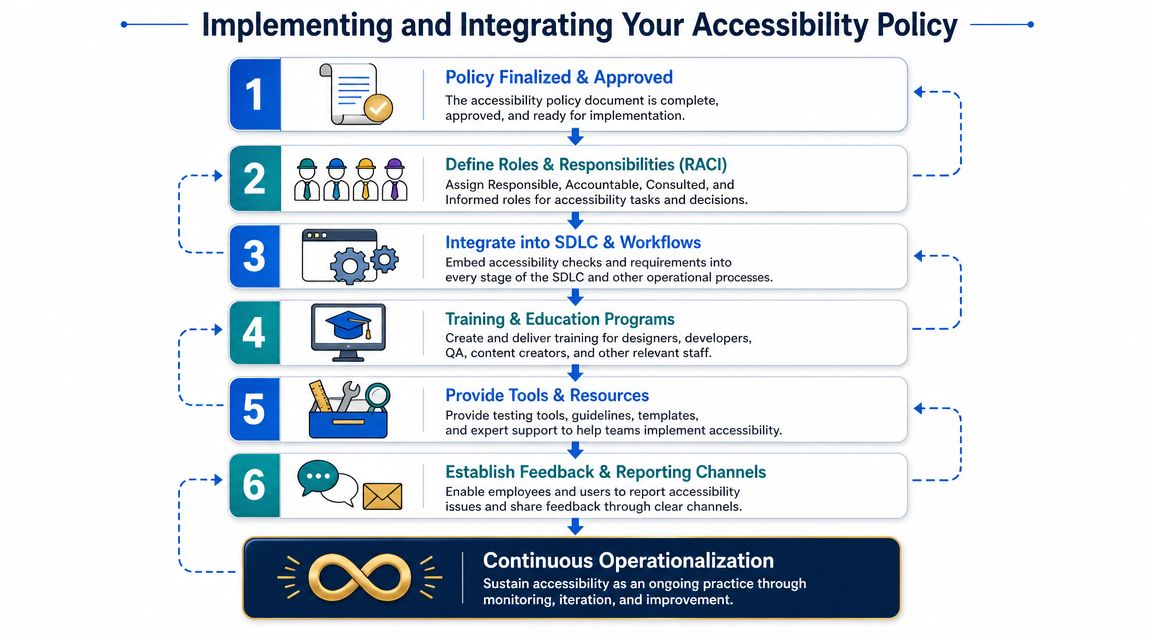
Use a RACI instead of vague accountability
A ticket that says “fix accessibility” usually hides three separate decisions: what failed, who changes it, and who verifies that the change satisfies the relevant success criteria. A RACI removes that ambiguity.
A simple model works well:
| Activity | Responsible | Accountable | Consulted | Informed |
|---|---|---|---|---|
| Component design review | Design system team | Product design lead | Accessibility lead, engineering | QA, product |
| Front-end implementation | Front-end engineer | Engineering manager | Design, QA | Product |
| Content publishing review | Content team | Marketing lead | Accessibility lead | Legal |
| Release validation | QA | Product owner | Engineering, accessibility lead | Leadership |
| Audit remediation tracking | Program manager | Accessibility owner | Design, engineering, content | Stakeholders |
Teams usually resist this step because it feels administrative. In practice, it cuts rework. If ownership is clear, accessibility defects stop bouncing between design, engineering, QA, and content with no closure date.
Build checks into the delivery lifecycle
Your process should test against WCAG success criteria as acceptance conditions, not rely on whether someone followed a preferred technique or used a familiar component pattern. That distinction matters when teams need to approve work, document exceptions, or defend a release decision.
A durable SDLC model usually includes:
Design stage: Review wireframes and prototypes for keyboard flow, visible focus, error prevention, target sizing, and reading order.
Build stage: Use component standards, semantic structure, and acceptance criteria tied to the relevant success criteria for each story.
QA stage: Combine automated testing with manual checks for focus behavior, form handling, hover and focus interactions, and assistive technology compatibility.
Release stage: Keep an issue log tied to severity, affected user flows, remediation owner, and decision status.
Post-release: Monitor regressions after CMS updates, redesigns, third-party script changes, and responsive layout changes.
This work belongs upstream. Teams that wait until QA usually spend more, argue more, and accept more exceptions because the design choices are already baked in.
For product teams shaping mobile-first experiences, this guide on app UX for founders is useful context because interaction design decisions made early often determine whether accessibility work stays manageable later.
A stronger design process reduces downstream defects. This walkthrough from WebAbility.io on design integration shows how to bring accessibility into component planning and workflow decisions before issues reach production.
Support the workflow with tools and evidence
Tools make the policy operational when they are tied to clear review points, named owners, and documented evidence.
Automated scanners help with coverage across templates and recurring patterns. Issue dashboards help teams prioritize by user impact and release risk. Component documentation reduces repeat defects. Accessibility overlays or managed accessibility features can support user choice and improve usability for many visitors, but they do not replace underlying design and code remediation.
WebAbility.io can serve as one operational layer in that process by handling scanning, dashboard reporting, remediation tracking, and user-facing accessibility controls. That supports a policy built around continuous review and evidence, rather than a one-time audit.
If the policy says “meet WCAG 2.2 AA,” the implementation system should show which success criteria were checked, what failed, who owns remediation, and when the issue was retested.
Establishing Audits KPIs and Maintenance
A policy without measurement turns into optimism. Teams assume things are improving because issues are being fixed, but they can't show where risk is shrinking, where regressions are happening, or which products are drifting.
That's why audit cadence and KPIs belong in the operating model, not as an afterthought.
Audit for coverage and for depth
WCAG 2.2 expanded the evaluation surface with 9 new success criteria, and organizations should treat upgrades as a delta-testing exercise that re-checks criteria affecting focus behavior, target size, and authentication, then regresses previously passing components, because small UI changes can invalidate conformance, according to the W3C WCAG overview.
That guidance is practical. You usually don't need to restart from zero each time standards or products evolve. You do need a repeatable method for identifying what changed and what those changes touch.
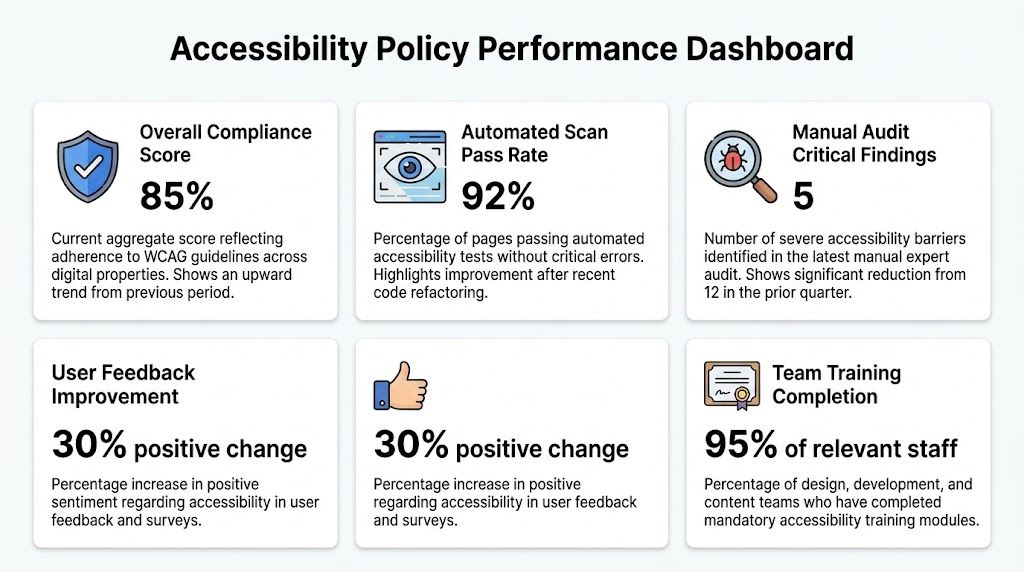
A workable audit model often looks like this:
Automated scanning: Run continuously or on a schedule across templates and high-traffic flows to catch recurring patterns.
Manual expert review: Test components and journeys that automation won't validate reliably, especially custom widgets, dynamic states, and cognitive-heavy flows.
Regression review: Re-test previously fixed issues after redesigns, CMS changes, or framework upgrades.
Delta audits: When moving from one WCAG version target to another, isolate newly relevant criteria and affected interfaces first.
Choose KPIs that drive action
Avoid vanity metrics. A single “accessibility score” can be useful for dashboards, but by itself it doesn't tell delivery teams what to do next.
Track indicators that change behavior:
| KPI | Why it matters |
|---|---|
| Critical issue backlog by product area | Shows where user barriers remain concentrated |
| Time to remediation | Exposes whether teams can fix issues at a sustainable pace |
| Reopen rate on fixed issues | Reveals weak validation or recurring implementation mistakes |
| Audit coverage by template or journey | Prevents blind spots caused by testing only a few pages |
| Training completion by role | Tells you whether prevention is being built into the process |
| Exception count and age | Keeps temporary accommodations from becoming permanent neglect |
These metrics work best when they map back to delivery meetings. If nobody reviews them at release, sprint, or governance level, they won't shape outcomes.
Maintenance is where policy maturity shows
The teams that maintain accessibility well don't wait for annual panic. They connect issue discovery, remediation, retesting, and reporting in one loop.
A formal website accessibility audit is often the best anchor for that loop because it gives the organization a current baseline, a prioritized issue list, and evidence that can feed both governance and implementation.
The mature question isn't “Did we pass once?” It's “What changed since the last verified state, and how quickly can we detect and correct regressions?”
Communicating the Policy and Training Your Teams
Policies don't fail because people oppose them. They fail because people don't know what the policy means for their own work.
A developer hears “WCAG” and thinks semantic HTML. A designer thinks contrast and focus states. A content editor thinks alt text. Legal thinks statements and complaints. None of them are wrong, but each is incomplete. That's why rollout has to be role-based, not generic.
Communicate by responsibility, not by department name
Company-wide announcements are useful, but they don't change behavior on their own. Teams need a short explanation of what is changing, why it matters, and what they now own.
A practical rollout usually includes:
Leadership message: Accessibility is part of quality, release readiness, and brand trust.
Manager briefing: Each lead gets a summary of process changes, approval expectations, and escalation paths.
Role-specific guidance: Designers, engineers, QA, content teams, and procurement each get their own checklist and examples.
Feedback route: Staff need a clear place to ask questions, flag blockers, and report gaps in the policy.
Train around modern failure points
Recent WCAG updates put more emphasis on interaction quality, not just baseline content structure. Guidance on newer criteria highlights requirements teams often miss, including Focus Not Obscured (2.4.11), Target Size (2.5.8), and Content on Hover or Focus (1.4.13) in this overview of newer WCAG criteria teams often miss.
That should change your training priorities.
For example:
Designers need practice with focus visibility, hit target sizing, hover and focus disclosures, error handling, and consistent help patterns.
Developers need concrete testing habits for keyboard flow, focus persistence, state announcements, and authentication patterns.
QA teams need scenario-based test scripts, not just automated scans.
Content teams need standards for headings, link purpose, instructional copy, form labels, and media handling.
Support and marketing teams need to understand how accessibility feedback is captured and routed.
Training works when people can connect a criterion to a screen they own, a workflow they use, and a failure they can recognize.
Build a shared vocabulary
Teams move faster when they stop translating accessibility from scratch every sprint. Terms like focus order, visible focus, target size, redundant entry, accessible authentication, and consistent help should become normal product language.
That shared vocabulary does two things. It prevents issues earlier, and it makes cross-functional conversations shorter. Instead of saying “that modal feels hard to use,” a QA lead can say “focus becomes obscured after the sticky header appears,” and the team knows exactly what to inspect.
Frequently Asked Questions About Accessibility Policies
The questions below come up in almost every first policy rollout.
| Question | Answer |
|---|---|
| Do we need a formal accessibility policy if we already fix issues as they appear? | Yes. Ad hoc fixes don't create a consistent standard, defined ownership, or evidence trail. A policy turns accessibility into an operating requirement instead of a reactive task list. |
| Should the policy name WCAG 2.1 or WCAG 2.2? | Name the exact version and level your organization will govern against. If you choose 2.2 AA, make sure your audits, design reviews, and training reflect the newer criteria. |
| Are WCAG success criteria the same as implementation techniques? | No. The success criteria are the conformance test. Techniques are optional guidance. Your policy and QA process should validate outcomes against criteria, not just whether a team used a preferred method. |
| Does every team need training? | Yes, but not the same training. Designers, developers, content authors, QA, procurement, and support each influence accessibility in different ways. |
| Should the policy include third-party tools and vendors? | It should. If users encounter a third-party booking flow, chat widget, payment screen, or embedded application, that experience affects your accessibility risk and user experience. |
| What belongs in an exception process? | A clear rationale, named approver, affected scope, user impact, remediation plan, and review date. Exceptions should be controlled and temporary wherever possible. |
| How often should we audit? | Set a cadence that matches how often your products change. Fast-moving teams usually need continuous automated scanning plus scheduled manual review of critical journeys and changed components. |
| Do accessibility widgets or managed accessibility tools replace policy work? | No single tool replaces governance, design review, testing, and remediation. User-facing accessibility controls can still be useful as part of a broader program that includes clear standards, ownership, and maintenance. |
| What is the biggest mistake first-time policy owners make? | Writing a polished policy before defining scope, owners, workflows, and evidence requirements. If those aren't settled, the document won't hold up in day-to-day operations. |
| How do we know the policy is working? | You should see fewer repeated issue types, faster remediation, clearer release decisions, and better visibility into where barriers remain. Working policy shows up in process, not just in published text. |
If you're turning WCAG success criteria into an actual operating program, WebAbility.io is worth evaluating as part of that stack. It can help teams connect policy to day-to-day execution through scanning, dashboards, reporting, and ongoing monitoring, while giving organizations a clearer record of what was checked, what failed, and what was remediated.