Achieve State Government Website Accessibility Compliance

Sidharth Nayyar
State and local governments with populations of 50,000 or more must meet WCAG 2.1 Level AA by April 26, 2027, while smaller entities and special district governments have until April 26, 2028. That requirement covers websites and mobile apps, and in practice it turns state government website accessibility into an operational issue spanning design, development, content, procurement, and vendor oversight.
For many agencies, the deadline is the headline. The story, however, is broader. WCAG 2.1 AA is now the working standard for what “accessible” and “usable” means under ADA Title II, and that reaches far beyond homepage fixes or a one-time scan. It affects service forms, legacy PDFs, mobile applications, crisis alerts, procurement language, editorial workflows, and every vendor platform the state puts in front of the public.
The New Digital Mandate for Public Services
The DOJ rule changed the conversation. Accessibility is no longer something a digital team can treat as a side initiative or an aspirational improvement. It now sits in the same category as uptime, security, records retention, and privacy. If residents apply for benefits, pay fees, download forms, read public notices, or use a mobile app, accessibility is part of service delivery.
That matters because public services have moved online faster than many governance models have kept up. Teams often separate legal compliance, content operations, procurement, and QA into different silos. Accessibility fails in the gaps between them. A procurement officer signs a vendor contract without strong accessibility terms. A content team uploads scanned PDFs. A developer ships a form that works with a mouse but not a keyboard. Each team did its piece. The resident still hits a barrier.
Accessibility is a service standard
The practical lens for state government website accessibility is simple: if a resident can't complete a task independently, the service isn't fully delivered.
That's why the strongest programs stop treating accessibility as a checklist owned by one specialist. They build it into the operating model:
- Policy ownership: Someone has authority to define standards and enforce them.
- Delivery ownership: Developers, designers, and content teams know what “accessible” means in daily work.
- Vendor ownership: Contracts and renewals address accessibility before software goes live.
- Quality ownership: Teams test before launch and monitor after publication.
Practical rule: Don't organize your program around WCAG alone. Organize it around resident tasks such as applying, paying, searching, downloading, registering, and reporting.
What experienced teams do differently
Teams that make progress usually stop asking, “Are we compliant?” and start asking, “Where can a resident get blocked today?”
That shift produces better prioritization. A governor's press page matters, but a broken unemployment form matters more. A decorative image without alt text needs correction, but an inaccessible renewal portal creates higher legal and service risk. Accessibility programs mature faster when they rank issues by public impact, not just by scanner count.
A practical program rests on three connected pillars:
| Pillar | What it means in practice |
|---|---|
| Legal clarity | Know exactly which properties, apps, vendors, and documents fall under the rule |
| Technical execution | Fix code, forms, content, and documents against WCAG 2.1 AA requirements |
| Operational governance | Build review, procurement, monitoring, and escalation into normal workflows |
That's also where E-E-A-T matters. State teams need advice grounded in implementation reality, not generic summaries of WCAG. The work only sticks when legal interpretation, engineering practice, and editorial process line up.
Understanding Your Legal and Regulatory Mandates
The baseline requirement is clear. State and local government entities must conform their web content and mobile apps to WCAG 2.1 Level AA, and that standard is codified in 28 CFR 35.200(b) under ADA Title II, as explained in this overview of government entities meeting website accessibility rules.
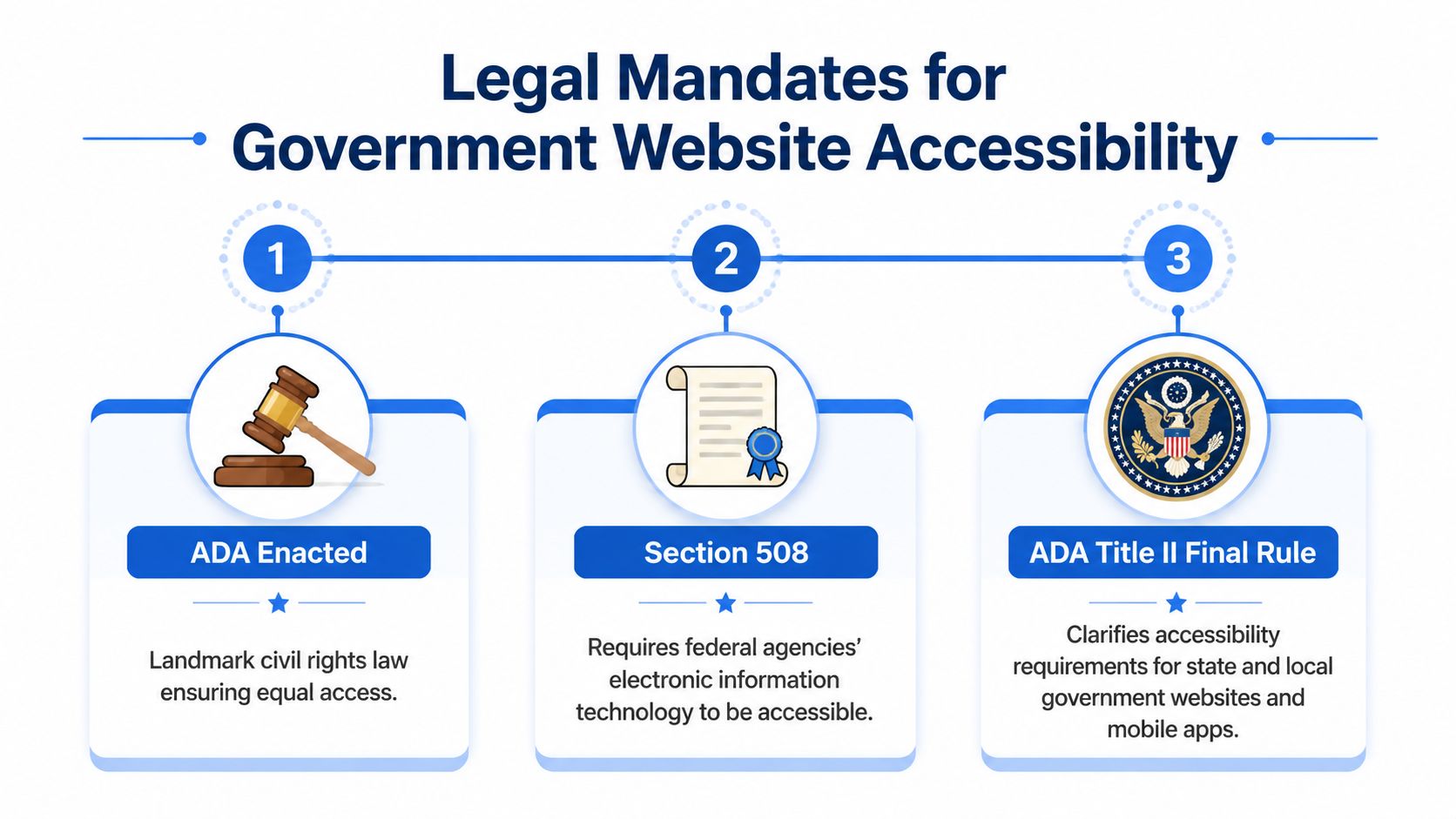
What the rule requires
For operational planning, strip away the legal phrasing and convert it into tasks. Your agency needs to make sure websites and mobile apps satisfy all 50 success criteria across the WCAG structure described in the DOJ-aligned summary above. It also needs to apply those requirements consistently to new releases, content updates, and systems managed by outside vendors on the government's behalf.
That last point catches many agencies off guard. If a third party runs the platform, the public entity still owns the accessibility exposure. Procurement is not separate from compliance. Procurement is where a large part of compliance is won or lost.
The dates that should drive your program plan
The immediate planning dates come from the DOJ's Interim Final Rule. The rule published on April 20, 2026 and extended the deadline for public entities with populations of 50,000 or more to April 26, 2027, and for entities with populations below 50,000, plus special district governments, to April 26, 2028, as summarized in this explanation of ADA Title II and government website accessibility.
For program managers, those dates should map directly to a workstream model:
- Inventory what you own
- Identify what vendors operate
- Rank high-risk services
- Remediate and retest
- Document exceptions carefully
Governments can use alternative methods if they can prove equal or greater accessibility, but the evidentiary burden is high. Treat that as a narrow path, not your default strategy.
Where agencies underestimate scope
The rule isn't limited to the main website. Scope usually includes:
- Primary websites: Agency pages, program sites, service microsites
- Mobile apps: Resident-facing transactional and informational apps
- Vendor-operated services: Appointment systems, payment tools, application portals
- Published content: Forms, notices, instructions, downloadable materials
A state CIO should also expect internal linking strategy to matter. Accessibility work often improves wayfinding, which in turn supports conversion rate optimization for critical service pages. When users can move clearly from informational content to task pages, fewer journeys stall halfway through. That's one reason it helps to direct teams toward high-value legal and implementation references such as Title II ADA compliance resources during planning and training.
Core Technical Standards and Common Failure Points
WCAG can feel abstract until you map it to the places where public sites usually break. In state government website accessibility work, the failures that create the most friction are rarely exotic. They are common, repeatable, and tied to ordinary publishing habits.
Here's a visual framework teams can use in training and QA.
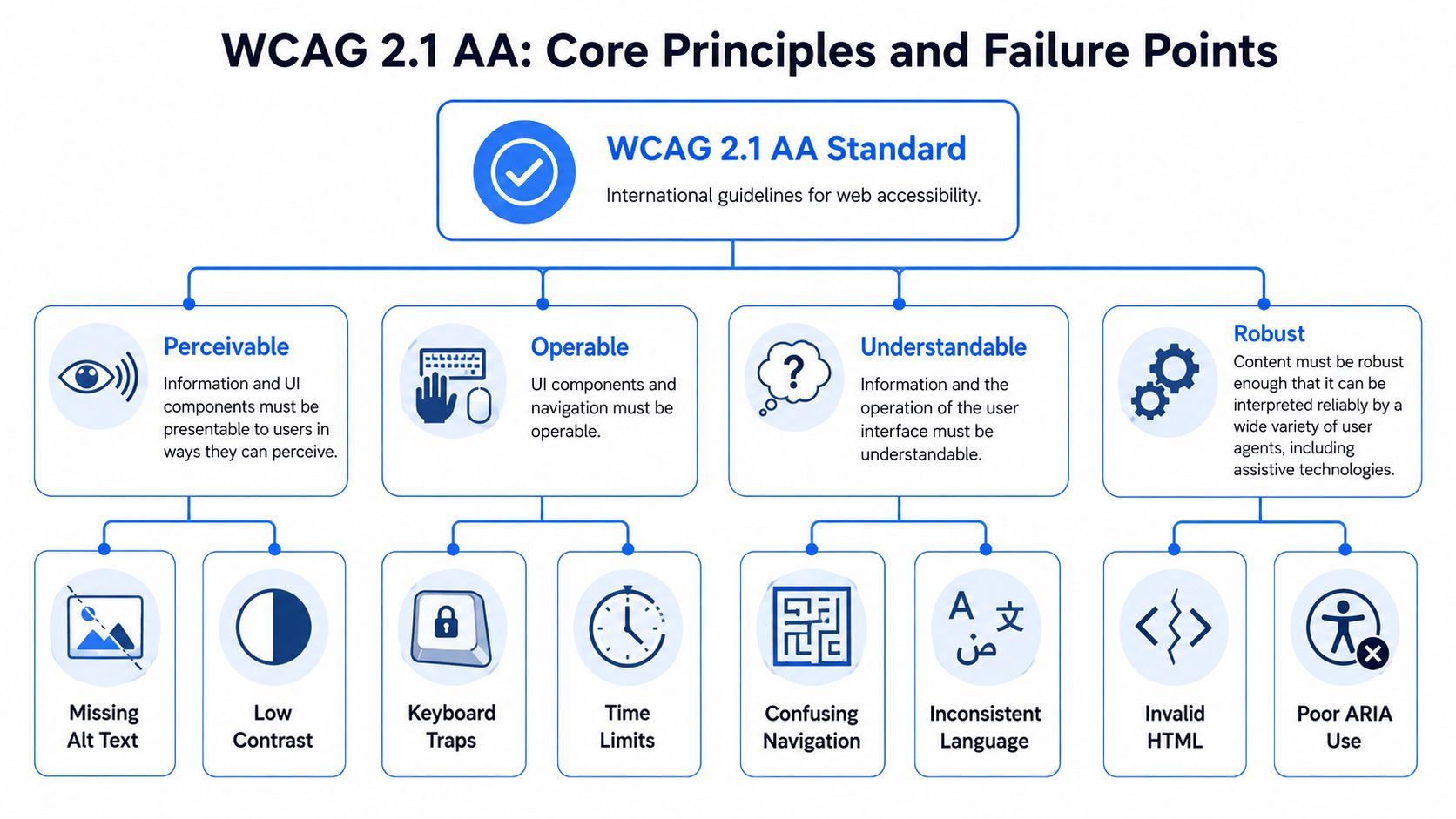
Perceivable and operable failures
If people can't perceive content or operate the interface, the transaction stops.
Common examples on government sites include:
- Missing alternative text: Service icons, charts, and informational images provide meaning visually but not programmatically.
- Low contrast alerts: Emergency banners, status notices, and benefit announcements often fail contrast checks because branding overrules readability.
- Keyboard traps: Menus, date pickers, and modal windows work with a mouse but strand keyboard users.
- Session and timeout issues: Forms expire or refresh without clear warnings, especially in payment or account workflows.
Teams should pair automated detection with live task testing. A scanner can flag contrast or missing alt text. It won't reliably tell you whether a resident can complete a permit application using a keyboard and screen reader without confusion.
For teams that need a practical technical benchmark, this guide on achieving WCAG 2.1 AA compliance is useful because it translates abstract criteria into development checks.
Understandable and robust failures
A page can pass superficial checks and still fail people badly if the flow is confusing.
Government sites often struggle with:
| Failure point | What it looks like in practice | Why it matters |
|---|---|---|
| Confusing navigation | Different labels for the same service across pages | Residents can't predict where to go next |
| Weak form errors | “Invalid input” with no field guidance | Users can't recover from mistakes |
| Invalid HTML | Broken heading order, mislabeled controls, duplicate IDs | Assistive tech gets unreliable page structure |
| Poor ARIA use | Added roles that conflict with native controls | Teams create problems while trying to fix them |
One pattern shows up constantly in audits: agencies add accessibility labels after a release without cleaning up the underlying markup. That often makes the interface noisier, not clearer. Native HTML usually beats custom scripting. If a standard button, fieldset, label, heading, or link will do the job, use it.
A short walkthrough helps teams see these issues faster.
What works better than endless issue lists
Long remediation spreadsheets often slow teams down. A better method is to group problems by resident journey:
- Forms and applications
- Payments and renewals
- Document downloads
- Search and navigation
- Alerts and announcements
The fastest gains usually come from fixing repeated components. If the design system button, alert, modal, form field, and navigation pattern are accessible, dozens of pages improve at once.
This also supports internal linking and CRO goals. When templates use clear headings, predictable calls to action, descriptive links, and accessible navigation, residents reach high-priority pages with less friction. Good accessibility architecture often improves discoverability inside the site because important paths become clearer to everyone, not just assistive technology users.
The Challenge of Retroactive Document Remediation
Legacy documents are where many agencies freeze. They see years of PDFs, board packets, application forms, meeting materials, and policy archives and assume the only options are “fix everything” or “do nothing.” Neither is workable.
The more useful question is: which documents create the highest public risk if they remain inaccessible?
Why backlog panic leads to bad decisions
A 2025 GAO study found that 78% of state agencies lack a prioritization strategy for retroactive document remediation, a gap that contributes to “undue financial and administrative burdens” arguments that courts often reject, according to this discussion of DOJ web accessibility regulation compliance challenges. The operational lesson is straightforward. If an agency can't show how it prioritized public-impact documents, it has a weak position when challenged.
A giant backlog doesn't excuse the absence of a method.
A defensible remediation model
Start with an inventory, then classify each document set by function. Not every PDF should enter the queue at the same level.
Use a triage approach like this:
Mission-critical current forms Application packets, benefit forms, notices with deadlines, licensing documents, tax materials
High-demand public information Policy guides, service instructions, compliance manuals, fee schedules, resident handbooks
Important archival material Historical reports, prior-year packets, superseded guidance still accessed for reference
Low-priority legacy content Duplicative files, outdated materials, documents that should be retired rather than remediated
That framework changes the conversation from abstract burden to managed risk.
If a document still drives a live public action, treat it like a digital form, not like an archive.
What agencies should do this quarter
A realistic remediation program usually includes both cleanup and prevention.
- Stop the inflow: Require all newly published documents to meet accessibility standards before posting.
- Replace where possible: Convert high-traffic PDFs into accessible HTML pages when the content is primarily informational.
- Tag and remediate strategically: Keep PDFs for forms, official records, or files where format matters.
- Retire aggressively: Remove obsolete documents that no longer serve the public.
- Track rationale: Document why a file was remediated, replaced, archived, or removed.
For teams dealing with large PDF inventories, a practical PDF remediation guide helps standardize decisions and reduce ad hoc handling across departments.
The important trade-off is speed versus durability. Quick fixes on individual files can help with immediate access, but they won't solve the backlog if publishing practices stay unchanged. Agencies need both a backlog plan and a publishing control.
Establishing Your Accessibility Governance and Workflow
Most accessibility failures aren't caused by lack of goodwill. They're caused by missing ownership. A state agency can hire auditors, train developers, and buy scanning tools, but if nobody decides what happens before procurement, before launch, and after publication, the same issues return.
Governance gives accessibility a home.
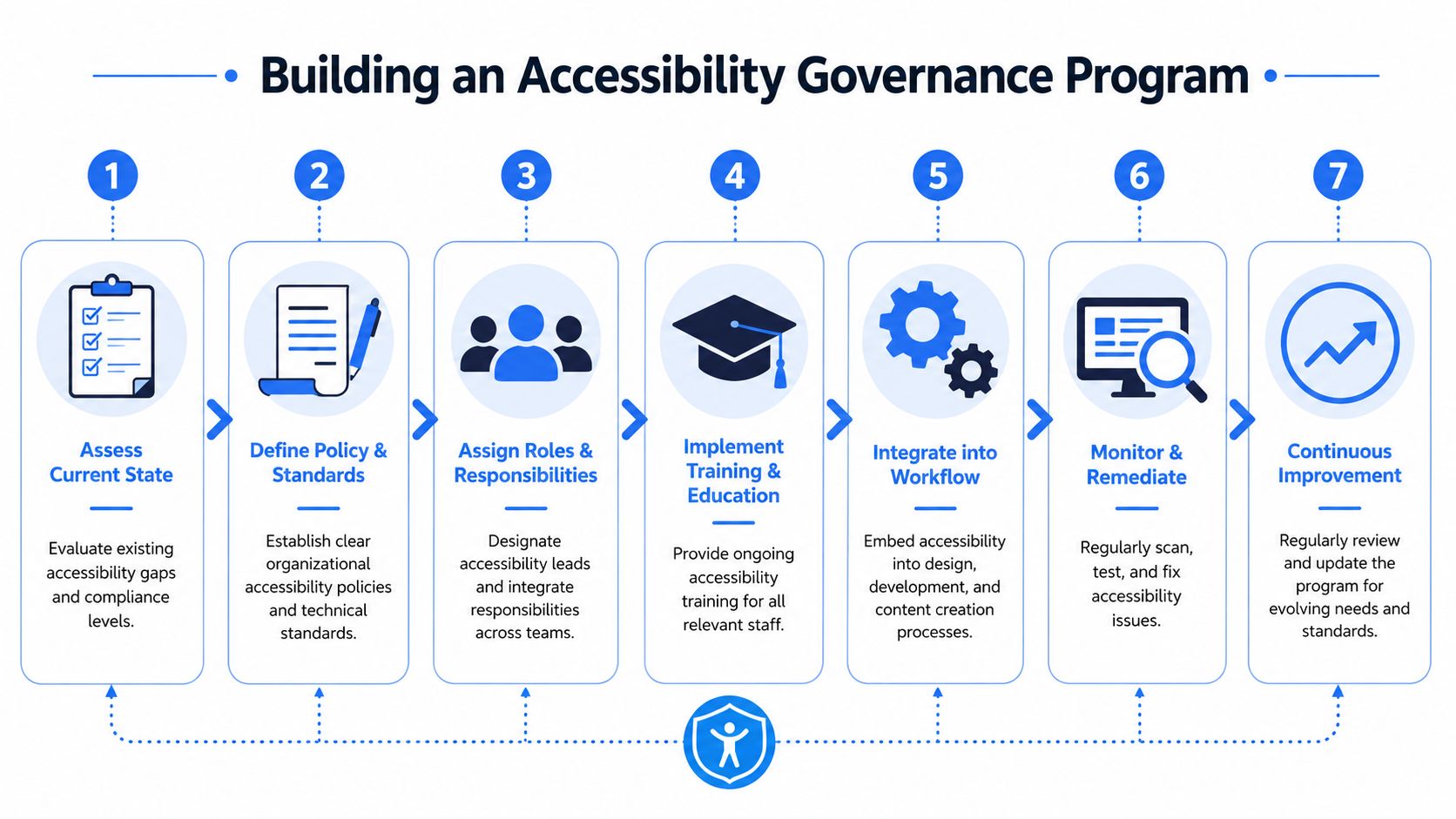
The operating model that holds up
A practical governance program usually has seven parts, but they don't all sit with one team.
| Governance element | Primary owner | Day-to-day effect |
|---|---|---|
| Policy and standards | CIO or digital governance office | Defines baseline requirements |
| Design guidance | UX or design system team | Prevents repeatable component failures |
| Engineering review | Development leads | Catches code-level issues before release |
| Content workflow | Editors and communications staff | Stops inaccessible uploads and copy patterns |
| Procurement controls | Contracts and purchasing | Pushes accessibility obligations to vendors |
| QA and monitoring | QA leads and accessibility specialists | Verifies fixes and tracks regressions |
| Public feedback path | Service owners and support teams | Captures barriers residents actually face |
Procurement is part of accessibility
One of the most important points in the rule is that vendor-operated sites and apps provided on behalf of the government still create accessibility liability for the public entity, as noted earlier in the legal section. That means accessibility language can't be a soft preference in procurement documents.
Contracts should require vendors to:
- State conformance target clearly: WCAG 2.1 Level AA for the delivered experience
- Provide testing evidence: Not just a marketing claim, but documented evaluation and remediation process
- Address defects promptly: Include timelines, escalation, and retesting obligations
- Support ongoing changes: Accessibility must survive upgrades, redesigns, and feature releases
- Cooperate with audits: Vendors should respond to issue lists and participate in verification
A weak contract creates expensive debates later. A clear contract provides an advantage before launch.
Build accessibility into daily workflow
Governance fails when it lives only in policy PDFs. It works when teams know exactly what to do at each step.
A simple workflow looks like this:
- Before design approval: review color contrast, focus order, form patterns, error handling
- Before development handoff: confirm components use accessible patterns from the design system
- Before content publication: check headings, link text, tables, image descriptions, document format
- Before launch: run automated scans and manual task testing
- After launch: monitor regressions, review resident feedback, assign fixes to owners
Accessibility statements matter, but workflow matters more. The public page should reflect a process that already exists behind the scenes.
Training also needs role specificity. Developers need markup and interaction guidance. Editors need document and plain-language standards. Procurement teams need contract language and review criteria. General awareness sessions are useful, but role-based training changes output.
Choosing Your Toolkit for Monitoring and Remediation
No single tool handles state government website accessibility on its own. Agencies need a layered setup. Automated scanning finds recurring code and content problems at scale. Manual audits catch workflow and usability failures. User-facing accessibility tools help residents tailor the interface to their needs while teams continue deeper remediation.
That combination is much more effective than relying on one tactic and hoping it covers everything.
What each tool type is good at
Start with automation. Scanners are useful for repeated checks on contrast, headings, labels, missing alt text, and common structural defects. They help teams monitor ongoing change, especially when many editors and vendors publish content.
Manual review is different. It tests things automation often misses, such as whether a service task is understandable, whether focus order makes sense, whether form recovery is clear, and whether document alternatives are usable.
Then there are user-facing tools. Used thoughtfully, they give visitors immediate options like text resizing, contrast changes, reading assistance, and navigation support. They shouldn't replace source-level remediation, but they can still play a constructive role in a broader accessibility program.
A practical monitoring stack
A mature toolkit usually includes:
- Continuous scanning: Scheduled checks across templates, content sections, and new pages
- Manual audits: Periodic expert testing of critical user journeys
- Document tools: Support for tagging, reading order review, and file conversion
- Issue management: Assign, track, verify, and archive remediation work
- User controls: Interface adjustments that improve immediate usability for many visitors
For teams handling documents outside a browser workflow, it can help to explore File Studio for offline processing when staff need another option for preparing and reviewing files before publication.
Here's the kind of dashboard view teams typically need for ongoing oversight.
One platform in this category is WebAbility.io, which combines automated scanning, dashboard reporting, expert services, and a user-facing accessibility widget in a single environment. For teams that want a fast baseline review before a manual audit, a wcag compliance checker can help surface obvious issues and start the remediation queue.
What doesn't work
The least effective approach is treating tooling as a substitute for governance. A scan report without owners becomes shelfware. A widget without code fixes leaves structural barriers in place. A manual audit without retesting becomes a point-in-time document that ages fast.
The stronger model is layered and explicit:
| Tool or method | Best use | Limitation |
|---|---|---|
| Automated scanning | Ongoing monitoring and regression detection | Misses many usability and workflow issues |
| Manual audit | Deep review of critical journeys and edge cases | Not continuous on its own |
| User-facing controls | Immediate personalization and support | Doesn't fix source code by itself |
| Reporting dashboard | Governance, assignment, and evidence tracking | Only useful if teams act on findings |
That structure also helps with CRO and internal linking. When teams monitor broken links, vague anchors, inaccessible buttons, and confusing page flow, important service pages become easier to find and complete. Accessibility and task completion often move together.
Your Roadmap to Inclusive Digital Government
The agencies that will handle this well won't be the ones chasing every issue in random order. They'll be the ones that connect legal mandate, technical remediation, and governance into one operating model.
That means three things.
First, treat the rule as a delivery standard, not a legal memo. The requirement affects how residents use your most important digital services. Second, fix the patterns that repeat. Design systems, form components, templates, and publishing controls usually produce more durable gains than isolated page edits. Third, build governance that survives turnover. Accessibility has to remain visible when staff change, vendors rotate, and priorities shift.
A good roadmap usually starts with a current-state audit, then moves into service prioritization, backlog triage, vendor review, workflow integration, and recurring QA. Agencies that follow that sequence tend to avoid the worst trap, which is spending months documenting issues without changing the way new issues get introduced.
The practical next step is simple. Pick a high-impact service and test it end to end. Then fix what blocks residents from completing the task. After that, move upstream into design standards, publishing controls, and procurement requirements so the same defects don't return.
Inclusive digital government isn't a one-time project. It's a discipline. Agencies that build it into how they ship digital services reduce risk, improve service access, and make their high-priority pages easier for everyone to reach and use.
Frequently Asked Questions
What should a state agency do first if the scope feels overwhelming
Start with an inventory and a prioritization model. List public websites, mobile apps, service portals, and document repositories. Then rank them by public impact. Agencies lose time when they begin with scattered issue hunting instead of identifying the services that matter most to residents.
A useful first pass is to separate assets into three groups: high-impact transactions, high-visibility information, and lower-risk legacy material. That gives the team a sequence for audits, remediation, and governance.
Are third-party platforms included if the state doesn't host them directly
Yes, that risk still matters. As covered earlier, the rule reaches vendor-operated websites and apps provided on behalf of the government. In practice, that means agencies should review contracts, platform settings, templates, and support obligations before launch and again at renewal.
If a vendor says accessibility is “supported,” ask what that means in the delivered implementation. Marketing language is not the same as tested conformance.
Can conforming alternate versions solve social media accessibility
Only in limited situations. The DOJ rule limits conforming alternate versions to cases of technical or legal limitations under 28 CFR 35.202, but it offers no concrete case studies, leaving a compliance gap for the 90% of state governments using social media where direct WCAG 2.1 AA compliance may be technically impossible, according to the DOJ's 2024 web rule resource.
The practical takeaway is caution. Don't assume a plain-text duplicate or linked web page automatically qualifies as a valid alternate version. Agencies should document the limitation, provide the most accessible equivalent available, and align communications, legal, and digital teams before relying on this path.
Social media is often treated as a communications problem. Under Title II, it can quickly become an accessibility governance problem.
Do accessibility widgets help or hurt
They can help when they're used as one part of a layered strategy. User-facing controls can improve readability, navigation, and personalization for many visitors right away. What they can't do is replace source-code remediation, accessible documents, or proper QA.
The right question isn't “widget or remediation.” It's whether the agency has combined user support, continuous monitoring, and underlying fixes in a coherent program.
How should agencies think about internal linking and conversion paths
For government sites, conversion usually means a resident completes a task: apply, register, renew, pay, report, request, or contact. Accessibility supports that when links are descriptive, navigation is predictable, headings are meaningful, and key service pages are easy to reach from informational pages.
A strong internal linking model does two things at once. It helps search engines understand which pages matter, and it helps residents move from information to action without getting lost. That's especially important for agencies with large content estates and many overlapping program pages.
What evidence should leadership expect from the team
Leadership should ask for more than a scan score. Useful evidence includes a current asset inventory, a prioritized remediation queue, vendor status, workflow controls for new content, testing records for critical services, and a documented path for residents to report barriers.
That kind of evidence shows the program is operational, not just aspirational.
If your team needs a clearer starting point, WebAbility.io can help you assess public-facing barriers, organize remediation work, and build a repeatable accessibility process across websites, documents, and ongoing publishing workflows.
Quick Questions
Tap to ask AI about this article