Section 508 Compliance Testing Software: The Complete Guide

Sidharth Nayyar
Sidharth Nayyar
Tap to ask AI about this article
Ready to make your website accessible? Engage with our team or start a free trial today.
Section 508 compliance can feel like a complex legal mandate, but the right software turns it into a manageable, data-driven process. This guide explains what Section 508 testing software actually does, the core features that separate genuinely useful tools from the noise, how to choose and deploy one, and why automation alone is never the whole answer.
TL;DR: Section 508 testing software automates accessibility scanning, produces severity-ranked reports, and provides remediation guidance. Look for accurate scanning, clear reporting, and actionable fixes. Remember that automated tools catch roughly 30-50% of issues - pair them with manual expert testing to reach true compliance.
Section 508 compliance testing software helps organizations find and fix the accessibility barriers that would put them out of step with the law. It's best understood as a diagnostic tool for your digital products: a great one doesn't just flag an error, it tells you what's wrong, why it's a problem for users, and how to fix it.
Section 508 vs. WCAG: think of Section 508 as the legal requirement - the "what." It's a U.S. federal law requiring federal agencies (and those who do business with them) to make digital content accessible. WCAG is the technical standard - the "how" - defining the criteria used to satisfy that requirement.
At its heart, Section 508 compliance testing software is a specialized tool built to make a complex job much more manageable: making sure technology is usable by people with disabilities.
Imagine building a brand-new public library but forgetting the wheelchair ramps or accessible restrooms. You'd be shutting out an entire segment of the community. This software helps prevent the digital version of that exact mistake.
It works by methodically crawling your digital properties—everything from your public-facing website to internal software—and conducting an accessibility audit against the technical rulebook laid out in Section 508 of the Rehabilitation Act. This helps you spot accessibility hurdles that are easy to miss during development.
At its heart, the software automates the painstaking work of accessibility testing. Instead of manually inspecting every component, these tools run a comprehensive audit in minutes and typically handle three key jobs:
The demand for these tools is grounded in federal law. Section 508 explicitly requires all electronic and information technology that U.S. federal agencies buy, build, or use to be accessible.
This mandate has been a major driver for the accessibility testing market, which was already valued at over $1.2 billion globally back in 2020. While no automated tool is perfect—they typically catch up to 50% of all accessibility issues—they are an indispensable first line of defense.
For a deeper dive into the law itself, you can learn more in our guide explaining Section 508.
Beyond the legal obligation for federal agencies and their partners, Section 508 compliance reduces legal risk, broadens your audience to include users with disabilities, and improves overall usability. Falling short can mean lost contracts and reputational harm - so treating compliance as a baseline, not an afterthought, is simply good business.
When organizations make this shift, they stop playing defense—reacting to complaints or just trying to meet the bare minimum. They start realizing that accessible products don't just reduce legal risk; they create a better experience for every single person who interacts with their brand.
One of the most immediate payoffs of accessibility is simple: you can reach more people. Worldwide, over 1.3 billion people live with a disability. This community, along with their families and friends, holds a massive amount of spending power.
When you make your website or app compliant, you're not just following a rulebook. You're consciously extending a welcome mat to a large, loyal group of customers who are too often ignored. This isn't just about doing the right thing; it’s a smart business move that can open up entirely new markets.
Put it this way: an inaccessible website is like a store with stairs but no ramp. It doesn't matter what you're selling inside if a significant part of the population can't even get through the front door. Section 508 compliance testing software is the tool that helps you find and open those digital doors.
Here’s a secret that accessibility experts have known for years: designing for people with disabilities almost always ends up making things better for everyone. This is often called the "curb-cut effect." Those sloped curbs were built for wheelchair users, but they also help parents pushing strollers, travelers pulling suitcases, and workers rolling dollies.
The same thing happens in the digital world.
Video Captions: They’re essential for users who are deaf or hard of hearing, but they're also a lifesaver for anyone watching a video in a noisy coffee shop or late at night with the sound off.
High-Contrast Colors: This is crucial for people with low vision, but it also makes your screen much easier to read when you're outside in the bright sun.
Keyboard-Friendly Navigation: While critical for screen reader users, it’s also a huge win for power users who fly through websites using keyboard shortcuts instead of a mouse.
By focusing on compliance, you naturally bake in design practices that make your digital presence more intuitive and easier for your entire audience to use.
Accessibility isn't a feature you tack on at the end. It's a core part of a quality product. When you design for the edges of human ability, you end up creating something stronger and more useful for everyone in the middle.
In a crowded market, people want to support companies that align with their values. Making a real, public commitment to accessibility shows that your organization genuinely cares about all of its customers. That kind of action builds trust and fosters a deep, lasting sense of brand loyalty.
On the flip side, ignoring accessibility can do serious harm. It can lead to public backlash, painting your brand as out-of-touch or exclusionary. The damage to your reputation can often be far more costly and harder to fix than any potential fine.
Ultimately, making Section 508 compliance a priority turns a requirement into a real advantage. It pushes your teams to solve interesting problems, improves the quality of your products for every user, and builds a brand that people see as modern, responsible, and truly for everyone.
When you're looking for the right Section 508 compliance testing software, it’s easy to get lost in a sea of features and marketing promises. Every vendor claims their tool is the best, but what really matters? The most effective web accessibility software boils down to three core capabilities: pinpoint accuracy in finding real issues, reports that actually help developers fix them, and the ability to slide right into your existing development process.
Under the hood, the most effective platforms combine three capabilities:
Think of this software less like a simple spell-checker for compliance and more like a sophisticated diagnostic tool for your digital products. A great tool doesn't just flag an error; it tells you exactly what’s wrong, why it’s a problem for users, and how to make it right. Let’s break down the features that separate the truly useful tools from the noise.
The heart of any testing tool is its automated scanner. This is the engine that crawls your website or app, cross-referencing your code against established WCAG standards to find potential violations. But not all engines are created equal. A cheap, inaccurate scanner can do more harm than good, burying your team in false positives or, even worse, missing critical barriers that leave you exposed.
Real value comes from high accuracy. A top-tier scanner must reliably identify a wide spectrum of issues. This includes the basics, like missing image alt text and poor color contrast, but also extends to more complex problems with ARIA (Accessible Rich Internet Applications) attributes. For instance, can it tell when a button is just a <div> with a click event but no proper role or label for a screen reader? That’s the kind of detail that matters.
This infographic shows just how critical scanning accuracy is compared to other features.
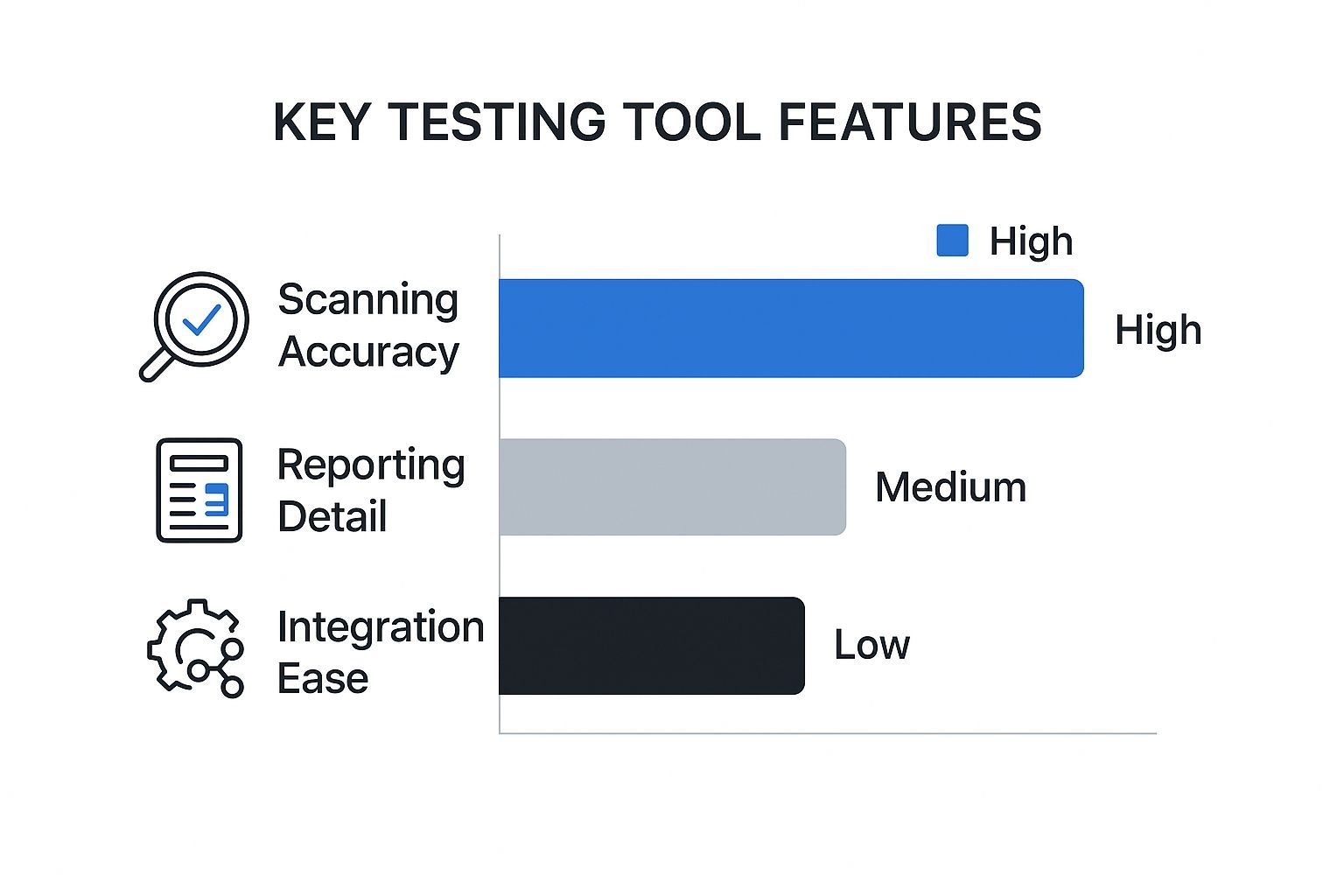
While everything plays a part, if the tool can't find the real problems, nothing else matters.
Okay, so the scanner found an issue. Now what? This is where most tools fall flat. A report that just lists error codes or vague WCAG violations is next to useless for a developer on a deadline.
The best Section 508 compliance testing software provides reports that are both detailed and immediately actionable. What does that look like?
Pinpoint Location: It shows the developer the exact line of code or specific element that needs attention. No guesswork.
Plain English Explanation: The report clearly explains why the issue is a barrier for someone with a disability.
Remediation Guidance: This is the game-changer. Great tools offer concrete code snippets and specific instructions on how to implement the fix.
A great accessibility report doesn't just create another ticket in the backlog. It gives developers the "what," the "why," and the "how," turning a potential roadblock into a quick and educational fix.
This transforms the tool from a simple fault-finder into a powerful teaching resource that helps your team get better at building accessible products over time. You can learn more about how different reporting features stack up in various automated accessibility testing tools to see what fits your team's needs.
Finally, the best software is the one your team will actually use. To truly succeed, accessibility can't be a last-minute checkpoint before launch; it has to be part of your team's daily rhythm. This is where seamless integration is non-negotiable.
Look for tools that connect directly into the platforms your team already lives in. Key integrations include:
CI/CD Pipelines: Automatically trigger accessibility scans whenever new code is committed, catching bugs long before they ever see the light of day.
Project Management Tools: Let the software create bug tickets directly in Jira, Asana, or Azure DevOps, complete with all the remediation details.
Browser Extensions: Empower designers and developers to run quick checks on components and pages as they’re being built.
Embedding these checks into your existing workflow shifts accessibility "to the left," making it a proactive and shared responsibility. It’s a move that not only saves a huge amount of time and money but also builds a stronger culture of inclusion from the ground up.
When you're evaluating different software options, it helps to have a clear checklist. This table breaks down what to look for in each of the three core feature areas we've discussed.
| Feature | Why It's Important | What to Look For |
|---|---|---|
| Scanning Accuracy | Prevents wasted time on false positives and ensures critical issues aren't missed. | A low false-positive rate, support for the latest WCAG standards (2.2), and the ability to scan dynamic content. |
| Actionable Reporting | Empowers developers to fix issues quickly and correctly without needing to be an expert. | Code-level highlighting, clear remediation advice, code snippets, and links to relevant WCAG documentation. |
| Workflow Integration | Makes accessibility a natural part of the development process, not a separate, painful step. | Plugins for CI/CD (Jenkins, GitHub Actions), project management tools (Jira), and browser extensions. |
Using this framework helps you cut through the marketing fluff and focus on the capabilities that will deliver real, measurable improvements to your product's accessibility.
Match the tool to your team and workflow. Developers value scanner accuracy and CI/CD integration; compliance teams need robust reporting and audit trails; agencies need to manage multiple sites. Weigh accuracy, remediation quality, ease of use, ongoing monitoring, and the ability to combine automated and manual testing.
Picking the right Section 508 compliance testing software isn't about finding the "best" tool on the market. It’s about finding the best tool for your team. Think of it like a toolbox: a carpenter, a plumber, and an electrician all need different tools to do their jobs well, even if they're working on the same house. The right software depends entirely on your team's skills, the size of your project, and your budget.
For a designer doing quick spot-checks, a simple, free browser extension might be all they need. But for a massive enterprise that has to keep a constant watch over dozens of applications, a full-fledged compliance platform is a much better fit. The goal is to find something that slides right into how your team already works, because the most powerful tool is the one that actually gets used.
Let's be realistic—a one-size-fits-all approach just doesn't work here. The needs of a small team managing a single WordPress site are worlds away from a Fortune 500 company juggling complex web apps and internal software. The key is choosing a solution that enhances your current workflow, not one that forces everyone to learn a whole new, complicated process.
First up, who is actually going to be using this software day-to-day? Are they developers who live and breathe code and feel right at home in a command-line interface? Or are they designers, project managers, and content creators who need clear, visual feedback to understand what needs fixing?
For Highly Technical Teams: Look for tools that offer deep integrations with developer environments. Think CI/CD pipeline hooks, detailed APIs, and specific code-level remediation advice. These teams want tools that fit seamlessly into their existing development lifecycle.
For Less Technical Teams: The priority here should be usability. You'll want software with intuitive dashboards, straightforward reports, and visual overlays that pinpoint problems right on the page. Browser extensions and tools with a simple graphical interface are often the perfect starting point, offering instant feedback without a steep learning curve.
Next, take stock of what you actually need to test. Are we talking about a simple 10-page marketing website? Or is it a massive e-commerce platform with dynamic content, user accounts, and intricate workflows? The size and complexity of your digital footprint will dramatically shape your decision.
For sprawling digital ecosystems, enterprise-level platforms are built to provide that bird's-eye view. They give you centralized dashboards, role-based access for different team members, and historical tracking to show progress over time. On the flip side, free browser plugins or standalone desktop apps are great for smaller projects or for teams just dipping their toes into accessibility testing. To get a better feel for the options, checking out a detailed automated testing tools comparison guide can help clarify which solutions are built for which scale.
Choosing the right tool is an exercise in self-awareness. It's about honestly assessing your team's capabilities and operational reality to find a solution that empowers them, rather than overwhelming them.
Finally, we have to talk about budget. It’s a real-world constraint that can’t be ignored. While free tools are fantastic for getting started, they often lack the robust reporting, dedicated support, and auditable trail that larger organizations need to prove ongoing compliance.
Think about your long-term vision for accessibility. If the goal is just to run a few occasional scans, free tools might be enough. But if you're serious about building a sustainable accessibility program, investing in a paid platform is a strategic move. It gives you the infrastructure to not only find problems but also to track fixes, manage workflows, and ultimately build a true culture of accessibility.
By carefully weighing these three factors—your team's expertise, your project's scale, and your budget—you can narrow down the options and find the Section 508 compliance testing software that will truly set your team up for success.
Software delivers the most value when it's woven into your process rather than run once before launch. Integrate scanning into your development pipeline to catch issues before code ships, schedule recurring scans to catch regressions as content changes, and route findings to the right owners so remediation actually happens.
A powerful tool sitting on a digital shelf doesn't help anyone. You've invested in Section 508 compliance testing software, but the real magic happens when you weave it into the fabric of your team's everyday habits. This is how you stop chasing bugs and start building a culture where accessibility is second nature.
This is about more than just running occasional scans; it’s about building a system. The goal is to embed these checks so deeply into your workflow that they become as routine as running security scans or performance tests. Let’s break down how to get it done.
Before you can map out a journey, you need to know your starting point. The very first thing to do is run a comprehensive, automated scan of your entire website or application with your new software. Think of this as your accessibility baseline—a complete snapshot of where you are right now.
This scan will almost certainly turn up a mix of issues, from minor warnings to critical problems that stop users in their tracks. Don't get overwhelmed. The trick is to use this data to build a prioritized backlog. Tackle the biggest blockers first, like keyboard traps or missing labels on your login and checkout pages.
The most effective (and cheapest) way to handle accessibility is to prevent problems from ever reaching your users. This idea is known as "shifting left"—addressing issues early in the development lifecycle, where they are far easier and faster to fix.
The best way to do this is to plug your Section 508 compliance testing software directly into your Continuous Integration/Continuous Deployment (CI/CD) pipeline.
Scan Every Code Commit: Set up your tools to automatically run an accessibility scan every time a developer pushes new code.
Fail the Build on Critical Errors: Create rules that stop code with severe accessibility violations from being merged. This makes compliance a non-negotiable part of your quality standards.
Give Developers Instant Feedback: Make sure the scan results show up right in the developer’s environment with clear, actionable advice on how to fix the problem.
This automated loop makes accessibility a shared, immediate responsibility, not just another task for the QA team to find later.
Integrating accessibility into the CI/CD pipeline transforms it from a final-stage inspection into an ongoing, collaborative practice. It’s the difference between renovating an entire house and simply making sure each brick is laid correctly from the start.
Once your baseline and automated scans are running, you'll have a constant flow of data. Now, what do you fix first? The reality is that not all accessibility issues are created equal. A minor technical violation on a page no one visits isn't as urgent as a major blocker on your main contact form.
Organize your fixes by weighing both the severity of the issue and its impact on your users. Always prioritize problems that break core user journeys. This approach guarantees your hard work provides the most value to the people actually using your product. To report these issues clearly, developers often need visual proof, which is why testers must know how to effectively take snapshots of a web page to show the full context.
At the end of the day, technology doesn't build an accessible culture—people do. Your software is a fantastic tool, but your team needs to understand the "why" behind what the tool is telling them. It's crucial to invest in training for everyone involved in making the product.
For Developers: Teach them common accessibility traps and how to write inclusive code from day one.
For Designers: Train them on accessible design fundamentals, like color contrast, focus indicators, and logical reading order.
For Content Creators: Show them the right way to write meaningful alt text and use headings correctly.
Beyond training, you need clear ownership. Assign specific accessibility duties to different roles and make it part of their job expectations. When everyone knows what their role is, accessibility stops being a checklist item and becomes a shared value that pushes your whole organization forward.
Automated tools are powerful but partial - they reliably catch only the code-detectable share of issues (roughly 30-50%). Many WCAG requirements hinge on context that only a person can judge: whether alt text is meaningful, whether the keyboard flow is logical, whether the screen reader experience makes sense. Combining accurate software with human expertise is the only path to genuine, defensible compliance.

Think of automated section 508 compliance testing software as your first line of defense. It's like having a tireless inspector who can scan thousands of lines of code in minutes, flagging all the clear-cut violations. But relying on automation alone is like using a spell-checker to edit a novel—it’ll catch the typos, but it has no idea if the story makes sense.
These tools are incredibly good at finding objective, rule-based errors. They excel where the answer is a simple "yes" or "no," giving you a strong, technical foundation for your accessibility work.
The catch is that automation completely lacks a human's ability to understand context, nuance, or empathy. Real accessibility is about usability, not just checking boxes, and for that, human expertise is absolutely essential.
Automated tools give you the speed and scale you need in today's fast-paced development cycles. They are masters at flagging quantitative problems that would take a person an eternity to find across an entire website.
Here's where they really come in handy:
Code Syntax and Structure: Spotting things like improperly nested headings, missing ARIA roles, or incorrect HTML elements.
Color Contrast Ratios: Instantly calculating whether text and background colors meet the strict WCAG standards.
Presence of Attributes: Checking that every image has an alt attribute or that all form fields have proper labels.
Basic Keyboard Navigation: Detecting some (but not all) keyboard traps or elements that shouldn't be focusable.
These automated checks can clear out a huge chunk of the foundational issues, letting your team fix the low-hanging fruit quickly.
While a tool can see an alt tag exists, it can’t tell you if the text is a jumbled mess or a genuinely helpful description. That's the critical difference, and it’s a gap only a human tester can fill. Manual testing goes beyond the code to evaluate the actual, lived user experience.
Automated tools can tell you if your website is technically compliant. Human experts can tell you if it's actually usable. You absolutely need both to create an experience that is truly inclusive.
Manual testing is the only way to assess the more subjective, but incredibly important, aspects of accessibility. This includes things like confirming the reading order is logical for someone using a screen reader or ensuring that navigating a complex checkout process is intuitive and doesn't become a frustrating dead end. Our guide on ADA compliance testing dives deeper into the hands-on methods used in these vital assessments.
In the end, the gold standard is a hybrid model. Let the section 508 compliance testing software handle the high-volume, black-and-white checks. This frees up your human experts to do what they do best: apply critical thinking, empathy, and real-world experience to make sure your digital front door is open to everyone.
No. Automated tools typically flag around 30-50% of code-detectable issues, but many requirements depend on context and human judgment. Pair software with manual expert testing.
Section 508 is the legal requirement (the "what") - a U.S. federal law. WCAG is the technical standard (the "how") that defines the criteria used to meet it.
Accurate automated scanning with few false positives, severity-ranked reporting, and actionable remediation guidance with code examples - plus workflow integration and monitoring.
U.S. federal agencies and, in practice, the vendors and contractors who do business with them. Many organizations also adopt it voluntarily as a benchmark.
Match it to your workflow: developers need accurate scanning and CI/CD integration; compliance teams need reporting and audit trails. Evaluate accuracy, remediation guidance, ease of use, monitoring, and automated-plus-manual coverage.
The right Section 508 compliance testing software makes accessibility measurable and manageable: it scans accurately, reports clearly, and guides remediation. Choose a tool that fits your workflow, integrate it into your process, and pair it with human expertise. That combination is how you move from a legal obligation to a genuinely accessible digital experience.
Ready to build a truly accessible digital experience? The WebAbility.io platform combines powerful automated scanning with the tools you need to manage and sustain compliance. Start your journey toward Section 508 compliance today.