Section 508 vs WCAG: Your 2026 Compliance Guide

Sidharth Nayyar
Section 508 is a U.S. federal law for federal agencies and their contractors, while WCAG is the global technical standard that explains how digital accessibility is built and tested. For federal ICT, Section 508 legally requires WCAG 2.0 Level AA, and Section 508 violations can carry fines of up to $55,000 for a first violation and $110,000 for subsequent violations.
If you're a compliance officer, agency lead, or delivery manager, you're probably dealing with a familiar problem. One stakeholder says the project needs to be "508 compliant." Another says the team should "meet WCAG." Procurement asks for a VPAT. Engineering asks which issues are blocking launch.
That confusion creates budget waste fast. Teams scope the wrong audit, buy tooling that doesn't match legal exposure, or treat accessibility as a documentation task instead of an operational workflow. The result isn't just slower remediation. It's unclear ownership, duplicate testing, and preventable risk.
The useful way to think about Section 508 vs WCAG is simple. Section 508 is the requirement. WCAG is the benchmark used to satisfy it. Once that relationship is clear, project planning gets easier. You can define which properties are in scope, what standard to test against, who signs off, and how to maintain compliance after launch.
A practical program doesn't separate these into two parallel workstreams. It builds one workflow that maps legal obligations, technical criteria, testing, reporting, and remediation into a single operating model. If you need a refresher on the technical standard itself, WebAbility.io's guide to WCAG gives a useful baseline before you map it to procurement and governance.
Introduction Clearing Up the Compliance Confusion
Organizations don't get stuck on accessibility because they disagree with the goal. They get stuck because the labels sound interchangeable when they aren't.
A federal project manager may ask for Section 508 compliance in the statement of work. The design and QA teams then build a checklist around WCAG. Procurement may still ask whether the product meets "508 requirements" for software, documents, and support materials. Everyone is talking about accessibility, but not always about the same layer of the work.
The operational distinction that matters
Use this rule internally:
- Section 508 is the legal obligation: It applies to U.S. federal agencies and contractors delivering covered ICT.
- WCAG is the technical yardstick: It defines the testable success criteria teams use to evaluate web content and related digital experiences.
- Compliance work happens through workflow: Legal, procurement, design, content, development, QA, and vendor management all need to align on the same benchmark.
Practical rule: If your organization has to satisfy Section 508, your delivery teams still need to work in WCAG terms. That's how accessibility gets designed, tested, fixed, and documented.
The mistake I see most often is treating accessibility as a policy statement at the top and an audit at the end. That doesn't work. By the time the audit lands, content authors have uploaded inaccessible PDFs, product teams have shipped custom components without keyboard support, and engineering is being asked to fix issues under deadline.
What works in practice
A cleaner approach starts with three decisions before any remediation begins:
- Define who is legally in scope.
- Define which standard the team will build against.
- Define how evidence of conformance will be collected.
That sounds basic, but it changes everything. Budget becomes easier to estimate. QA knows what to test. Vendors know what documentation to provide. Leadership gets a risk picture tied to actual deliverables instead of abstract accessibility promises.
The Origins and Purpose of Section 508 and WCAG
Section 508 and WCAG didn't start as competing standards. They came from different problems and different institutions.
Section 508 began as federal civil rights and procurement policy
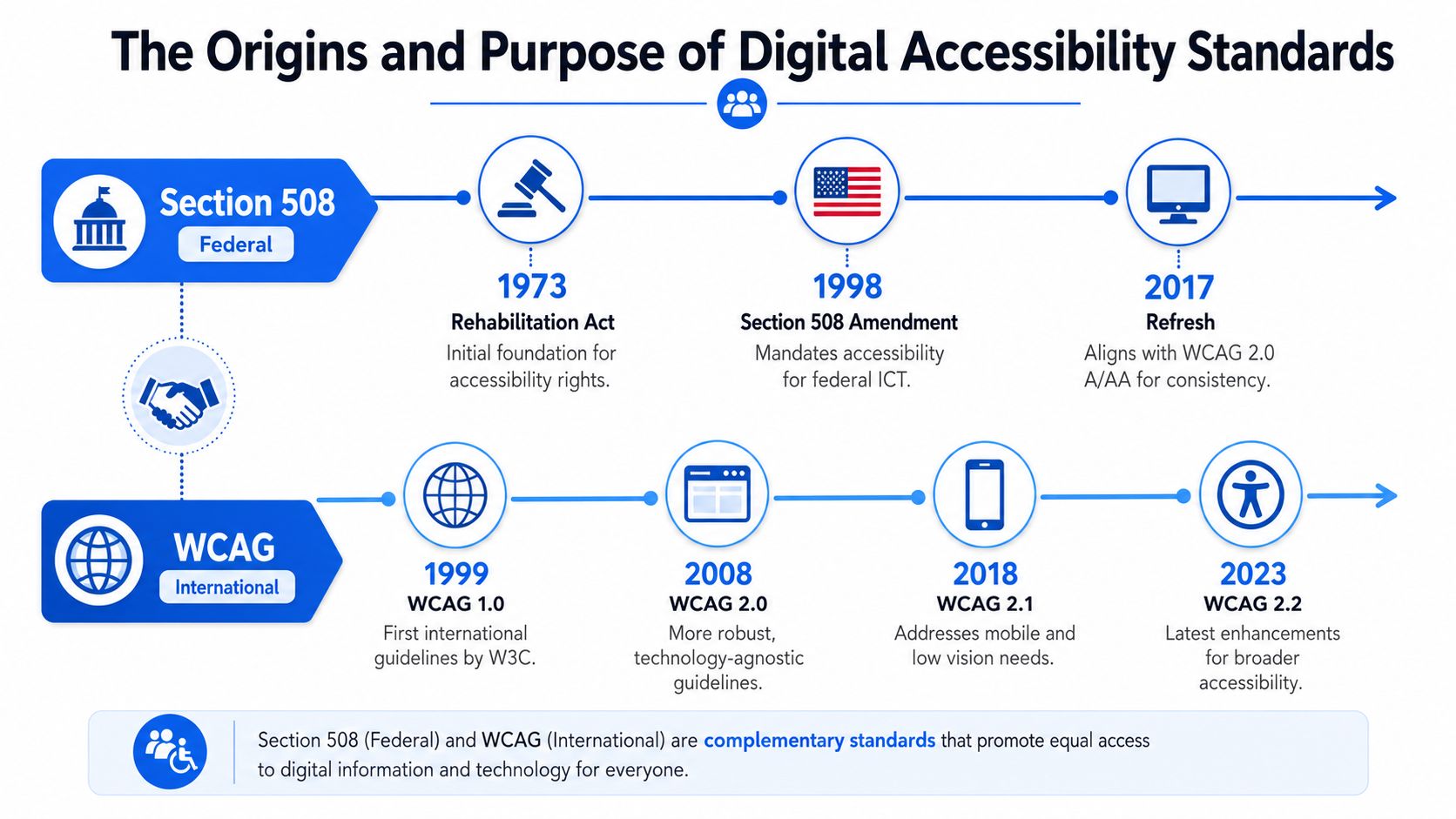
Section 508 originated from the Rehabilitation Act of 1973 and became federal law in the United States in 1986, with a 1998 amendment that explicitly required all federal agencies to make their electronic and information technology accessible. WCAG, by contrast, is a non-legislative guideline created by the World Wide Web Consortium in 1999, as explained in this overview of the Section 508 and WCAG timeline.
That history matters because it explains why Section 508 is broader than many web teams expect. It isn't only about webpages. It sits inside a federal compliance environment that includes procurement, software, electronic documents, hardware, and support obligations. That's why accessibility conversations in public sector work often involve contracting officers, legal teams, and procurement staff, not just designers and developers.
For agencies and vendors handling federal work, web 508 compliance is really an operating requirement. It influences buying decisions, acceptance criteria, and contract risk.
WCAG came from a different need
WCAG emerged from the web standards world. Its job was to create a shared technical method for making digital content accessible across technologies, teams, and countries.
That difference in purpose is why WCAG reads the way it does. It focuses on testable success criteria, not statutory language. It tells teams how to think about text alternatives, navigation, structure, contrast, forms, timing, and interaction patterns. It gives designers and developers something they can implement and QA teams something they can verify.
Section 508 tells federal organizations what obligation they have. WCAG tells delivery teams what accessible implementation looks like.
Why the origin story still affects current workflow
These separate origins still shape how work gets done today:
- Procurement teams think in legal scope: They ask whether a product satisfies federal requirements.
- Delivery teams think in technical criteria: They need success criteria, test cases, and remediation tickets.
- Leadership needs one reporting model: They don't want legal language in one document and technical findings in another with no bridge between them.
If you understand those different starting points, the "Section 508 vs WCAG" debate becomes less confusing. One governs accountability. The other governs execution.
How Section 508 and WCAG Work Together
The relationship became much clearer when federal standards were updated. Instead of maintaining a separate federal-only benchmark for many digital requirements, Section 508 adopted WCAG as the practical compliance path.
Section 508 vs WCAG at a glance
| Attribute | Section 508 | WCAG |
|---|---|---|
| Type | U.S. federal law | Global technical standard |
| Primary role | Creates legal accessibility obligations for federal ICT | Defines testable success criteria for accessibility |
| Who uses it day to day | Compliance officers, procurement, legal, federal program teams | Designers, developers, QA, auditors, content teams |
| Scope style | Regulatory and procurement-driven | Technical and implementation-driven |
| Benchmark for federal web accessibility | Relies on WCAG 2.0 Level AA | Provides the actual criteria teams test against |
| Geographic reach | U.S. federal environment | Used globally and referenced by many laws and policies |
| Best use in workflow | Contract language, policy, conformance expectations | Design reviews, engineering acceptance criteria, audits, remediation |
The refresh changed execution
In 2018, the U.S. Access Board formally updated Section 508 to directly adopt WCAG 2.0 Level AA as the mandatory accessibility standard for federal ICT, which means that meeting WCAG 2.0 Level AA, including 38 applicable Level A and AA success criteria, generally satisfies Section 508 compliance, as summarized in this explanation of the 2018 update.
That shift removed a lot of unnecessary translation work. Teams no longer had to ask whether they should follow a federal checklist or WCAG for core digital accessibility. For covered federal ICT, WCAG 2.0 AA became the compliance benchmark.
What that means for your workflow
Often, many organizations make the right legal decision but the wrong operational one.
They hear that Section 508 requires WCAG 2.0 AA and conclude they should only build to WCAG 2.0 AA. That may satisfy a narrow federal baseline, but it often creates rework later when the same systems also need to satisfy broader organizational policies, ADA-related expectations, or newer procurement language.
A better workflow usually looks like this:
- Compliance maps to law: Section 508 defines the binding federal obligation.
- Delivery maps to criteria: Product teams work from WCAG checkpoints and test cases.
- Governance maps the two together: Reporting should show legal coverage and technical conformance in the same artifact.
If your audit report doesn't help a compliance officer answer legal exposure and doesn't help a developer fix the issue, the report isn't doing enough.
The practical takeaway
You don't pick Section 508 or WCAG as if they're alternatives. For federal work, you use WCAG to achieve Section 508 compliance. The useful question isn't which one matters more. The useful question is whether your workflow makes that relationship visible to everyone involved.
Understanding Scope and Legal Applicability
Scope is where teams either simplify compliance or make it much harder than it needs to be.
Section 508 has a narrower legal trigger
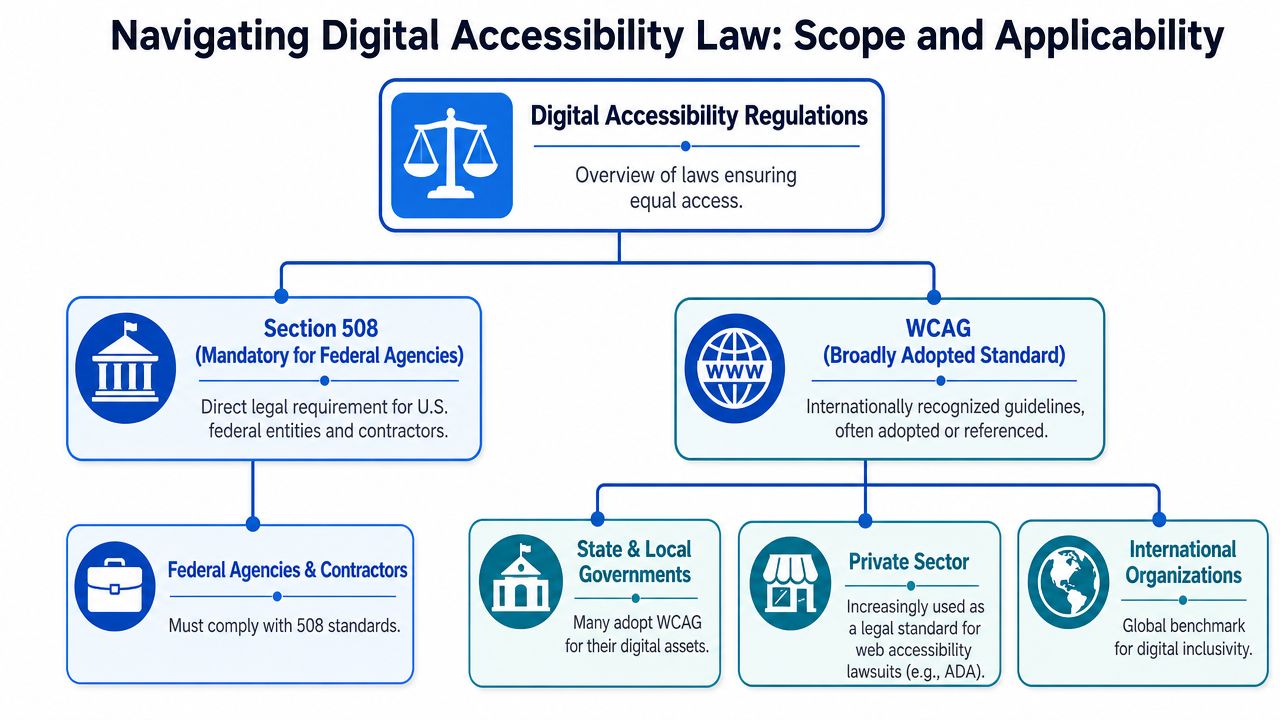
Section 508 of the Rehabilitation Act is a U.S. federal law requiring all federal agencies and their contractors to ensure ICT is accessible, whereas WCAG is a global technical standard developed by the W3C's Web Accessibility Initiative that provides the testable success criteria used to measure compliance and is referenced by laws worldwide, according to Vispero's summary of Section 508 and WCAG.
That means Section 508 usually becomes a direct obligation in a few common cases:
- Federal agency ownership: A federal department, office, or program operates the site, software, document set, or platform.
- Federal contracting: A vendor builds, licenses, maintains, or customizes ICT for a federal customer.
- Procurement review: Accessibility documentation becomes part of vendor evaluation and contract acceptance.
If you're supporting bids or vendor reviews, teams often pair accessibility review with Software for Government contracting tools so they can confirm agency fit, contract pathways, and procurement context before they scope remediation.
WCAG has much broader practical reach
WCAG doesn't become enforceable by itself in most situations. Its reach comes from adoption. Laws, policies, procurement rules, and litigation frameworks use it because it gives a shared technical benchmark.
That broader reach matters for organizations that assume Section 508 doesn't apply, so accessibility can wait. A private e-commerce company may not be under Section 508, but it still needs a defensible accessibility standard for its public digital experience. A university outside the federal procurement context still needs a benchmark for websites, course systems, documents, and media. That's where WCAG becomes the common operating standard.
For teams managing multiple obligations across public sector, education, and commercial properties, a broader web accessibility compliance program is usually more efficient than creating separate standards for each business unit.
A simple way to decide what applies
Use these examples:
| Organization type | Direct Section 508 obligation | Practical WCAG obligation |
|---|---|---|
| Federal agency website | Yes | Yes, as the technical benchmark |
| Vendor selling software to a federal agency | Yes | Yes, because that's how accessibility is evaluated |
| Private retail website | Not usually direct | Yes, typically as the benchmark used in accessibility disputes and compliance programs |
| Public institution outside the federal sphere | Depends on jurisdiction and funding | Often yes, through policy or other legal frameworks |
The key point is this. Section 508 is narrow in jurisdiction but high in consequence. WCAG is broad in use and often becomes the standard teams need even when Section 508 doesn't directly apply.
Enforcement Risk and Financial Consequences
Accessibility decisions get easier when teams stop treating them as abstract policy and start treating them as risk management.
Section 508 carries direct statutory exposure
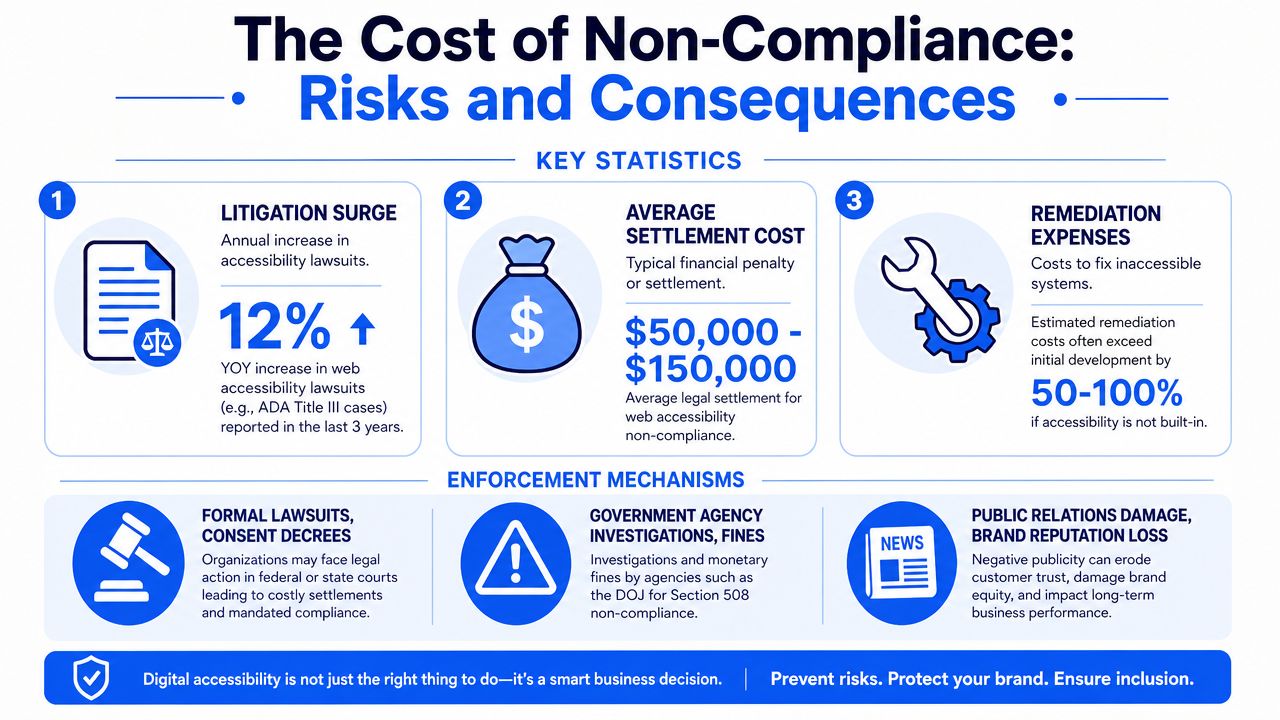
Non-compliance with Section 508 is enforced by the Department of Justice and can result in fines of up to $55,000 for the first violation and $110,000 for subsequent violations, plus loss of federal grants. By contrast, WCAG compliance is voluntary unless mandated, but failure to comply is the leading cause of ADA-related lawsuits, as noted in this comparison of WCAG and Section 508 enforcement.
For federal agencies and contractors, that changes budgeting decisions immediately. Accessibility isn't just a usability improvement line item. It's a compliance control with contract and funding consequences.
The cost isn't only the fine
The visible penalty gets attention, but the hidden costs often hurt more:
- Late remediation: Teams fix accessibility after release, when code, content, and PDFs are already distributed across systems.
- Procurement friction: Sales cycles slow down when a vendor can't provide credible accessibility evidence.
- Operational drag: Legal, PMO, engineering, and support teams spend time reconciling findings that should have been caught in design and QA.
- Funding and contract risk: Public sector organizations can't treat accessibility defects as cosmetic when grants or acceptance decisions are involved.
Compliance failures rarely stay inside one team. Procurement feels them, legal feels them, support feels them, and engineering gets the shortest timeline to repair them.
WCAG risk looks different but is still expensive
WCAG doesn't fine you on its own. The exposure comes when a law, policy, or plaintiff uses WCAG as the benchmark to evaluate whether your digital property is accessible.
That's why private organizations shouldn't read "WCAG is voluntary" and assume the practical risk is low. In real workflow terms, WCAG is often the document that determines what your experts test, what your outside counsel reviews, and what your remediation plan must address.
If your leadership team still sees accessibility as a one-time audit purchase, it's worth aligning them around the litigation and governance side using resources like this overview of website accessibility lawsuits.
What reduces risk fastest
Not every issue carries the same urgency. In active programs, I recommend triaging in this order:
- Critical user blockers: Keyboard traps, unlabeled form fields, inaccessible navigation, broken dialog behavior.
- High-exposure templates: Homepage, login, checkout, account flows, application forms, top-traffic content types.
- Recurring content systems: Design system components, CMS modules, document templates, media workflows.
- Evidence and governance: Decision logs, audit records, remediation ownership, acceptance criteria.
That order works because it reduces user impact and legal exposure at the same time.
Building a Unified Compliance Workflow for Both
The best accessibility programs don't run a "Section 508 track" and a separate "WCAG track." They run one production workflow with one standard operating model.
Aim above the minimum when you can
One of the most useful planning decisions is to separate the binding baseline from the internal build standard.
Section 508 mandates WCAG 2.0 Level AA as the official benchmark for U.S. federal agencies, while WCAG itself continues to evolve. WCAG 2.1 and 2.2 introduce new success criteria beyond the 508 baseline, and while WCAG 2.0 AA satisfies Section 508, a practical approach for federal and public sector entities is to aim for WCAG 2.1 or 2.2 AA so teams can satisfy Section 508 and broader accessibility obligations together, as explained in this comparison of Section 508, WCAG, and related standards.
That doesn't mean your contract suddenly changes. It means your internal delivery standard can be stronger than the narrowest legal minimum. In practice, that reduces future rework, especially for shared platforms, design systems, and products that serve both public and commercial audiences.
A workflow that actually scales
Here is the model that tends to hold up across agencies, universities, SaaS teams, and digital service firms:
Start with scoping
Identify which websites, apps, documents, templates, and third-party integrations are in scope. Teams often miss PDFs, embedded tools, and account workflows because they scope by domain instead of user journey.
Run automated scanning early
Automated tools catch common issues fast. They are useful for baseline inventory, regression monitoring, and template-level prioritization. They are not a substitute for expert review.
Add manual audit coverage
Screen reader behavior, keyboard flow, focus management, form handling, dynamic UI states, and document usability need human testing. If your program skips this, you'll miss the issues most likely to block users.
Remediate at the system level
Fix patterns, not just pages. Component libraries, CMS modules, and document templates create recurring defects or recurring gains.
Track evidence continuously
Accessibility work needs audit trails, issue ownership, status tracking, and executive summaries, making governance platforms and broader modern compliance capabilities useful alongside accessibility-specific tooling.
Build your process so the same evidence can answer three questions at once: what is broken, who owns the fix, and what risk remains.
Where platforms fit
For teams managing ongoing accessibility operations, one option is WebAbility.io, which provides automated scanning, real-time monitoring, compliance scoring, historical reporting, dashboard-based management, and user-facing accessibility features while remediation is underway. That kind of setup helps when multiple departments need visibility into status without turning every release into a separate audit project.
The key point isn't the product name. It's the operating model. A workable accessibility program needs:
- A repeatable intake process: New pages, apps, and document sets can't enter production without accessibility checks.
- Role-based accountability: Designers, developers, content teams, QA, and compliance each need defined ownership.
- Monitoring after launch: Accessibility can regress whenever templates, plugins, or content change.
- User support options: Immediate user-facing assistance can coexist with source-code remediation while the long-term fixes are being completed.
What doesn't work
A few patterns fail repeatedly:
- Audit-only compliance: The report exists, but nobody owns remediation.
- Developer-only ownership: Content, procurement, and document workflows remain untouched.
- One-and-done fixes: The launch passes, then the next CMS update reintroduces problems.
- Minimum-standard thinking: Teams build only to the narrowest stated requirement and create rework later.
Unified compliance works when legal, technical, and operational views are tied together in one system.
Frequently Asked Questions on Section 508 and WCAG
What if Section 508 compliance is considered an undue burden
This is one of the least understood parts of federal accessibility compliance. Section508.gov states agencies must provide "alternative means" to access data when conformance is an undue burden or ICT is not commercially available, but the process for documenting that exception and ensuring the alternative is functionally equivalent is complex, as explained in Section 508's exceptions guidance.
The practical takeaway is that "undue burden" is not a free pass. Teams need documentation, decision-making records, and a realistic alternative access method that lets users obtain the same information or complete the same task.
Should federal teams target WCAG 2.1 AA or WCAG 2.2 AA now
There is still real market confusion here. Content in the space often doesn't clearly explain whether federal procurement should stop at the current Section 508 reference point or move to a newer WCAG version for future-proofing. The safer operational choice is usually to build to the newer version your organization can sustain, especially for long-lived platforms and shared components, while still documenting the legally binding baseline in contracts and reporting.
Does WCAG conformance guarantee zero lawsuit risk
No. WCAG is the technical benchmark, not a blanket legal shield. It gives organizations a strong structure for auditing, remediation, and defense, but legal risk also depends on scope, maintenance, user complaints, third-party content, document accessibility, and how current your conformance evidence is.
The strongest position is not "we passed a scan." It's "we run an active accessibility program with testing, remediation records, and governance."
What's the simplest rule to remember
If you're in the federal space, treat Section 508 as the legal requirement and WCAG as the execution standard. If you're outside it, WCAG is still usually the right operational benchmark because it gives your teams one common language for design, development, QA, and compliance.
If you're trying to turn accessibility from a one-off audit into a working process, WebAbility.io is worth evaluating as part of that stack. It can help centralize scanning, monitoring, reporting, and remediation visibility so your team can manage WCAG and Section 508 obligations in one place instead of chasing them across disconnected spreadsheets, audits, and release cycles.
Quick Questions
Tap to ask AI about this article