California Unruh Act a Guide for Websites in 2026

Sidharth Nayyar

Sidharth Nayyar
Ready to make your website accessible? Engage with our team or start a free trial today.
Tap to ask AI about this article
The California Unruh Civil Rights Act can make website accessibility a direct legal and business issue for companies that serve California residents. For digital accessibility claims, exposure can include at least $4,000 per offense, which is why many businesses treat Unruh compliance as a core part of risk management, not a side project.
A lot of owners still think of accessibility as a federal ADA issue only. In practice, California changes the equation. The combination of a broad civil rights statute, private enforcement, and website-related claims means the California Unruh Act matters to retailers, SaaS companies, healthcare groups, schools, agencies, and service businesses far beyond state lines.
California generates a disproportionate share of accessibility litigation, and that reality affects far more than companies with offices in the state. If a California resident can browse your site, create an account, book a service, or buy a product, your digital experience can become part of your legal risk profile.
For digital businesses, the Unruh Act changes the conversation inside the company. Website accessibility stops being a design preference or a backlog item and becomes an operational issue tied to revenue, support costs, and exposure to claims. The same barriers that frustrate disabled users also block conversions, increase abandonment, and create preventable complaints.
The pattern is usually practical, not theoretical. A customer cannot complete checkout with a keyboard. A patient cannot submit an intake form. A job applicant cannot finish an application because a form field is unlabeled for screen readers. Those failures can trigger lost business first and legal scrutiny after.
Online-only companies and brick-and-mortar businesses do not face identical risk, and that distinction matters. An ecommerce brand, SaaS platform, or telehealth provider may rely on its website or app as the primary point of sale or service delivery, so accessibility defects can affect nearly every customer interaction. A retailer, restaurant, bank, or clinic with physical locations often has website risk too, but the analysis may also involve how the digital experience connects to in-person services like booking, store information, menus, directions, account access, or payment.
That difference should shape the compliance plan. Online-first businesses usually need tighter controls around product design, sprint QA, and release testing because the site is the business. Physical businesses often need to address both sides at once: the public-facing website and the customer journey that continues in store, at the office, or at the facility.
The trade-off is straightforward. Address accessibility early and teams can build requirements into templates, components, vendor selection, and QA. Wait until a complaint arrives and the work becomes more expensive, more rushed, and harder to prioritize against other production issues.
I usually tell owners to judge accessibility the same way they judge checkout errors or broken login flows. If a disabled user cannot complete a core task, the issue already affects the business.
That is also why securing buy-in for accessibility initiatives matters. Internal support tends to come faster when leadership understands that accessible digital experiences reduce avoidable risk while opening the business to a wider customer base.
California businesses that serve the public face one of the country's strongest anti-discrimination laws. The California Unruh Civil Rights Act, codified at Civil Code Section 51, requires full and equal accommodations, advantages, facilities, privileges, or services in all business establishments of every kind.
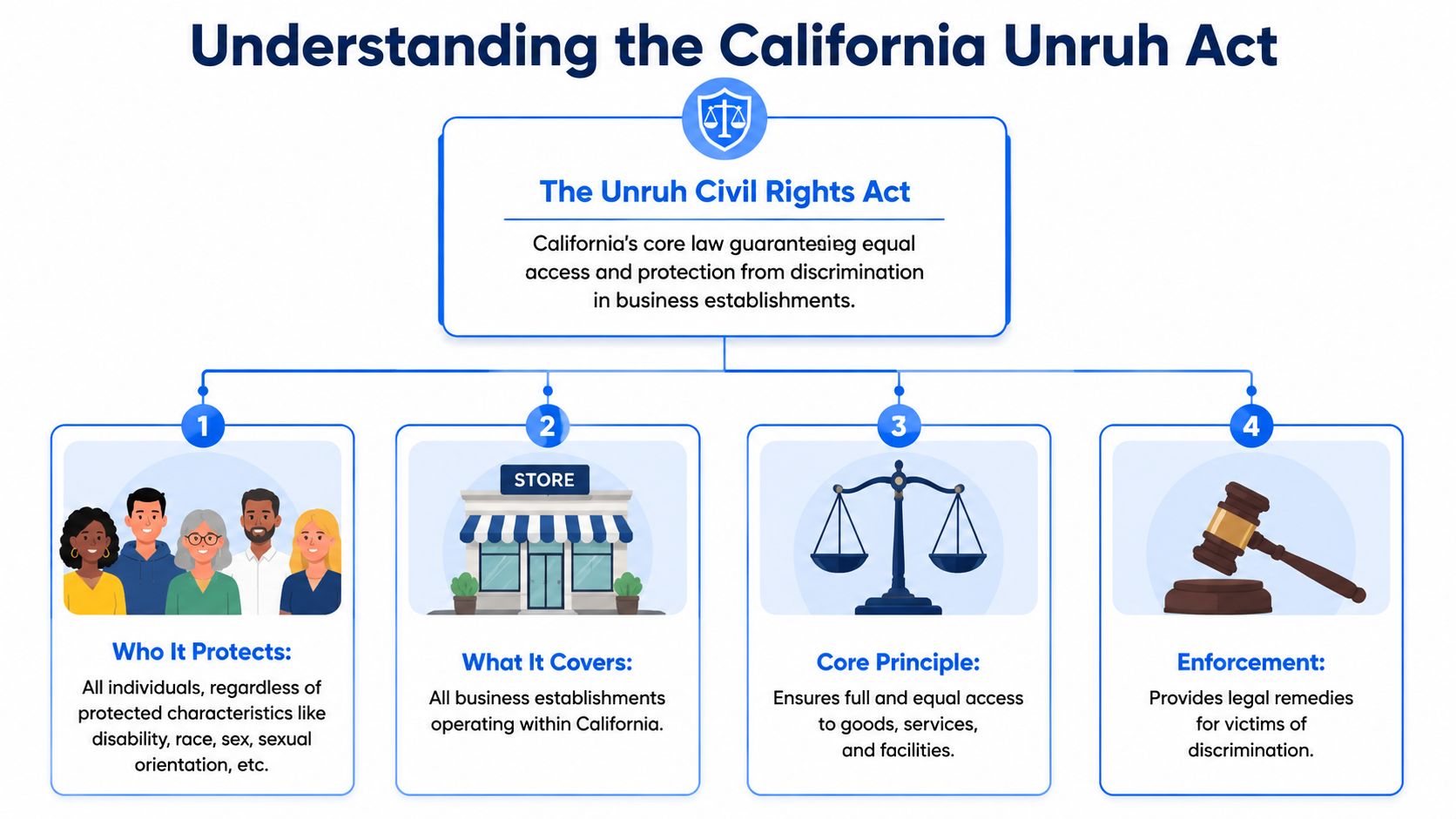
The Act prohibits discrimination against customers based on protected characteristics that include disability, race, religion, national origin, sex, sexual orientation, and other recognized categories under California law.
For business owners, the practical point is simple. This is a civil rights statute, not a narrow rule about ramps, parking spaces, or a single website feature. If a customer is blocked from using your services because of disability-related barriers, the issue can move from a UX defect to a legal claim.
California courts have interpreted "business establishment" broadly. The term reaches well beyond stores, restaurants, hotels, and medical offices. It can also cover membership businesses, service providers, and other commercial operations that offer goods or services to the public.
That matters because the risk profile is different depending on how your business operates.
A brick-and-mortar business usually has two exposure points. The physical location and the digital tools customers use before they arrive, such as booking, account access, menus, forms, or payments. An online-only business has a different problem. The website or app is the storefront, the sales counter, and the customer service desk at the same time.
The Unruh Act was written long before ecommerce became standard, but the core obligation is broad enough to reach modern customer interactions. In practice, website accessibility disputes often focus on whether disabled users can complete the same core tasks as everyone else.
I usually tell clients to stop treating the site as marketing collateral if it accepts payments, books appointments, delivers account access, or gates essential information. At that point, it functions as part of the business itself.
This is also why teams that already struggle with common website accessibility challenges should treat Unruh compliance as an operational issue, not just a legal one.
The Act does not give you a web build checklist. Businesses usually rely on accepted accessibility standards and testing practices to show they are providing equal access online. For product teams, that means reviewing templates, components, forms, PDFs, media, and transaction flows against recognized guidance such as the WCAG principles for enterprise platforms.
The trade-off is real. A lightweight brochure site may need periodic audits and content controls. A retailer, bank, university, or healthcare group usually needs design standards, release testing, vendor requirements, and a process for fixing defects quickly.
That distinction gets missed often. Under the Unruh Act, an online-only company can face concentrated website risk because nearly every customer interaction happens digitally. A business with physical locations may face broader operational risk because barriers can appear both online and in person.
In California, a website can create Unruh Act exposure the moment a customer cannot complete a core task because of an accessibility barrier. For digital businesses, that usually means the legal question is not whether the website matters. It is whether the site gives disabled users equal access to the same goods, services, and benefits offered to everyone else.
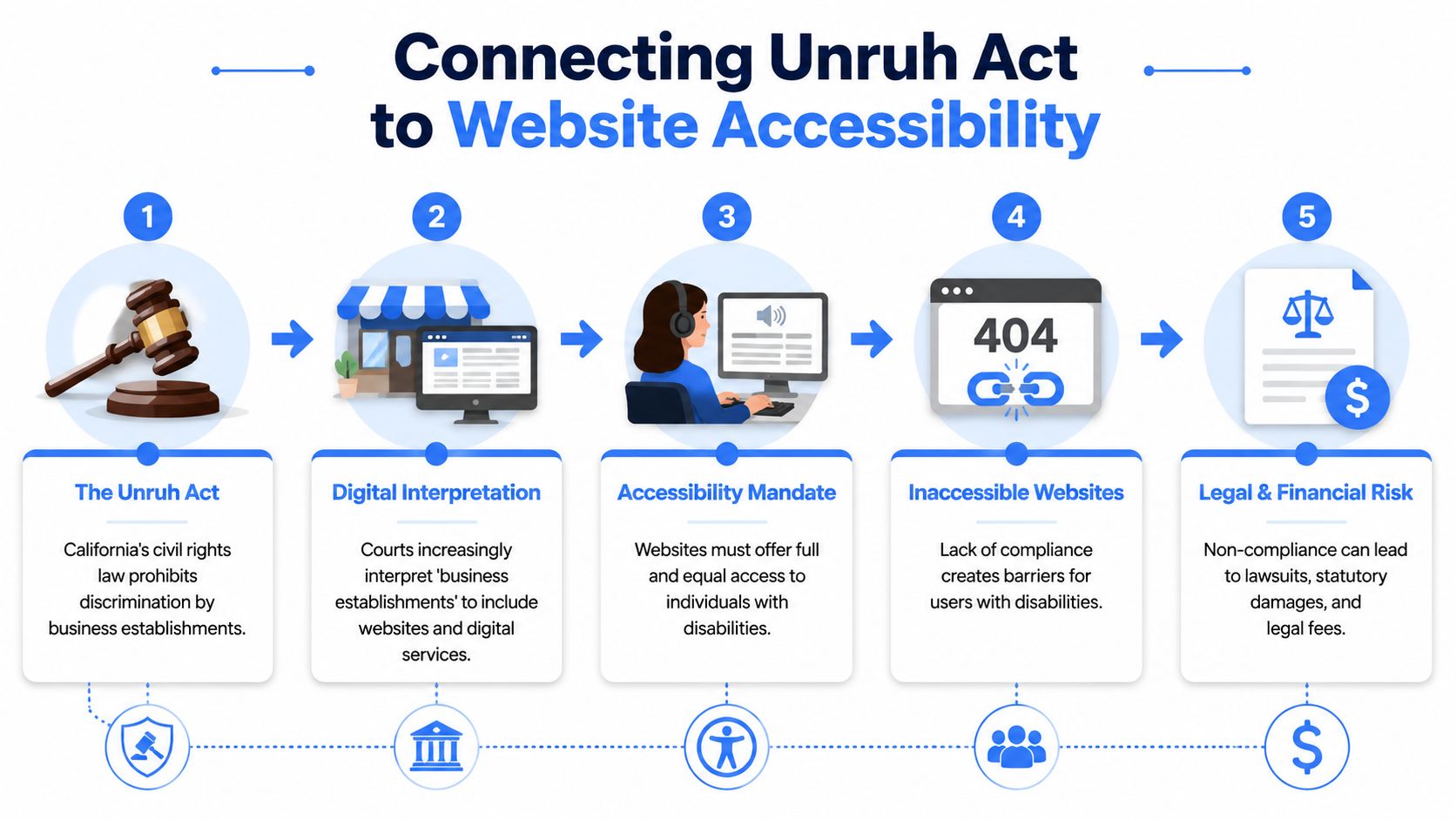
In practice, Unruh Act website claims often track alleged ADA accessibility failures. That matters because a website problem in California can create state-law exposure, not just a demand to fix the site.
For owners, the practical takeaway is simple. If a customer cannot search products, submit a form, book an appointment, use account tools, or complete checkout with a keyboard or screen reader, the issue can move from user frustration to legal risk quickly.
The highest-risk pages are usually the ones tied to revenue or service delivery. Product filters, scheduling tools, intake forms, payment pages, account dashboards, PDFs, and media players come up often because they block meaningful use, not just casual browsing.
This is the nuance many guides miss. The Unruh Act risk profile is not identical for every company.
A business with physical locations often sees website claims framed around the site's connection to stores, clinics, restaurants, hotels, or other in-person operations. That connection, often called nexus, can make the claim easier to present because the website supports access to a physical place.
Online-only businesses have a different problem. They may have less room to argue that the website is secondary when the website is the business. If every sale, signup, support request, or member interaction happens online, barriers on the site affect nearly every customer relationship and can concentrate risk in one channel.
A better way to assess exposure is to ask two questions. Does the website function as a primary delivery channel for goods or services? And can a disabled customer complete the same key tasks as any other customer without extra friction?
Compliance work usually fails when teams treat it as a plugin purchase or a one-time cleanup. Websites stay accessible when design, engineering, content, QA, and vendor management all follow the same standard.
For implementation, WCAG remains the benchmark teams use to define accessible behavior across components and user flows. If your team needs a practical baseline, these WCAG principles for enterprise platforms give a useful summary of what to build and test for.
Start with the journeys that make or break access. In audits, I usually prioritize the paths tied to money, account access, and time-sensitive service because those are the pages plaintiffs examine and customers rely on most.
What works:
What creates avoidable exposure:
If you need a starting point for triage, review the common website accessibility challenges that repeatedly create both user friction and legal scrutiny. That approach helps teams fix the barriers most likely to affect customers, revenue, and claim risk first.
A single accessibility claim under the Unruh Act can turn a website issue into a real budget issue. California allows statutory damages of at least $4,000, and fee exposure often matters just as much in practice.

Under California Civil Code section 52, a successful Unruh Act plaintiff can seek actual damages, statutory minimum damages, and attorney's fees. That changes the business calculation fast. Accessibility stops being a deferred UX project and becomes a legal, operational, and revenue risk.
For digital businesses, the hard part is not just the headline number. It is the uncertainty around how alleged violations are framed, how long barriers remained in place, which user journeys were blocked, and how much documentation the company has to show good-faith remediation.
That risk profile differs by business model.
A company with stores, clinics, restaurants, or other public-facing locations often faces a more straightforward claim path if its website blocks reservations, ordering, account access, or location-specific services. An online-only business may have more room to argue scope, but that does not make the claim cheap to defend. The legal theory may be less settled, yet the demand letter, internal scramble, and remediation costs still arrive on the same timeline.
I rarely see the main pain point as the damages figure alone. The larger cost usually comes from compressed response deadlines, outside counsel fees, developer rework, QA retesting, executive involvement, and the need to document fixes while the site stays live.
A weak paper trail makes that worse.
If a business cannot show audits, remediation logs, vendor accountability, and retesting results, settlement posture usually gets weaker. By contrast, teams that can show a pattern of testing and repair often have more options in early negotiations, even if the site still has issues to fix.
Use this as an operator's checklist, not a legal memo:
| Risk area | What to verify internally |
|---|---|
| Damages exposure | Which customer tasks could support a claim that access was denied or materially limited? |
| Business model risk | Is the site tied to physical locations, or is the business online-only with a narrower but still active risk profile? |
| Documentation | Do you have dated audit findings, remediation tickets, and retest records? |
| Vendor control | Who owns accessibility for booking tools, payment flows, chat widgets, and other third-party components? |
| Response readiness | Can leadership produce a clear timeline of what was identified, fixed, and still in progress? |
This review also helps with budgeting. If you want a benchmark for how companies frame settlement exposure, compare your situation against these typical disability discrimination payouts, then weigh that against the cost of proactive testing and remediation.
The practical takeaway is simple. Online-only companies and brick-and-mortar businesses do not face identical Unruh Act risk, but both benefit from the same discipline: fix blocked user journeys early, keep records, and treat accessibility as part of release governance instead of post-complaint cleanup.
The most important nuance in current California Unruh Act website analysis is this: online-only risk isn't identical to brick-and-mortar-linked risk.
A lot of articles flatten the issue and suggest that any website available to Californians is covered the same way. That's not a safe assumption. Independent guidance notes that a 2022 California Court of Appeal decision limited that view for online-only businesses, and the issue could still shift if the California Supreme Court takes it up (AudioEye on the Unruh Act and web accessibility).
If your website supports a physical location or public-facing operation, the legal path is generally easier to understand. A restaurant site that handles reservations, a retailer site tied to stores, or a medical group portal connected to clinics fits the familiar nexus model.
Online-only companies sit in a less settled position. That doesn't mean no risk. It means the arguments are more contested, and counsel has more room to debate scope.
| Argument For | Plaintiff's Position (Claiming a Violation) | Defendant's Position (Mounting a Defense) |
|---|---|---|
| Website as a business establishment | The website itself delivers goods or services to the public and should provide equal access. | The statute should not be stretched beyond the limits recognized by current case law. |
| Connection to public commerce | The company serves California residents and benefits from doing business in the state. | Serving California customers online doesn't automatically create Unruh liability for an online-only operation. |
| Physical nexus | The site is connected to stores, offices, or service locations used by the public. | If no meaningful nexus exists, coverage may be narrower. |
| Equal access failure | Accessibility barriers denied full and equal access to products, services, or information. | The alleged barriers may not have denied access in the way claimed, or may already have been remediated. |
Experienced legal and accessibility teams usually make better decisions than reactive ones. They don't ask only, "Can we win the legal argument?" They ask, "What risk profile are we operating under, and what evidence would we want if challenged?"
For brick-and-mortar-linked businesses, the answer is usually obvious. Invest early, document consistently, and don't test the edge of the law.
For online-only businesses, the uncertainty isn't a reason to do nothing. It's a reason to avoid building a fragile position. If the law shifts, companies with no accessibility program will have no factual story to tell except delay.
The smartest posture is rarely "we think we're outside scope." It's "we've been reducing barriers and can prove it."
A defensible Unruh Act position starts with records. If a demand letter arrives, counsel will want to see what you tested, which barriers you found, who owned the fixes, when retesting happened, and whether accessibility is built into normal release work. That paper trail matters for both risk and remedy.
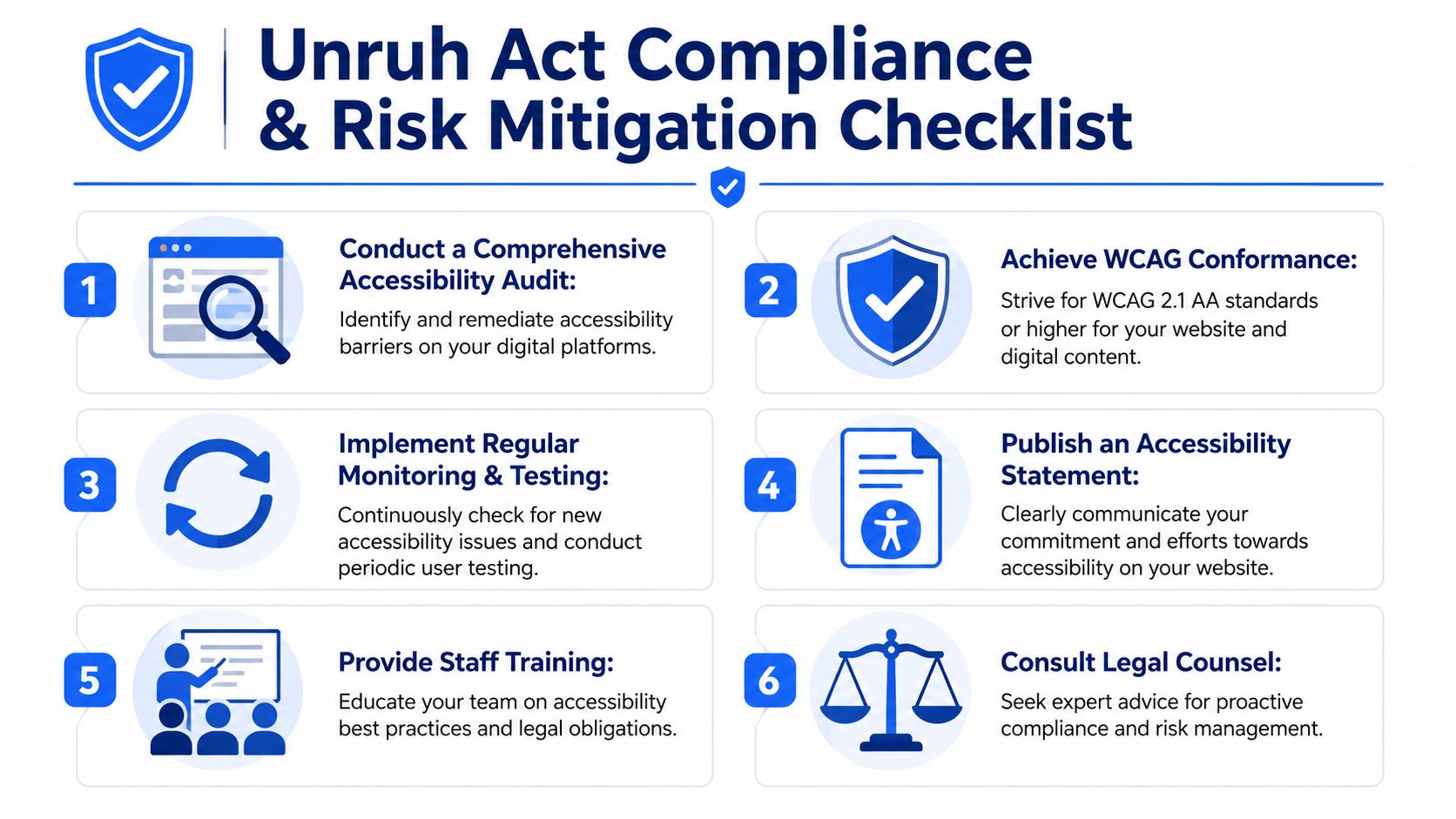
A homepage scan does not tell you much about legal exposure. Claims usually grow out of blocked tasks such as browsing products, scheduling, completing intake forms, checking out, logging in, or contacting support. Review the paths that matter to revenue and service delivery.
The checklist below works differently for different business models. A retailer, clinic, bank, restaurant, or service business with California locations should treat web accessibility as part of public-facing access. An online-only company still benefits from the same discipline, but should pay extra attention to documenting scope, known issues, and remediation progress because the legal arguments can be more fact-specific.
Run a structured accessibility audit
Review templates, reusable components, core user journeys, PDFs, and embedded tools. Include manual testing, keyboard testing, and screen reader checks.
Prioritize barriers by user and business impact
Fix issues that block purchases, account access, booking, applications, consent flows, and customer support before lower-friction defects.
Set a written remediation timeline
Assign owners, deadlines, and retest dates. If work stalls, the record should show why and when the issue is scheduled.
Publish an accessibility statement
Provide a contact method for reporting barriers. That gives users a direct path to raise issues before they turn into legal claims.
Retest after fixes
Code changes are not proof on their own. Verification under real use conditions is what closes the loop.
Use independent review where the risk justifies it
Outside testing can help validate scope, challenge internal assumptions, and give legal teams better facts if a dispute develops.
One-time cleanup projects rarely hold. Sites change every week. New content, redesigns, third-party widgets, and rushed releases can reintroduce the same barriers you just fixed.
That is why mature programs assign responsibility across teams:
This operational piece is where brick-and-mortar businesses often have more obvious exposure, because inaccessible online scheduling, ordering, or location information can affect access to a physical service. Online-only businesses still face business risk even where legal coverage is less settled. Poor accessibility blocks conversions, creates support costs, and limits reach.
For regulated sectors, accessibility often overlaps with intake, consent, privacy notices, and time-sensitive communications. That makes process discipline even more important. Guides like 925 studios on healthtech accessibility show how accessibility work fits inside broader compliance and product decisions when trust and clarity matter.
Automated tools help teams catch recurring issues, monitor regressions, and create a starting record of what changed over time. They do not replace manual review or internal ownership.
A practical approach is to use an accessibility checker for an initial baseline, then route confirmed issues into the same workflow you use for other product defects. That keeps accessibility visible, assigned, and retested instead of stranded in a separate report.
A steady program usually includes regular scanning, issue tracking, policy visibility, training by role, and periodic manual review of high-risk flows. Those habits improve user experience and give the business stronger facts if accessibility is challenged.
The California Unruh Act isn't a reason to panic. It's a reason to stop treating accessibility as optional maintenance.
The businesses that handle this well usually follow a simple pattern. They get a baseline, fix the highest-friction barriers, document progress, and keep monitoring. That approach improves usability for customers while giving legal counsel better facts to work with if a claim appears.
If you're deciding what to do next, start with resources that help you move from uncertainty to evidence:
If you run ecommerce on Shopify, it's also worth reviewing practical guidance on how to improve your Shopify store accessibility. Platform convenience doesn't remove accessibility responsibility, especially once apps, themes, and custom sections enter the picture.
Good progress isn't a claim of perfection. It's a visible pattern of diligence:
| Focus | Useful outcome |
|---|---|
| Testing | You know where barriers exist |
| Remediation | High-impact defects are being fixed on a schedule |
| Documentation | Your team can show what changed and when |
| Monitoring | New releases don't quietly undo old fixes |
If your legal, marketing, and product teams can all answer the same question, "What have we tested, fixed, and verified?" you're already in a stronger position than a company relying on assumptions.
Web accessibility is easier to manage when it becomes part of your normal product workflow. WebAbility.io gives teams a practical way to scan sites, monitor issues, support users with accessibility features, and maintain reporting records that help with both usability and compliance efforts.