Web Accessibility Lawsuits: Costs, Risks, and How to Avoid One (2026)

Sidharth Nayyar
Web Accessibility Lawsuits: What Triggers Them and How to Avoid One
TL;DR: Web accessibility lawsuits, based on the Americans with Disabilities Act (ADA), are rising sharply. Courts treat websites as "public accommodations," making them subject to accessibility rules. The unofficial standard for compliance is the Web Content Accessibility Guidelines (WCAG) 2.1 Level AA. Lawsuits often target common, fixable issues like missing image descriptions, poor color contrast, and lack of keyboard navigation. The best defense is proactive: conduct a professional audit, publish an accessibility statement, and train your team. Quick-fix widgets are not a reliable solution.
Let's be blunt: if your website isn't accessible to people with disabilities, you're at risk of being sued. A web accessibility lawsuit is exactly what it sounds like, a legal challenge filed because a person with a disability can't use your website or mobile app.
These lawsuits usually point to the Americans with Disabilities Act (ADA), and they're not just a minor issue. We're talking thousands of cases filed every single year. While e-commerce and retail sites are hit the hardest, the truth is that any business with a website is a potential target.
Worried about your exposure?Scan your site free to see the exact issues a plaintiff's firm would flag, no signup. See what these lawsuits typically cost, or get protected with our ADA compliance services.
Your Essential Guide to Web Accessibility Lawsuits
For a long time, business owners treated their websites as separate from their physical locations. That thinking is now dangerously outdated. A web accessibility lawsuit gets filed when someone with a disability—like a person who is blind and uses a screen reader, or someone with a motor impairment who can't use a mouse—runs into a digital wall on your site.
Think of it this way: your website is your digital front door. A physical store is required by law to have a wheelchair ramp for entry. In the same way, your website needs its own "digital ramps" to allow people using assistive technologies to get in and navigate effectively.
Key Aspects of Web Accessibility Lawsuits at a Glance
To get a clearer picture of what these lawsuits involve, it helps to break down the key components. The table below offers a quick summary of the legal basis, the people involved, and why it's a critical issue for any business.
| Aspect | Description |
|---|---|
| Legal Basis | Primarily based on Title III of the Americans with Disabilities Act (ADA), which prohibits discrimination against individuals with disabilities in "places of public accommodation." |
| Who Files Lawsuits? | Lawsuits are typically initiated by individuals with disabilities or by advocacy groups representing them. |
| Common Targets | E-commerce, retail, healthcare, hospitality, and financial services are frequently targeted due to their public-facing nature and complex websites. |
| Primary Issues | Common complaints include websites being incompatible with screen readers, lacking keyboard navigation, missing alt text for images, and videos without captions. |
| Business Impact | The consequences range from expensive legal fees and settlements to brand damage and the forced redesign of the company's website. |
This table lays out the core elements, but the real story is in how these factors play out for businesses that find themselves on the receiving end of a demand letter.
Why This is a Big Deal Right Now
Simply hoping you'll fly under the radar is no longer a viable strategy. The legal precedent is getting stronger every year. Courts have repeatedly affirmed that commercial websites are considered "public accommodations" under the ADA, which has kicked the door wide open for a surge in litigation.
Getting a handle on this issue is your first and best line of defense. In this guide, we're going to walk you through everything you need to know:
The laws that form the backbone of these lawsuits.
The landmark court cases that have defined today's rules.
The most common website mistakes that invite legal trouble.
Practical steps you can take to protect your business.
By understanding the reality of web accessibility lawsuits, you can do more than just avoid a legal headache. You can build a better, more inclusive website that serves every single one of your customers.
Why Are Digital Accessibility Lawsuits on the Rise?
It’s not just your imagination—web accessibility lawsuits are piling up faster than ever. This isn't a random fluke; it's the direct result of a few powerful shifts in how we live, how the law sees the internet, and how a specialized legal industry operates.
Think of it this way: our lives have fundamentally moved online. At the same time, the law has caught up, now treating websites like physical public spaces. This created a perfect storm, turning inaccessible websites from a simple inconvenience into a major legal risk for businesses.

Your Website Is Now Your Front Door
Your website isn't just a brochure anymore; it’s your main storefront. The Americans with Disabilities Act (ADA) has long required physical stores to have things like wheelchair ramps. For years, nobody was quite sure if this 1990 law applied to the digital world.
That ambiguity is gone. Courts have repeatedly affirmed that commercial websites are considered “places of public accommodation.” This legal interpretation is the single biggest driver behind the explosion in litigation.
This shift means your website is no longer just a marketing tool. It’s a legally regulated space. Ignoring accessibility is like telling a customer in a wheelchair they can't enter your building—a clear violation that invites legal action.
When your website has barriers—like images a screen reader can't describe, videos without captions, or navigation that requires a mouse—you’ve essentially locked the door on a whole group of potential customers.
The Emerging Business of Accessibility Lawsuits
Another key piece of the puzzle is the rise of a highly efficient legal niche focused solely on digital accessibility. A small handful of law firms are behind the vast majority of these cases.
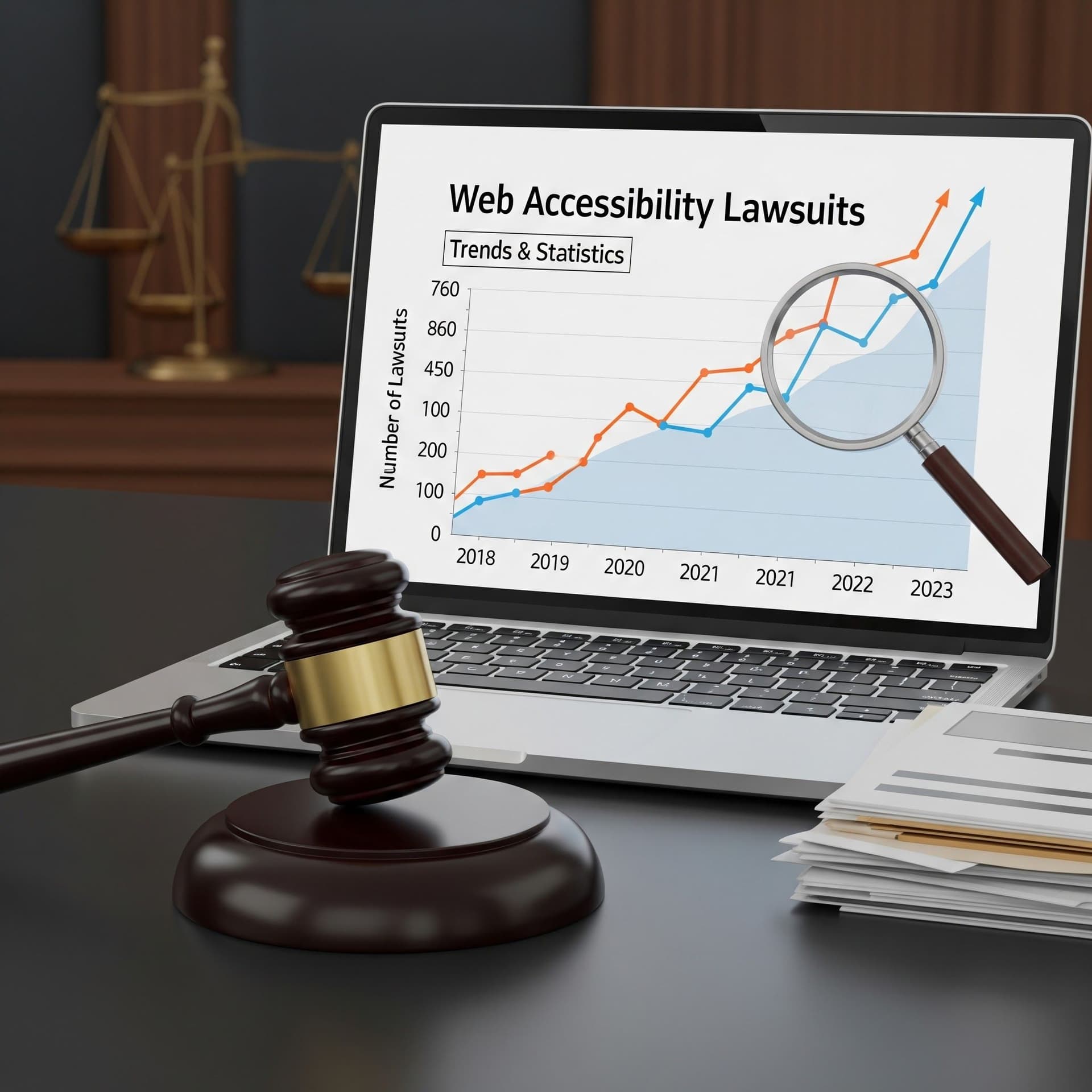
This has become a numbers game. Since 2019, there has been an average annual increase of 13% in web accessibility lawsuits. In 2023 alone, 4,605 cases were filed in federal and state courts. What's truly telling is that 69% of those lawsuits came from just five law firms.
They’ve developed a straightforward and repeatable process:
Automated Scanning: Law firms use software to crawl the web and flag sites with common accessibility errors.
Demand Letters: The first step is often a demand letter, offering to settle out of court if the business fixes the site and pays their legal fees.
Serial Litigation: Many of these cases are filed by the same plaintiffs, who repeatedly encounter barriers across the web.
This system makes it easy and profitable to target non-compliant businesses, which keeps the lawsuit numbers climbing. For a deeper look into the numbers, check out our analysis of web accessibility lawsuit trends and statistics.
No Clear Government Rules Means More Risk
Finally, the U.S. government has been slow to provide clear, official regulations for web accessibility under the ADA. This has created a legal gray area that attorneys are more than happy to step into.
While courts consistently point to the Web Content Accessibility Guidelines (WCAG) as the de facto standard, it has never been formally written into law.
This leaves businesses in a tough spot. Without a definitive "rulebook" from the government, companies have to interpret court decisions and best practices on their own. This uncertainty makes them vulnerable, as it’s easier for a plaintiff to argue that a site isn't "reasonably accessible" when the rules aren't set in stone.
Here's the bottom line: The Americans with Disabilities Act (ADA), a 1990 civil rights law for physical places, now covers websites because courts consider them "public accommodations." The ADA doesn't give technical rules for websites, so courts rely on the Web Content Accessibility Guidelines (WCAG) as the standard. To stay out of legal trouble, your website needs to follow WCAG—it's essentially the unofficial building code for the internet.
Understanding the Legal Framework for Websites

Trying to make sense of web accessibility law can feel a bit overwhelming, but it really comes down to two key pieces that fit together. Think of it like building a house: one piece is the law saying the house must be safe, and the other is the detailed building code that shows you how to make it safe.
The whole legal picture for web accessibility is built on the Americans with Disabilities Act (ADA), which is interpreted through the lens of the Web Content Accessibility Guidelines (WCAG). Getting how these two work together is the first real step to preventing a lawsuit.
The ADA: The "Why" Behind Accessibility
The Americans with Disabilities Act is a historic civil rights law from 1990—long before the internet was a daily staple. Its original purpose was straightforward: to stop discrimination against people with disabilities in everyday public life. That meant ensuring physical access to places like stores, restaurants, and hotels.
For a long time, the digital world was a legal gray area. But that's changed. The Department of Justice (DOJ) and U.S. courts now consistently rule that websites are "public accommodations" under ADA Title III. This single interpretation is what’s fueling the massive spike in web accessibility lawsuits.
A key part of digital compliance in the U.S. is the Americans with Disabilities Act (ADA), which heavily shapes ADA website compliance. It doesn't matter if your business is a small local shop or a huge corporation; if you serve the public, your digital front door has to be accessible.
The crucial takeaway is this: the ADA sets the legal requirement for accessibility but offers zero technical guidance. It tells you that your website must be accessible, not how to do it. That’s where WCAG steps in.
This gap is exactly why so many well-meaning businesses get into trouble. They know about the ADA, but without a clear, government-issued checklist for their websites, they're left exposed to legal risk.
WCAG: The "How" of Accessibility
Since the ADA isn't a technical manual, the legal system needed a dependable yardstick to measure whether a website is actually accessible. That yardstick is the Web Content Accessibility Guidelines (WCAG).
Developed by the World Wide Web Consortium (W3C), WCAG is the detailed "building code" that developers and designers use to build an inclusive website. It lays out a set of technical criteria for making web content usable for people with all kinds of disabilities. While it's not technically law in the U.S. for most private companies, it's the benchmark used in almost every single web accessibility lawsuit.
WCAG is built on four core principles. It says web content must be:
Perceivable: Users must be able to take in the information. A great example is providing text alternatives for images so screen readers can describe them.
Operable: People have to be able to navigate and use the interface. This means making sure everything works with just a keyboard, not only a mouse.
Understandable: The information and the site's operation have to make sense. This comes down to using clear language and predictable navigation.
Robust: The content needs to work reliably with a wide range of technologies, especially assistive devices like screen readers.
If you're curious about how regulations differ around the world, you can dive into the legal landscape of web accessibility in our global overview.
Conformance Levels and Legal Risk
WCAG isn't an all-or-nothing standard. It has three levels of conformance: A (the bare minimum), AA (the accepted industry standard), and AAA (the highest level, often for specialized sites).
When it comes to web accessibility lawsuits, WCAG 2.1 Level AA is the gold standard for ADA compliance.
Meeting this level is your best defense against legal action. It shows you’ve made a genuine effort to create an accessible experience and brings your site in line with the technical standard that courts and plaintiffs' lawyers are looking at. Anything less leaves a website wide open to a legal challenge.
You can’t really grasp the weight of web accessibility until you see what happens when it goes wrong. While the legal theories are important, the real-world stories of major brands getting tangled in lawsuits are what truly hit home. These aren't just cautionary tales; they've set the legal precedents that every business operates under today.
By breaking down these landmark cases, we can see exactly what kind of website issues draw legal fire and how courts are ruling. Think of it as a playbook on what not to do. These lawsuits reveal the specific digital barriers that lead to litigation and the steep price of ignoring them.
https://www.youtube.com/embed/xkUKU1gpgfE
Domino's Pizza: The Supreme Court Showdown
The lawsuit against Domino's Pizza is probably the most famous one out there. Back in 2016, a blind man named Guillermo Robles sued the pizza chain because he couldn't order a pizza. Simple as that. The Domino's website and mobile app didn't work with his screen reader, the software that reads on-screen content out loud for visually impaired users.
Domino's decided to fight it, arguing that the Americans with Disabilities Act (ADA) was written for physical spaces, not websites. The legal battle dragged on for years, eventually making its way to the U.S. Supreme Court, which in 2019 refused to hear the case. That refusal was huge—it let the lower court's ruling in favor of Robles stand.
This was a game-changer. The court's decision sent a shockwave through the business world, making one thing crystal clear: your website is a "public accommodation" under the law. It’s not exempt from the ADA.
The Domino's case taught us a few crucial lessons:
You can't just ignore the problem: Arguing that the law isn't specific enough about websites is a losing battle. The courts have made up their minds.
Mobile apps are on the hook, too: The lawsuit wasn't just about the website. It included the mobile app, proving that all your digital platforms need to be accessible.
It’s about core functionality: This wasn't a minor bug. The entire point of the website—ordering a pizza—was broken for him. When your core services are inaccessible, you’re in serious trouble.
H&R Block: When the Department of Justice Steps In
Another pivotal case involved the tax-prep giant, H&R Block. This one was different because it marked the first time the Department of Justice (DOJ) got directly involved in a web accessibility lawsuit. In 2014, the National Federation of the Blind sued H&R Block because its website and tax tools were impossible for people with vision impairments to use.
The DOJ's intervention cranked up the pressure significantly. The final settlement forced H&R Block to pay $100,000 in damages, but the real impact was the other requirement: they had to make their website and apps compliant with WCAG 2.0 Level AA. This was a landmark moment because it officially tied a legal outcome to a specific technical standard. If you want to dig deeper, you can explore more details about this and other major web accessibility lawsuits to see how the legal landscape has evolved.
What These Cases Mean for Your Business
These high-profile lawsuits weren't just about big corporations with bottomless legal budgets. They hammered out the legal framework that applies to every business, big or small. The takeaways are straightforward and affect anyone with a website.
First, your website is seen as an extension of your physical storefront. If the public can walk into your store, they should be able to access your website, including people with disabilities. Second, the Web Content Accessibility Guidelines (WCAG) have become the unofficial law of the land. While Congress hasn't written them into federal law, courts and settlement agreements consistently use WCAG Level AA as the go-to benchmark for compliance.
At the end of the day, these cases prove that building accessibility in from the start is no longer a "nice-to-have." It’s a core requirement for doing business online. The financial fallout from a lawsuit—legal fees, settlements, and court-ordered redesigns—is massive. By learning from the mistakes of these big brands, you can sidestep a similar fate and create a digital presence that’s welcoming to everyone and, just as importantly, legally sound.
TLDR: Most web accessibility lawsuits aren't about obscure technical glitches. They're triggered by the same recurring website errors, like missing image descriptions, hard-to-read text, forms you can't fill out with a keyboard, and videos without captions. Fixing these high-risk, low-effort issues is the fastest way to lower your legal exposure and make your site work better for everyone.
Common Website Flaws That Trigger Lawsuits
Most business owners I talk to think web accessibility lawsuits must be about some complex, deep-in-the-code problem. But that’s rarely the case.
The reality is, the vast majority of legal complaints come from a small handful of common, and often easily fixable, website flaws. These issues create major roadblocks for people with disabilities, and they’re what lawyers look for first.
Think of it like a building inspection. An inspector has a checklist of common problems they know to look for—faulty wiring, bad plumbing. Addressing these high-risk areas first is the best way to pass the inspection and avoid trouble. The same logic applies here.
The Low-Hanging Fruit for Plaintiffs
When law firms or advocacy groups scan for non-compliant websites, they’re not looking for a needle in a haystack. They’re looking for big, obvious violations that are easy to document and build a solid legal case around.
These are the red flags that get you noticed:
Missing or Vague Alt Text: Images without descriptive alternative text are completely invisible to screen readers. For a visually impaired user, it means they have no clue if an image is a product photo, a crucial diagram, or just a stock photo.
Poor Color Contrast: This one is simple. When your text color is too similar to the background color, it’s a nightmare for anyone with low vision or color blindness to read.
No Keyboard Navigation: Millions of people can't use a mouse due to motor disabilities. If they can’t tab through your links, fill out a form, or use a dropdown menu with just their keyboard, your site is basically a brick wall for them.
Uncaptioned Videos: If your video has no closed captions, you’re completely excluding anyone who is deaf or hard of hearing from accessing that information.
These four issues are the bread and butter of accessibility demand letters. A huge number of lawsuits cite failures like websites being incompatible with screen readers or having text that’s impossible to decipher. These aren’t just minor inconveniences; they are fundamental communication barriers. The persistent failure to address them is why so many organizations find themselves facing legal action under the ADA. You can discover more insights about these common legal triggers and their impact.
How These Flaws Create Real Barriers
It’s one thing to see a list of technical flaws, but it’s another to understand what it feels like for a user.
Imagine someone trying to buy a pair of shoes from your online store. If they're blind and your product images have no alt text, they can't get a description of what the shoes look like. If they have a motor impairment and your "Add to Cart" button can't be reached with the keyboard, they’re stuck. They literally cannot buy from you.
A website that cannot be navigated by keyboard is the digital equivalent of a store with stairs but no ramp. It fundamentally excludes a segment of the population from ever getting through the door.
This isn't just about avoiding lawsuits; it's about not shutting out paying customers.
The infographic below shows exactly where companies are failing most often. It breaks down which WCAG conformance levels are most commonly cited in legal complaints.
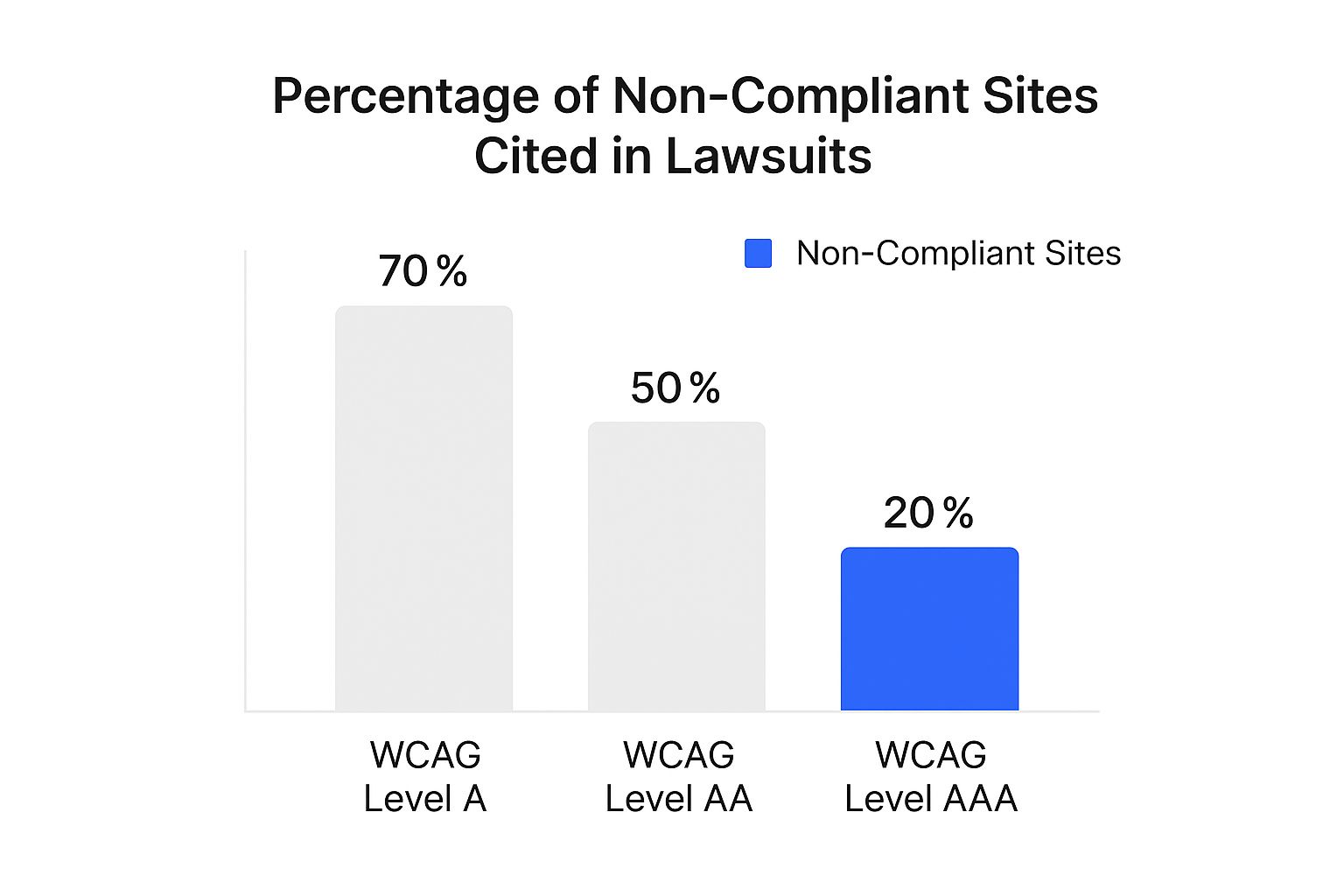
As you can see, a staggering 70% of lawsuits cite failures at Level A—the most basic, foundational level of accessibility. This tells us that many businesses are stumbling on the absolute essentials.
To help you get a handle on this, here's a quick reference table outlining these high-risk problems and, more importantly, how to fix them.
High-Risk Accessibility Issues and Their Solutions
| Common Issue | Impact on Users | Recommended Solution |
|---|---|---|
| Missing Alt Text | Screen reader users have no context for images, preventing them from understanding visual content like products or charts. | Write descriptive alt text for all informative images. For decorative images, use an empty alt attribute (alt=""). |
| Poor Color Contrast | Users with low vision or color blindness cannot read text on the website, making content and navigation inaccessible. | Use a contrast-checking tool to ensure text has a minimum contrast ratio of 4.5:1 against its background (WCAG AA). |
| No Keyboard Navigation | Users with motor disabilities who cannot use a mouse are unable to access links, buttons, menus, or forms. | Ensure all interactive elements can be reached and activated using the Tab key, Enter key, and arrow keys. The focus order must be logical. |
| Inaccessible Forms | Screen reader users can't tell which label corresponds to which input field, making it impossible to fill out forms correctly. | Use proper <label> tags programmatically associated with each form field (<input>, <textarea>, etc.). |
| Uncaptioned Video Content | Deaf and hard-of-hearing users cannot access audio information, missing out on everything from product demos to news updates. | Provide accurate, synchronized closed captions for all prerecorded video content. Transcripts are also highly recommended. |
By tackling the issues in this table, you're directly addressing the problems most likely to land you in legal hot water.
Beyond the Basics: Other High-Risk Areas
While those are the big four, they aren't the only culprits. Inaccessible online documents are another huge source of litigation, especially PDFs. If your restaurant menu or job application is a PDF that a screen reader can't parse, you have a major problem.
Similarly, forms without proper labels are a disaster for assistive technology. Without a clear, programmatically linked label explaining what each field is for ("First Name," "Email Address"), a screen reader user is just guessing. It makes simple tasks like signing up for a newsletter or completing a checkout completely impossible.
TLDR: Don't wait for a demand letter to show up. The only real defense against a web accessibility lawsuit is to get ahead of the problem. That means getting a professional accessibility audit, posting a clear accessibility statement, and making sure your team is continuously trained. When you make accessibility part of your DNA instead of just a reaction, you massively cut down your legal risk.
Building Your Proactive Defense Strategy
Waiting for a demand letter to land in your inbox is the most expensive and stressful way to deal with web accessibility. A reactive approach is a recipe for high costs, frantic fixes, and a black eye for your brand. The smart play is to build a proactive defense—a solid, sustainable plan that bakes accessibility right into how you do business.
This approach flips the script from panicked reaction to intentional prevention. Think of it like maintaining a commercial building. You don't wait for a fire to start before thinking about installing a sprinkler system; you build it in from the get-go. Your website needs that exact same forward-thinking mindset to prevent legal fires.
Start with an Accessibility Audit
You can't fix a problem you don't know you have. That’s why the first real step in any defense strategy is a thorough web accessibility audit. Automated tools are great for catching some obvious issues, but they simply can’t spot the more complex problems that require a human touch. A professional audit gives you a comprehensive, actionable report card on where your site falls short of WCAG 2.1 AA standards.
This audit does two critical things for you:
It creates a roadmap. The results from your audit become a prioritized to-do list for your development team. No more guessing.
It demonstrates good faith. If a demand letter does arrive, having a recent, professional audit and a plan to fix the issues shows you’re already taking compliance seriously.
A professional audit is your diagnostic tool. It’s like having a structural engineer inspect your building for hidden cracks. Without one, you’re just guessing where your biggest legal risks are hiding.
Publish an Accessibility Statement
Being transparent is one of your most powerful shields against legal trouble. An accessibility statement is just a page on your site that tells the world you’re committed to inclusivity and lays out the steps you're taking to get there.
This isn't just some legal boilerplate; it’s a reflection of your company's values. A good accessibility statement should include:
A clear declaration of your commitment to accessibility.
The specific standard you're aiming for (like WCAG 2.1 Level AA).
Any known issues you're still working on and a rough timeline for fixing them.
Contact info for anyone who runs into a barrier.
By giving users a direct line to report problems, you often head off potential plaintiffs before they ever talk to a lawyer. It proves you’re listening and ready to solve problems, which can de-escalate a situation that could easily have turned into a lawsuit. To get deeper into this, you can learn more about how to avoid ADA lawsuits with other practical, preventative tips.
Integrate and Train Your Team
Accessibility isn't a one-person job. To build a defense that actually lasts, you have to weave it into every part of your workflow. This is what people mean when they talk about "shifting left"—thinking about accessibility from the very beginning of a project, not as an afterthought right before launch.
This means everyone needs to be in the loop with ongoing training:
Designers need to understand things like color contrast and designing logical, intuitive layouts.
Developers have to get comfortable with ARIA roles and proper keyboard navigation.
Content creators should be trained to write meaningful alt text for every image.
As you build this strategy, it's also vital to think about the risks that come from outside tools and widgets on your site. Understanding effective third-party risk management can help you plug these potential holes. By making accessibility a shared responsibility, you create a culture of compliance that protects your business from the ground up and makes it much harder for a web accessibility lawsuit to ever take root.
Here's the rewritten section, designed to sound like it was written by an experienced human expert.
TLDR: Think you're too small to get sued for web accessibility? Think again. Small businesses are a huge target. If a demand letter lands on your desk, your first call should be to a lawyer—don't just hope it goes away. And those quick-fix accessibility widgets? They're not the magic shield many people think they are.
Answering Your Top Questions About Web Accessibility Lawsuits
Getting into the weeds of web accessibility can bring up a lot of questions, especially when the threat of a lawsuit is involved. Let's tackle some of the most common things business owners worry about.
Are Small Businesses Really a Target?
Yes, and it’s a big misconception that they aren't. While you hear about massive corporations in the news, small and medium-sized businesses are actually prime targets for web accessibility lawsuits.
Here’s why: plaintiff law firms often cast a wide net using automated tools to scan thousands of websites for violations. Your small e-commerce shop or local restaurant website can get flagged just as easily as a Fortune 500 company. In many ways, smaller businesses are seen as easier targets because they often lack the resources for a protracted legal fight.
I Got a Demand Letter. Now What?
First, take a deep breath. Second, do not ignore it. Pretending it doesn't exist is the fastest way to turn a demand letter into an actual lawsuit.
Your immediate next step is crucial: contact a lawyer who specializes in ADA and digital accessibility litigation. They know the landscape, can determine if the claim is legitimate, and will guide you on how to respond. This is not the time for a DIY approach.
While your lawyer gets to work, you should also start the process of an accessibility audit. Understanding the issues mentioned in the letter—and any others you might have—is key to forming a strategy.
Are Accessibility Widgets and Overlays Enough to Protect Me?
This is one of the most important questions out there, and the answer is a firm no. Accessibility widgets and overlays—those plugins that add a little accessibility icon and menu to your site—are not a get-out-of-jail-free card.
While these tools can address some surface-level issues, they often miss the deep, code-level problems that truly prevent access. In fact, many lawsuits have been successfully filed against companies that were using an overlay. Courts are increasingly skeptical of them as a complete fix.
Think of a widget as a temporary patch, not a permanent solution. True accessibility requires a more hands-on approach that includes manual testing and fixing your website's underlying code. Relying only on an overlay leaves you exposed.
Ready to stop reacting and start building a real defense against accessibility lawsuits? WebAbility.io offers an end-to-end platform with AI-enhanced tools and expert guidance to help you get compliant and stay that way. Protect your business and create a better experience for everyone. Visit WebAbility.io to start your free trial.
Quick Questions
Tap to ask AI about this article