A Guide to Website Accessibility Laws

Sidharth Nayyar
TLDR: Website accessibility laws are rules that make sure websites can be used by people with disabilities. Laws like the ADA in the US are in place to stop discrimination and guarantee everyone gets equal access to online information. The universal standard for measuring compliance is almost always the Web Content Accessibility Guidelines (WCAG). Achieving accessibility involves a combination of strategies, including manual code fixes, professional audits, and utilizing managed solutions or widgets, all aimed at creating an inclusive online experience.
Understanding the Landscape of Accessibility Laws

Diving into website accessibility laws can seem a little intimidating, but the core idea is straightforward: your digital space should be welcoming to everyone. It helps to think of it like a physical storefront. Just as a shop needs a ramp for wheelchair access, a website needs to work with assistive technologies, like screen readers, so people with disabilities can browse and interact with your content.
This isn't just about ticking a legal box; it's about a genuine commitment to inclusivity. An estimated 1.3 billion people worldwide live with some form of disability. When a website is inaccessible, it's like putting a "closed" sign on the door for a huge part of your potential audience.
The Global Gold Standard: WCAG
While various countries and regions have their own specific laws, they almost all point to a single, central set of guidelines as the benchmark for what "accessible" actually means: the Web Content Accessibility Guidelines (WCAG). Developed by the World Wide Web Consortium (W3C), WCAG provides a clear, actionable roadmap for making the web work for everyone.
By treating WCAG as your North Star, you build a solid foundation that helps you meet legal requirements across the globe. It simplifies your compliance efforts and, more importantly, creates a better, more consistent experience for all your visitors.
In most legal cases and settlements, WCAG 2.1 Level AA is the specific target you'll see mentioned. This level is widely considered the sweet spot—it provides a robust level of accessibility without being overly difficult for most organizations to implement.
To make sense of the different regulations, here’s a quick overview of the major laws and standards you’ll come across.
Key Website Accessibility Laws at a Glance
This table breaks down the most significant laws, where they apply, and the specific standards they reference.
| Law / Standard | Primary Region | Who It Applies To | Referenced Standard |
|---|---|---|---|
| ADA (Title III) | United States | Private businesses considered "public accommodations" | WCAG 2.1 AA |
| Section 508 | United States | Federal agencies and their contractors | WCAG 2.0 AA |
| AODA | Canada (Ontario) | Public, private, and non-profit organizations | WCAG 2.0 AA |
| EN 301 549 | European Union | Public sector bodies and many private entities | WCAG 2.1 AA |
As you can see, even though the names and regions change, the core technical requirement—adhering to WCAG—remains the constant.
TLDR: Forget just dodging lawsuits for a moment. Making your website accessible opens your doors to a global market with $13 trillion in spending power. A truly accessible site works better for everyone, seriously boosts your brand's reputation, improves your SEO, and delivers a massive return on investment. This isn't just about compliance; it's smart business.
Why Accessibility Is a Business Imperative
If you're only looking at website accessibility laws as a legal checklist to avoid getting sued, you're missing the forest for the trees. Embracing digital inclusion is actually one of the smartest moves you can make to grow your business, build a loyal customer base, and simply connect with more people. It turns a "have-to" into a serious competitive advantage.
It's easy to see accessibility as just another expense, but it's much better to think of it as an investment with a high return. When you design a website that works for everyone, you end up with a better experience for all your users, not just those with disabilities. Think about it: clear navigation, readable text, and a logical layout make your site easier for every single visitor to use. That directly translates to better engagement and more conversions.
The Overlooked Economic Powerhouse
The global community of people with disabilities, along with their friends and family, represents a massive and largely untapped economic force. Companies that don't make their websites accessible are basically putting up a "Closed" sign for a huge group of customers ready to spend money. This isn't some tiny niche; it's a mainstream opportunity hiding in plain sight.
Globally, the combined spending power of people with disabilities and their networks is pegged at a staggering $13 trillion. The cost of ignoring this audience is real. For instance, a UK survey on the "Click-Away Pound" found that businesses lose an estimated £17.1 billion every year simply because 71% of users with disabilities will immediately leave a site they can't use. On the flip side, investing in accessibility can bring an incredible ROI, with some estimates as high as $100 for every $1 spent. You can dig into more of these eye-opening stats over at AllAccessible.org.
An inaccessible website isn't just a barrier for some users; it's a leaking bucket for potential revenue. Every person who leaves in frustration represents a lost sale, a missed connection, and a blow to your brand's reputation.
Driving Business Growth and Brand Loyalty
A genuine commitment to accessibility says a lot about your company's values. It shows you're serious about inclusivity and that you want to serve every customer well. That kind of message builds deep brand loyalty and a positive public image, which are priceless in today's market.
This resource from the W3C perfectly illustrates how businesses in both direct and indirect ways.
As the diagram shows, a single accessibility improvement can ripple out to create multiple advantages—strengthening your brand, reaching more people, and even improving your search engine rankings. It's a clear sign that every effort you make toward accessibility builds a stronger, more successful business.
Gaining a Competitive and SEO Edge
Here’s a bonus: many of the best practices for accessibility are also fantastic for SEO. The same features that help a screen reader understand your content also help a search engine crawler figure out what your page is about.
Here are just a few ways accessibility directly boosts your business:
Improved SEO: Proper heading structures, descriptive alt text for images, and transcripts for videos are all accessibility wins. They also provide crucial context for search engines, helping you rank higher.
Enhanced User Experience (UX): Accessible design principles—like good color contrast and predictable navigation—make your site less frustrating and reduce bounce rates for all visitors.
Expanded Market Reach: An accessible website is naturally easier for an older audience to use, as well as people with slow internet connections or those browsing on different types of devices.
By building an inclusive digital presence, you're not just checking a box to comply with website accessibility laws. You're building a more effective, more profitable, and more respected brand.
In a nutshell: The Americans with Disabilities Act (ADA) is a major U.S. civil rights law. While it doesn't have its own tech rulebook for websites, courts consistently treat them as "public accommodations." This means the Web Content Accessibility Guidelines (WCAG) have become the go-to standard for compliance. With ADA-related lawsuits on the rise, getting proactive about accessibility isn't just good practice—it's essential for reducing legal risk and welcoming every customer.
Decoding the Americans with Disabilities Act (ADA)
The Americans with Disabilities Act (ADA) is a groundbreaking U.S. civil rights law signed back in 1990, long before the internet was a fixture in our daily lives. Its purpose is straightforward but profound: to stop discrimination against people with disabilities in all areas of public life. Even though it was written with physical spaces in mind, U.S. courts have repeatedly decided its principles apply to the digital world, too.
This means your company’s website is considered a “place of public accommodation” under Title III of the ADA. Think of it like this: a brick-and-mortar store can’t legally bar someone in a wheelchair from entering, and in the same way, your website can’t put up barriers that stop someone using a screen reader from buying a product. The end goal is to ensure everyone gets full and equal access to your goods and services, whether they're online or in person.
The Surge in Digital Lawsuits
Because the ADA itself doesn't offer a technical checklist for websites, it created a legal gray area that has fueled a massive spike in lawsuits. The digital accessibility legal scene has become a minefield, with ADA enforcement getting more intense every year. The end of 2024 saw a 7% increase in ADA lawsuits, with roughly 8,800 Title III digital accessibility complaints filed against websites and mobile apps. You can learn more about these trends and what they mean for businesses by exploring the 2025 compliance standards.
These cases drive home a critical point: accessibility can't be an afterthought. Slapping on a quick "bolt-on" fix almost never holds up in court because real accessibility has to be baked into a site’s design from the very beginning.
Why WCAG Is the Unofficial Rulebook
So, if the ADA doesn't give you technical rules, how do you know if your site is compliant? Over the years, both the courts and the Department of Justice (DOJ) have consistently pointed to one place for answers: the Web Content Accessibility Guidelines (WCAG).
WCAG provides the clear, actionable criteria that the ADA lacks. By aiming for WCAG 2.1 Level AA, you are aligning your website with the standard that is overwhelmingly recognized in legal settlements and DOJ guidance as the measure of effective accessibility.
This has made WCAG the de facto, universally accepted standard for digital ADA compliance.
Here's a look at the official ADA website, the central hub for information on the law and how it's enforced.
The site itself is a fantastic resource for grasping the huge scope of the ADA, which covers everything from employment to public services and reinforces its far-reaching impact.
From Wheelchair Ramps to Lines of Code
The easiest way to understand digital accessibility is to connect it to the physical world. An inaccessible website creates the exact same kind of discriminatory barriers as a building without a ramp or accessible restrooms.
No Alt Text on Images: This is like showing a picture to a blind person without describing it. A screen reader has nothing to read, leaving the user completely in the dark.
A Keyboard-Inaccessible Menu: This is the digital version of putting the only checkout counter at the top of a flight of stairs. Anyone who relies on a keyboard instead of a mouse is stuck.
Poor Color Contrast: This is like printing a restaurant menu with light gray text on a white background. For people with low vision, it's virtually unreadable.
These examples show that website accessibility laws aren't just about technical jargon and code; they're about people and their fundamental right to equal access. As you build out your accessibility strategy, knowing the differences between regulations like the ADA and Section 508 is key. For a deeper look, check out our guide on ADA and Section 508 compliance. Following these established standards is the most dependable way to build an inclusive digital space and protect your business from legal trouble.
TLDR: Think of the Web Content Accessibility Guidelines (WCAG) as the official rulebook for building an accessible website. It's all based on four common-sense principles: Perceivable, Operable, Understandable, and Robust (POUR). Since most accessibility laws point to WCAG 2.1 Level AA as the benchmark, that's the clear goal for any business.
Decoding the Web Content Accessibility Guidelines (WCAG)
While laws like the ADA state that you must have an accessible website, they don't spell out exactly how to do it. That’s where the Web Content Accessibility Guidelines (WCAG) come in.
Developed by the World Wide Web Consortium (W3C), WCAG is the globally recognized instruction manual for digital accessibility. It provides a single, shared standard for creating websites and apps that genuinely work for everyone, including people with disabilities.
The best part? It’s not just a dense list of technical commands. WCAG is built on a foundation of four human-focused principles, making it much easier to understand the why behind each technical requirement. These principles are known by the simple acronym POUR.
This infographic neatly shows how the legal mandates connect with the technical standards.
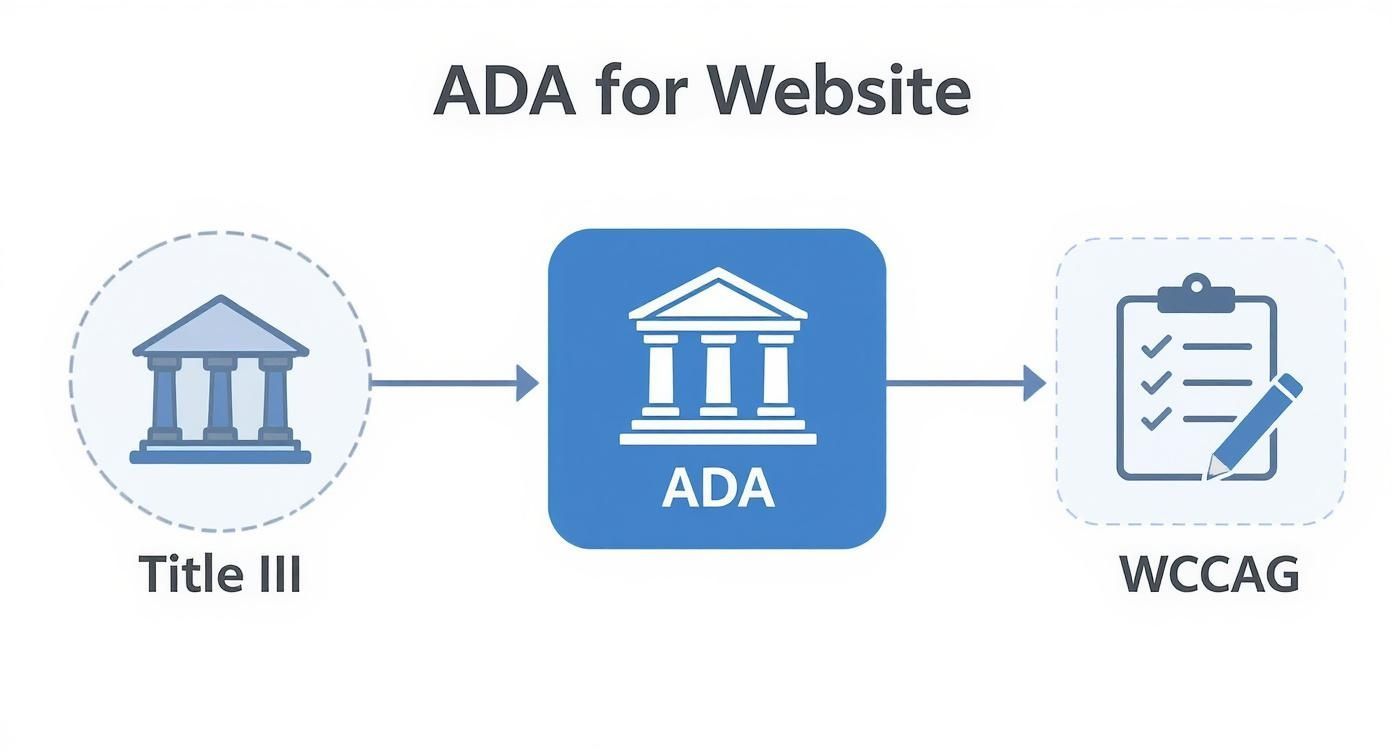
As you can see, the ADA sets the legal obligation, but it’s WCAG that provides the practical, real-world checklist you need to follow to get there.
The Four Pillars of WCAG Explained
To really get a handle on WCAG, you need to understand the POUR principles. They reframe technical rules as practical goals that are all about the user's experience.
Perceivable: Can everyone see, hear, or otherwise take in your content? This is all about making sure information isn't invisible to people with certain disabilities. It’s about offering alternatives, like text for audio or audio for text.
Operable: Can people actually use your website? This focuses on navigation and interaction. It ensures someone can do everything with just a keyboard that another person can do with a mouse.
Understandable: Does your website make sense? This principle covers readability and predictability. It means using clear, simple language and designing a site that behaves in a consistent, intuitive way.
Robust: Can your site be reliably interpreted by different browsers and assistive technologies? This is the technical backbone. It ensures your code is clean so that tools like screen readers can understand it without getting confused.
Why WCAG 2.1 Level AA Is the Magic Number
WCAG has three different levels of conformance: A, AA, and AAA. Each level adds more requirements, demanding a more accessible experience.
For most businesses, WCAG 2.1 Level AA is the sweet spot. It has become the de facto standard in legal settlements and international laws. Level A is seen as the bare minimum, while Level AAA is often a stretch goal that isn’t practical for all types of content.
Aiming for Level AA gives you a strong, defensible accessibility posture that meets legal expectations and serves the vast majority of users with disabilities. It strikes the perfect balance between meaningful inclusion and realistic implementation. If you want to dive deeper, you can learn more about the WCAG guidelines and why they matter on our blog.
Putting Principles into Practice
So, how do these principles translate to actual features on your website? Connecting the abstract rules to real-world examples makes it all click.
The table below breaks down the POUR principles into simple goals and gives a concrete example for each one.
WCAG Principles Explained with Examples
| Principle (POUR) | Core Goal | Practical Example |
|---|---|---|
| Perceivable | Information must be available through more than one sense. | Providing text alternatives (alt text) for every image so a screen reader can describe the picture to a user who is blind. |
| Operable | All functions must be usable with a keyboard. | Making sure a visitor can navigate menus, fill out a contact form, and submit it using only their Tab and Enter keys. |
| Understandable | Content and navigation must be clear and predictable. | Writing in plain language, avoiding industry jargon, and keeping the site’s main navigation consistent on every single page. |
| Robust | The site must work with various assistive technologies. | Building the website with clean, standard-compliant HTML so that screen readers and other tools can interpret it correctly. |
By building around these human-centered goals, you move beyond just checking boxes for compliance. You start creating a better, more inclusive website that works for every person who visits.
TLDR: Website accessibility laws aren't just a US thing; they're global. While America has the ADA, other key players include Section 508 for federal agencies, Canada's AODA, and Europe's EN 301 549. The good news? They almost all point to WCAG as the gold standard, so building a strong accessibility foundation helps you stay compliant just about everywhere.
A Quick Tour of Global Accessibility Laws
While the ADA gets most of the attention in the United States, digital accessibility is a worldwide movement. Countries across the globe have passed their own laws, all pushing for a more inclusive internet. If your business has an international footprint, you absolutely need to understand this landscape to stay compliant and connect with a wider audience.
Thankfully, there's a common thread running through most of these regulations. Think of it like a family tree—while the laws themselves are different, they share a common ancestor: the Web Content Accessibility Guidelines (WCAG). This shared foundation is a huge advantage. The work you put in to meet one country's rules will give you a major head start on meeting others.
Section 508 in the United States
First, let's clear up a common point of confusion in the U.S. While the ADA applies to public-facing businesses, Section 508 of the Rehabilitation Act has a different target: U.S. federal agencies. This also extends to any organization that does business with the government or receives federal funding.
Section 508 mandates that all information and communication technology—websites, software, and even digital documents—must be accessible. The technical benchmark for this law is crystal clear: WCAG 2.0 Level AA.
This screenshot from the U.S. Access Board shows just how central these standards are to federal operations.
It's all about making sure federal employees and the public can access information and data on equal footing.
Canada's AODA
Just across the northern border, Canada is taking a proactive, province-by-province approach. The best-known example is the Accessibility for Ontarians with Disabilities Act (AODA). This ambitious law is working to make the entire province of Ontario fully accessible by 2025 by setting firm standards for public, private, and non-profit organizations.
When it comes to websites, AODA points directly to WCAG 2.0 Level AA as the standard. The law even lays out phased deadlines based on an organization's size, creating a structured path for everyone to get on board. For any business operating in North America, understanding how laws like the ADA and AODA overlap is critical. You can learn more in our deep dive on how to stay legally compliant across different countries.
The European Accessibility Act
Over in the European Union, the current standard is EN 301 549, which mostly applies to public sector websites and apps. But the real game-changer is the European Accessibility Act (EAA), which is set to take full effect in 2025. This act dramatically expands accessibility requirements to a whole range of private-sector products and services, including e-commerce, banking, and e-books.
The European Accessibility Act is being called the "GDPR of accessibility" for its massive scope and serious implications for any business serving EU customers. It's a huge step toward making the private sector accountable for digital inclusion.
This is just one more sign that accessibility is no longer optional—it's a standard cost of doing business. And the trend is global. Australia’s Disability Discrimination Act of 1992 and India’s Rights of Persons with Disabilities Act 2016 both lean on WCAG principles. Brazil’s 2015 law does the same for companies headquartered there. It all points to a growing worldwide commitment to a web that works for everyone.
TLDR:Start with a professional audit that uses both automated tools and human testers. Focus first on fixing the big problems that stop users in their tracks, like broken navigation or checkout forms. Then, bake accessibility into your everyday process, publish a public accessibility statement, and keep an eye on your site to stay compliant.
Your Action Plan for Achieving Compliance

Knowing the laws is one thing, but turning that knowledge into action is where the real work begins. Getting your website compliant—and keeping it that way—is a journey, not a one-and-done task. But with a solid, structured plan, you can make the whole process feel less overwhelming and far more effective.
Think of it like building a house. You wouldn't just grab a hammer and start putting up walls without a blueprint. The same logic applies here. You need a clear plan to build an accessible website that’s solid from the foundation up. This isn't just about dodging legal trouble; it’s about creating a genuinely better experience for everyone who visits your site.
Start with a Comprehensive Audit
First things first: you need to know exactly where you stand. A deep-dive accessibility audit is your blueprint, showing you precisely where the barriers are on your site. Don't make the mistake of relying solely on an automated scanner. Those tools are helpful, but they only catch about 30% of all WCAG issues on their own. A real audit needs a multi-layered approach.
Automated Scanning: Use professional tools to crawl your site and flag the low-hanging fruit—common code violations like missing alt text or poor color contrast. This gives you a quick, high-level map of the terrain.
Manual Testing: This is where the human expertise comes in. Have an expert actually go through your site’s key flows, like trying to navigate the main menu, fill out a form, or go through the checkout process. They’ll spot the nuanced problems that software always misses.
Assistive Technology Testing: For a true picture of the user experience, you have to test with the same tools people with disabilities rely on every day. This means firing up screen readers and trying to navigate using only a keyboard. This is where you get the most powerful insights.
Prioritize Fixes for Maximum Impact
Once you get your audit report back, you’ll probably be looking at a long list of fixes. It's easy to feel swamped, but the trick is to be strategic. Don't just start at the top of the list and work your way down. Instead, prioritize based on what will make the biggest real-world difference for your users.
A great rule of thumb is to fix the "showstoppers" first. These are the critical barriers that completely block someone from getting something done. An inaccessible checkout button, for example, is a much bigger deal than a minor contrast issue on a footer link.
Group the issues by how much they impact the user. Anything related to core navigation, essential forms, or the checkout process should jump to the top of your list. This way, you’re putting your effort where it matters most, improving the user experience and dramatically lowering your legal risk right away.
Build Accessibility into Your Workflow
The only way to stay compliant long-term is to stop treating accessibility as a chore you do at the end. It needs to become part of how your team works every single day. The industry calls this "shifting left"—tackling accessibility in the design and development phases, not as a last-minute check before launch.
Here’s how you can make it a habit for your whole team:
Educate Your Team: Get your designers, developers, and content writers up to speed with training on WCAG principles and practical best practices.
Update Your Checklists: Add accessibility checkpoints to your project management tools. It should be on the list from the first wireframe all the way to the final QA review.
Create an Accessibility Statement: Publish a dedicated page on your site about your commitment to accessibility. Crucially, include contact information so users can report any barriers they find. It shows you’re transparent and acting in good faith.
When accessibility becomes a shared responsibility, compliance stops being a burden and starts being a natural result of doing great work.
So, What's the Bottom Line on Accessibility Laws?
Let's cut through the noise. Here are the straight answers to the questions we hear all the time from business owners trying to get a handle on this.
TLDR: Nope, your small business isn't exempt from the ADA. Those accessibility widgets are a helpful piece of the puzzle, but they won't solve everything without fixing your site's underlying code. The gold standard you're aiming for is WCAG 2.1 Level AA. And yes, thousands of businesses get sued over this every single year.
Does My Small Business Website Need to Be ADA Compliant?
In almost every case, yes. The Americans with Disabilities Act (ADA) applies to any "public accommodation." For years, U.S. courts have consistently ruled that this includes commercial websites—no matter how big or small the business is.
It's easy to assume only the big corporations are targets, but that's a risky bet. We're seeing more and more legal action against small businesses. Thinking about accessibility from the get-go is the smartest way to protect your business and make sure you're not turning away customers at the digital front door.
What's the Difference Between WCAG A, AA, and AAA?
Think of the Web Content Accessibility Guidelines (WCAG) as different levels of a video game. Each level gets a bit more challenging but also unlocks a better experience for everyone.
Level A: This is the beginner level. It tackles the most severe and obvious roadblocks on a website. It's the absolute minimum.
Level AA: This is the industry standard. It’s what most laws and legal cases point to as the reasonable and achievable goal. It addresses the most common barriers that stop people with disabilities from using a site.
Level AAA: This is the expert mode. It’s the highest standard possible, making your site accessible to the widest audience. While it's an amazing goal, it isn't always practical or even possible for all types of content.
For legal compliance and best practice, your target should be WCAG 2.1 Level AA. That’s the sweet spot.
Can I Really Get Sued If My Website Isn't Accessible?
Absolutely. The risk is very real and growing every year. We're talking thousands of ADA-related lawsuits filed annually against businesses of all sizes over websites and apps that people can't use.
These lawsuits aren't just a headache; they lead to staggering legal bills, expensive settlements, and court orders forcing you to rebuild your site. Being proactive is your best defense. It's worth remembering that digital rules are just one part of the compliance picture; businesses also have to manage physical regulations, like the legal requirements for emergency exit signage, which are just as critical.
An inaccessible website isn't just a compliance risk; it's a direct barrier that turns away customers. Fixing these issues is about both legal protection and good business sense.
Are Accessibility Widgets Enough for Compliance?
Widgets and overlays can be a decent first step. They add a layer of tools that let visitors adjust things like contrast or font size, which can definitely help some people.
But they aren't a silver bullet. Relying only on a widget is like putting a fresh coat of paint on a house with a crumbling foundation. True accessibility has to be built into your website's code. The best approach combines a good widget with solid, accessible design and development practices. That's how you build something that works for everyone and truly stands up to scrutiny.
Quick Questions
Tap to ask AI about this article