Web Design and the Law: A 2026 Compliance Guide

Sidharth Nayyar
Modern web design sits inside a legal framework, not outside it. 94.8% of the top 1 million homepages failed WCAG accessibility standards in February 2025, and the average homepage had at least 50 distinct accessibility errors, which means legal exposure is built into ordinary design decisions long before a complaint or audit appears.
The useful way to think about web design and the law is through three connected areas: digital accessibility, data privacy, and intellectual property. That isn't a burden. It's a practical system for building sites that are easier to use, easier to trust, and less likely to create avoidable risk for clients.
Why Web Design and the Law Are Inseparable
Most agencies still treat legal review as a late-stage check. That approach fails because the law shows up in navigation, forms, media, copy, checkout, analytics, and design systems. By the time a site is in QA, the expensive mistakes are already wired into templates and content.
The strongest wake-up call comes from accessibility. In February 2025, WebAIM found that 94.8% of the top 1 million homepages failed WCAG accessibility standards, with the average homepage containing at least 50 distinct accessibility errors (WebAIM data summarized here). For agencies, that means ordinary projects often start from a position of hidden compliance risk, especially when teams treat accessibility as a plugin choice instead of a build requirement.
Three legal pillars shape most projects:
- Accessibility applies to structure, contrast, forms, keyboard use, media alternatives, and component behavior. For many teams, this is the clearest path to stronger web accessibility compliance.
- Privacy governs what data the site collects, how consent is requested, what users are told, and how control is presented in the interface.
- Intellectual property decides whether the client has rights to the logo, imagery, fonts, copy, video, and code being published.
Practical rule: If a legal requirement changes what a user sees, clicks, submits, reads, or downloads, it belongs in the design process, not in a post-launch memo.
The agencies that handle web design and the law well usually do one thing differently. They translate legal requirements into build rules. That means approved UI patterns, content requirements, asset approval steps, and recurring reviews. Once compliance becomes operational, teams move faster because fewer issues get rediscovered at the end.
Navigating Digital Accessibility Laws
Website accessibility claims and demand letters are now common enough that agencies should treat accessibility as a delivery requirement, not a cleanup task. The legal pressure is only part of the reason. The same fixes that reduce exposure also remove friction for keyboard users, screen reader users, mobile users, and anyone trying to complete a task quickly.
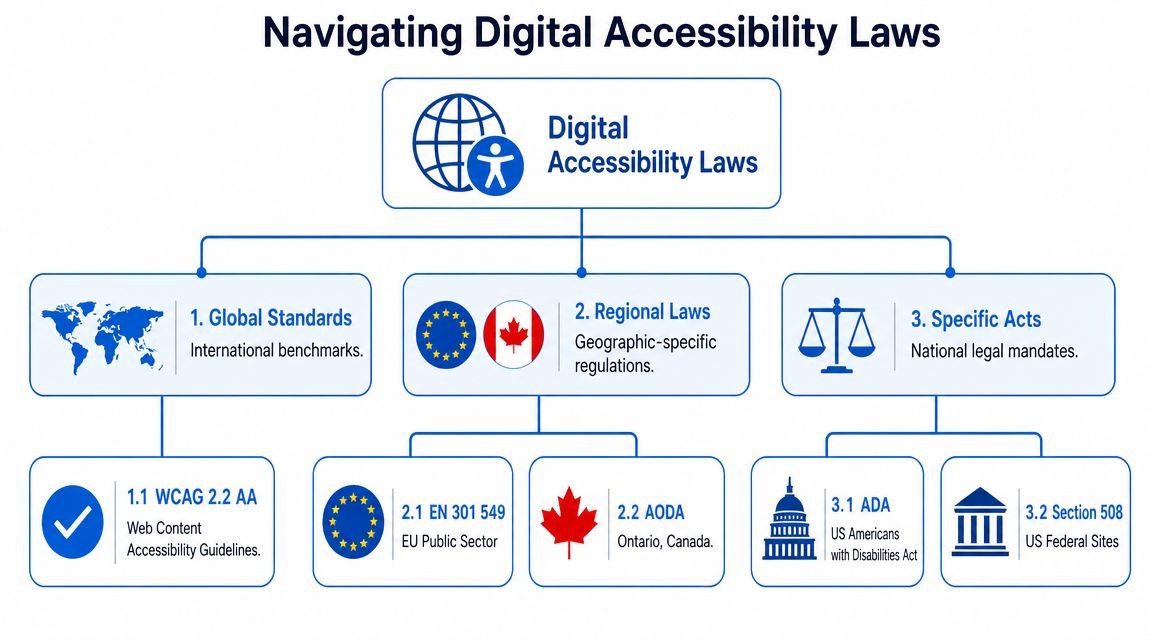
In the U.S., accessibility work usually starts with two reference points. Courts and plaintiffs regularly test websites against the ADA, and Section 508 applies to federal agencies and to vendors working on covered public sector projects. The U.S. General Services Administration explains how Section 508 applies to information and communication technology and ties conformance to WCAG-based requirements (Section 508 requirements overview). Agencies also run into AODA, EN 301 549, or client procurement standards that call for WCAG 2.2 AA because enterprise buyers want a measurable target.
That changes how projects should be scoped. Accessibility is not one line in a proposal. It needs acceptance criteria, design system rules, content governance, and QA time. If those pieces are missing, the team usually ends up debating defects late in the build, after templates, components, and CMS fields are already locked.
What the law changes in actual interface work
Legal risk shows up in recurring implementation failures. These are the issues that create rework, client exposure, and poor task completion rates:
| Area | What legal risk looks like in design |
|---|---|
| Navigation | Menus that do not work by keyboard, lose focus visibility, or collapse into confusing mobile patterns |
| Forms | Missing labels, weak error handling, placeholder-only instructions, and inaccessible validation states |
| Visual design | Low contrast, color-only status cues, and text that breaks when users resize it |
| Media | Missing alt text, captions, transcripts, or inaccessible embedded players |
| Components | Modals, tabs, carousels, and custom controls that screen readers or keyboard users cannot operate predictably |
The web content accessibility guidelines give agencies a practical baseline because they translate broad legal duties into testable behavior. That is what teams need in production. Designers need reusable component rules. Developers need clear implementation patterns. QA needs pass or fail criteria. Platforms such as WebAbility.io help operationalize that work by turning recurring checks into workflow steps instead of leaving them to memory.
I advise agencies to treat accessibility defects the same way they treat broken forms or checkout errors. If a user cannot open the menu, understand a field error, or submit a purchase with a keyboard, that is a release issue.
Usability and compliance usually point to the same fix
A lot of accessibility work is disciplined interface design. CXL's summary of Hick's Law and Fitts's Law connects directly to choices agencies make every day, including target size, choice overload, form structure, and interaction clarity. IxDF then translates those principles into concrete design guidance such as sufficient contrast, associated labels, clear grouping, responsive layouts, and text alternatives (design and engineering guidance).
That matters because accessibility fixes often improve commercial performance at the same time. A larger tap target reduces input errors. A properly labeled form field improves completion rates. Clear focus states help keyboard users, but they also help sighted users move through dense interfaces faster.
Here's a short explainer that helps clients understand the overlap between usability and compliance:
Accessibility needs a workflow, not a widget
The legal exposure is real. Law firms tracking business disputes concerning website access show why agencies should stop treating accessibility overlays and end-stage scans as a risk strategy. They do not fix source code issues, weak content structure, or broken interaction logic.
The practical approach is earlier and more specific. Define accessible patterns in Figma. Set contrast and focus requirements in design tokens. Require alt text and heading structure in CMS workflows. Test keyboard paths on staging before visual signoff. Run automated checks, then add manual review for forms, modals, media, and dynamic states.
That is how compliance becomes operational. Teams spend less time arguing over standards at the end of the project and more time shipping interfaces that are easier to use and easier to defend.
Understanding Data Privacy and Protection
Privacy failures usually start long before launch. They start in discovery, when a project adds analytics, chat, CRM syncs, lead forms, heatmaps, retargeting tags, and account features without deciding what data is being collected, why it is needed, and which legal rules apply.
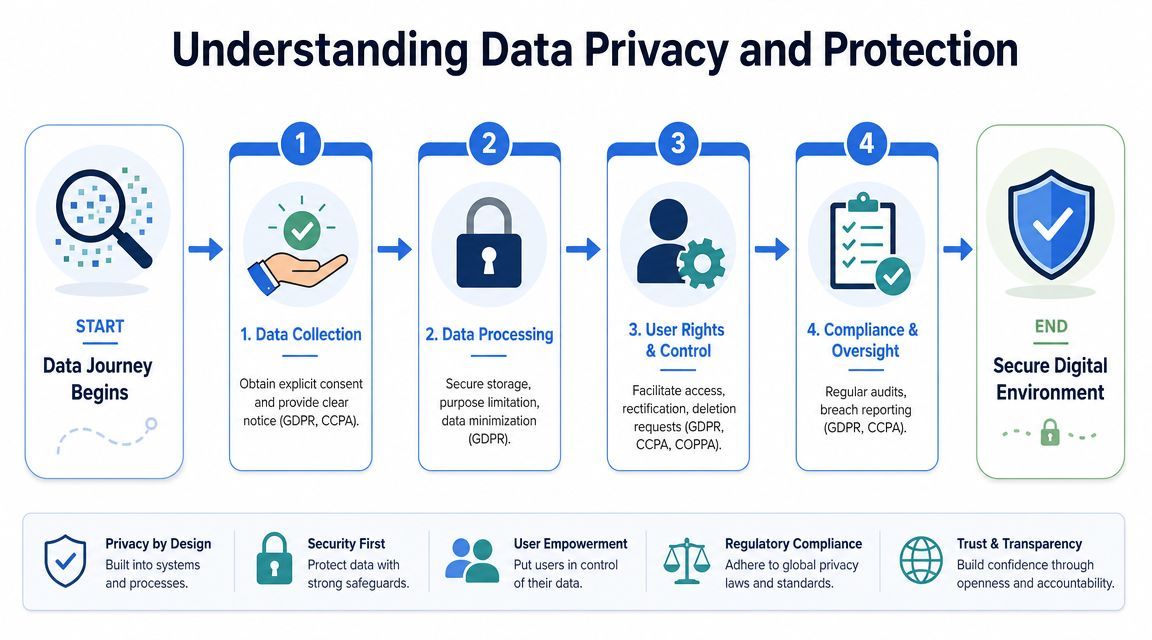
GDPR, CCPA, and COPPA affect interface decisions at the page level, not just policy language. GDPR requires a lawful basis for processing and gives users rights tied to access, deletion, and objection. CCPA focuses on notice, disclosure, and control for California residents. COPPA adds stricter requirements when a site or feature is directed to children under 13, including verifiable parental consent. The Federal Trade Commission's COPPA guidance for businesses is a better reference point here than a general legal roundup, especially for teams designing child-facing experiences.
The agency risk is operational. If consent banners are configured after tags are already firing, if form fields collect more than the service requires, or if no one can trace where submissions end up, the site has a compliance problem and a UX problem. Users lose trust fast when privacy choices are unclear or ineffective.
A workable review before launch should answer four questions:
- What data enters the system: Form inputs, uploaded files, analytics events, cookies, support messages, account details, and third-party enrichment.
- Why each data point is needed: Service delivery, fraud prevention, support, measurement, marketing, or legal retention.
- What the user sees at the moment of collection: Plain-language notice near forms, account settings, checkout steps, or consent prompts.
- How choices are recorded and honored: Consent logs, opt-out handling, deletion workflows, retention rules, and vendor-level controls.
That last point is where projects often break down.
Teams frequently treat the cookie banner as the privacy project. The core work is mapping data flow across the stack, from front-end forms to analytics tools to downstream systems like CRMs, email platforms, and support desks. If a user withdraws consent or requests deletion, the agency should know which systems need to be updated and who owns that response.
For a legal perspective on how access and website-related conflicts can escalate, this overview of business disputes concerning website access from Miles Hansford Law Firm is a useful reference for agency leaders and in-house teams.
The practical fix is to build privacy into delivery, not tack it on at handoff. Add a privacy checkpoint to discovery. Maintain a data inventory during design and development. Review every third-party script before it reaches staging. Confirm who writes and updates the policy. Test whether user choices change system behavior. If clients need a baseline example of clear platform policy language, point them to the WebAbility.io privacy statement. It shows the kind of plain disclosure teams should be prepared to support with system rules.
That is how legal theory becomes agency process. It also explains why compliance platforms matter. Tools such as WebAbility.io help teams turn requirements into repeatable checks, documentation, and implementation steps instead of relying on memory and last-minute legal cleanup.
Meeting E-commerce and Consumer Rights Rules
E-commerce projects create a different kind of legal exposure because the design directly affects purchase understanding. If pricing, shipping, refunds, or terms are unclear, the problem isn't just bad UX. It can become a consumer protection issue and a dispute risk.
The sites that hold up best do the obvious things consistently. Product pages show what the item is, what it costs, what happens after purchase, and how returns work. Checkout pages repeat the important terms before commitment. Order confirmation pages preserve the same clarity instead of burying the next steps in account menus.
What to make visible before checkout
A legally safer commerce experience usually includes these elements in obvious places:
- Clear pricing: Total cost should be understandable before final submission.
- Shipping disclosure: Timelines, delivery restrictions, and fulfillment expectations should appear before purchase commitment.
- Returns and refunds: Policies should be easy to find from product pages, cart, checkout, and footer navigation.
- Terms access: Users should be able to reach terms, privacy information, and support details without hunting.
Teams also need to think about enforceability, not just presence. A terms link hidden in small footer text may exist, but it may not do much to help when a purchase flow creates weak notice. The safer pattern is conspicuous placement near commitment actions, especially for subscriptions, auto-renewals, and higher-friction transactions.
Where compliance helps conversion
The strongest ecommerce flows reduce uncertainty. Buyers convert more readily when shipping, support, payment security cues, and return options are easy to inspect. Accessibility also matters here because every blocked form field, unreachable coupon control, or inaccessible cart drawer is both a compliance issue and a lost sale.
For teams building stores at scale, WebAbility.io's e-commerce compliance insights are relevant because they connect accessibility requirements to common shopping experiences such as product browsing, cart interaction, and checkout.
What doesn't work is writing a long policy page and assuming that satisfies the interface. Consumer-facing rules need prominent placement inside the buying journey itself.
Protecting Your Work with Copyright and Trademark
Intellectual property issues in web projects usually begin with assumptions. The client assumes they own everything they paid for. The agency assumes the contract language is enough. The developer assumes the font license covers web use. Those assumptions are where expensive cleanup starts.
Copyright and trademark don't sit on the edge of the project. They sit inside it. Logos, photos, icons, videos, illustrations, written copy, custom code, templates, downloadable resources, and brand names can all create ownership or permission problems.
The most common agency-side risk
A client sends over assets and says, "Use these." That doesn't prove ownership or licensing.
If the client provides a logo they don't own, publishes stock imagery beyond the license scope, or reuses copy lifted from a competitor, the agency may still get pulled into the fallout. The practical response isn't paranoia. It's documentation. Ask who owns each asset, what license applies, whether sublicensing is permitted, and whether any restrictions apply to geographic use, media format, or modification.
Contract language matters more than people think
IP terms should answer a few direct questions:
| Issue | What the contract should clarify |
|---|---|
| Final design files | When ownership transfers and what payment conditions apply |
| Source code | Whether the client receives full ownership, a license, or limited-use rights |
| Third-party assets | Who is responsible for securing and retaining licenses |
| Portfolio use | Whether the agency can display the work after launch |
| Client-supplied materials | Who bears responsibility if those materials infringe rights |
Get asset ownership in writing before production starts, not after launch when a takedown demand arrives.
Trademark adds another layer. Even if a logo was custom-designed, the client can still face conflict if the mark is too close to an existing brand in the same market. Agencies shouldn't present themselves as trademark counsel unless they are. They should, however, flag the risk and push brand owners to verify clearance before launch.
The cleanest projects are the ones where rights, licenses, and usage permissions are tracked alongside content and design approvals.
A Practical Risk Mitigation Framework for Agencies
Agencies don't need a legal department to work more safely. They need a repeatable operating model. The best compliance workflows are boring on purpose. They assign checks to normal project stages so risk doesn't pile up in pre-launch QA.
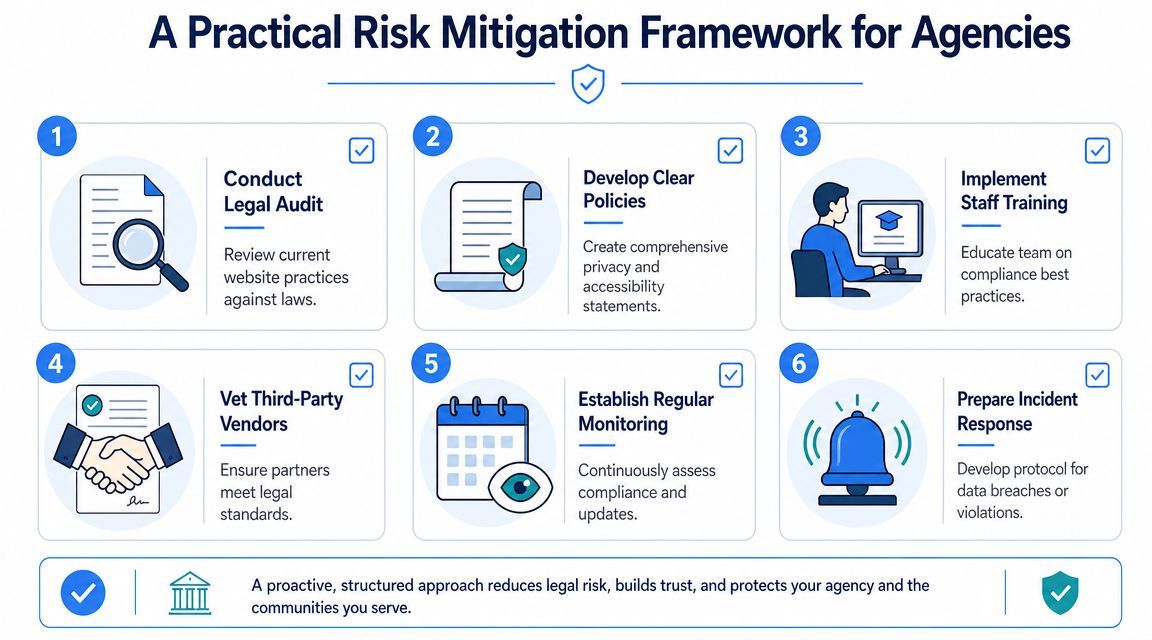
Discovery and scope
Discovery is where agencies prevent most avoidable legal friction. This is the point to ask whether the client is subject to accessibility obligations, privacy requirements, public sector procurement rules, child-directed restrictions, or strict brand licensing controls.
A practical intake checklist includes:
- Accessibility baseline: Existing audit status, known barriers, required standards, and testing expectations
- Privacy map: Forms, analytics, consent needs, cookies, embedded tools, and data-sharing vendors
- IP inventory: Logos, fonts, stock assets, code libraries, copy ownership, and license files
- Commerce obligations: Refund terms, shipping disclosures, subscription language, and checkout notices
Design and development controls
Once the project moves into production, agencies need controls that are easy to enforce. In this context, design systems, content templates, and component libraries carry real legal value.
Use a structured handoff model:
- Design approves accessible components, content hierarchy, and consent patterns.
- Development implements semantic structure, keyboard behavior, responsive handling, and policy-linked flows.
- Content verifies alt text, disclosures, claims language, and rights-cleared assets.
- QA tests real user journeys, not just isolated pages.
For broader engineering discipline, Digital ToolPad's SDLC recommendations are a useful companion resource because they reinforce the idea that security and compliance checks belong inside the software development lifecycle rather than after it.
Launch and post-launch governance
Launch isn't the finish line for web design and the law. Accessibility drifts as editors add content. Privacy exposure changes when marketing installs new scripts. IP problems appear when teams reuse assets without checking license terms.
A durable agency workflow usually includes:
- Recurring scans and manual review
- Change control for scripts, forms, and media
- Policy review when data practices change
- Ticketing for reported accessibility barriers
- Vendor review for third-party embeds and integrations
Compliance that isn't maintained becomes a historical artifact, not a live safeguard.
What works is assigning ownership. Someone has to own the backlog, the policy updates, the retesting cycle, and the client communication. Without that, every issue becomes "known but unassigned."
How WebAbility.io Operationalizes Legal Compliance
The theory is often understood. The hard part is making compliance repeatable across active websites, client portfolios, and ongoing content changes. That's where platforms become useful.
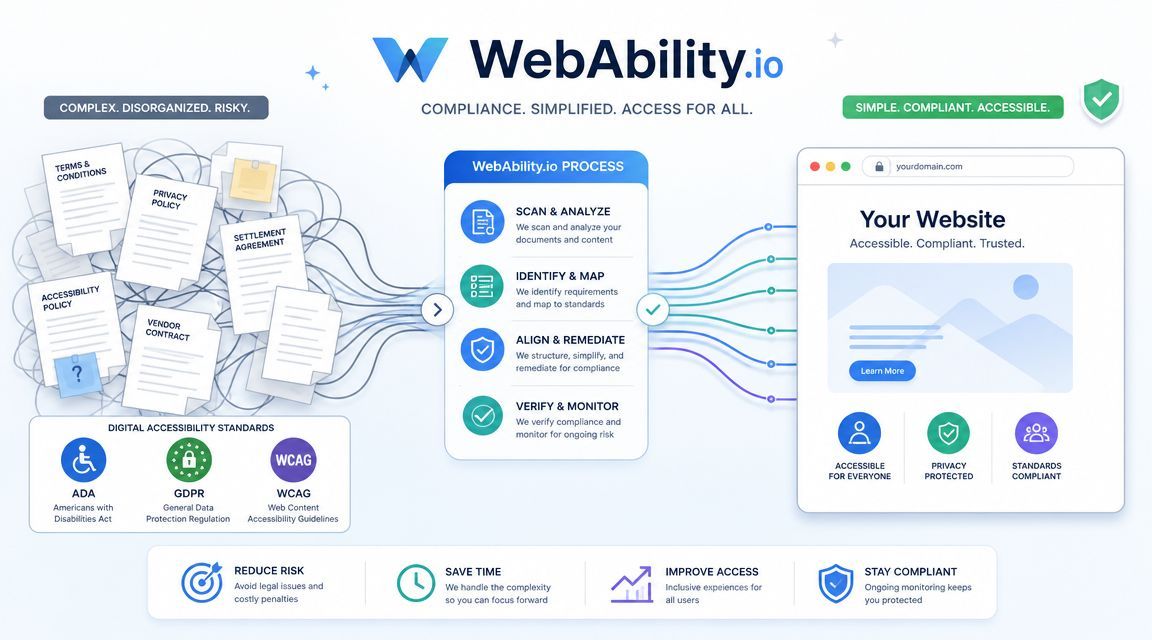
A practical platform should do more than produce scan results. It should help agencies monitor issues continuously, document remediation work, support user adjustments, and give teams evidence they can use in internal reviews or client reporting. In accessibility, that often means some combination of automated scanning, reporting dashboards, issue prioritization, audit support, and front-end user controls.
Where automation helps and where governance still matters
AI can help teams move faster, especially when it assists with issue detection, triage, or content support. But legal responsibility doesn't move from the organization to the tool. The EU AI Act entered into force in 2024 and is being phased in through 2025 and 2026, while ongoing DOJ guidance underscores the need for human governance (AI and accountability context). That means teams still need testing, review, reporting, and clear ownership.
This is the right lens for evaluating accessibility tooling. Managed accessibility features and widgets can support users directly by offering controls such as contrast changes, text scaling, keyboard support options, and reading assistance. They work best when they're part of a broader compliance process that also includes code-level review, documented remediation, and governance.
How this looks in practice
For agencies and multi-site teams, WebAbility.io is one example of a platform built around operational execution rather than one-time advice. It offers an AI-enhanced accessibility widget with visitor-facing adjustment features, plus dashboard functions such as automated scanning, compliance scoring, monitoring, audit trails, and reporting for ongoing management. Used properly, that kind of setup helps teams connect design decisions, remediation workflows, and executive oversight in one place.
The key test is simple. Can the team show what issues were found, what was fixed, what still needs review, and who owns the next action? If the answer is yes, the platform is doing useful compliance work. If the answer is no, then the agency still has a process gap, even if the site has tooling installed.
If your agency or in-house team needs a more structured way to manage accessibility and legal risk across active websites, WebAbility.io is worth evaluating. It combines user-facing accessibility controls with scanning, reporting, and governance features that can help turn compliance from an occasional project into a maintained operating process.
Quick Questions
Tap to ask AI about this article