A Practical Guide to Technical Website Auditing

Sidharth Nayyar

TL;DR: A technical website audit is a deep health check of your site's foundation. It ensures search engines can crawl and index your content, your pages load quickly, your site is secure, and it's accessible to all users. This process uncovers hidden issues like broken links, slow performance, and security risks, providing a clear, prioritized roadmap to improve your site's performance, user experience, and search engine rankings.
What Exactly Is a Technical Website Audit? (The TLDR)
Think of a technical website audit as a comprehensive health check for your site's engine room. It's a deep dive into your website's technical guts to make sure search engines can easily crawl, index, and understand your content, all while giving your visitors a fast, secure, and frustration-free experience.
This isn't about the color of your buttons or the font you chose. It's the foundational work that makes all your other marketing efforts—like content and SEO—actually pay off. A solid audit uncovers hidden problems and gives you a clear, prioritized to-do list for fixing them.
In short, it’s about:
Checking if search engine bots can easily navigate your site.
Measuring load times and Core Web Vitals to keep users happy.
Finding security weak spots and ensuring HTTPS is working correctly.
Mapping out your site's structure to make sure it’s logical.
Ensuring your website is usable by everyone, including people with disabilities.
Ultimately, a technical audit diagnoses the issues that are quietly hurting your rankings and pushing visitors away. It moves past the surface-level stuff to inspect the very code and structure your site is built on.
Understanding Your Website's Foundation
Let's use an analogy. Your website is a house. The content and design—the text, images, and branding—are the furniture and decor. It’s what everyone sees first.
A technical audit, on the other hand, is the home inspection. It checks for cracks in the foundation (poor site architecture), faulty wiring (slow page speeds), and leaky pipes (security holes).
If the foundation is unstable, it doesn't matter how great the interior design is. The house just won't be a pleasant or safe place to be. It’s the same with your website; if the technical side is a mess, even the most brilliant content will fail to perform.
Why a Technical Audit Matters
A systematic audit turns a mountain of confusing data into a clear roadmap. It's a critical process for any serious online business because it directly impacts your visibility and how much users enjoy—or tolerate—your site. The stakes are high; a staggering 88% of users say they won't return to a site after a single bad experience.
Instead of guessing what to fix, an audit tells you exactly where to focus your time and money for the biggest impact. It's about making smart, data-driven decisions that actually move the needle.
A website audit is an in-depth, data-driven assessment of the experience your website provides to users. It helps you evaluate your site methodically so you can find new ways to improve it.
The Core Goals of an Audit
While the specifics can vary, the end goals of a technical audit are almost always the same: find and fix the foundational problems to achieve real business results. To see these principles in action, you can delve deeper into SEO audits and explore how the diagnostic process works.
Here’s what we’re typically trying to achieve:
Improve Search Engine Performance: The absolute first step to ranking is making sure search engines like Google can crawl, index, and make sense of your site without hitting roadblocks.
Boost User Experience: Fixing slow load times, broken links, and clunky navigation creates a much smoother journey for your visitors, keeping them on your site longer.
Enhance Accessibility: An audit helps ensure your site is built for everyone, including those with disabilities. This is not only the right thing to do, but it also widens your potential audience.
Strengthen Security: We hunt for vulnerabilities to protect your website, your business, and your customers' private data from threats.
The Core Pillars of a Technical Website Audit
A technical website audit isn't a single, one-off task. It's more like a thorough inspection of a complex building, where you bring in a team of specialists. One expert checks the foundation and structural integrity (Site Architecture), another tests the wiring and plumbing for efficiency (Performance), and a third inspects the locks and alarm systems (Security).
Just like that building, your website is a system of interconnected parts. A comprehensive technical audit dives deep into each of these foundational pillars to give you a complete picture of your site's health. Neglecting one area can easily create a domino effect of problems in others, which is why a holistic approach is absolutely essential.
Technical SEO and Crawlability
First up, and arguably the most fundamental pillar, is Technical SEO. At its core, this is all about making sure search engines like Google can find, understand, and index your website's content without a hitch. If the search engine bots can't even get in the door, it doesn't matter how brilliant your content is—it's going to be invisible to the world.
This part of the audit is like being a detective, looking for clues and roadblocks that might confuse search engine crawlers. Some common culprits include:
A misconfigured
robots.txtfile: This simple text file can accidentally tell search engines to ignore huge, important sections of your website.XML Sitemap errors: An outdated or broken sitemap is like giving a delivery driver the wrong map. It misleads crawlers and can leave your best pages undiscovered.
Wasted crawl budget: Things like endless redirect chains or mountains of duplicate content can exhaust the limited time search engines give to crawling your site, meaning they might leave before they see everything.
Performance and Core Web Vitals
Next, we look at Performance. This is all about speed. How quickly does your site load? How responsive is it to user interaction? In a world where attention spans are measured in seconds, a slow website is a death sentence. Performance doesn't just impact user experience; it’s a major factor in search rankings, especially with Google's focus on Core Web Vitals.
A smooth, fast experience isn't a bonus feature anymore—it's the baseline expectation. A delay of just one second in page load time can lead to an 11% drop in page views and a 7% loss in conversions.
A performance audit measures key metrics like Largest Contentful Paint (LCP), First Input Delay (FID), and Cumulative Layout Shift (CLS). It pinpoints the exact causes of sluggishness—whether it's massive image files, bloated code, or a slow server—and gives you a clear roadmap to a faster, more enjoyable website.
To get a feel for what a full audit covers, the table below breaks down the primary focus and business impact of each core domain.
Key Domains of a Technical Website Audit
| Audit Domain | Primary Focus | Business Impact |
|---|---|---|
| Technical SEO | Ensuring search engines can effectively crawl, render, and index your website content. | Increases organic visibility, drives qualified traffic, and improves keyword rankings. |
| Performance | Measuring and optimizing site speed, responsiveness, and stability (Core Web Vitals). | Enhances user experience, reduces bounce rates, and boosts conversion rates. |
| Accessibility | Making the website usable for people with disabilities by adhering to WCAG standards. | Expands audience reach, mitigates legal risks, and strengthens brand reputation. |
| Security | Identifying and fixing vulnerabilities to protect the site and user data from threats. | Builds user trust, prevents data breaches, and protects brand credibility. |
| Site Architecture | Analyzing the logical structure, internal linking, and navigational pathways of the site. | Improves user navigation, distributes link equity effectively, and helps search engines understand content hierarchy. |
| Analytics | Verifying the correct implementation and accuracy of tracking codes and data collection. | Ensures reliable data for making informed business decisions and accurately measuring ROI. |
Each domain is a crucial piece of the puzzle, contributing to a website that is not just functional but truly effective.
Accessibility and Security
These two pillars are non-negotiable for building trust and ensuring your website is a welcoming and safe place for everyone.
Accessibility is about making sure people with disabilities can use your site. It involves checking for compliance with standards like the Web Content Accessibility Guidelines (WCAG). This is more than just a box-ticking exercise; it’s about inclusive design that opens your digital doors to a much wider audience while reducing legal risks.
Security, on the other hand, is your site's defense system. A security audit scans for vulnerabilities, confirms that HTTPS is implemented correctly across the board, and reviews data handling practices. In an era of constant cyber threats, a secure website is absolutely fundamental to protecting your brand’s reputation and your customers’ private information.
Site Architecture and Analytics
Finally, a top-tier audit looks at your site's blueprint and the tools you use to measure its performance.
Site Architecture is all about how your pages are organized and connected. A logical, well-thought-out structure helps both real users and search engine bots find their way around. A good audit will analyze your site's hierarchy, check for a smart internal linking strategy, and ensure your most important pages aren't buried deep within the site. You can learn more about how to audit a website and its structure in our detailed guide.
Analytics Integrity makes sure the data you're collecting is actually correct. You'd be surprised how often tracking codes are broken or missing from key pages. Without reliable data, you’re flying blind. Consider the SaaS industry, where organic search is a huge driver, accounting for 53% of all website traffic. In one audit for a B2B SaaS company, we discovered a simple canonical tag error on just 10% of their pages was causing a 20% drop in organic traffic—a costly problem that only a deep technical check could uncover. You can find more insights on how technical SEO drives SaaS growth on seomator.com.
Executing Your Step-by-Step Audit Workflow
A successful technical website audit isn't just about running a tool and getting a score. It’s a methodical process, much like an archeological dig. You wouldn't just grab a shovel and start digging randomly; you’d first map the site, then carefully excavate layer by layer, documenting every find. This systematic approach is what turns a mountain of raw data into a prioritized list of things you can actually fix.
Everything kicks off with a comprehensive site crawl. This is your foundational move. Using a crawler, you’ll spider your entire website, following every link to build a complete blueprint of its architecture. This first pass almost always uncovers critical, low-hanging fruit—think broken links (404s), server errors, and messy redirect chains that frustrate both users and search engines.
Once you have that raw data, you shift from discovery to analysis. The idea is to systematically work through the key pillars of website health, using the crawl data as your map.
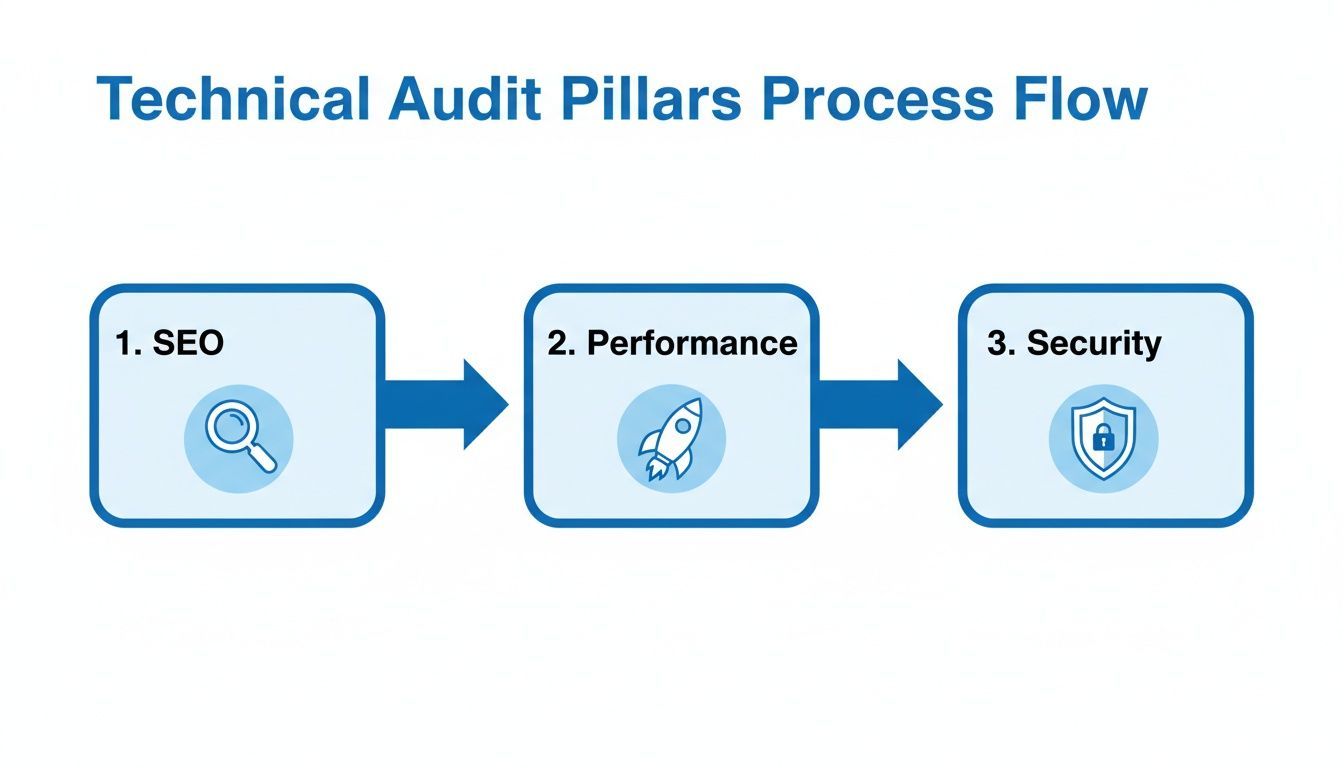
This diagram really drives home how interconnected these areas are. A security vulnerability can tank performance, and poor performance will absolutely drag down your SEO rankings. They don't live in a vacuum.
Phased Analysis for Clear Results
With your crawl data in hand, the real work begins. The trick is to avoid getting overwhelmed. Instead of trying to tackle everything at once, break your analysis into manageable phases. I always recommend starting with on-page SEO issues found in the crawl, as they often deliver the quickest wins.
Here's a logical way to approach it:
Initial Crawl Analysis: First, dive into the crawl report and hunt for the big, glaring errors. You're looking for all 4xx and 5xx status codes, long redirect chains that chew up crawl budget, and pages with duplicate or missing title tags and meta descriptions.
Performance Deep Dive: Once you've flagged the major structural problems, turn your attention to speed. Measure your Core Web Vitals on key page templates. Look for the usual suspects: oversized images, render-blocking resources, or sluggish server response times that kill the user experience.
Architectural and Indexing Review: Now, zoom out to look at the site’s structure and how it communicates with search engines. Are your canonical tags set up right to handle duplicate content? Is your
robots.txtfile accidentally blocking search crawlers from important files? Double-check your XML sitemap to make sure it’s clean and accurate.
Validating Functionality and User Experience
A technically perfect site that doesn't work for a real person is a failure. This is where you have to step away from the crawlers and start testing things from a user's perspective. Integrating UI automated testing into your audit is a smart move; it’s like an insurance policy against user-facing bugs and ensures things work consistently across different browsers and devices.
This stage is all about making sure critical user journeys are smooth. For instance, can someone actually get from a product page to the checkout without a hitch? Do the dropdowns, buttons, and filters on the page actually work?
An effective audit workflow is iterative. It’s a cycle of crawling to find problems, analyzing to understand their root cause, implementing fixes, and then re-crawling to verify the solution worked.
For a more granular look at exactly what to check in each phase, you can use our detailed website audit checklist to guide your work.
Transforming Data into Action
The final, and most crucial, step is turning all your findings into clear, actionable tasks. Every single issue you've uncovered needs to be documented with specifics: what the problem is, where to find it, and why it matters.
I find it helpful to organize the findings by the pillars we've discussed—SEO, performance, security, and accessibility. This structure makes it much easier to present the information to your development team in a way they can immediately understand and act on. Following this process ensures nothing gets missed and sets you up for a smooth remediation phase.
Prioritizing Fixes and Reporting Your Findings
Let’s be honest: an audit that just ends up as another spreadsheet is a complete waste of time. The real magic of a technical website audit happens when you turn all those findings into focused, decisive action. After you've spent hours or days compiling a long list of issues, the big question is always, "Okay... now what?"
Trying to fix everything at once is a classic mistake. It's a surefire way to get overwhelmed and accomplish nothing.
This is where a smart prioritization strategy becomes your best friend. Not all technical problems carry the same weight. A broken link on a ten-year-old blog post is an annoyance, sure. But a noindex tag accidentally left on your homepage? That’s a five-alarm fire. You need a simple framework to separate the emergencies from the minor clean-up jobs.
The most effective way I’ve found to do this is by plotting every single issue on an Impact vs. Effort matrix. This straightforward grid helps you categorize every fix based on two simple questions: how much good will this do, and how hard is it to get done?
The Impact vs. Effort Matrix
Think of this as your command center for getting things fixed. It gives you a bird's-eye view of your action plan and, just as importantly, helps you get your team and stakeholders on board by focusing on what truly matters first.
Here’s how you can break it down:
High Impact, Low Effort (Quick Wins): These are your immediate priorities. Jump on these right away. We're talking about things like fixing a critical
robots.txterror that's blocking Google, or adding missing title tags to your most important service pages. These are the fixes that deliver a huge bang for your buck with minimal work.High Impact, High Effort (Major Projects): These are the game-changers. Think big, like a site migration to a better architecture or a massive push to nail your Core Web Vitals. They require serious planning and resources, but they're absolutely essential for long-term growth and success.
Low Impact, Low Effort (Fill-in Tasks): These are the "nice-to-haves." You can chip away at these when you have some downtime. This bucket includes things like fixing a handful of internal broken links or compressing some images on less-trafficked pages.
Low Impact, High Effort (Time Sinks): Avoid these like the plague. Seriously. These are the tasks that eat up a ton of time, budget, and developer energy for almost no noticeable gain. A complete redesign of a blog category that gets almost no traffic would probably fall right in here.
Tailoring Your Audit Report for Different Audiences
Once you know what needs to be fixed and in what order, the final piece of the puzzle is communicating your plan. A one-size-fits-all report just doesn’t cut it. Different people in your organization need different information, presented in a way they can actually understand and use.
A technical audit often shines a light on foundational problems that have surprisingly far-reaching business consequences. For example, 56% of large organizations say the cost of fixing technical debt is a major roadblock to new projects, and 40% deal with weekly IT glitches because of outdated systems. When your audit reveals that 18% of internal links are broken or that 65% of pages are failing Core Web Vitals—which lines up with a 15-20% traffic dip—you're not just listing problems; you're telling a story about a leaky bucket.
Communicating this is everything, especially when you know that a fix like cleaning up duplicate content can lead to a 35% jump in organic visibility. If you want to dive deeper, you can discover more insights about these technology challenges on kpmg.com.
The whole point of a report isn't just to dump data on people; it's to get them to do something. Frame your findings as business opportunities—more traffic, happier users, and better conversions—not just a long to-do list for the tech team.
To make sure your message hits home, create at least two versions of your report:
The Executive Summary: This is for your C-suite, your boss, and other key decision-makers. Keep it to a single page, high-level, and focused on the big picture: what's broken, what are the business risks, and what’s the potential return on investment for fixing it? Use charts and simple visuals to make the impact crystal clear.
The Implementation Guide: This one’s for the developers. It needs to be detailed, technical, and actionable. Every issue should be laid out like a ticket, with a clear description, the exact URLs affected, its priority level, and specific instructions on how to implement the fix.
By prioritizing with a clear head and reporting with your audience in mind, you transform your technical audit from a simple check-up into a powerful roadmap for real, measurable improvement.
Assembling Your Technical Auditing Toolkit
You wouldn't expect a mechanic to fix a modern car with just a single wrench, and the same principle applies to auditing a website. To really get under the hood and diagnose what’s going on, you need a diverse set of tools. The best approach is to build a toolkit that combines different types of software, with each one specializing in a specific part of the audit.
Think of your toolkit as a team of specialists. You've got your all-in-one SEO platforms like Ahrefs or Semrush, which are like the general practitioners of your audit. They give you a fantastic, high-level view of your site's health, from keyword performance to its backlink profile.
Then you have your dedicated website crawlers—tools like the Screaming Frog SEO Spider are the surgeons on your team. These crawlers meticulously comb through every single page of your site, flagging broken links, redirect chains, and metadata problems with absolute precision.

No single piece of software can do everything, which is why this multi-tool strategy is so crucial. A typical workflow might kick off with a crawler to map out the site's structure, then pivot to more specialized tools to dig into specific problems that pop up.
Core Tools for Every Audit
No matter the size or complexity of the site, every technical audit should start with a core group of tools. These are the essentials that cover the big three: SEO, performance, and accessibility. They’ll give you the foundational data you need to start painting a clear picture of your website's condition.
Here are the non-negotiables for any serious audit:
All-in-One SEO Platforms: Tools like Semrush and Ahrefs are your go-to for tracking how you stack up against competitors, monitoring keyword rankings, and analyzing your backlink health. They provide the big-picture dashboard for your site's SEO pulse.
Dedicated Crawlers: You absolutely need a tool like Screaming Frog or Sitebulb for any deep technical dive. They crawl your site just like a search engine bot would, giving you a complete inventory of every URL and flagging on-page issues at scale.
Performance Analyzers: Google’s PageSpeed Insights is the industry benchmark for a reason. It’s the best way to measure your Core Web Vitals and pinpoint exactly what’s slowing your site down, offering clear recommendations for both mobile and desktop.
Specialized Tools for Deeper Insights
Once you have the fundamentals covered, you can bring in specialized tools to zero in on specific areas, like accessibility and security. These platforms are designed to go much deeper than the general-purpose tools, catching issues that might otherwise slip through the cracks.
For example, making sure your website is truly inclusive requires dedicated attention. Accessibility monitoring platforms are built to automatically check for compliance with WCAG standards. They can scan your site for problems like missing alt text, poor color contrast, and incorrect heading structures. If you want to learn more, check out our guide on web accessibility testing tools and see how they fit into a complete audit strategy.
A great toolkit isn’t about having the most tools; it's about having the right tools that work together. Your crawler finds the "what," your performance tool explains the "why," and your accessibility platform ensures it works for everyone.
By combining these different types of tools, you create a powerful, multi-layered auditing process. This approach ensures you not only find surface-level errors but also uncover the root causes of performance, SEO, and usability issues, setting you up for a truly effective remediation phase.
Moving From Audits to Continuous Improvement
A one-time technical audit is great, but it’s just a snapshot. Your website isn't a static brochure; it’s a living, breathing thing that changes with every content update, code deployment, and shift in user behavior. Because of this, thinking about website health isn't about a single check-up. It's about building a culture of continuous improvement.
This means getting out of the "fire drill" mode, where an audit only happens after traffic tanks or a critical feature breaks. The real goal is to weave technical health directly into your everyday operations and development cycles.
Establishing a Regular Audit Cadence
The first step is setting up a predictable schedule. The right rhythm for your audits really depends on how often your site changes.
Large, Dynamic Sites: If you're running a big e-commerce store or a news site with daily updates, a full audit every month is a smart baseline. You can back that up with automated scans every week.
Smaller, Static Sites: For a simpler website that doesn't change much, a deep-dive audit every quarter or even twice a year usually does the trick.
Putting audits on a regular schedule turns them from a massive, once-a-year headache into a manageable, ongoing process. This helps you spot things like broken links or slowing page speeds before they grow into major issues that hurt both your users and your SEO rankings.
For enterprise-level sites, you have to be even more on top of it. We're talking bi-weekly or even weekly deep crawls. A monthly audit might catch a sudden spike in 4xx/5xx crawl errors that, if ignored, could impact up to 15% of your pages and pull your indexability rate below 80%. We’ve seen cases where consistent fixes after each audit—like enforcing HTTPS properly—shot a site’s indexability from a dismal 72% to a fantastic 98% in just two months. You can read more about how frequent audits drive results for enterprise sites on clickrank.ai.
Integrating Monitoring into Your Workflow
Thankfully, modern tools make this "always-on" approach much easier to manage. Automated scanners and real-time dashboards act like an early-warning system, flagging issues for your team the moment they pop up.
The ultimate goal is to make technical excellence a cultural value, not just a task on a checklist. Auditing should be an integrated part of your development process, ensuring that new features and content are optimized from day one.
When you bring these tools into your workflow, you give your team the power to watch key metrics all the time. Performance dips, new accessibility errors, or sudden crawl problems get flagged right away, not six months down the line in the next big audit. This creates a powerful feedback loop where your website is constantly getting stronger and better prepared to meet the needs of both users and search engines.
Your Top Technical Auditing Questions, Answered
Even with a solid grasp of the process, it's natural to have a few lingering questions about technical website audits. Getting comfortable with the concepts is the first step toward building a real strategy for your site's health. Let's tackle some of the most common questions to clear things up and help you dive into your next audit with confidence.
How Often Should I Run a Technical Audit?
This is a big one, and the honest answer is: it depends. The right audit schedule really hinges on how big your site is and how often you're making changes. There's no single magic number that works for everyone.
For a large, dynamic site—think a busy e-commerce store or a news site that's always publishing—a full-blown audit every quarter is a smart move. You'll also want to supplement that with automated weekly crawls to catch any new, glaring errors right away.
But if you have a smaller, more static site that doesn't see a lot of updates, a deep dive every 6 to 12 months will probably do the trick. The major exception? Always, always run an audit before and after a big change like a site migration, a complete redesign, or a switch to a new platform.
What's the Real Difference Between a Technical Audit and an SEO Audit?
It's easy to get these two mixed up. While they definitely overlap, a technical website audit goes much deeper than your typical SEO audit.
A standard SEO audit tends to focus on the things you can easily see and measure, like your on-page content, how you're using keywords, and your backlink profile. A technical audit, on the other hand, is all about the invisible foundation that makes your SEO efforts possible. It gets into the weeds of crawlability, indexing, site speed, security protocols, and the overall site architecture.
Here's a helpful way to think about it: A technical audit is like the structural inspection of a skyscraper, making sure the foundation is solid and the framework is sound. An SEO audit is more like the interior design review. Both are critical for a great building, but you can't hang pictures on crumbling walls.
Can I Actually Do a Technical Audit Myself?
You absolutely can. Armed with fantastic free tools like Google Search Console and PageSpeed Insights, plus a free website crawler, you can definitely run a basic audit on your own. This guide gives you the roadmap to spot many of the common problems that might be holding you back.
That said, for massive, complex websites, some technical issues are buried deep and can be incredibly tricky to diagnose. In those cases, bringing in a specialist or using a professional auditing platform can save you a ton of time and headaches, giving you the advanced tools and expertise needed to fix critical problems fast.
Where Does Accessibility Fit into All This?
Accessibility isn't just a nice-to-have; it's a non-negotiable part of a modern technical website audit. It's a series of technical checks designed to make sure your site is genuinely usable for people with disabilities, following standards like the Web Content Accessibility Guidelines (WCAG).
This means checking for logical heading structures that screen readers can follow, adding the right ARIA attributes for interactive elements, making sure someone can navigate the entire site with just a keyboard, and providing descriptive alt text for every important image. Building accessibility into your audit process doesn't just create a better site for all users—it also expands your potential audience and helps you avoid legal trouble.
At WebAbility.io, we’re firm believers that a technically sound website is an accessible one. Our platform gives you automated scanning and real-time monitoring, making accessibility a natural part of your workflow. To ensure your site is inclusive and compliant, learn more at https://www.webability.io.
Quick Questions
Tap to ask AI about this article







