Your Guide to a Powerful Accessibility Audit

Sidharth Nayyar
TL;DR: An accessibility audit is a full check-up for your website to see how well it works for people with disabilities, measuring it against standards like WCAG. It involves automated scans, manual testing by experts, and testing with assistive tech like screen readers. The goal is to get a clear, prioritized roadmap to fix barriers, improve user experience for everyone, expand your audience, and meet legal requirements like the ADA. While you can start with free tools, a professional audit is key for full compliance and real-world usability.
Let's break down what an accessibility audit is in plain English. Think of it as a comprehensive health check for your website or app, specifically designed to see how well it works for people with disabilities. The audit measures your digital property against established standards, most notably the Web Content Accessibility Guidelines (WCAG).
This isn't just about running a quick scan. A proper audit combines automated tools, hands-on expert testing, and real-world simulation with assistive technologies to find and rank any roadblocks that might prevent someone from using your site.
What an Accessibility Audit Really Means
It’s best to think of an accessibility audit less like a simple checklist and more like a building inspection for your digital presence. A physical building needs ramps, elevators, and accessible restrooms to be truly open to everyone. In the same way, your website needs to be built so that anyone, regardless of their physical or cognitive abilities, can find what they need and do what they came to do.
The real goal here is to pinpoint the actual, human-centric barriers that stop people from completing tasks. A good audit doesn't just list technical errors; it gives you a clear blueprint for making your digital space more inclusive and welcoming for a much broader audience. It’s a foundational step for any organization that takes digital equality seriously.
The Scope of a Thorough Audit
A truly comprehensive accessibility audit goes way beyond what a simple automated scan can accomplish. While automated tools are great for catching some of the more obvious code-based issues—what we often call "low-hanging fruit"—they can't see the full picture. A real audit digs much, much deeper.
It’s a layered process designed to catch everything:
Automated Scanning: This is the first pass. We use software to quickly flag clear violations of WCAG rules, like images missing alt text or text with poor color contrast.
Manual Testing: Here's where the human expertise comes in. Accessibility specialists navigate your site by hand, testing things that automated tools simply can't, like keyboard-only navigation, complex forms, and interactive menus.
Assistive Technology Testing: This is the most critical step. We actually use the same tools that people with disabilities rely on every day—like screen readers, screen magnifiers, and voice controls—to experience the site just as they would.
Why an Initial Audit Is So Important
Kicking things off with an audit is a powerful first move toward building a more inclusive digital product. It gives you a baseline, showing you exactly where you are right now in terms of compliance and genuine usability. If you want to dive deeper into the nuts and bolts, you can learn more about the complete accessibility audit process in our glossary.
An audit gives you a prioritized roadmap for remediation. Instead of guessing where to start, you get a clear, actionable plan that ranks issues by severity, allowing your teams to focus on the fixes that will have the greatest impact on users first.
In short: An accessibility audit isn't just a technical to-do list; it's a strategic business move. Think of it as opening your digital doors to over a billion people with disabilities, which in turn strengthens your brand, boosts your SEO, and expands your market. More importantly, it's your best defense against expensive accessibility lawsuits under laws like the ADA.
Why an Accessibility Audit Is More Than Just a Checklist
It’s easy to think of an accessibility audit as a simple box-checking exercise, but that misses the entire point. It’s like looking at a building inspection report and only seeing a list of materials. The real goal of that inspection is to confirm the building is safe, functional, and welcoming for everyone who enters.
An audit does the same for your digital property. It ensures you have the "virtual ramps" and "accessible doorways" in place so that everyone can navigate your site or app.
This is about more than just technical compliance. It’s a deep look into how committed your organization is to digital inclusion. With over 1.3 billion people worldwide living with some form of disability, an audit is your first step in welcoming a massive, and often overlooked, part of the population.
Ultimately, an audit is a deep dive into the core principles of user experience and inclusive design, making sure your site is built on sound web design practices from the very start.
The Business Case for Digital Inclusion
A proper accessibility audit is your roadmap to some serious business advantages. When your website is accessible, you automatically expand your market reach. This isn't just a feel-good idea; it translates directly into real growth and a healthier bottom line.
Beyond that, accessibility enhances your brand's reputation. Companies that genuinely care about inclusion are seen as ethical and modern, which builds trust with all customers, not just those with disabilities. It also gives your search engine optimization (SEO) a nice lift, since many accessibility best practices—like a clear content structure and descriptive alt text for images—are exactly what search engines love to see.
Legal and Ethical Mandates
Let's be blunt: the legal requirements for digital accessibility are getting stricter every year. An accessibility audit is your primary tool for navigating and complying with crucial laws like the Americans with Disabilities Act (ADA) in the US and the European Accessibility Act.
The need for these audits has exploded recently due to a sharp rise in legal challenges. We've seen thousands of ADA-related digital accessibility lawsuits filed in the US alone, and it’s part of a global trend toward tougher enforcement.
According to a survey by AbilityNet, while 55% of professionals now try to build accessibility into their development process, the fear of legal action is still a major driver. This is why audits are so critical. They are diagnostic powerhouses, often resulting in detailed 10-30 page reports that map every single issue to specific WCAG criteria, complete with screenshots, severity ratings, and clear instructions for fixing the problems.
An accessibility audit is not a one-time fix. It’s the foundational first step in an ongoing commitment. It gives you the blueprint for building and maintaining a digital presence that is sustainable, inclusive, and legally sound.
At the end of the day, ignoring accessibility is more than just a legal risk—it's an ethical failure. It creates barriers that stop people from accessing the same information, services, and opportunities that others take for granted. An audit is the first and most important step you can take to tear down those barriers and create a digital world that works for everyone.
Choosing the Right Type of Accessibility Audit
Not all audits are created equal, and knowing the difference is key to spending your time and money wisely. Each approach offers a different lens through which to view your website's accessibility, much like a mechanic has different tools for diagnosing a car.
Think of it this way: an automated scan is like plugging your car into a diagnostic computer. It’s fast and spits out a list of error codes. A manual audit is like having a master mechanic take the car for a test drive, listening to the engine and feeling how it handles to find problems the computer could never detect. The right choice depends on your goals, your budget, and how far along you are on your accessibility journey.
Automated Audits: The First Line of Defense
Automated audits are powered by software that crawls your site's code to spot common accessibility violations. They are incredibly fast and efficient at flagging widespread, programmatic issues that go against clear-cut WCAG success criteria.
This approach is perfect for:
Routine Health Checks: Running scans regularly to catch new bugs that sneak in with code updates or new content.
Spotting Low-Hanging Fruit: Quickly identifying and fixing straightforward problems like missing alt text, poor color contrast, or empty links.
Getting a Baseline: Taking a quick pulse of your site's overall accessibility health before committing to a more intensive review.
Just remember, automated tools have their limits. They can only catch around 30% of accessibility issues because they can't understand context, judge the quality of a user experience, or navigate complex workflows. That's where a human expert comes in.
Manual Audits: The Deep Investigation
A manual accessibility audit is carried out by a real person—an expert who systematically tests every nook and cranny of your website. These specialists use their deep understanding of WCAG guidelines and assistive technologies to find the subtle but critical barriers that automated tools fly right past.
During a manual audit, an expert will:
Try to use your entire site with just a keyboard.
Interact with complex components like forms, dropdown menus, and modals.
Check if the content flows logically and is structured correctly.
Use screen readers and other assistive devices to experience the site exactly as a person with a disability would.
This hands-on approach is the only way to truly assess real-world usability. An expert can tell you if a checkout process is not just technically compliant, but actually logical and frustration-free for someone using a screen reader.
Hybrid Audits and User Testing
For the most comprehensive view, a hybrid approach is the gold standard. It combines the speed of automated scanning for broad coverage with the depth and nuance of a manual review. You get the best of both worlds.
But to take it a step further, you need to bring in the real experts: your users. User testing with people with disabilities provides the most powerful feedback imaginable. It involves watching real people use their own assistive technologies to accomplish tasks on your website. Their direct feedback uncovers practical roadblocks and pain points that even a seasoned auditor might overlook. This isn't just about ticking boxes; it's about understanding the human on the other side of the screen. An audit that includes this is less of a report and more of a roadmap to genuine inclusivity.
A Step-By-Step Framework for Your First Audit
Getting started with your first accessibility audit can feel daunting, but breaking it down into a structured process makes it entirely manageable. Think of this framework as your roadmap—a clear path that takes you from initial planning to actionable insights, turning a complex job into a series of clear, logical steps.
The flowchart below gives you a bird's-eye view of the different audit types, from quick automated scans to the more thorough manual and hybrid reviews.
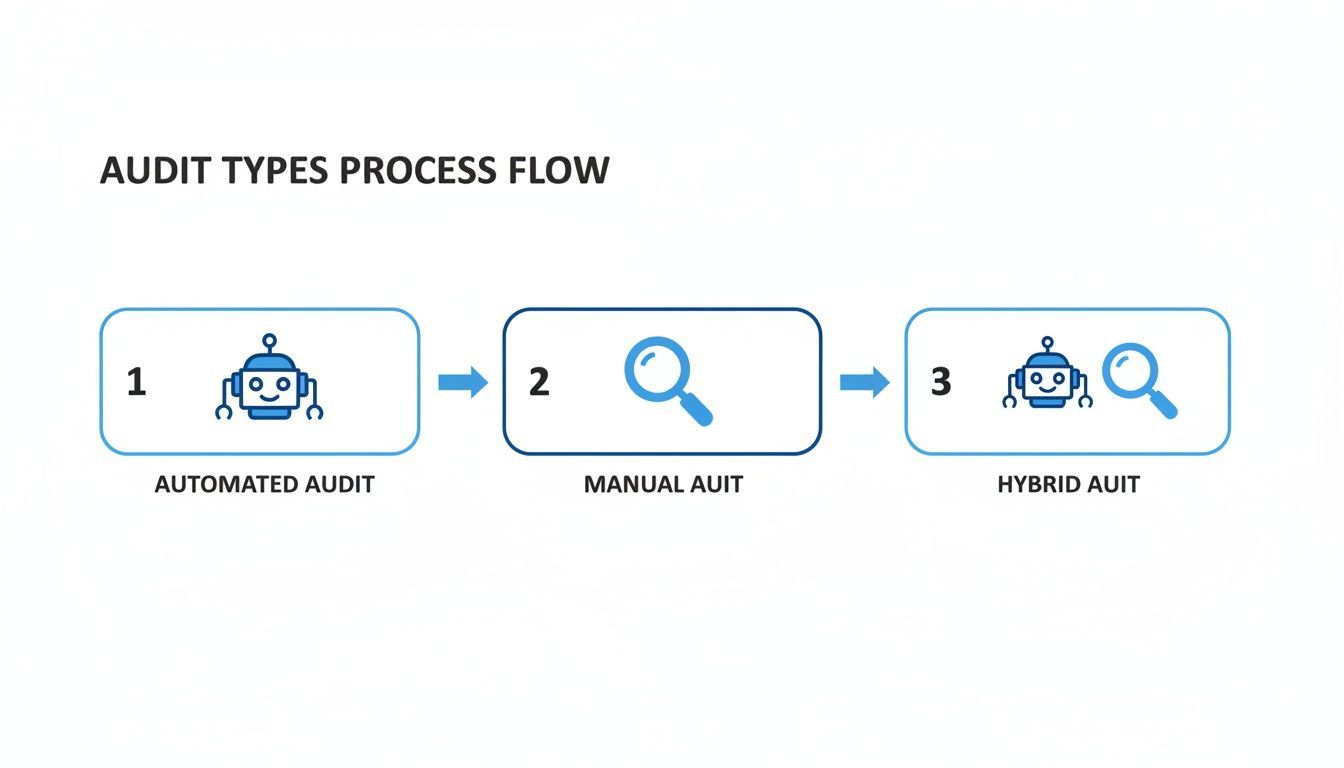
As you can see, automated testing is a fantastic starting point for catching obvious errors. Manual testing, however, is where you find the nuanced issues that impact real users. A hybrid approach combines the best of both, giving you the most complete picture of where you stand.
1. Define Your Scope and Goals
Before you run a single test, you need to know what you're aiming for. The first step is to define the scope of your accessibility audit. Are you going to tackle the entire website at once? Or does it make more sense to focus on critical user journeys, like the checkout flow, account sign-up, or course registration?
Next, set a clear goal. For most organizations, this means aiming for a specific conformance level of the Web Content Accessibility Guidelines (WCAG), typically Level AA, which has become the de facto standard for legal compliance. Defining your scope and goals from the outset prevents the audit from spiraling into an endless, unfocused project. For a broader perspective on initial assessments, it's worth understanding the process of conducting a foundational audit.
2. Gather Your Toolkit
With your objectives clear, it's time to assemble your tools. A solid accessibility toolkit should blend automated scanners with manual testing aids to give you comprehensive coverage.
Here’s what you'll want to have handy:
Automated Scanners: Browser extensions like WAVE or axe DevTools are perfect for quick checks and flagging programmatic errors.
Manual Testing Aids: You'll absolutely need screen readers (like the free NVDA or the industry-standard JAWS and VoiceOver), the ability to test with keyboard-only navigation, and color contrast checkers. These are non-negotiable for evaluating real-world usability.
Having these tools ready to go means you can move efficiently through the audit without hitting roadblocks.
3. Run Automated Scans
Always start with automated scans. They're brilliant at finding the "low-hanging fruit." These tools will crawl your defined scope and quickly flag common issues like missing alt text, form labeling errors, and improper ARIA attributes. This initial sweep gives you a high-level snapshot of your site's health and provides your development team with a list of immediate, often straightforward, fixes.
Don't be surprised if this first pass uncovers a lot. The WebAIM Million report, which analyzed the homepages of the top one million websites, found that a staggering 96.3% had detectable WCAG 2 failures. On average, each page had 50 distinct errors. Low-contrast text remains the number one offender, but things like missing alt text and empty links are close behind—all of which create huge barriers for users.
4. Perform Detailed Manual Testing
Now for the deep dive. Manual testing is where you methodically step into the shoes of users with disabilities to see how your website actually performs.
This isn't just about clicking around. A good manual audit involves systematically testing every interactive element with only a keyboard, digging into the code to check for proper semantic HTML, and verifying that custom components have the correct ARIA roles.
This hands-on process is the only way to uncover the subtle but critical usability issues that automated tools simply cannot see.
To help structure your manual review, here is a checklist of essential items to test, grounded in the four core principles of WCAG.
Essential Accessibility Audit Checklist
| Checklist Item | WCAG Principle | Common Failure Example |
|---|---|---|
| Alt text for all images | Perceivable | An image of a product is missing alt text, so a screen reader user has no idea what it is. |
| Keyboard-only navigation | Operable | A dropdown menu can only be opened with a mouse, trapping keyboard-only users. |
| Sufficient color contrast | Perceivable | Light gray text on a white background is unreadable for users with low vision. |
| Descriptive page titles | Operable | Every page has the same title, making it impossible to distinguish between browser tabs. |
| Logical heading structure | Perceivable | An <h1> is followed by an <h4>, skipping levels and confusing the page hierarchy. |
| Resizable text | Perceivable | Text doesn't reflow correctly when zoomed to 200%, forcing horizontal scrolling. |
| No keyboard traps | Operable | A pop-up modal appears, but the user cannot use the Esc key or tab out of it. |
| Clear form labels & errors | Understandable | An error message just says "Invalid input" without specifying which field or why. |
| Consistent navigation | Understandable | The main menu changes its location and order from one page to the next. |
| Video captions & transcripts | Perceivable | A promotional video has music and speech but no captions for deaf or hard-of-hearing users. |
This checklist is just a starting point, but it covers the foundational issues that have the biggest impact on your users.
5. Involve Users of Assistive Technologies
This is arguably the most important step of all. Nothing beats real-world feedback. Involving people who use assistive technologies like screen readers every single day will provide insights you simply can't get any other way.
Their lived experience will shine a light on frustrating workflows, confusing page structures, or dead ends that a purely technical audit might overlook. If you're new to this, a great place to start is by learning how to conduct your own basic tests. Our guide on how to complete your first screen reader test can walk you through the basics.
6. Consolidate and Prioritize Findings
The final step is to bring everything together. Gather all your notes from the automated scans, manual tests, and user feedback into a single, cohesive report. But don't just dump a massive list of problems on your team. The key here is prioritization.
Organize the issues you found based on:
Severity: Rank problems from "blocker" (prevents a user from completing a task) down to "minor" (a small inconvenience).
User Impact: Focus first on fixing things that create major barriers for the largest number of users.
Effort: Make a note of which issues are quick fixes versus those that will require a significant development lift.
This structured approach transforms your audit from a scary list of flaws into a practical, actionable roadmap for building a more inclusive experience for everyone.
Turning Audit Findings Into Actionable Reports
An accessibility audit is only as good as the action it inspires. A thick report detailing technical failures doesn't help a single user. A great report, on the other hand, is a strategic roadmap. It translates complex technical findings into a clear, prioritized plan that everyone can follow.
The whole point is to create a document that speaks to different audiences—from the executive who needs the 30,000-foot view to the developer who needs to get into the code. This report is the crucial bridge between identifying problems and actually solving them, ensuring your investment in an accessibility audit leads to real, lasting change.
Key Components of a High-Impact Report
To be genuinely useful, your report must be organized, clear, and actionable. It needs to go beyond simply pointing out what's broken and explain why it's a problem for users and exactly how to fix it. A well-structured report makes sure every person on the team knows their part in the remediation process.
A solid report should always include these core elements:
Executive Summary: This is a one-page snapshot for stakeholders. It should summarize the audit's scope, the most important findings, the overall compliance picture, and the biggest risks.
Detailed Issue Descriptions: For every single issue, you need a clear explanation of what the problem is, exactly where to find it (including URLs), and which users it affects.
Visual Evidence: Screenshots and screen recordings are gold. They show developers precisely what an issue looks like and how it behaves for someone using assistive technology. Seeing is believing.
WCAG Success Criteria: Each finding must be linked directly to the specific WCAG guideline it violates, like WCAG 2.1 AA Success Criterion 1.4.3 Contrast (Minimum).
Putting these pieces together creates a comprehensive and defensible document. It acts as both a record of your compliance efforts and a practical guide for your team. A more formal version of this is the Accessibility Conformance Report, which is often a requirement in procurement and sales cycles.
Prioritizing for Maximum Impact
A thorough audit can easily turn up hundreds of issues, which can feel completely overwhelming. That’s why the most critical job of a report is to provide a clear sense of priority. Without it, teams can waste valuable time fixing minor cosmetic issues while critical barriers that block users remain untouched.
Issues need to be ranked by severity. A typical scale looks something like this:
Blocker/Critical: An issue that completely stops a user from doing something essential, like completing a purchase or submitting a form.
High: A major barrier that makes a task extremely difficult for some users, even if it’s not completely impossible.
Medium: A significant problem that makes the experience frustrating or confusing but doesn't necessarily halt the entire process.
Low: A minor inconvenience or a deviation from best practices that doesn't create a major roadblock.
Prioritizing by impact ensures that your team tackles the most severe problems first. This approach delivers the biggest improvements to your users in the shortest amount of time and is the most effective way to reduce legal risk.
Writing for Developers and Decision-Makers
The last—and arguably most important—piece of the puzzle is providing clear guidance on how to fix things. This is where you empower your development team to become accessibility champions, not just bug-fixers.
For each issue, offer prescriptive, actionable advice. Don't just write "image missing alt text." That's not helpful. Instead, give them a code snippet showing exactly what to do: <img src="product.jpg" alt="A blue running shoe with white laces">. This kind of specificity removes all the guesswork and dramatically speeds up the remediation process.
When you frame your audit report as a collaborative tool—a guide for improvement rather than a list of failures—you can truly transform your organization's approach to digital inclusion.
From One-Time Audit to Ongoing Accessibility
An accessibility audit is a critical snapshot in time, but your website is a living, breathing thing. It's constantly changing with every new blog post, feature release, or design tweak. That's why a one-time audit, while incredibly important, is just the starting line. The real win is moving from a reactive, project-based mindset to a proactive culture of accessibility.
Think of an audit as a comprehensive annual physical for your website. It gives you a deep, expert look at its health on a specific day. But you wouldn't just rely on that one checkup to stay healthy all year, right? You'd also need daily habits—like eating well and exercising. For your website, that ongoing care is continuous accessibility monitoring.
The Role of Continuous Monitoring
Continuous monitoring tools are like a 24/7 security guard for your website's accessibility, complementing those deep-dive manual audits. These platforms run ongoing, automated scans to catch regressions and new errors almost as soon as they pop up.
This approach helps development teams "shift left"—a fancy way of saying they build accessibility checks into the very beginning of the development process. Instead of waiting for a yearly audit to flag issues that have been live for months, developers get immediate feedback. They can catch and fix problems long before they ever make it to the public site.
Adopting this early-and-often approach pays off in a few big ways:
Stay Compliant: It prevents your site from slowly drifting out of compliance between major audits.
Lower Costs: Fixing a bug in development is exponentially cheaper than fixing it after it's launched.
Build a Stronger Culture: It makes accessibility an everyday responsibility for the whole team, not just an annual headache for a select few.
Blending Automated Tools with Human Expertise
As powerful as they are, automated monitoring tools can't replace a manual audit. They're fantastic at catching a wide range of technical bugs, but they can't tell you what it feels like for a person with a disability to use your site. They miss the human nuance.
Recent research from AudioEye's Digital Accessibility Index really drives this point home. The study found a massive increase in detected issues thanks to better automation, with some tools running nearly 100,000 automated tests per page. But here's the kicker: it also found that about a third of all accessibility issues still require a human expert to find them. This means any organization that relies only on automation is blind to critical usability barriers and legal risks. You can explore the full Digital Accessibility Index research for more on that.
The best strategy marries the strengths of both. Use continuous monitoring for constant vigilance and broad coverage, then bring in periodic manual audits for deep, expert-led validation of the actual user experience.
Building a Sustainable Accessibility Culture
Ultimately, you want to break the cycle of audit, fix, forget, repeat. By weaving automated monitoring into your daily workflows and backing it up with regular expert audits, you build a system that keeps accessibility front and center.
This dual approach ensures your initial investment in an audit delivers long-term value. It helps transform accessibility from a one-off project into a core part of how your organization works. This commitment doesn't just protect your brand and reduce legal risk—it ensures your digital doors stay open to everyone, every single day. An accessibility audit is the first step, but continuous improvement is the journey.
Your Accessibility Audit Questions, Answered
If you're just getting into digital accessibility, you've probably got a lot of questions. Let's tackle some of the most common ones to give you a clearer picture of the audit process.
How Much Does an Accessibility Audit Cost?
There's no single price tag for an accessibility audit; the cost really hinges on a few key things. For a small website with just a handful of templates, you might be looking at a few thousand dollars. But for a sprawling e-commerce site or a complex web application, the investment could easily be $25,000 or more.
So, what drives the price? It boils down to a few factors:
Website Size and Complexity: The more pages, unique templates, and interactive features you have, the more time and effort it takes to test everything thoroughly.
Audit Scope: A basic automated scan is one thing, but a comprehensive manual audit involving real assistive technology testing is a much deeper—and more valuable—dive.
Auditor Expertise: You're paying for experience. A team that deeply understands WCAG guidelines and the nuances of accessibility law brings a level of insight that justifies a higher cost.
Think of it this way: a proper audit is an investment. It helps you sidestep potential legal headaches down the road and connect with a massive market. Globally, consumers with disabilities have an estimated $13 trillion in annual disposable income.
How Often Should We Conduct an Audit?
Accessibility isn't a "set it and forget it" task. Your website is a living thing—you add new content, update features, and tweak designs. Your accessibility efforts need to keep pace.
As a rule of thumb, a full, expert-led accessibility audit should happen at least once a year. This keeps your baseline strong and catches any new issues that have crept in.
Beyond that annual check-in, you should definitely schedule an audit in these situations:
Right before you launch a major website redesign.
After rolling out significant new functionality.
When you're expanding into new regions that have different legal standards.
Can We Do an Accessibility Audit Ourselves?
Absolutely. In fact, doing some initial checks in-house is a great way to start. Free browser extensions and other automated tools are perfect for catching the "low-hanging fruit" and helping your team build an accessibility mindset. Even simple manual tests, like trying to use your site with only a keyboard, can be incredibly revealing.
But here’s the reality: a DIY audit can only take you so far. Automated tools are known to catch only about 30% of all potential accessibility barriers. They miss the nuanced, human side of the experience.
A professional audit closes that gap. Experts bring in the human element, testing how your site actually feels to someone using a screen reader or other assistive tech. They ensure your site isn't just checking a box for compliance but is genuinely usable and welcoming for everyone.
Ready to move from a one-time audit to a culture of continuous accessibility? WebAbility.io provides an end-to-end platform with automated monitoring, AI-powered remediation, and expert support to help you achieve and maintain compliance effortlessly. Discover how WebAbility.io can simplify your accessibility journey.
Quick Questions
Tap to ask AI about this article