Your Guide to Navigating a Website Accessibility Lawsuit

Sidharth Nayyar
TLDR: A website accessibility lawsuit happens when a person with a disability can't use your website, leading to a legal claim under laws like the Americans with Disabilities Act (ADA). These lawsuits are rising sharply, affecting businesses of all sizes, especially in e-commerce and food service. Common issues include missing image descriptions, poor keyboard navigation, and uncaptioned videos. The best defense is a proactive strategy: conduct a thorough accessibility audit, fix issues in your site's code, publish an accessibility statement, and integrate accessibility into your ongoing operations to maintain compliance with Web Content Accessibility Guidelines (WCAG).
Think of a website accessibility lawsuit as the digital equivalent of a physical barrier lawsuit. It happens when someone with a disability can't properly use a website because it wasn't built to accommodate them. This is often seen as a civil rights violation under laws like the Americans with Disabilities Act (ADA), and it's becoming a serious legal risk for businesses. The best defense is proactive compliance with standards like the Web Content Accessibility Guidelines (WCAG).
The Rising Tide of Digital Accessibility Lawsuits
A website accessibility lawsuit is what happens when a company gets sued because its website is unusable for people with disabilities. This isn't a rare occurrence anymore. In 2024 alone, we've already seen over 4,000 of these lawsuits filed, making it a clear and present danger for any business with a website.
For a long time, laws like the Americans with Disabilities Act (ADA) were only thought of in terms of physical spaces. But courts are now consistently ruling that websites count as a "place of public accommodation." The logic is simple: if a physical store needs a wheelchair ramp, its website needs a digital one for people using tools like screen readers or navigating without a mouse.
When your site doesn't meet recognized standards—usually the Web Content Accessibility Guidelines (WCAG)—you're essentially putting up a "closed" sign for a whole segment of the population. That's not just bad business; it's the foundation for a discrimination claim.
Why Every Business Should Pay Attention
Don't make the mistake of thinking this is only a problem for big-name corporations. Small and medium-sized businesses, even those that are purely e-commerce, are prime targets. A single lawsuit can be financially devastating, piling on legal fees, settlement costs, and the mandatory, often expensive, website overhaul.
The frustrating part is that most of these lawsuits stem from the same, fixable issues:
Images missing descriptive alt text for screen readers.
Videos lacking captions, making them useless for the hearing-impaired.
Website menus or forms that can't be used with just a keyboard.
Text that's hard to read due to poor color contrast.
To get a sense of what's involved if a demand letter lands in your inbox, it's helpful to understand the legal roadmap. This resource on the 7 essential steps in a civil case offers a good overview of the journey from complaint to resolution.
At the end of the day, making your website accessible isn't just about avoiding a lawsuit. It's about growing your business. An accessible site opens your doors to a wider audience, improves the online experience for every single visitor, and builds a powerful reputation for being an inclusive, forward-thinking brand.
Untangling the Legal Web of Digital Access
When a website accessibility lawsuit hits, it's often a complete surprise. The first question most business owners ask is, "How can a law from 1990 possibly apply to my website?" It's a fair question, and the answer shows how our legal system has adapted old rules for a new, digital world.
The cornerstone of almost every digital accessibility case is the Americans with Disabilities Act (ADA). Enacted long before the internet was a household staple, the ADA was built to fight discrimination against people with disabilities. Its Title III is the key part, mandating that "places of public accommodation" must be accessible to all.
So, how does that translate online? Think of it like this: your physical store needs a wheelchair ramp. Courts have increasingly decided that your website—your digital storefront—needs a "digital ramp" too. It has to work for people who use assistive tech like screen readers or for those who can't navigate with a mouse.
The ADA's Gray Area in the Digital Age
Here's where things get tricky: the ADA never actually mentions the word "website." This omission has created a legal maze, with different courts across the country seeing things differently.
Some federal courts say a website only falls under the ADA if there's a "nexus," or a clear link, to a physical, brick-and-mortar location. Others have taken a much broader stance, arguing that any commercial website is a place of public accommodation all on its own.
This legal uncertainty is a major reason why these lawsuits are so common. Without one clear, federal rule for websites, businesses are caught in the crossfire, with their risk often depending on where a lawsuit is filed.
This patchwork of court opinions means your legal exposure can change depending on geography. Even if your company is based in one state, you can be sued in a more plaintiff-friendly jurisdiction like New York or California if you have customers there. To get a better handle on this, you can dig deeper into the various website accessibility laws that influence these rulings.
WCAG: The Unofficial Standard
If the ADA doesn't spell out the technical rules for an "accessible" website, how does anyone know what to do? This is where the Web Content Accessibility Guidelines (WCAG) come in.
Let's be clear: WCAG is not a law. It’s a set of technical guidelines created by global experts to establish a universal benchmark for accessibility. It provides clear, testable success criteria to ensure content is perceivable, operable, understandable, and robust.
With no official government standard for private businesses to follow, WCAG has become the go-to rulebook in court. Almost all demand letters, lawsuits, and settlement agreements point to WCAG 2.1 Level AA as the goal for compliance.
Other Important Laws on the Radar
While the ADA gets most of the attention, a few other laws also shape your legal responsibilities.
Section 508 of the Rehabilitation Act: This one is non-negotiable for anyone doing business with the federal government. It requires federal agencies and their contractors to ensure their digital technology is accessible.
State-Level Laws: Many states have their own anti-discrimination laws that plaintiffs often include in their lawsuits. California's Unruh Civil Rights Act is a big one because it allows for statutory damages, which can dramatically raise the financial stakes of a claim.
Getting a handle on how these laws work together is the first step in protecting your business. The fundamental message from the courts is simple: your digital doors need to be just as open to everyone as your physical ones.
The Unmistakable Rise in Digital Accessibility Litigation
If you think a website accessibility lawsuit is a remote possibility, something that only happens to other companies, it's time for a reality check. These lawsuits aren't just a possibility; they're a rapidly growing reality for businesses all across the United States.
The number of cases hitting federal courts is surging, and it's no longer a problem confined to hotspots like New York and California. This isn't random. It’s the result of a calculated legal strategy from specialized law firms and plaintiffs who systematically target non-compliant websites.
The raw numbers tell a story you can't ignore. What was once a niche legal issue has exploded into a mainstream business risk. The trend is consistently, relentlessly, upward.
This chart drives the point home, showing the sharp climb in lawsuit filings over the last few years.
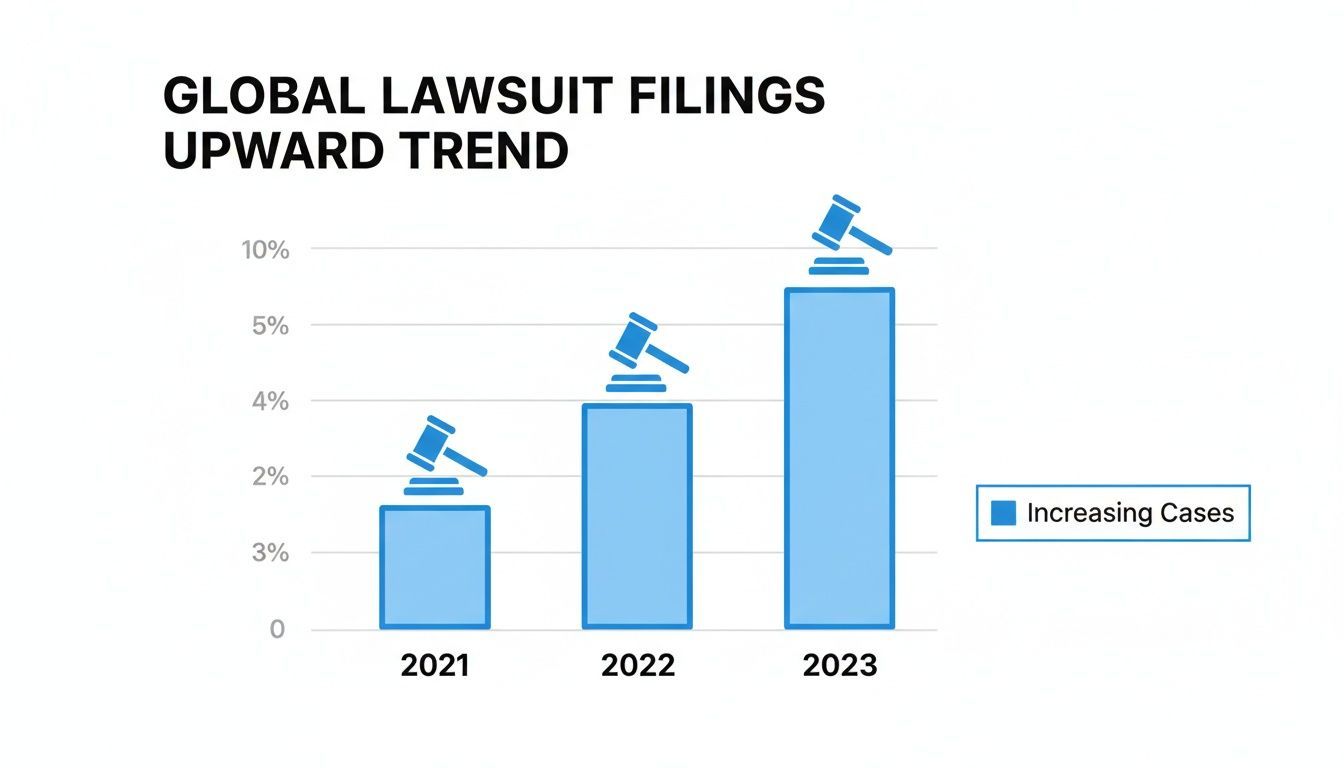
You don't need to be a data scientist to see the pattern here. The legal pressure on businesses is getting more intense with each passing year.
The Data Behind the Surge
The latest data paints an even starker picture. In the first half of just one recent year, ADA website accessibility lawsuits shot up by 37% compared to the same period the year before.
That translates to a staggering 2,014 cases filed between January and June alone. This isn't a small jump; it's a massive escalation that highlights the growing legal mandate for accessible digital platforms under the Americans with Disabilities Act (ADA).
New York led the pack with 637 lawsuits, but Florida wasn't far behind, nearly doubling its numbers to 487 cases. Perhaps most shocking was Illinois, which saw an unbelievable 745% increase. The risk is spreading, and it's spreading fast.
The Rise of "Serial Filers"
So, who's behind this massive wave of litigation? A huge portion of it is driven by what the industry calls "serial filers."
This isn't a derogatory term; it's a description of a small group of plaintiffs and highly specialized law firms responsible for filing a disproportionately large percentage of all accessibility lawsuits. Their approach is anything but random—it's systematic and incredibly efficient.
These firms often use automated scanning tools to crawl the web, identifying thousands of websites with common, easy-to-spot violations. Things like:
Missing alt text on images
Forms that can't be filled out with a keyboard
Videos without captions
Once a non-compliant site is flagged, a demand letter or lawsuit follows like clockwork.
This isn't a matter of chance. It's a calculated, scalable legal strategy that has turned digital non-compliance into a business model, making any unmonitored website a potential target.
This methodical approach means your company's size doesn't matter. An automated scanner doesn't care if you're a Fortune 500 company or a local mom-and-pop shop. It only looks for code that violates WCAG standards, which is why small and medium-sized businesses are increasingly getting hit with these lawsuits.
Why This Trend Is Accelerating
This isn't a bubble that's going to pop. Several powerful factors are fueling the continued rise in digital accessibility litigation.
For one, our reliance on the internet for everything—from banking and shopping to healthcare and education—has made digital access a fundamental part of modern life. When a website is inaccessible, it creates a very real barrier, effectively shutting out people with disabilities from society and strengthening the grounds for a discrimination claim.
On top of that, legal precedents continue to affirm that websites are "places of public accommodation" under the ADA, solidifying the legal foundation for these cases. Every successful lawsuit just emboldens more plaintiffs and law firms to pursue similar claims.
The evidence is overwhelming. To learn more about the specific figures, you can read these web accessibility lawsuits trends and statistics. The takeaway is clear: proactive accessibility is no longer optional for any business with an online presence.
Which Industries Get Sued the Most?
While any business with a website can technically face a lawsuit, the risk isn't spread evenly across the board. The data shows a clear pattern: plaintiff law firms tend to zero in on specific industries where the website is everything. Looking at who gets hit the hardest can teach every business a valuable lesson.
It all comes down to where digital interaction is most critical. Consumer-facing businesses, especially in e-commerce and food services, consistently find themselves at the top of the litigation list. It makes sense when you think about it—their websites are the primary way customers browse, buy, and get service. When an accessibility barrier gets in the way of those core functions, the harm is immediate and obvious, which makes for a pretty solid legal case.
These are high-traffic, high-interaction environments. Even a seemingly small accessibility mistake can impact thousands of people a day, making them easy targets for lawyers running automated scans for common compliance failures.
The Spotlight on Retail and E-commerce
The retail sector, particularly e-commerce, is ground zero for accessibility lawsuits. It’s not hard to see why. The entire customer experience, from window shopping to the final click of the "buy" button, happens online. An inaccessible online store is no different than a brick-and-mortar shop with a locked front door.
Lawsuits against e-commerce sites almost always point to the same fundamental problems—glitches that turn the simple act of shopping into an exercise in frustration for someone using assistive technology.
Here are the usual suspects:
Missing Alt Text on Images: If a product image doesn't have a descriptive alt tag, a screen reader can't tell a visually impaired user what the product is, what it looks like, or why they should buy it.
Broken Shopping Carts: It's shocking how many shopping carts and checkout flows are impossible to navigate with just a keyboard. Users literally get stuck, unable to add items, change quantities, or actually pay for their order.
Confusing Checkout Forms: Forms with missing labels, vague instructions, or fields that screen readers can't identify stop a transaction cold. If a customer can't enter their payment details, you can't make a sale.
For an online store, these aren't just abstract compliance problems; they're revenue killers. Every accessibility flaw in the checkout process is a lost sale and a customer who probably won't be back.
Why the Food Service Industry Is a Prime Target
While retail has been on the hot seat for years, another industry has recently shot to the top of the list. The restaurant, food, and beverage industry is now the single most-targeted sector for ADA website accessibility lawsuits.
One recent report found this industry was hit with 614 cases in just the first six months of the year. That’s 30.49% of the 2,014 lawsuits filed nationwide. This spike is directly tied to the industry's rush to adopt digital menus, third-party ordering systems, and online reservation platforms—many of which were built without a thought for accessibility. You can discover more insights about these legal trends from the full report.
The features driving these lawsuits are the very ones central to the modern dining experience. Online menus are often just inaccessible PDFs or image-based carousels that a screen reader can't make sense of. Likewise, when a restaurant plugs in a third-party ordering or reservation tool, it often inherits a host of new accessibility headaches, from forms that trap keyboard users to buttons without proper labels.
By studying where things go wrong in these high-risk industries, any business can get a much better handle on its own weak spots and start taking steps to fix them before it's too late.
How to Build a Proactive Accessibility Strategy
So, you want to avoid a lawsuit? The best defense is a good offense. Don't wait for a demand letter to land in your inbox before you start taking website accessibility seriously. A truly proactive strategy isn't a one-time fix; it's a continuous cycle of improvement that protects your business and, more importantly, opens your doors to a wider audience.
The whole process boils down to four key stages: Audit, Remediate, Publish, and Maintain.
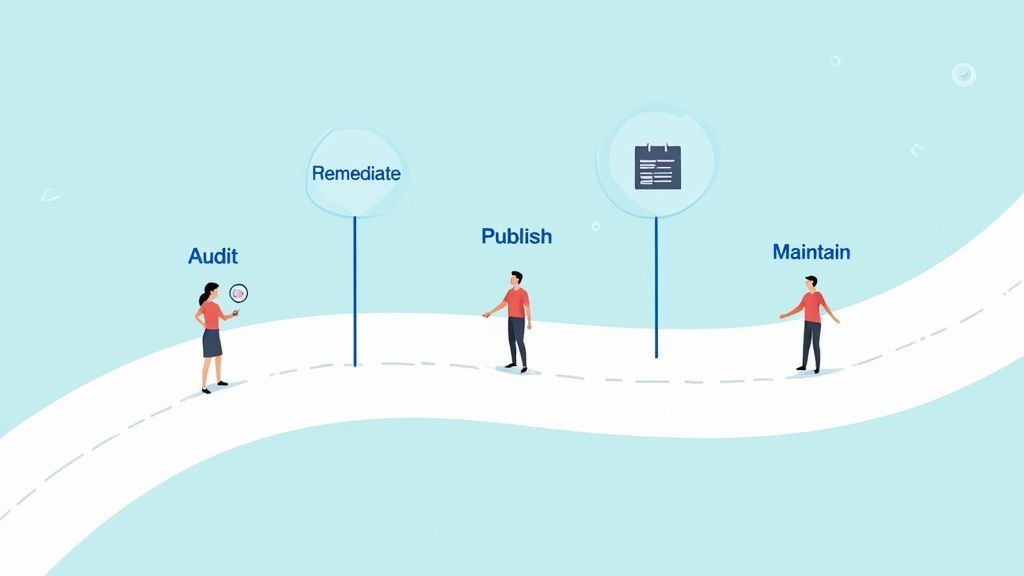
Reacting to a website accessibility lawsuit is always a losing game. It’s stressful, incredibly expensive, and immediately puts you on the back foot. The far smarter move is to get ahead of the curve by treating accessibility as a fundamental part of how you do business, not just another project on a checklist. This mindset shift changes everything, moving you from frantically patching holes to building an inclusive digital experience from day one.
A solid accessibility program is a sustainable, multi-layered process. It's about systematically reducing your legal risk while making your website better for every single person who visits. By taking these structured steps, you build a framework for long-term compliance and show you're genuinely committed to getting it right.
Start with a Comprehensive Accessibility Audit
First things first: you can't fix a problem you don't understand. A comprehensive accessibility audit is your diagnostic tool, giving you a brutally honest look at your website's health. Think of it as a top-to-bottom inspection of your digital property.
The best audits are never just one thing; they blend the efficiency of automated tools with the critical thinking of a human expert. A thorough review should always include:
Automated Scanning: These tools are great for a first pass. They'll quickly crawl your site and flag common WCAG violations like missing alt text or poor color contrast. This gives you a high-level view of the low-hanging fruit.
Manual Testing: This is where the real expertise comes in. An accessibility specialist will manually go through your site, mimicking how users with various disabilities navigate the web. They'll catch the nuanced, real-world problems that software simply can't, like a confusing checkout process or an illogical keyboard navigation order.
Assistive Technology Testing: For the gold standard, you need to see how your site performs with the actual tools people use. Testing with screen readers, magnifiers, and voice control software provides invaluable, real-world feedback on the barriers that are truly blocking users.
Remediate Issues at the Source Code Level
With your audit report in hand, you'll have a clear, prioritized to-do list. Now it's time for your development team to roll up their sleeves and start remediating. It's absolutely critical to fix these issues directly in the source code—the HTML, CSS, and JavaScript—to make sure the changes stick.
True remediation builds a stronger, more accessible foundation for the future. You can learn more about how to avoid ADA lawsuits by focusing on these core code-level improvements.
Publish a Clear Accessibility Statement
Transparency goes a long way. An accessibility statement is a dedicated page on your site that outlines your commitment, the standards you're working toward (like WCAG 2.1 AA), and the progress you've made.
An accessibility statement does more than just state your goals. It provides users with a point of contact to report issues, showing that you value their feedback and are actively working to improve their experience.
This simple page can be a powerful risk mitigator. It signals to users and, yes, to plaintiff's law firms, that you're aware of your accessibility obligations and have a plan in place.
Maintain Compliance with Ongoing Integration
This might be the most important step of all: accessibility is not a "set it and forget it" project. Your website is dynamic. Every time you add a new blog post, launch a new feature, or tweak the design, you can introduce new accessibility barriers.
The only way to achieve sustainable compliance is to bake accessibility into your everyday workflow. It has to become second nature for your entire team.
Design: Your designers should be thinking about color contrast, readable fonts, and logical layouts from the earliest wireframes.
Development: Your developers must code to WCAG standards, ensuring every new feature is keyboard-navigable and works with assistive tech.
Content Creation: Your content team needs to be trained to write descriptive alt text for images, use proper heading structures, and create meaningful link text.
When accessibility becomes part of your company's DNA, you shift from a reactive, problem-fixing mode to a proactive culture of quality. That ongoing commitment is your best defense against a lawsuit and the only way to build a truly inclusive digital presence.
Your Top Accessibility Questions, Answered
Let's cut right to the chase. The main driver behind these lawsuits is the Americans with Disabilities Act (ADA), which courts have consistently applied to commercial websites. Any business, no matter the size, is on the hook because automated legal tools can easily sniff out common violations. A lawsuit can set you back tens of thousands in settlements and legal fees, and that's before you even pay to fix the website itself.
The most common mistakes are things like missing image descriptions, clunky keyboard navigation, and uncaptioned videos. The only real way to protect yourself is to be proactive: audit your site, fix the code, and make a plan to stay compliant.
It's easy to get lost in the legal jargon and technical standards of digital accessibility. To help you find your footing, here are some straight-to-the-point answers to the questions we hear most often from business owners.
What Law Is Actually Behind These Lawsuits?
The big one is the Americans with Disabilities Act (ADA), specifically Title III. This law was passed way back in 1990—long before anyone was thinking about online shopping—but courts have repeatedly decided that commercial websites count as "places of public accommodation."
Think of it this way: your website is your digital storefront. Just like your physical shop has to be accessible, your website has the same legal responsibility. On top of the ADA, many states have their own civil rights laws, like California's Unruh Act, which can pile on even more financial penalties if your site isn't compliant.
How Much Does a Website Accessibility Lawsuit Really Cost?
You'll want to sit down for this. The costs add up quickly and come from all sides. A typical settlement alone can run anywhere from $10,000 to over $50,000.
But that’s just the beginning. That figure doesn't even touch what you'll pay your own lawyers to defend you, which can easily match or even exceed the settlement itself. Then, you're still on the hook for the cost of actually fixing your website, a bill that can get very steep for complex sites. For most business owners, the total financial hit is a real shock.
These lawsuits aren't going away. In one peak year, there were nearly 11,452 federal accessibility lawsuits filed. While the numbers go up and down, the trend is clear—one recent projection showed cases on pace to hit 4,975, a 20% jump from the previous year. It's a perfect storm: plaintiffs can sue from anywhere, settlements average around $25,000, and the courts keep confirming that e-commerce sites fall under the ADA. You can dig into the numbers yourself by checking out the statistical trends in web accessibility lawsuits on UserWay.org.
Are Small Businesses Actually at Risk?
Yes. One hundred percent. It's a common myth that only big corporations get sued, but the reality is that businesses of every size are targets.
Plaintiff law firms use automated scanning tools that crawl thousands of websites looking for easy-to-spot accessibility errors. They don't care how big your company is or how much money you make. The ADA’s Title III doesn't have an employee count or revenue requirement, which means if your business is open to the public online, you're at risk.
Small businesses are often more vulnerable because they don't have a team of in-house experts or a big budget to get ahead of these problems. This, unfortunately, makes them low-hanging fruit for lawyers looking for an easy win.
This isn’t just a big-business problem. If you run a commercial website, you need to take this seriously.
What Are the Most Common Problems Cited in Lawsuits?
Most lawsuits aren't vague. They point to very specific, technical violations of the Web Content Accessibility Guidelines (WCAG), which has become the gold standard for accessibility in the eyes of the courts. The issues cited are usually fundamental problems that stop people with disabilities from doing basic things online.
Here are the repeat offenders we see all the time:
Missing alt text for images. Without a text description, a screen reader can't tell a blind user what's in a picture.
Poor keyboard navigation. If someone can't use a mouse, they rely on their keyboard to get around. If they can't tab through your menu or fill out a form, your site is unusable for them.
No captions on videos. This one's simple: users who are deaf or hard of hearing are completely left out if there are no captions.
Inaccessible online forms. Forms that don't work with assistive technology are a dead end, preventing users from buying products or contacting you.
Other frequent culprits include poor color contrast that makes text unreadable and text that can't be resized by the user, both of which are major hurdles for people with low vision. Tackling these core issues is the best first step you can take to lower your legal risk.
Ready to build an inclusive website and protect your business from costly litigation? WebAbility.io provides an end-to-end platform to achieve and maintain ADA and WCAG compliance. Our AI-enhanced tools and expert services make accessibility straightforward, so you can focus on growing your business. Start your journey toward a more accessible web today at https://www.webability.io.
Quick Questions
Tap to ask AI about this article