Is My Website ADA Compliant? Essential Accessibility Checklist

Sidharth Nayyar

TL;DR: Your website is probably not ADA compliant, as over 90% of sites fail basic standards. The legal risk is real and growing, especially for small businesses. To check your site, focus on four key areas: low contrast text, missing image alt text, vague link text, and unlabeled forms. Use a mix of automated tools (like WAVE or axe) and manual testing (keyboard-only navigation, screen readers) to find issues. Create a prioritized plan to fix the most severe problems first. Don't rely on "overlay" plugins for a quick fix—they don't solve core code issues.
Let's be blunt: Is your website ADA compliant? The honest answer is probably not. It’s a tough pill to swallow, but research consistently shows that over 90% of websites fail to meet even the most basic accessibility standards. Non-compliance has unfortunately become the default.
The good news? You can start making a real difference by checking for a few common, high-impact issues. Things like poor keyboard navigation and missing image descriptions are surprisingly easy to spot once you know what to look for.
Your Quick Guide to Website ADA Compliance
Trying to figure out your website's accessibility status can feel like a massive undertaking. But really, it all comes down to a simple, powerful idea: making sure everyone, including people with disabilities, can actually use your site.
With ADA-related lawsuits becoming more common every year, this isn’t just a "nice-to-have" anymore—it's a business necessity. Ignoring digital accessibility opens you up to serious legal risks and, just as importantly, cuts off a huge group of potential customers.
The entire framework for digital ADA compliance is built on the Web Content Accessibility Guidelines (WCAG). Think of these guidelines as the blueprint for creating an inclusive online experience that works for everybody.
Getting Started with a Compliance Check
You don't need to be a coding wizard to find the most glaring problems. The first step is just to start looking for obvious roadblocks that get in a user's way.
Put yourself in someone else's shoes for a moment. If you couldn't use a mouse, could you still get to every part of your site using only your keyboard? That's the kind of fundamental question we need to start asking.
The ultimate goal of an ADA-compliant website is to provide "full and equal enjoyment" of your digital space. This means creating an experience that is perceivable, operable, understandable, and robust for all users.
This guide will walk you through a practical process to audit your site, pinpoint the biggest problem areas, and get you on the path to making your website truly accessible.
To get you started, here's a quick rundown of the most critical areas I always check first during an initial audit. These are the basics that catch a surprising number of issues right away.
Core ADA Compliance Checklist at a Glance
| Compliance Area | What to Check For | Common Failure |
|---|---|---|
| Image Alt Text | Are all meaningful images described with alternative text? | Missing or generic alt text like "image.jpg". |
| Keyboard Navigation | Can you tab through all links, buttons, and forms logically? | The "focus" gets trapped or skips interactive elements. |
| Readable Text | Is there enough contrast between text and its background? | Light gray text on a white background. |
| Form Labels | Does every form field have a clearly associated label? | Unlabeled input fields that are confusing for screen readers. |
| Headings | Is the heading structure (H1, H2, H3) logical and sequential? | Skipping heading levels (e.g., an H1 followed by an H4). |
| Video Captions | Do all videos have accurate, synchronized captions? | Auto-generated captions that are full of errors. |
This table isn't exhaustive, of course, but if you can confidently check off these six items, you're already ahead of the curve. It provides a solid foundation to build upon as you dive deeper into your website's accessibility.
Here’s the deal: treating website accessibility as a "nice-to-have" is a surefire way to get into financial trouble. Lawsuits over ADA compliance shot up by 7% at the end of 2024, and a whopping 77% of those were aimed at businesses making less than $25 million a year. The bottom line is that ignoring accessibility is no longer just bad practice—it's a serious risk to your business.
Why You Can No Longer Ignore ADA Compliance
If you've been putting digital accessibility on the back burner, it's time to change your thinking. We've moved far beyond the point where it was simply a good idea. Today, it’s a non-negotiable legal and financial reality. The risk of doing nothing has become far too great to ignore.
This isn't just talk. The legal landscape has shifted dramatically, with a significant spike in litigation. 2024 closed out with a 7% jump in ADA lawsuits, culminating in roughly 8,800 ADA Title III complaints filed. This trend sends a clear message: the legal system is taking digital accessibility very seriously. You can get more details on the rise of ADA lawsuits from AudioEye.
Small Businesses Are Now the Primary Target
There's a dangerous myth that only corporate giants need to worry about accessibility lawsuits. The data paints a completely different picture. In reality, small and medium-sized businesses are squarely in the crosshairs.
Think about this: in 2023, an incredible 77% of all ADA lawsuits were filed against companies with annual revenues under $25 million. Why? Smaller businesses often don't have in-house legal teams or the resources to tackle accessibility issues upfront, making them prime targets for demand letters.
The tangible business risks make it clear that proactive accessibility isn't just an ethical choice—it's a crucial financial one. A single complaint can quickly escalate into expensive settlements, legal fees, and lasting damage to your brand's reputation.
The costs go well beyond the courtroom. When your website isn't accessible, you're shutting the door on a huge portion of potential customers, which means lost sales and a damaged reputation. Investing in accessibility is an investment in your brand's future and financial stability. You can dive deeper into the financial risks of ADA non-compliance right here on our blog.
The Four Most Common Accessibility Failures to Find
If you're just starting your accessibility audit, you don't need to boil the ocean. A massive percentage of accessibility issues fall into just a few common buckets. I always tell people to start here. By focusing on these four high-impact areas, you'll make the biggest difference for the most people, right away.
Let's look at the data.
This chart from a WebAIM study of the top one million homepages is eye-opening. It shows that the vast majority of websites are failing at the absolute basics. Low contrast text is, by far, the most common offender.
Now, let’s get practical and break down how to spot these exact problems on your own site.
Low Contrast Text
This is the number one issue found across the web, and thankfully, it’s often one of the easiest to fix. Low contrast text is simply when your text color doesn't stand out enough from its background color.
Think about that light gray text on a white background that designers sometimes love. It might look clean and minimalist, but for someone with low vision or color blindness, it can be completely unreadable. Your goal is to have a strong enough color ratio to ensure everyone can read your content without straining their eyes.
Missing Alternative Text for Images
Every single image on your website that communicates something important must have alternative (alt) text. Think of it as a short, written description of the image that screen readers announce aloud to users who can't see it. If there's no alt text, that visual information is completely lost.
For example, if you have a great photo of your new product but no alt text, a screen reader user just gets silence. A helpful alt text would describe the image concisely, like, "A blue ceramic coffee mug with the company logo on the side."
According to the 2025WebAIM Million analysis, a staggering 94.8% of the top one million homepages had detectable WCAG 2 failures. The most common problems? Low contrast text on 79.1% of pages and missing alt text on 55.5%.
Vague Link Text and Missing Form Labels
Finally, look closely at the elements people use to interact with and navigate your site. Vague links and unlabeled form fields can be dead ends for many users.
Ambiguous Link Text: How many times have you seen links that just say "click here" or "learn more"? For a screen reader user who often navigates by jumping from link to link, this is incredibly unhelpful. The link text itself needs to describe the destination. Instead of "click here," try "Read our e-commerce accessibility case studies."
Missing Form Labels: Every input field on your site—from a simple contact form to a complex checkout process—needs a clear, visible label. Without it, someone using assistive tech has no idea whether they're supposed to type in their name, email, or credit card number. This is one of the fastest ways to frustrate a potential customer and lose a sale.
How to Conduct a Practical Website Accessibility Audit
So, you're asking, "Is my website ADA compliant?" The only real way to answer that is to roll up your sleeves and perform a hands-on audit. While that might sound intimidating, you can get a clear picture by blending automated scanning with some crucial manual checks.
Think of automated tools as your first pass. They're great for sweeping your site and quickly flagging common problems like missing image alt text or low-contrast colors. But here's the catch: these tools can only spot about 30% of all accessibility issues. That's why getting your hands dirty with manual testing is an absolute must for a real-deal review.
Starting with Manual Checks
Some of the most revealing tests don't require fancy software—just a different way of looking at your site. For starters, unplug your mouse. Seriously.
Try to get around your entire website using only your keyboard. Can you reach every single link, button, and form field just by using the Tab key? Pay attention to the "focus indicator" (that little box that highlights what you've tabbed to). Does it follow a logical path, or does it bounce around the page like a pinball? This simple test immediately uncovers massive roadblocks for anyone who can't use a mouse.
Next, you need to experience your site through a screen reader. Free tools like NVDA for Windows or the built-in VoiceOver on Macs will read your content aloud, simulating the experience for a user with a visual impairment. This is where you'll find out if your heading structure actually creates a logical outline or if your "click here" links are frustratingly vague.
I see this all the time: people assume accessibility is something you can just tack on at the end. But if a site wasn't built from the ground up with the Web Content Accessibility Guidelines (WCAG) in mind, you can bet it's not compliant.
This is the kind of process flow you should be aiming for when you audit and fix your site.
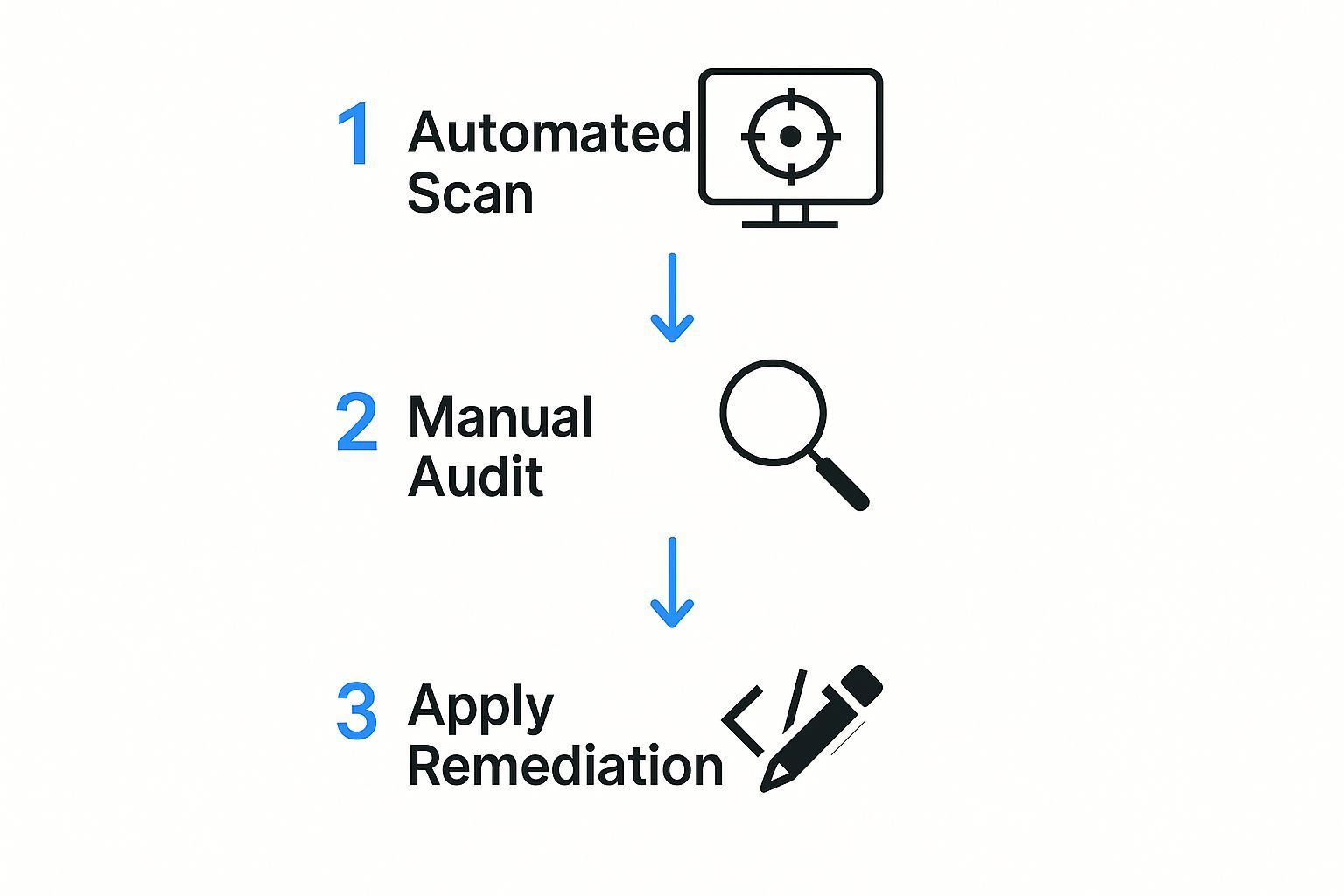
As you can see, a solid strategy always starts with a broad automated scan before diving into the detailed manual work that informs your remediation plan.
Creating a Prioritized Action Plan
Once your audit is done, you’re probably looking at a pretty long list of issues. Don't get overwhelmed. The trick is to prioritize intelligently. I always recommend building an action plan based on two simple factors:
Severity: How badly does this issue break the experience for a user? A non-functional "Add to Cart" button is a five-alarm fire compared to a minor color contrast problem on a footer link.
Effort: How hard is the fix? Adding a few dozen missing alt tags is a quick win. Rebuilding your entire navigation menu from scratch is a major project.
This mindset helps you knock out the most critical, high-impact fixes first, which is where you'll see the biggest improvements.
It's a sobering statistic, but in 2025, an estimated 4% of websites are expected to be ADA compliant. A huge reason for this is that most businesses simply don't have a structured plan to fix the problems they find. You can learn more about how to properly document website accessibility to build out a framework that works. A clear, step-by-step process is what turns a long list of problems into real, meaningful progress.
Ready to figure out if your website is really ADA compliant? It's time to build your testing toolkit. This isn't just about running a single scan; it's about combining the right tools to get a full picture of your site's accessibility.
We'll cover the best automated scanners for quick wins, crucial browser extensions for hands-on testing, and why you can't skip color contrast checks. I'll also break down the deal with accessibility overlays—what they do, what they don't do, and why they're never a complete solution.
Choosing the Right Tools for ADA Compliance

Okay, you've done your initial walkthrough. Now, let's bring in some specialized tools to dig deeper and make this process more efficient. The key to a solid accessibility audit is mixing automated scanners for wide-ranging checks with manual tools that let you see your site through the eyes of your users. This two-pronged approach is the only way to confidently answer the question, "Is my website ADA compliant?"
Think of automated checkers as your first line of defense. They’re fantastic for crawling your site and quickly flagging common, code-level problems like missing alt text or incorrect ARIA attributes.
But here's the reality check: automated tools can only catch about 30% of all accessibility issues. They can't tell you if your page's reading order makes sense or if your alt text is actually helpful. That's where manual testing comes in.
Essential Tools for Your Toolkit
To fill the gaps left by automated scans, you need a few indispensable tools for manual inspection. These are what allow you to truly step into your users' shoes.
Your go-to toolkit should absolutely include:
Browser Extensions: These are non-negotiable. Tools like the WAVE Web Accessibility Evaluation Tool or axe DevTools plug right into your browser. They give you instant, on-page feedback and visualize accessibility problems as you navigate your site.
Color Contrast Analyzers: It sounds simple, but this is a big one. These tools help you verify that your text is legible against its background, which is a core requirement of the WCAG.
Screen Readers: You have to experience your site the way users with visual impairments do. There's no substitute. Firing up built-in software like NVDA on Windows or VoiceOver on Mac is a must.
It's easy to get lost in the sea of accessibility tools out there. To make it easier, we put together a detailed accessibility checker comparison that breaks down the top options by features, who they're for, and what they cost.
Choosing Your ADA Compliance Toolkit
With so many options, picking the right tools can feel overwhelming. This table breaks down some of the most popular and effective tools to help you build a well-rounded testing strategy.
| Tool Name | Best For | Type | Cost |
|---|---|---|---|
| WAVE | Quick on-page audits & visual learners | Browser Extension | Free |
| axe DevTools | Developers & in-depth code analysis | Browser Extension | Free & Paid tiers |
| NVDA / VoiceOver | Simulating the screen reader user experience | Native OS Software | Free |
| WCAG Color Contrast Checker | Verifying text legibility | Browser Extension | Free |
| accessiBe | Organizations looking for an overlay solution | Overlay Widget | Paid Subscription |
| UserWay | Basic accessibility adjustments & widgets | Overlay Widget | Free & Paid tiers |
Ultimately, the best approach is to combine an automated scanner for breadth with manual tools like browser extensions and screen readers for depth. This combination ensures you're not just checking boxes but genuinely improving the user experience.
A Quick Word on Accessibility Overlays
You’ve probably seen them—widgets that promise instant ADA compliance with a single line of code. They're often marketed as a quick fix.
While these overlays can offer some minor, user-facing adjustments (like changing font sizes), they do not fix the underlying code issues on your website. Relying on an overlay as your only solution creates a false sense of security. It often fails to provide true accessibility and can still leave you exposed to legal risk. Think of them as a small supplement, never the entire strategy.
Your Burning Questions About Website Accessibility, Answered
Getting your head around ADA compliance can feel like untangling a knotted rope. But don't worry, we're here to tackle the questions I hear most often from business owners. Let's get you some straight answers so you can build a website that works for everyone.
Common Questions About Website ADA Compliance
When you first dive into website accessibility, a lot of questions pop up. Let’s clear the air on some of the biggest points of confusion so you can move forward with confidence.
Does the ADA Even Mention Websites?
This is a big one. The original Americans with Disabilities Act was written in 1990—long before the web looked anything like it does today. So no, the word "website" isn't in the original text.
But that's not a loophole. The Department of Justice (DOJ) and a mountain of court rulings have repeatedly confirmed that websites are considered “places of public accommodation.” That interpretation makes website accessibility a solid legal requirement, not just a nice-to-have.
What is WCAG and Which Version Matters?
WCAG stands for the Web Content Accessibility Guidelines, and it's the gold standard for digital accessibility worldwide. Think of it as the technical rulebook.
When it comes to legal cases in the United States, WCAG 2.1 Level AA is the standard everyone points to. It's the benchmark you'll see cited in lawsuits and settlement agreements time and time again. My advice? Aim for the latest version if you can. It’s the best way to future-proof your site and give your users the best experience.
Relying solely on a plugin or widget creates a false sense of security and won't protect you from legal action. True compliance requires addressing the underlying code of your website.
Can't I Just Install a Plugin to Be Compliant?
I wish it were that easy, but the answer is a firm no. This is probably the most dangerous misconception out there.
Accessibility plugins, often marketed as overlays or widgets, can patch a few simple, surface-level things like color contrast. But they can’t touch the deep, structural code issues that are at the heart of most accessibility problems. Those require manual work, plain and simple.
Do I Still Need to Be Compliant If I’m Just a Small Business?
Yes, absolutely. The size of your business doesn't matter when it comes to the ADA. In fact, we've seen a huge spike in lawsuits specifically targeting small and medium-sized businesses over the last few years.
Being proactive about compliance isn't just for the big corporations. It’s the single best thing you can do to protect your business from legal trouble, no matter how big or small you are.
Ready to stop guessing and start fixing? WebAbility.io provides an end-to-end platform with AI-powered tools and expert guidance to help you achieve and maintain ADA compliance. Start your free trial today.
Article created usingOutrank
Quick Questions
Tap to ask AI about this article